Code-server: Enforce user permissions for user data and extension dirs on container startup
Description
When we start code-server as a docker container and mounting a path for extensions we need to make sure on startup that it belongs to the same user as the code-server
Steps to Reproduce
use the oneliner from README.md
Result
docker run -it -p 127.0.0.1:8080:8080 -v "${HOME}/.local/share/code-server:/home/coder/.local/share/code-server" -v "$PWD:/home/coder/project" codercom/code-server
(node:6) [DEP0005] DeprecationWarning: Buffer() is deprecated due to security and usability issues. Please use the Buffer.alloc(), Buffer.allocUnsafe(), or Buffer.from() methods instead.
ERROR { [Error: EACCES: permission denied, mkdir '/home/coder/.local/share/code-server/extensions']
  [stack]:
   'Error: EACCES: permission denied, mkdir \'/home/coder/.local/share/code-server/extensions\'',
  [message]:
   'EACCES: permission denied, mkdir \'/home/coder/.local/share/code-server/extensions\'',
  errno: -13,
  code: 'EACCES',
  syscall: 'mkdir',
  path: '/home/coder/.local/share/code-server/extensions' }
 frank-dspeed
All 12 comments
or we add instructions for mkdir -p befor running that and chmod 0777 so that it will work
frank-dspeed
on 17 Sep 2019
I got the same problem.
 DDeme
on 18 Sep 2019
DDeme
on 18 Sep 2019
This is a open field of debate at the moment as one of the Engineers declined to have the RW access workaround due to "permission concerns" - where it shouldn't. Revisiting this once more.
 sr229
on 18 Sep 2019
sr229
on 18 Sep 2019
@sr229 but this issue is about the extensions dir i think there the discussion is less relevant as it is always clear that extensions need to be readwrite by code-server user it self its not about the project files
frank-dspeed
on 19 Sep 2019
Yes this is a separate issue. But closely related to #640
 nhooyr
on 20 Sep 2019
nhooyr
on 20 Sep 2019
I am still getting this error. Are we waiting for an updated push for this to be fixed?
 mukk85
on 1 Oct 2019
mukk85
on 1 Oct 2019
@mukk85 current state is you manualy create the extensions dir befor you run the oneliner and chmod the folder right befor you start the oneliner
because when docker creates the folder while starting it will be owned by root
frank-dspeed
on 2 Oct 2019
Running:
docker run -d -p 0.0.0.0:8000:8080 --name codeserver -v "/home/dev/codeserver/.local/share/code-server:/home/coder/.local/share/code-server" -v "/home/dev/projects:/home/coder/project" codercom/code-server:v2
I resolve this problem with:
sudo chmod 777 -R dev/
 pedrolucasoliva
on 29 Oct 2019
pedrolucasoliva
on 29 Oct 2019
mode 0777 is a dangerous permission to give since it gives R/W and execution perms, you should only give it R/W perms (mode 0600 AFAIK).
sr229
on 29 Oct 2019
@pedrolucasoliva
i am docker specialist i give you a little hint the --user flag
docker run --user $(id):$(id) -d -p 0.0.0.0:8000:8080 --name codeserver -v "/home/dev/codeserver/.local/share/code-server:/home/coder/.local/share/code-server" -v "/home/dev/projects:/home/coder/project" codercom/code-server:v2
the --user $(id):$(id) will switch the user id of the coder user to your user id and group :)
frank-dspeed
on 30 Oct 2019
I still have same issue on Ubuntu server 18.04 LTS
I tried to make the folder manually, but it doesn't work.
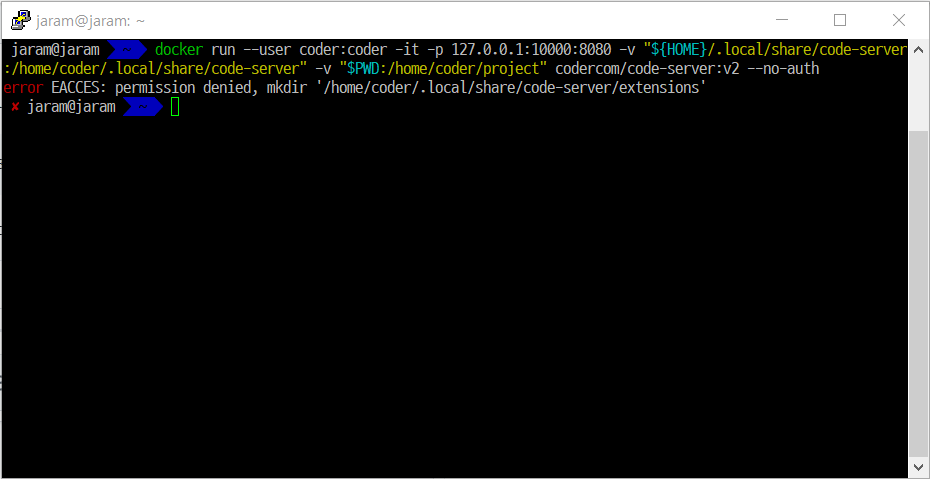
Edited
Finally It runs very well! 🎉 🎉
I used this command
docker run --user 1000:1000 -d -p 0.0.0.0:8000:8080 --name codeserver -v "/home/dev/codeserver/.local/share/code-server:/home/coder/.local/share/code-server" -v "/home/dev/projects:/home/coder/project" codercom/code-server:v2
and it runs perfectly.

The only thing I changed is $(id):$(id) to 1000:1000.
Thanks for @frank-dspeed
 CXZ7720
on 13 Dec 2019
nhooyr
on 30 Jan 2020
CXZ7720
on 13 Dec 2019
nhooyr
on 30 Jan 2020
Related issues
 infogulch
·
3Comments
infogulch
·
3Comments
 pchecinski
·
3Comments
pchecinski
·
3Comments
 avelino
·
3Comments
avelino
·
3Comments
 Arsaev
·
3Comments
Arsaev
·
3Comments
 chrischabot
·
3Comments
chrischabot
·
3Comments
Most helpful comment
@pedrolucasoliva
i am docker specialist i give you a little hint the --user flag
the --user $(id):$(id) will switch the user id of the coder user to your user id and group :)