code-serverversion: development- OS Version: Ubuntu 16.04.6
Description
The directories for logging in the user's home directory .cache/code-server/logs are created but the log files are not consistently written. For a lot of our users no log file can be found in the log directories.
Steps to Reproduce
When starting an instance of VSCode, whenever we try to access the logs in the output pane, an error File not found like the one pasted bellow are showing up

 fmder
fmder
All 13 comments
You mentioned you were using a development copy. Does this occur for you in the latest release version? I cannot reproduce this on Linux with the latest version.
 deansheather
on 26 Jul 2019
deansheather
on 26 Jul 2019
I have see consistent writing (every 5 minutes) while a web browser is connected to a code-server instance to the file ".cache/code-server/logs/????/sharedprocess.log" Where ???? is the highest number.
We use this "every 5 minute" connection as part of our determination of if a user is active or not. We also can tell from this file if code server was started, and not yet used in this file only has 4 lines in it (for user monitoring reports only)
However other than 'activity' the contents of this log file, or any other log file, including normal code-server output (other than for password retrieval), have not proven to be very useful.
ASIDE: We clear out all code-server cached files when the user's docker container is started, just before we start their code-server within the container (just before also starting their apache webserver), so there is only even one such sub-directory, making it even easier. I would say some sort of 'cleanup' of the code-server cache files is actually a MUST in any major system.
 antofthy
on 27 Jul 2019
antofthy
on 27 Jul 2019
The number in the log directory name is a timestamp.
deansheather
on 29 Jul 2019
The number in the log directory name is a timestamp.
Yes, in UTC - That confused me for a few seconds. But that does not matter... Just go for the last number, and junk the rest, and you have the current log being updated.
antofthy
on 29 Jul 2019
With the released version I still have no log
$ code-server --version
1.1156-vsc1.33.1
My usecase for the log is that I'm trying to run pytest and somehow it fails. I think the answer why it fails is in the log but I can't find it anywhere. This is the output for the latest folders
$ ls -la ~/.cache/code-server/logs/20190729133123675/output_20190729133203550_20190729T093204/
total 0
drwxr-xr-x 2 rpqjh889 users   6 Jul 29 09:32 .
drwxr-xr-x 6 rpqjh889 users 186 Jul 29 09:32 ..
$ ls -la ~/.cache/code-server/logs/20190729133123675/exthost20190729133203550/
total 0
drwxr-xr-x 3 rpqjh889 users  52 Jul 29 09:32 .
drwxr-xr-x 6 rpqjh889 users 186 Jul 29 09:32 ..
drwxr-xr-x 2 rpqjh889 users  10 Jul 29 09:32 output_logging_20190729T093206
$ ls -la ~/.cache/code-server/logs/20190729133123675/exthost20190729133203550/output_logging_20190729T093206/
total 0
drwxr-xr-x 2 rpqjh889 users 10 Jul 29 09:32 .
drwxr-xr-x 3 rpqjh889 users 52 Jul 29 09:32 ..
I am facing the same issue. I ran tree after running a few Python tests looking for the test output.
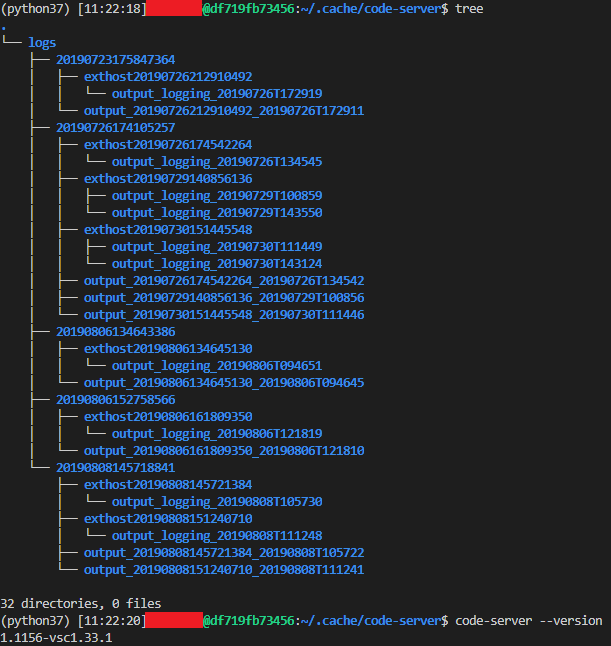
Note that I'm running it in a Docker container.
 ePerspi
on 8 Aug 2019
ePerspi
on 8 Aug 2019
Could you please try with the v2 prerelease and see if it's fixed?
deansheather
on 11 Aug 2019
I could not get code-server started.
I downloaded the release, copied it in my Docker image, launched the container, entered it then tried to start code-server.
Got this error:
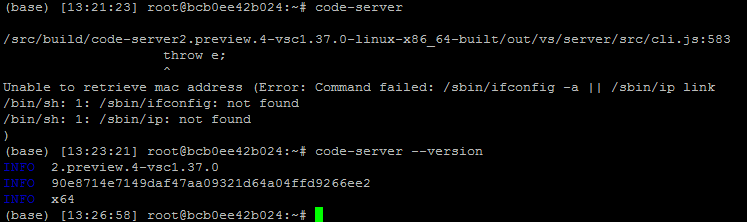
I could solve it by installing ifconfig and ip, but why do we need those with the new release?
ePerspi
on 14 Aug 2019
Most Linux systems should have ifconfig or ip installed on them anyways by default, it's fairly unusual to see a distro without it. It needs (one of) these programs to determine the mac address of the computer.
Does the log file work in the preview?
deansheather
on 14 Aug 2019
VS Code uses the MAC address for the purpose of generating a
unique machine ID that is used in the telemetry so one solution
would be to disable telemetry (--disable-telemetry).
 code-asher
on 14 Aug 2019
code-asher
on 14 Aug 2019
"ifconfig" and "ip" (also "arp") are also not available in the minimal "debian" docker containers.
Which form the base-images we use in our 'code-server' teaching environments. But then we also --disable-telemetry.
On the other hand to get the IP address this still worked...
perl -e 'printf "%s %s %s %s %vd\n",gethostbyname(shift)' `hostname`
host.domain host 2 4 10.0.0.186
however perhaps these last few comments should become a separate issue, and be closed.
antofthy
on 15 Aug 2019
Moved the MAC stuff to a new issue: #911.
deansheather
on 15 Aug 2019
Looks like this is solved in v10.15.1.
fmder
on 24 Sep 2019
Related issues
 sa7mon
·
3Comments
sa7mon
·
3Comments
 broady
·
3Comments
broady
·
3Comments
 chrischabot
·
3Comments
chrischabot
·
3Comments
 korzq
·
3Comments
korzq
·
3Comments
 rcarmo
·
3Comments
rcarmo
·
3Comments