code-serverversion: master branch- OS Version: Ubuntu 18.04
Description
https://code.visualstudio.com/docs/editor/multi-root-workspaces#_workspace-file-schema
VSCode is supported in Create Workspace, when opening the workspace configuration file automatically pops up a button to load the workspace, this button is not working

- [ ] close workspace not working
- [ ] load workspace not working
Steps to Reproduce
https://code.visualstudio.com/docs/editor/multi-root-workspaces#_opening-workspace-files
 avelino
All 12 comments
If I try opening the workspace file directly from the File > Open dialog, then a key is written to local storage for the workspace with a file path. On refreshing the page, the bundle does not load as the file path fails URI schema validation.
To recover, I have to delete the workspace key from local storage.
 jwulf
on 13 Mar 2019
jwulf
on 13 Mar 2019
Having the same issue that @jwulf mentioned. "File > Open Workspace" results in a blank (grey) page with no options. On my local installation I was able to recover by wiping .local, but on ide.coder.com there is nothing I can do and the editor is unusable. (Console says Failed "Start workbench")
 geoah
on 17 Mar 2019
geoah
on 17 Mar 2019
Having the same issue that @jwulf mentioned. "File > Open Workspace" results in a blank (grey) page with no options. On my local installation I was able to recover by wiping .local, but on
ide.coder.comthere is nothing I can do and the editor is unusable. (Console saysFailed "Start workbench")
I couldn't recover by wiping ~/.local/ is that the correct location? I've only been able to get it to work after using a workspace action with incognito mode.
 krazyito65
on 18 Mar 2019
krazyito65
on 18 Mar 2019
Open developer tools in your browser. In Chrome you are looking for the Application > Local Storage tab. Something like that. It is HTML Local Storage in the browser client, which is why Incognito mode works.
jwulf
on 18 Mar 2019
FYI Saving a workspace file doesn't seem to work from the command palette (i.e., nothing happens after providing a name). So I created one in vscode and tried to open it using code-server. It shows the content of the file and a button to open the workspace (see screenshot). Clicking the button shows the the following error in developer tools.


 vnijs
on 4 May 2019
vnijs
on 4 May 2019
im wondering if #490 is related to this and if #755 fixes this
 levifox54
on 9 Jun 2019
levifox54
on 9 Jun 2019
I though it was me.. but apparently its not implemented..
 danger89
on 11 Jul 2019
danger89
on 11 Jul 2019
Hey OP, can you try out v2? I think we have workspaces implemented
 sr229
on 12 Sep 2019
sr229
on 12 Sep 2019
@sr229 I think V2 gives me only more problems now.
Issue nr. 1:
Clicking on the folder won't change the path (which either stays /home or /), see video:
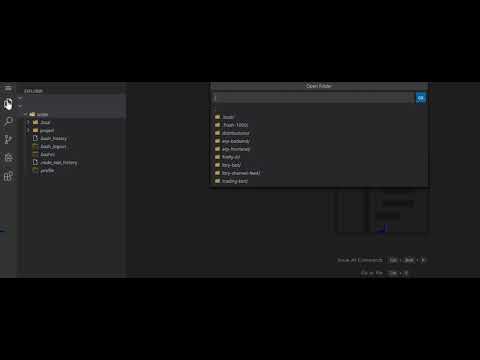
Issue nr. 2:
Moreover, I pressed 'OK', redirected me to a blank page. Which was rather confusing..
Issue nr. 3:
Eventually the folder was added to the explorer, but I can't remove it from the explorer without removing the content. Now /home/coder folder was added accidentally, which is not ideal.
danger89
on 1 Nov 2019
If you're using Firefox you might be running into this issue: https://github.com/cdr/code-server/issues/1063
 code-asher
on 1 Nov 2019
code-asher
on 1 Nov 2019
Yep firefox.
danger89
on 1 Nov 2019
We've opened this in Microsoft/vscode so it will be the web team that'll be in charge of this from now on.
sr229
on 4 Nov 2019
Related issues
 pchecinski
·
3Comments
pchecinski
·
3Comments
 justmao945
·
3Comments
justmao945
·
3Comments
 RealSlimMahdi
·
3Comments
avelino
·
3Comments
RealSlimMahdi
·
3Comments
avelino
·
3Comments
 sa7mon
·
3Comments
sa7mon
·
3Comments
Most helpful comment
If I try opening the workspace file directly from the File > Open dialog, then a key is written to local storage for the workspace with a file path. On refreshing the page, the bundle does not load as the file path fails URI schema validation.
To recover, I have to delete the workspace key from local storage.