Code-server: Broken syntax highlighting on PHP files.
code-serverversion: 1.31.1-100- OS Version: Ubuntu 16.04
Steps to Reproduce
- Create a blank PHP file.
- Start coding by using
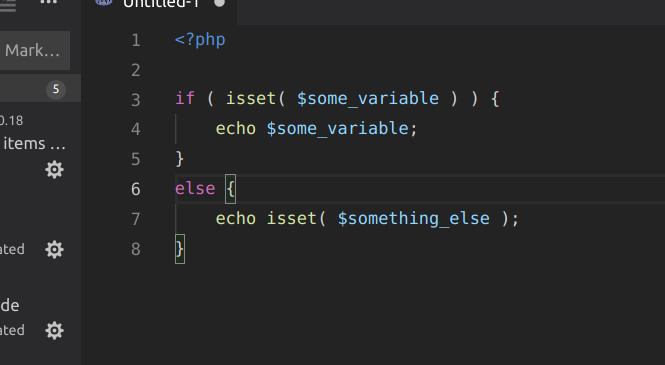
if ( isset( $some_variable ) .... You'll notice that the syntax is broken afterisset().
Attached to this report you'll find a screenshot related to this as well. Amazing product anyways :+1: :smile:

 endridev
All 10 comments
Does this work in vscode?
 nhooyr
on 8 Mar 2019
nhooyr
on 8 Mar 2019
@kylecarbs we're using vscode's syntax highlighting right so this shouldn't be a bug in code-server?
nhooyr
on 8 Mar 2019
Correct(ish). We use a wasm port of the library VS Code uses. It's possible there's an issue with that.
 kylecarbs
on 8 Mar 2019
kylecarbs
on 8 Mar 2019
Vanilla VSCode does seem to work correctly:

 NGTmeaty
on 8 Mar 2019
NGTmeaty
on 8 Mar 2019
I second NGTmeaty. Here is my vanilla VSCode installation.
endridev
on 8 Mar 2019
Def something wrong here. Will investigate.
kylecarbs
on 8 Mar 2019
I need to install php-cli to get php highlighting working without error message. Maybe add php-cli to docker image?
 pwFoo
on 15 Mar 2019
pwFoo
on 15 Mar 2019
@pwFoo What was the error message that you received?
 foresthoffman
on 16 Mar 2019
foresthoffman
on 16 Mar 2019
Without php-cli installed the message is that no php is found. Installed it in console fixes that, but highlighting has delay. It needs some time (maybe a half minute?) until directories and files are colored (local code is initially cloned from git) and code changes from plain to highlighted.
pwFoo
on 16 Mar 2019
v2 finally fixed this (https://github.com/cdr/code-server/commit/07ec4ca63e5a735315a6cb71f8379556b481924c) by downgrading onigasm https://github.com/NeekSandhu/onigasm/issues/17.
 code-asher
on 23 Oct 2019
code-asher
on 23 Oct 2019
Related issues
 chrischabot
·
3Comments
chrischabot
·
3Comments
 RealSlimMahdi
·
3Comments
RealSlimMahdi
·
3Comments
 Arsaev
·
3Comments
Arsaev
·
3Comments
 tecosaur
·
3Comments
tecosaur
·
3Comments
 balazssoltesz
·
3Comments
balazssoltesz
·
3Comments
Most helpful comment
Vanilla VSCode does seem to work correctly: