Code-server: safari from ipad pro does not working...
i see just blank page.
 kd0g
kd0g
All 84 comments
Will fix!
 kylecarbs
on 7 Mar 2019
kylecarbs
on 7 Mar 2019
For me I see the editor. I am on IOS 12.1.4.
 clempat
on 8 Mar 2019
clempat
on 8 Mar 2019
i can get in to the editor but the smart folio / keyboard for the iPad does not work. The arrow keys don’t work, some of the keys like quotes don’t put in the right characters, etc.
 rblalock
on 8 Mar 2019
rblalock
on 8 Mar 2019
Same here, I can open the editor but I can't write / type anything.
 koalalorenzo
on 8 Mar 2019
koalalorenzo
on 8 Mar 2019
The arrow keys is a mobile safari and VS code bug, codesandbox has the same issue. I’ll have to dig up the links to the issues where that’s tracked.
I was just seeing a blank page as well until a couple of minutes ago when the IDE finally loaded for me, but a ton of images are missing in the sidebar.
 PilotConway
on 8 Mar 2019
PilotConway
on 8 Mar 2019
Interesting. How are you hosting it @PilotConway ?
kylecarbs
on 8 Mar 2019
This is a wontfix. Monaco does not support iOS.
 sr229
on 9 Mar 2019
sr229
on 9 Mar 2019
@sr229 can't there be an alternative to Monaco? 😮 sounds weird
koalalorenzo
on 9 Mar 2019
@koalalorenzo We can't change it to something else. Monaco is the entire core of VSCode. If we change it to something else its no longer VSCode.
sr229
on 9 Mar 2019
Just realised that after looking into it. But it seems that there are other bug reports there that are involving ipads.
Totally OT: What abour Atom?
koalalorenzo
on 9 Mar 2019
I'm pretty sure the previous Alphas have Atom in the Cloud in roadmap soon. Expect that to happen (or not happen).
sr229
on 9 Mar 2019
Coder has gotten working iPad support in the past. I guess we'll see how it'll work on the opensource version.
 NGTmeaty
on 9 Mar 2019
NGTmeaty
on 9 Mar 2019
We can definitely improve iPad support. It's in the plans.
kylecarbs
on 9 Mar 2019
Chrome in iPad does working :(
 avelino
on 9 Mar 2019
avelino
on 9 Mar 2019
FWIW I'm getting blank (dark) page in both Chrome and Safari on iPad Pro 11" with smart keyboard folio installed. iOS 12.1.4
 boozedog
on 10 Mar 2019
boozedog
on 10 Mar 2019
Interesting. How are you hosting it @PilotConway ?
I was trying the regular hosted version and a linode ubuntu instance I have. The code.com one was the one that finally started loading but I haven't played anymore with getting the linode to not show a blank screen after the password entry page.
PilotConway
on 10 Mar 2019
I can reproduce the above (ipad pro) – coder.com load correctly but self-hosted sits on a blank page. I tried debugging using the remote inspector but could not get anything to display on it (it looked like the page was not loaded; no requests fired).
Arrow keys issue looks to be tracked here (and the linked rdar at the end of that thread).
 peppy
on 13 Mar 2019
peppy
on 13 Mar 2019
Keep in mind there's also upstream work happening in VSCode to allow Monaco to work in iPads but its still in progress and I don't know how long is that still happening. @peppy
We do still need to get Monaco to work in iPad natively.
sr229
on 13 Mar 2019
Yes, I'm aware of this and have been tracking the efforts (although it seems to still be somewhat backlogged).
peppy
on 13 Mar 2019
FWIW Theia seems to be doing this as well in their Monaco package. I recommended upstream so people like Coder can benefit on the modifications.
sr229
on 13 Mar 2019
I can reproduce the above (ipad pro) – coder.com load correctly but self-hosted sits on a blank page. I tried debugging using the remote inspector but could not get anything to display on it (it looked like the page was not loaded; no requests fired).
Arrow keys issue looks to be tracked here (and the linked rdar at the end of that thread).
Have same problem on iPad Pro: after entering password I get just grey screen. Did not tried coder.com.
 wuzzapcom
on 17 Mar 2019
wuzzapcom
on 17 Mar 2019
@wuzzapcom It would be the same since coder.com uses the same codebase as code-server.
Since VSCode isn't entirely designed for Apple and WebKit, I can safely assume the patchfile that's gonna be used is going to grow larger since we also need to tamper with Monaco.
If WE were to tamper Monaco, i suggest taking these changes upstream so other projects can benefit.
sr229
on 17 Mar 2019
@sr229 can you define "WE" and "tamper with" in an Open Source context?
In any case, I agree with bringing this upstream as well and start collaborating as I think this is not the only project that might get the benefits. :) In case the upstream doesn't agree, a fork might happen.
koalalorenzo
on 17 Mar 2019
@koalalorenzo We as in Coder and the contributors, and "tamper with" as in to make our own modifications. Sorry for the terms.
I did bring the same concern and suggestion to the Theia devs, and people have been actively working on making Monaco to work on iPads, we need more support regarding this to bring Coder/Theia/anything based on Monaco to Webkit.
sr229
on 17 Mar 2019
@sr229 to clarify situation: there are some problems with work of monaco editor with Webkit, which requires some big changes in it?
wuzzapcom
on 17 Mar 2019
Yes @wuzzapcom, there’s need for substantial changes so it could work for iOS, but Microsoft is compensating as well for other devices, so fingers crossed we might get what we want soon
sr229
on 18 Mar 2019
The loading for code-server on iPad has been fixed. Since this issue is separate from the arrow keys and only regarding the blank page, this issue is being closed as resolved.
 nol166
on 26 Mar 2019
nol166
on 26 Mar 2019
I tried 1.408 but I'm still only getting a blank page
 tmm1
on 27 Mar 2019
tmm1
on 27 Mar 2019
@tmm1 Are you using safari or chrome? Also are you using an iPad Pro, or iPad. Finally, what version of iOS are you running? Thank you in advance
nol166
on 27 Mar 2019
Safari on iPad Pro running 12.1.4
coder.com works but when I ran code-server on my iMac, I can enter the password and then all I see is a dark background.
tmm1
on 27 Mar 2019
Likely is a caching issue. Will fix.
kylecarbs
on 27 Mar 2019
If ide.coder.com runs behind CF, we might need to purge the cache.
sr229
on 27 Mar 2019
Hmm coder.com works though.
It's just locally I can't make it work. So would that still be caching?
tmm1
on 27 Mar 2019
能不能快一点支持ipad啊,好想用ipad编程啊
 tismagic
on 28 Mar 2019
tismagic
on 28 Mar 2019
能不能快一点支持ipad啊,好想用ipad编程啊
Can you support ipad faster? I want to use ipad for programming.
nol166
on 28 Mar 2019
There needs some upstream work as well for Monaco to reiterate.
sr229
on 29 Mar 2019
How come coder.com works but code-server doesn't work?
tmm1
on 29 Mar 2019
Coder uses code-server, you should compile your own binaries sooner or later if you REALLY want the changes. @tmm1
sr229
on 29 Mar 2019
I am using code-serer on Google Cloud but a blank screen appears on Ipad pro 11" on ios 12.2. How can I solve it? I need it to use iPad for my all of programming
 amittbhardwj
on 14 Apr 2019
amittbhardwj
on 14 Apr 2019
Hi there? Any news on this? Using from Safari, Chrome, and nothing. darkgrey page, sadness :(
 milgron
on 15 Apr 2019
milgron
on 15 Apr 2019
iOS 12.2, self-hosting on home server, latest release. Had the issues with the blank (black) screen until I installed and fixed all issues with my SSL certs. Works in both Safari and Chrome now. I believe iOS will refuse to run this (connect to the websocket) if your cert is not trusted or invalid, maybe that's what some of you are running in to. I ended up self-signing and then installing my own CA on the device. Just trying to help :)
 mattriverm
on 16 Apr 2019
mattriverm
on 16 Apr 2019
That's awesome @mattriverm. I'll definitely give this a try. Just to confirm though, did the arrow keys work for you. Were you able to open a file and move around in the code using the arrow keys with some sort of external keyboard?
 maxjerin
on 16 Apr 2019
maxjerin
on 16 Apr 2019
@mattriverm I tried the solution you suggested but I am still stuck at blank page
amittbhardwj
on 18 Apr 2019
@tmm1 Are you using safari or chrome? Also are you using an iPad Pro, or iPad. Finally, what version of iOS are you running? Thank you in advance
Chrome of Safari doesn't matter BTW. All browsers on iOS use WebKit. There should be 0 functional difference between the two.
 lucacasonato
on 18 Apr 2019
lucacasonato
on 18 Apr 2019
@mattriverm I tried the solution you suggested but I am still stuck at blank page
Do you still see the warning in this section in the docs?
It does not matter if you proceed at that point. You need to resolve the cert issues it is reporting.
mattriverm
on 18 Apr 2019
Do you still see the warning in this section in the docs?
It does not matter if you proceed at that point. You need to resolve the cert issues it is reporting.
No, i dont see any warning like that on safari or firefox
amittbhardwj
on 18 Apr 2019
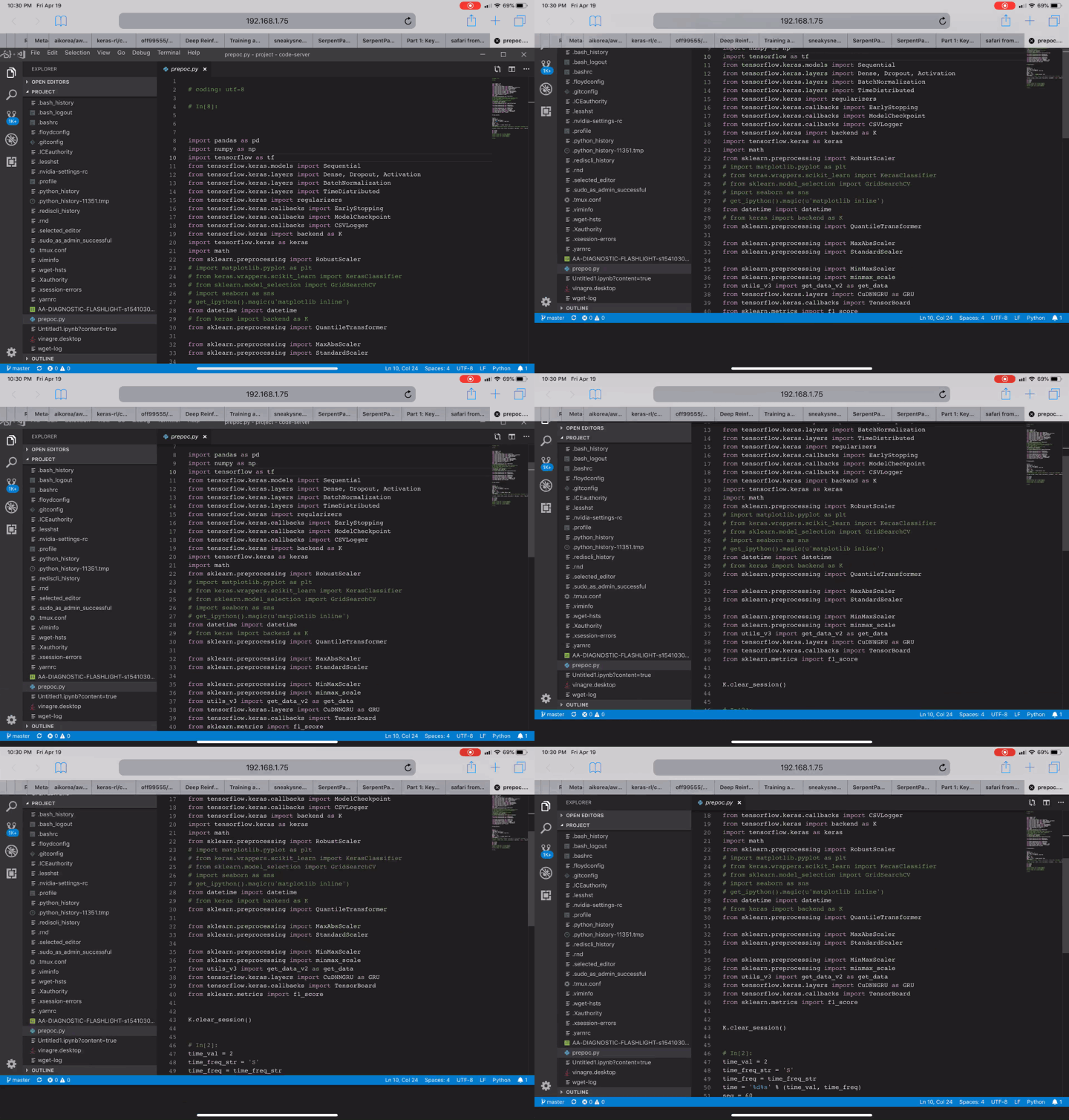
I am hosting the code server(v1.868-vsc1.33.1) on my Mac mini, I got a blank grey screen while I am using my iPad Pro 11" w/ smart keyboard (iOS 12.2). When I tried again without smart keyboard, I got this screen _(I hide my directory manually)_:

The service work perfectly on MacOS safari but seems no luck for iOS
Hope this can help on solving out!! Looking forward to bring my workflow on the go with this awesome work!!
 hhhlau
on 19 Apr 2019
hhhlau
on 19 Apr 2019
launches fine for me on iPad Pro iOS 12.3
only issues that remain are that damn arrow keys bug and the whole window bouncing when trying to scroll
 pourhadi
on 20 Apr 2019
pourhadi
on 20 Apr 2019
I tried with iOS 12.3 but seems no luck.
I got this warning keep coming from the code server console
WARN stderr {"data":"/bin/sh: ioreg: command not found\n"}
and these from browser console
`[Error] Failed to load resource: 無法完成作業。(kCFErrorDomainCFNetwork 錯誤 303。)
[Error] Cannot read file /Users/travis/build/codercom/code-server/packages/server/build/extensions/node_modules/package.json: undefined.
_logMessageInConsole (ide.main.5508eb.js:67:314445)
_logOrShowMessage (ide.main.5508eb.js:67:314614)
(anonymous function) (ide.main.5508eb.js:67:309618)
error (ide.main.5508eb.js:67:341421)
error (ide.main.5508eb.js:67:341051)
(anonymous function) (ide.main.5508eb.js:67:342839)
promiseReactionJob
[Error] Failed to load resource: 無法完成作業。(kCFErrorDomainCFNetwork 錯誤 303。)
[Error] [IPC Library: File Watcher (chokidar)] Watcher is not using native fsevents library and is falling back to unefficient polling.
[Error] Activating extension 'vscode.extension-editing' failed: ENOENT: no such file or directory, open '/product.json'.
[Error] [Extension Host] Activating extension vscode.extension-editing failed: – "ENOENT: no such file or directory, open '/product.json'" – "(at newlyActivatingExtension._host.actualActivateExtension.then (/Users/travis/build/codercom/code-server/packages/server/build/bootstrap-fo…"
`
any thought??
hhhlau
on 20 Apr 2019
Those errors are unrelated to the IDE not loading properly. I found that I was able to get the IDE to load when using the no-auth flag. iOS seems to block self signed certificates which seems to be the root cause of the issue. The certificates that are backed by a third party seem to work fine. We will keep looking into this because it is an very annoying bug.
nol166
on 21 Apr 2019
Those errors are unrelated to the IDE not loading properly. I found that I was able to get the IDE to load when using the
no-authflag. iOS seems to block self signed certificates which seems to be the root cause of the issue. The certificates that are backed by a third party seem to work fine. We will keep looking into this because it is an very annoying bug.
no-auth will remove the authentication and then anyone can access my workspace. I don’t want that to happen. Is there a way to still use authentication on http ?
amittbhardwj
on 23 Apr 2019
Those errors are unrelated to the IDE not loading properly. I found that I was able to get the IDE to load when using the
no-authflag. iOS seems to block self signed certificates which seems to be the root cause of the issue. The certificates that are backed by a third party seem to work fine. We will keep looking into this because it is an very annoying bug.
Did Let's encrypt also counted as self-signing? As I am already pointing in the certs for the service already
hhhlau
on 23 Apr 2019
@amittbhardwj if you have a nginx or Apache web server running use basic authentication in the config file and start code server with the no with flag
 anitricks
on 2 May 2019
anitricks
on 2 May 2019
@hhhlau let’s encrypt certificates should work
anitricks
on 2 May 2019
arrow key issue seems to be fixed in iPadOS
pourhadi
on 4 Jun 2019
I'm just seeing a black screen in my Ipad Pro with IpadOS. Anyone knows how can I fix it?
 skurt23
on 10 Jun 2019
skurt23
on 10 Jun 2019
I am also having the same problem... Is this issue solved or will be solved in the future???
 ghost
on 27 Jun 2019
ghost
on 27 Jun 2019
FWIW my arrows are back with open beta of ipadOS 13.
code-server, AWS c9, monaco and gitpod are all working fine.
https://beta.apple.com/sp/betaprogram/
 hakanu
on 27 Jun 2019
hakanu
on 27 Jun 2019
I think I can reproduce the error con iPadOS.
All work ok until I change nginx reverse proxy to add http basic auth.
Then only back screen.
 NGarate
on 30 Jun 2019
NGarate
on 30 Jun 2019
@Ngarate I had the exact same issue. This is because while Desktop Chrome does pass http basic auth headers for websocket calls, Safari does not.
To resolve this, I disabled http basic auth and used the built in password option instead for now.
 wei
on 30 Jun 2019
wei
on 30 Jun 2019
Is there a bug report on webkit's bug tracker?
 deansheather
on 30 Jun 2019
deansheather
on 30 Jun 2019
Yes and it's been floating around for years.
wei
on 30 Jun 2019
I’m also using an nginx proxy and seeing the black screen. When I remove the proxy I am able to use the app on safari or chrome. With the proxy I see black screen on Safari as well as Chrome. I’m using this nginx file:
server {
    listen 443 ssl;

    server_name mydomain.com

    ssl on;
    ssl_certificate /etc/letsencrypt/live/mydomain.com/fullchain.pem;
    ssl_certificate_key /etc/letsencrypt/live/mydomain.com/privkey.pem;
    ssl_session_timeout 5m;
    ssl_protocols  SSLv2 SSLv3 TLSv1;
    ssl_ciphers  HIGH:!aNULL:!MD5;
    ssl_prefer_server_ciphers on;

    #prevent 502 bad gateway
    #large_client_header_buffers 8 32;

    location / {
        auth_basic "Restricted Content";
        auth_basic_user_file /etc/nginx/.htpasswd;
        # prevents 502 bad gateway error
        proxy_buffers 8 32k;
        proxy_buffer_size 64k;
        # redirect all HTTP traffic to localhost:8443;
        proxy_pass http://localhost:8443;
        proxy_set_header X-Real-IP $remote_addr;
        proxy_set_header Host $http_host;
        proxy_set_header X-Forwarded-For $proxy_add_x_forwarded_for;
        #proxy_set_header X-NginX-Proxy true;
        # enables WS support
        proxy_http_version 1.1;
        proxy_set_header Upgrade $http_upgrade;
        proxy_set_header Connection "upgrade";
        proxy_read_timeout 999999999;
        proxy_buffering on;
    }
}
For the record the authentication via coder also results in a black screen for me on Chrome and Safari
 okwme
on 30 Jun 2019
okwme
on 30 Jun 2019
@okwme any console errors or network errors under that tab?
wei
on 30 Jun 2019
Wish i could check for console errors but i'm on an ipad.
I've got an app called web Tools but the console it has only prints nonsense:
%x INFO %x%s%c%s
Chrome on iOS will behave the same as Safari iOS. HTTP Basic Auth definitely does not work. It works perfectly without it for me. I'm using the latest code-server release
wei
on 30 Jun 2019
Thanks for the help @wei sounds like my only option is to use the auth supplied by the app. Luckily when I set my certificates manually I no longer see the black screen.
It would be nice to handle my own authentication but I could also live with this option. I'm a little confused how to supply my own password as an option though.. I've created an .env file with
PASSWORD=mypassword and run source .env before running the startup command but it does not honor the env variable.
okwme
on 30 Jun 2019
The env needs to be specified in the docker run command using -e option so code-server running inside the container can access it.
wei
on 30 Jun 2019
I'm not using docker but i found the docs that reference it as export PASSWORD="mypassword", thanks for your help!
okwme
on 30 Jun 2019
I fixed it by using Let's Encrypt instead of a self signed certificate.
 planecore
on 30 Jun 2019
planecore
on 30 Jun 2019
Chrome on iOS will behave the same as Safari iOS. HTTP Basic Auth definitely does not work. It works perfectly without it for me. I'm using the latest code-server release
Same for me.
NGarate
on 30 Jun 2019
@NGarate this is beyond the scope of this project. https://bugs.webkit.org/show_bug.cgi?id=80362 I doubt Apple will do anything about it.
wei
on 30 Jun 2019
@kylecarbs Just close the issue.
I doubt it too, nine years and nothing yet.
NGarate
on 30 Jun 2019
I've managed to use in my iPad Pro with iOS 13 without HTTPS by using sudo ./code-server -N -allow-http.
Not recommended, but if you are in a hurry or just trying it out, it is a way
 ammichael
on 30 Jun 2019
ammichael
on 30 Jun 2019
With iOS13 all is working fine now on IPad Pro. Using under nginx+ Let's encypt, with reverse proxy to localhost http 'code-server' with password authentification.
 antlad
on 1 Jul 2019
antlad
on 1 Jul 2019
On iPad OS 13 too, just want to clarify: Yes - built-in password authentication works,
http basic authentication does not work.
wei
on 1 Jul 2019
i can get in to the editor but the smart folio / keyboard for the iPad does not work. The arrow keys don’t work, some of the keys like quotes don’t put in the right characters, etc.
Smart keyboard quotes is unrelated to code server. You can fix it by turning off smart punctuations on your iPad.
 SlowRoasted
on 9 Jul 2019
SlowRoasted
on 9 Jul 2019
I'm on iPadOS v13.1.2. It doesn't work for me either. I see a blank grey page, no UI. The same setup works as a charm on the desktop macOS v10.14.6 Safari v13.0.2
 satyrius
on 21 Oct 2019
satyrius
on 21 Oct 2019
@satyrius are you using a self signed cert? If so, I remember that being the cause of the blank page problem.
 coadler
on 21 Oct 2019
coadler
on 21 Oct 2019
Also, this issue seems to be from pretty early in the v1 days. As far as I can tell, the two major issues discussed here are now fixed.
The blank page problem is caused by self signed certificates. You can get around this by using LetsEncrypt to generate a trusted certificate. The problem with arrow keys not working were fixed in iPadOS 13.
If I missed anything let me know.
coadler
on 21 Oct 2019
@coadler thanks for the quick reply. Just for a reference, I installed it from a Digital Ocean Marketplace https://cloud.digitalocean.com/marketplace/5d3f3a29bdfa55613aea566e?i=15a27f. Yes. it has a self-signed cert. I would be great to have the template updated with Let's Encrypt or instructions how to make it manually.
satyrius
on 21 Oct 2019
cc @sr229
coadler
on 21 Oct 2019
Do not use basicauth.
It's my config file ,using caddy server. In iPad 10.5,iOS 13,Safari.
code.example.com{
proxy / 127.0.0.1:8081 {
transparent
websocket
}
}
And systemd service config
[Unit]
Description=Code Server
Wants=network-online.target
After=network-online.target
[Service]
Environment=PASSWORD="password"
Type=exec
User=http
ExecStart=/usr/local/bin/code-server --port 8081
[Install]
WantedBy=multi-user.target
 jianfei96
on 7 Jan 2020
jianfei96
on 7 Jan 2020
There’s a workaround if you are using nginx. The problem for iOS (not iPad Pro version) is the browser won’t set Authentication header for web sockets connection. If you configure nginx to use cookie based authentication like SSO. The one I tried is nginx-sso https://github.com/Luzifer/nginx-sso
 LindenLiu
on 13 Jan 2020
LindenLiu
on 13 Jan 2020
Related issues
avelino
·
3Comments
 chrischabot
·
3Comments
chrischabot
·
3Comments
 rcarmo
·
3Comments
rcarmo
·
3Comments
 pchecinski
·
3Comments
pchecinski
·
3Comments
 grant
·
3Comments
grant
·
3Comments
Most helpful comment
FWIW I'm getting blank (dark) page in both Chrome and Safari on iPad Pro 11" with smart keyboard folio installed. iOS 12.1.4