Cocoapods: Unable to debug the simulator in the xcode12
- [ ] I've read and understood the CONTRIBUTING guidelines and have done my best effort to follow.
Report
What did you do?
Run pod install,Run the project on the simulator。
What did you expect to happen?
Run successfully。
What happened instead?
Run failed。
Prompt that the third-party library cannot be found。
Or prompt:
The linked library 'libPods-PushNotificationService.a' is missing one or more architectures required by this target: arm64.
But if there is no problem without using the simulator, you can run the project normally.
CocoaPods Environment
CocoaPods : 1.10.0.rc.1
Ruby: 2.6.3p62 (2019-04-16 revision 67580)
RubyGems:3.0.3
Host:Mac OS X 10.15.6 (19G2021)
Xcode: 12.0 (12A7209)
Ruby lib dir : /System/Library/Frameworks/Ruby.framework/Versions/2.6/usr/libGit:git version 2.24.3 (Apple Git-128)
Repositories : https://gems.ruby-china.com/
Project that demonstrates the issue
ℹ Please link to a project we can download that reproduces the issue.
You can delete this section if your issue is unrelated to build problems,
i.e. it's only an issue with CocoaPods the tool.
 CLANNADAIR
All 9 comments
same issue, seems should set EXCLUDED_ARCHS in *.xcconfig
 iOSleep
on 17 Sep 2020
iOSleep
on 17 Sep 2020
same issue, seems should set
EXCLUDED_ARCHSin *.xcconfig
Could you give me a more detailed answer, please.
CLANNADAIR
on 17 Sep 2020
same issue, seems should set
EXCLUDED_ARCHSin *.xcconfigCould you give me a more detailed answer, please.
have a try, in your *.xcodeproj -> Build Settings -> User-Defined delete the VALID_ARCHS
iOSleep
on 17 Sep 2020
We're seeing the same thing, but don't have VALID_ARCHS defined in build settings anywhere
 ball-hayden
on 17 Sep 2020
ball-hayden
on 17 Sep 2020
i have the same issue and don't have VALID_ARCHS defined in User-Defined
 oselvi
on 17 Sep 2020
oselvi
on 17 Sep 2020
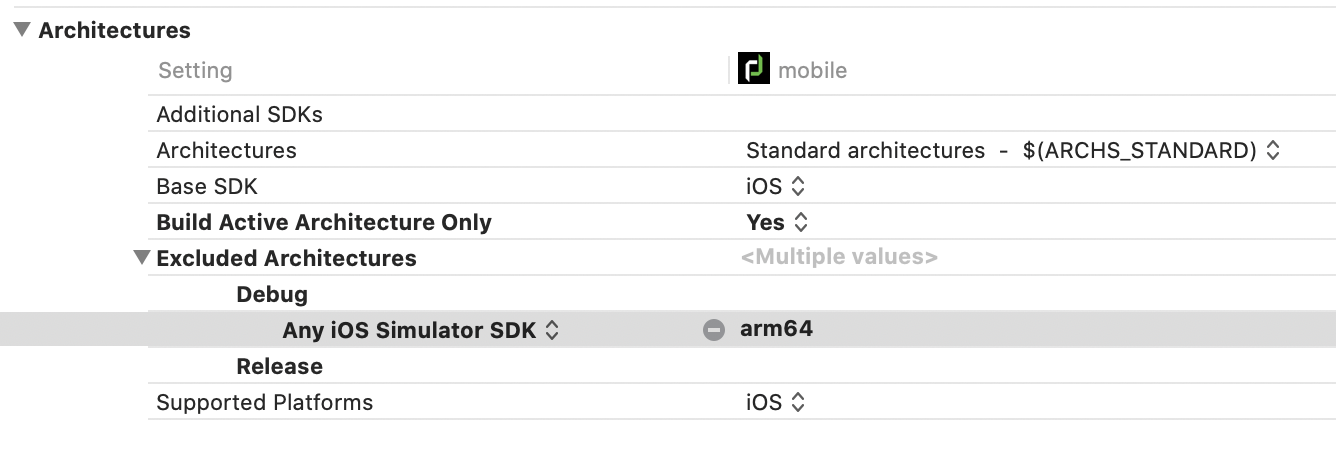
We've managed to ~solve~ work around the problem with some inspiration from https://github.com/CocoaPods/CocoaPods/issues/10065#issuecomment-694266259.
We've set our iOS Deployment Target to 14, and then the following for our main project:
ball-hayden
on 17 Sep 2020
I have found the problem. Xcode 12 don't want VALID_ARCHS and in some of my project i can't clear completely this line.
When you look at your taget build settings (search for archs) and display every levels, you can see in the Config.File column every arch you can't remove directly.
We must go in the file located in the Pods/Targets Support Files/ Pods-(projectname)/Pods...xcconfig. Both in debug and release when you look at the very bottom there is a line with VALID_ARCHS. Remove it and problem resolved :)
 SmartHbdev
on 18 Sep 2020
SmartHbdev
on 18 Sep 2020
I tried to delete the VALID_ARCHS,but got another error about permission,finally my effective solution is “Xcode12-Targets-Build Settings-VALID_ARCHS add x86_64”
 huangrun
on 18 Sep 2020
huangrun
on 18 Sep 2020
Thank you for your answers, I have solved the problem.I temporarily addedVALID_ARCHS to x86_64, and it ran successfully.
CLANNADAIR
on 18 Sep 2020
Related issues
 Mingmingmew
·
3Comments
Mingmingmew
·
3Comments
 dawnnnnn
·
3Comments
dawnnnnn
·
3Comments
 sonu5
·
3Comments
sonu5
·
3Comments
 pronebird
·
3Comments
pronebird
·
3Comments
 steffendsommer
·
3Comments
steffendsommer
·
3Comments
Most helpful comment
We've managed to ~solve~ work around the problem with some inspiration from https://github.com/CocoaPods/CocoaPods/issues/10065#issuecomment-694266259.
We've set our iOS Deployment Target to 14, and then the following for our main project: