Cocoapods: XCFrameworks slice selection fails in multiple ways
- [x] I've read and understood the CONTRIBUTING guidelines and have done my best effort to follow.
Report
What did you do?
Integrating a pod distributed as a xcframework.
What did you expect to happen?
The xcframework pod to be handled properly by Cocoapods and for the target to compile without errors.
What happened instead?
The shell script generated by copy_xcframework_script.rb does not handle all xcframeworks correctly.
Example 1
Given the following xcframework:
SampleXCFramework.xcframework
├── Info.plist
├── ios-arm64
│   └── SampleXCFramework.framework
│       └── ...
└── ios-arm64_x86_64-simulator
    └── SampleXCFramework.framework
        └── ...
When compiling on a device or using the _Any iOS Device_ destination. The pod's copy_xcframework_script.rb will select the simulator slice instead of the device slice.
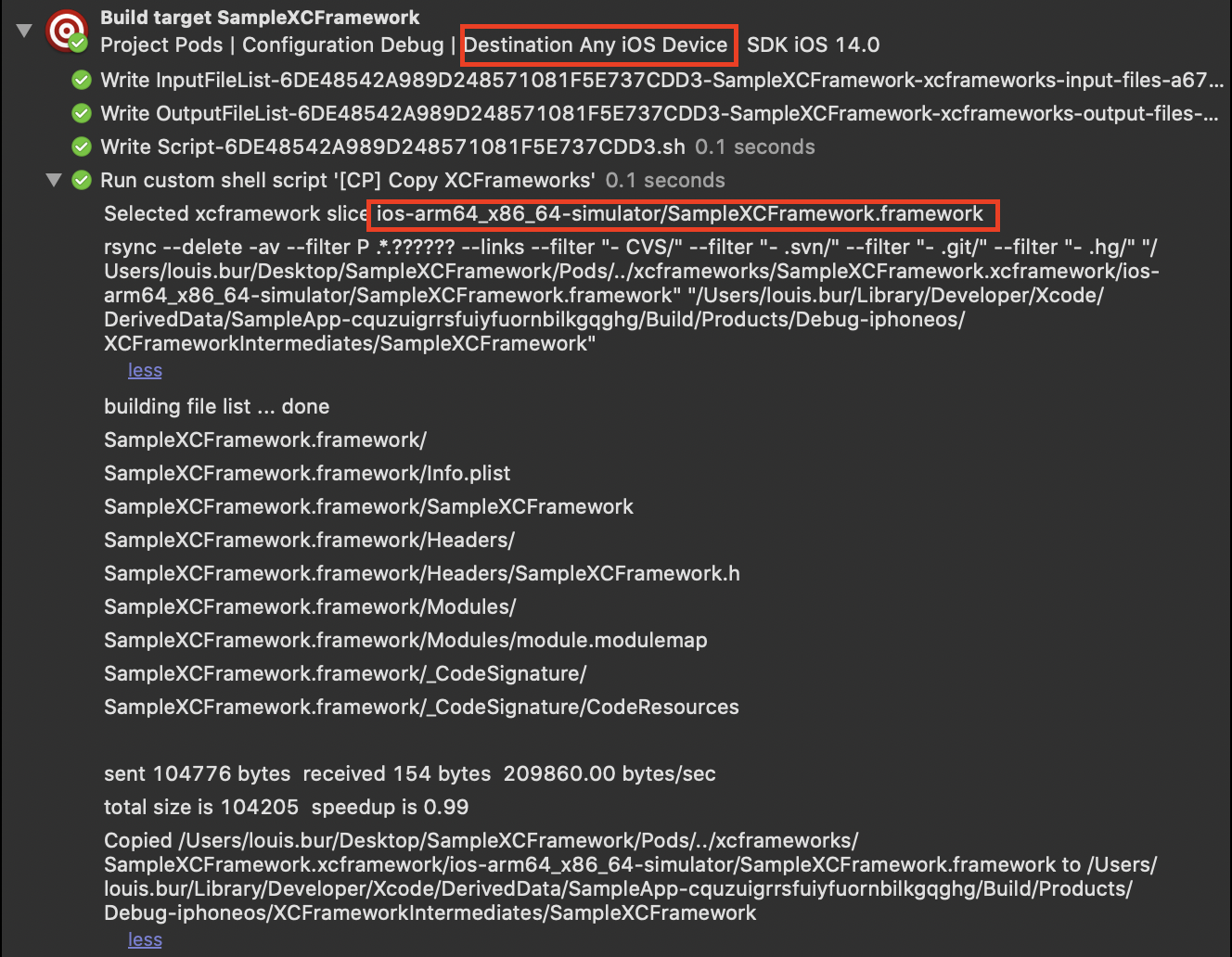
This leads to the following compilation error on the target:
Building for iOS, but linking in dylib file (.../SampleXCFramework.framework/SampleXCFramework) built for iOS Simulator, file '.../SampleXCFramework.framework/SampleXCFramework' for architecture arm64
Example 2
Given the following xcframework:
AppboyKit.xcframework
├── Info.plist
├── ios-arm64_armv7
│   ├── Headers
│   │   └── ...
│   └── libAppboyKitLibrary.a
└── ios-arm64_i386_x86_64-simulator
    ├── Headers
    │   └── ...
    └── libAppboyKitLibrary.a
When compiling on a device or using the _Any iOS Device_ destination. The pod's copy_xcframework_script.rb will fail to select a slice in the xcframework:
[CP] Unable to find matching .xcframework slice in '.../AppboyKit.xcframework AppboyKit library ios-arm64_i386_x86_64-simulator ios-arm64_armv7' for the current build architectures (armv7 arm64).
As you can see, the slice ios-arm64_armv7 contains all the architectures needed (armv7 arm64). The script fails to select this slice due to the following regex:
# This regex matches all possible variants of the arch in the folder name:
# Let's say the folder name is: ios-armv7_armv7s_arm64_arm64e/CoconutLib.framework
# We match the following: -armv7_, _armv7s_, _arm64_ and _arm64e/.
# If we have a specific variant: ios-i386_x86_64-simulator/CoconutLib.framework
# We match the following: -i386_ and _x86_64-
local target_arch_regex="[_\-]${target_arch}[\/_\-]"
That regex fails to match the target architecture in the string ios-arm64_armv7. A possible fix for that regex is:
"[_\-]${target_arch}([\/_\-]|$)"
Notes
In both examples, the xcframeworks were:
- generated using _Xcode 12 beta 6_
- tested and work correctly when integrated manually into an Xcode project
CocoaPods Environment
Stack
   CocoaPods : 1.10.0.beta.2
        Ruby : ruby 2.6.1p33 (2019-01-30 revision 66950) [x86_64-darwin19]
    RubyGems : 3.0.1
        Host : Mac OS X 10.15.6 (19G2021)
       Xcode : 12.0 (12A8189n)
         Git : git version 2.28.0
Ruby lib dir : /Users/louis.bur/.rbenv/versions/2.6.1/lib
Repositories : cocoapods - git - https://github.com/CocoaPods/Specs.git @ a73178d31cff733dba361b7b9332648ff995121d

               trunk - CDN - https://cdn.cocoapods.org/
Installation Source
Executable Path: /Users/louis.bur/.rbenv/versions/2.6.1/bin/pod
Plugins
cocoapods-deintegrate : 1.0.4
cocoapods-plugins     : 1.0.0
cocoapods-search      : 1.0.0
cocoapods-stats       : 1.1.0
cocoapods-trunk       : 1.4.1
cocoapods-try         : 1.1.0
Podfile
platform :ios, '14.0'
project 'SampleApp.xcodeproj'

target :SampleApp do
  pod 'SampleXCFramework', :path => './'
end
Project that demonstrates the issue
Example 1 - SampleXCFramework.zip
Example 2 - AppboyKit.xcframework.zip
 lowip
lowip
All 15 comments
Yes! great issue report. If we need to update the regex care to open a PR for it? Target branch 1-10-stable so it ships with 1.10.x
 dnkoutso
on 2 Sep 2020
dnkoutso
on 2 Sep 2020
@lowip also would be awesome to expand our test surface area with the sample xcframeworks to ensure no regressions.
dnkoutso
on 2 Sep 2020
@dnkoutso I'm preparing a PR.
lowip
on 2 Sep 2020
This was merged.
dnkoutso
on 11 Sep 2020
I believe this bug or at least a variation of it might still be occurring. I'm getting a build issue only on my Development configuration because Cocoapods is selecting the wrong slice of the XCFramework. This prevents me from building for a simulator but it works normally when building for a device.
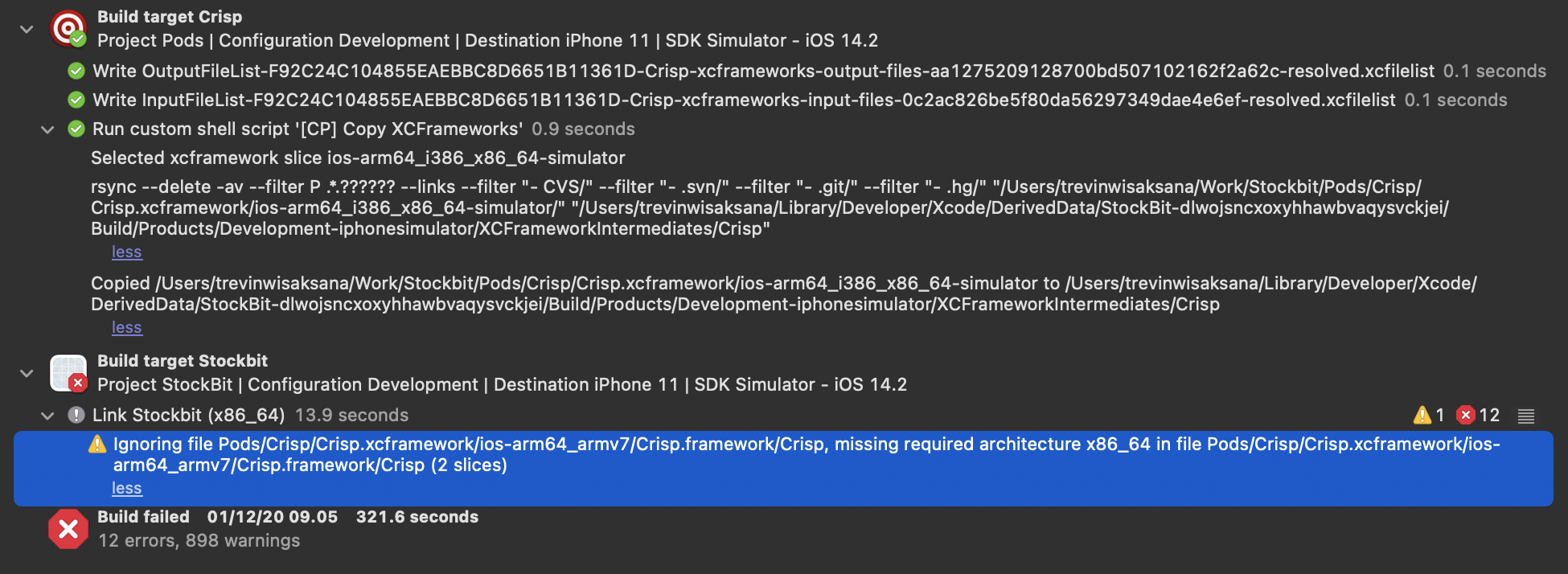
It correctly selected the correct slice at first as shown on the logs. But then notice that it's still looking for the x86_64 architecture in the ios-arm64_armv7 folder.
missing required architecture x86_64 in file Pods/Crisp/Crisp.xcframework/ios-arm64_armv7/Crisp.framework/Crisp (2 slices)
I'm using Xcode 12.2 and Cocoapods 1.10 to generate this.
 trevinwisaksana
on 1 Dec 2020
trevinwisaksana
on 1 Dec 2020
@trevinwisaksana Did you find a solution to that?
 perrosnk
on 18 Dec 2020
perrosnk
on 18 Dec 2020
@perrosnk
My solution was adding this to the bottom of the Podfile
xcframeworks = ['PodName1', 'PodName2'] # pods which are xcframeworks
post_install do |installer|
installer.pods_project.targets.each do |target|
if xcframeworks.include? target.name
target.build_configurations.each do |config|
config.build_settings['ARCHS'] = ["$(ARCHS_STANDARD)", "i386", "x86_64"]
end
end
end
end
 ManueGE
on 18 Dec 2020
ManueGE
on 18 Dec 2020
@ManueGE did you add this to post_install do |installer| or pre_install do |installer|?
Thank you very much
perrosnk
on 18 Dec 2020
@perrosnk post_install. Updated my answer.
ManueGE
on 18 Dec 2020
@ManueGE Thank you very much for your help. Unfortunately it doesn't work for me. It seems that xcode still tries to use the ios slice (instead of ios-simulator) of the XCFrameworks that doesn't contain the x86_64 architecture. I have no idea why that is the case!
perrosnk
on 18 Dec 2020
@trevinwisaksana Did you find a solution to that?
I haven't found a long term solution to this. But I found a stop gap one by deleting the ios-arm64_armv7 folder in the ExampleFramework.xcframework folder when building for a simulator. You can find it in the Pods folder of your project. However, you need to pod deintegrate and pod install if you want to archive or build for a device. Yes, this is annoying and not ideal. But if you need a quick solution this works
trevinwisaksana
on 19 Dec 2020
I'm having a similar issue- on CircleCi/remote, it's building for simulator all the time, never for device. Locally, it builds for device, but on CircleCI, it builds for simulator. I see the warning, and the failure (when try to verify on upload with app store). This is Plaid/LinkKit xc framework.
 banane
on 10 Jan 2021
banane
on 10 Jan 2021
@trevinwisaksana I had this same issue with the AppCenter Cocoapod today. I fixed it by removing an recursive path ($(SRCROOT)/**) from the Framework Search Path in the target (though it could also be in the project) Build Settings.
The recursive path was causing XCode to add every folder into the Link step including (incorrectly) the architecture folders inside of the xcframework, and using those paths it would find the wrong architecture framework. You can tell if this is the case by looking at the Link step log

for paths similar to this:
-FPods/AppCenter/AppCenter-SDK-Apple/AppCenter.xcframework/ios-arm64_arm64e_armv7_armv7s
-FPods/AppCenter/AppCenter-SDK-Apple/AppCenter.xcframework/ios-arm64_i386_x86_64-simulator
-FPods/AppCenter/AppCenter-SDK-Apple/AppCenter.xcframework/ios-arm64_x86_64-maccatalyst
-FPods/AppCenter/AppCenter-SDK-Apple/AppCenter.xcframework/macos-arm64_x86_64
-FPods/AppCenter/AppCenter-SDK-Apple/AppCenter.xcframework/tvos-arm64
-FPods/AppCenter/AppCenter-SDK-Apple/AppCenter.xcframework/tvos-arm64_x86_64-simulator
 tplester
on 11 Mar 2021
tplester
on 11 Mar 2021
@tplester it works! Thank you so much for this!
trevinwisaksana
on 12 Mar 2021
If you still facing this issue i had to exclude arm64 from build settings like this:
if target.name == "AgoraRtcEngine_iOS"
        config.build_settings["EXCLUDED_ARCHS[sdk=iphonesimulator*]"] = "arm64"
      end
 m1entus
on 1 Apr 2021
m1entus
on 1 Apr 2021
Related issues
 pronebird
·
3Comments
pronebird
·
3Comments
 tlandsmancars
·
3Comments
tlandsmancars
·
3Comments
 Curtis-Halbrook
·
3Comments
Curtis-Halbrook
·
3Comments
 luhui
·
3Comments
luhui
·
3Comments
 lzwjava
·
3Comments
lzwjava
·
3Comments
Most helpful comment
@trevinwisaksana I had this same issue with the AppCenter Cocoapod today. I fixed it by removing an recursive path (
$(SRCROOT)/**) from the Framework Search Path in the target (though it could also be in the project) Build Settings.The recursive path was causing XCode to add every folder into the Link step including (incorrectly) the architecture folders inside of the xcframework, and using those paths it would find the wrong architecture framework. You can tell if this is the case by looking at the Link step log

for paths similar to this: