Cocoapods: Xcode 12 minimum deployment target
[X] I've read and understood the CONTRIBUTING guidelines and have done my best effort to follow.
Xcode 12 recommended settings is suggesting to update the minimum deployment target to 12.0, but my project target is set to 11.0, and it isn't building right now because some pods minimum deployment version is 8.0, which isn't supported anymore.
If I manually change my pods to minimum deployment 11.0 it all works, but anytime I run pod install or pod update it goes back to 8.0.
I have in my Podfile platform :ios, '11.0'
My question is, is there any way I can force all pods to a certain minimum deployment target (11.0 in this case)?
 brurend
All 17 comments
See some discussion here https://github.com/CocoaPods/Core/pull/636 and here https://github.com/CocoaPods/CocoaPods/issues/9884
you can use a post install hook to update the deployment target of all pods that havent been updating to support a new deployment target.
 dnkoutso
on 23 Jul 2020
dnkoutso
on 23 Jul 2020
I have tried this:
post_install do |installer|
    installer.pods_project.build_configurations.each do |config|
    config.build_settings['DEBUG_INFORMATION_FORMAT'] = 'DWARF with dSYM File'
    config.build_settings['SWIFT_VERSION'] = '5.0'
    config.build_settings['IOS_DEPLOYMENT_TARGET'] = '11.0'
    end
  end
But didn't work
brurend
on 23 Jul 2020
I think you are changing the actual Pods.xcodeproj configuration. You need to do that on the target level. Either update it in the xcconfig that is generated by CocoaPods or directly on the target.
dnkoutso
on 23 Jul 2020
Yes, you are correct. I tried this one now and still didn't work, perhaps something wrong with my syntax?
post_install do |installer|
    installer.pods_project.build_configurations.each do |config|
      config.build_settings['DEBUG_INFORMATION_FORMAT'] = 'DWARF with dSYM File'
      config.build_settings['SWIFT_VERSION'] = '5.0'
    end
    installer.pods_project.targets.each do |target|
        target.build_configurations.each do |config|
          config.build_settings['IOS_DEPLOYMENT_TARGET'] = 'iOS 11.0'
        end
    end
  end
its possible that the target itself has the setting set which takes precedence from the .xcconfig which you are altering.
I would open up the Xcode UI go to a target of a pod and see what the deployment target has evaluated to. Open up "Levels" view in Build Settings and see.
dnkoutso
on 23 Jul 2020

Thats what it looks like
brurend
on 23 Jul 2020
yes so its set on the target directly. Your post install hook has to change that in the target itself.
dnkoutso
on 23 Jul 2020
Could you please show me how it should be done? I'm not sure how to set it directly on the target
brurend
on 23 Jul 2020
You already have the PBXNativeTarget in your loop so just do:
target.deployment_target = '9.0'
I think that would work?
dnkoutso
on 23 Jul 2020
It's also possible that this is overridden afterwards by CocoaPods as the post_install hook is executed before the project is saved.
In this case the newly added post_integrate hook in 1.10.0.beta.1 can help.
dnkoutso
on 23 Jul 2020
target.deployment_target = '11.0' did work, thanks a lot for your help!
brurend
on 23 Jul 2020
@brurend I think your post_install hook wasn't working because the build setting is IPHONEOS_DEPLOYMENT_TARGET, not IOS_DEPLOYMENT_TARGET
 amorde
on 24 Jul 2020
amorde
on 24 Jul 2020
@amorde thank you, I will try that too.
How do I find the name of the build settings? I couldn't find in this "key" format
brurend
on 24 Jul 2020

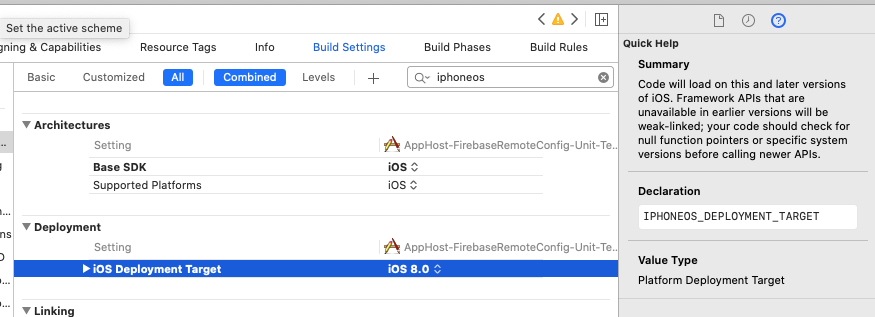
If you hover over the value in Xcode it will show you the build setting value.
You can also select the whole row in Xcode and copy it to your clipboard. It will copy something like this:
//:configuration = Debug
IPHONEOS_DEPLOYMENT_TARGET = 10.0

//:configuration = Release
IPHONEOS_DEPLOYMENT_TARGET = 10.0

//:completeSettings = some
IPHONEOS_DEPLOYMENT_TARGET
Another way is to click the ? icon in the right panel while the setting is selected. It also provides a description:
 paulb777
on 24 Jul 2020
paulb777
on 24 Jul 2020
Since this is closed; what did you guys do to fix this?
Nothing in here fixes it for me, in the post_install, I tried:
- setting IPHONEOS_DEPLOYMENT_TARGET = '11.0' on the project
- setting IPHONEOS_DEPLOYMENT_TARGET = '11.0' on the target
- setting target.deployment_target = '11.0'
None of those options work.
 joridor
on 22 Oct 2020
joridor
on 22 Oct 2020
To fix it I wrote this.
post_install do |installer|
installer.pods_project.targets.each do |target|
target.build_configurations.each do |config|
config.build_settings['IPHONEOS_DEPLOYMENT_TARGET'] = '11.0'
end
installer.pods_project.build_configurations.each do |config|
config.build_settings['DEBUG_INFORMATION_FORMAT'] = 'DWARF with dSYM File'
config.build_settings['SWIFT_VERSION'] = '5.0'
config.build_settings['IOS_DEPLOYMENT_TARGET'] = '11.0'
end
end
end
end
 BlackSpartan117
on 18 Feb 2021
BlackSpartan117
on 18 Feb 2021
Related issues
 gerchicov-bp
·
3Comments
gerchicov-bp
·
3Comments
 marzapower
·
3Comments
marzapower
·
3Comments
 hmistry
·
3Comments
hmistry
·
3Comments
 soleares
·
3Comments
soleares
·
3Comments
 lzwjava
·
3Comments
lzwjava
·
3Comments
Most helpful comment
Since this is closed; what did you guys do to fix this?
Nothing in here fixes it for me, in the post_install, I tried:
None of those options work.