Cocoapods: SSL peer certificate or SSH remote key was not OK
- [x] I've read and understood the CONTRIBUTING guidelines and have done my best effort to follow.
Report
What did you do?
Run pod search YF_HotFix --verbose
What did you expect to happen?
search a pod
What happened instead?
CDN: trunk Redirecting from https://cdn.cocoapods.org/Specs/f/c/8/YF_HotFix/1.0.0/YF_HotFix.podspec.json to
https://cdn.jsdelivr.net/cocoa/Specs/f/c/8/YF_HotFix/1.0.0/YF_HotFix.podspec.json
CDN: trunk URL couldn't be downloaded: https://cdn.jsdelivr.net/cocoa/Specs/f/c/8/YF_HotFix/1.0.0/YF_HotFix.podspec.json Response: SSL peer certificate or SSH remote key was not OK
CocoaPods Environment
Stack
   CocoaPods : 1.9.3
        Ruby : ruby 2.7.0p0 (2019-12-25 revision 647ee6f091) [x86_64-darwin19]
    RubyGems : 3.1.2
        Host : Mac OS X 10.15.4 (19E287)
       Xcode : 11.5 (11E608c)
         Git : git version 2.24.3 (Apple Git-128)
Ruby lib dir : /Users/myname/.rvm/rubies/ruby-2.7.0/lib
Repositories : trunk - CDN - https://cdn.cocoapods.org/
Installation Source
Executable Path: /Users/zhangqiang/.rvm/gems/ruby-2.7.0/bin/pod
Plugins
cocoapods-deintegrate : 1.0.4
cocoapods-plugins     : 1.0.0
cocoapods-search      : 1.0.0
cocoapods-stats       : 1.1.0
cocoapods-trunk       : 1.5.0
cocoapods-try         : 1.2.0
Project that demonstrates the issue
 J0hnChang
All 29 comments
'pod install' has the same issue, guess something wrong with the new cdn server
J0hnChang
on 1 Jun 2020
same wrong
 cubegao
on 1 Jun 2020
cubegao
on 1 Jun 2020
Have you solved the problem ?
 MuYuLi
on 1 Jun 2020
MuYuLi
on 1 Jun 2020
I have a same wrong, so sad
MuYuLi
on 1 Jun 2020
I had the same wrong, and it's been a day.
 JackStronger
on 1 Jun 2020
JackStronger
on 1 Jun 2020
i had the same problem in the whole day, It's annoying
CDN: cocoapods- URL couldn't be downloaded: https://cdn.jsdelivr.net/cocoa/Specs/f/c/8/YF_HotFix/1.0.0/YF_HotFix.podspec.json Response: SSL peer certificate or SSH remote key was not OK
CDN: cocoapods- URL couldn't be downloaded: https://cdn.jsdelivr.net/cocoa/Specs/f/c/8/YF_HotFix/1.0.1/YF_HotFix.podspec.json Response: SSL peer certificate or SSH remote key was not OK
 Decin
on 1 Jun 2020
Decin
on 1 Jun 2020
I had the same wrong, and it's been a day.
I use curl to test "https://cdn.jsdelivr.net":
curl: (60) SSL certificate problem: certificate has expired

JackStronger
on 1 Jun 2020
it's ok to open "https://cdn.jsdelivr.net/cocoa/Specs/f/c/8/YF_HotFix/1.0.0/YF_HotFix.podspec.json" in the web browser, but not work in terminal
Decin
on 1 Jun 2020
We've contacted jsDelivr to see if they can find any issues on their end. It looks like this might be specific to certain regions (so far looks like this is only happening in China).
 amorde
on 1 Jun 2020
amorde
on 1 Jun 2020
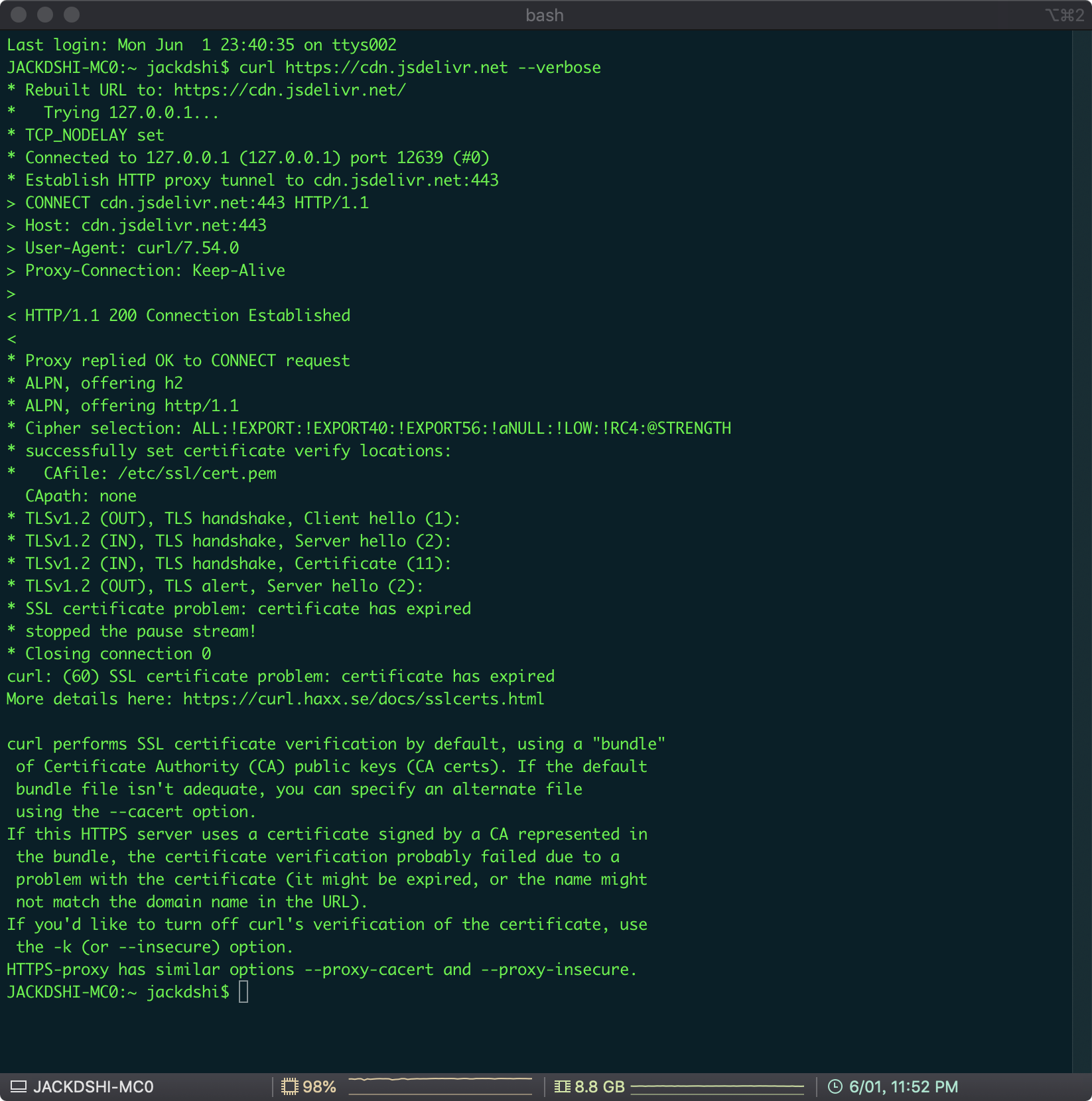
@JackStronger can you please run "curl https://cdn.jsdelivr.net --verbose" and post the results here? I tried to check it myself by running the command from within China but even that worked without issues.
// cc @jimaek
 MartinKolarik
on 1 Jun 2020
MartinKolarik
on 1 Jun 2020
@JackStronger can you please run "curl https://cdn.jsdelivr.net --verbose" and post the results here? I tried to check it myself by running the command from within China but even that worked without issues.
// cc @jimaek
sure,the results is:
JackStronger
on 1 Jun 2020
Thanks, we've temporarily switched China traffic from Quantil to Cloudflare. It should work now (with worse performance). @jimaek will follow up shortly to fix the original issue and enable Quantil again.
MartinKolarik
on 1 Jun 2020
@MartinKolarik thank you for investigating, and for your support of CocoaPods!
amorde
on 1 Jun 2020
Closing for now given the above change
amorde
on 1 Jun 2020
The traffic was switched back to Quantil and everything should be working fine. Our certificate did not expire, it was an issue with the CA chain
 jimaek
on 1 Jun 2020
jimaek
on 1 Jun 2020
Everything works like a charm now, thank you guys.
J0hnChang
on 2 Jun 2020
Same issue here now
[!] CDN: trunk URL couldn't be downloaded: https://cdn.jsdelivr.net/cocoa/Specs/0/8/4/GoogleUtilities/6.7.1/GoogleUtilities.podspec.json Response: Timeout was reached
`curl https://cdn.jsdelivr.net --verbose
- Trying 151.101.194.109...
- TCP_NODELAY set
- Connected to cdn.jsdelivr.net (151.101.194.109) port 443 (#0)
- ALPN, offering h2
- ALPN, offering http/1.1
- successfully set certificate verify locations:
- CAfile: /etc/ssl/cert.pem
CApath: none - TLSv1.2 (OUT), TLS handshake, Client hello (1):
- TLSv1.2 (IN), TLS handshake, Server hello (2):
- TLSv1.2 (IN), TLS handshake, Certificate (11):
- TLSv1.2 (IN), TLS handshake, Server key exchange (12):
- TLSv1.2 (IN), TLS handshake, Server finished (14):
- TLSv1.2 (OUT), TLS handshake, Client key exchange (16):
- TLSv1.2 (OUT), TLS change cipher, Change cipher spec (1):
- TLSv1.2 (OUT), TLS handshake, Finished (20):
- TLSv1.2 (IN), TLS change cipher, Change cipher spec (1):
- TLSv1.2 (IN), TLS handshake, Finished (20):
- SSL connection using TLSv1.2 / ECDHE-RSA-AES128-GCM-SHA256
- ALPN, server accepted to use h2
- Server certificate:
- subject: C=US; ST=California; L=San Francisco; O=Fastly, Inc.; CN=f3.shared.global.fastly.net
- start date: Jul 8 22:07:09 2020 GMT
- expire date: Apr 17 15:42:40 2021 GMT
- subjectAltName: host "cdn.jsdelivr.net" matched cert's "*.jsdelivr.net"
- issuer: C=BE; O=GlobalSign nv-sa; CN=GlobalSign CloudSSL CA - SHA256 - G3
- SSL certificate verify ok.
- Using HTTP2, server supports multi-use
- Connection state changed (HTTP/2 confirmed)
- Copying HTTP/2 data in stream buffer to connection buffer after upgrade: len=0
- Using Stream ID: 1 (easy handle 0x7fa58b80de00)
GET / HTTP/2
Host: cdn.jsdelivr.net
User-Agent: curl/7.64.1
Accept: /
- Connection state changed (MAX_CONCURRENT_STREAMS == 100)!
< HTTP/2 301
< access-control-allow-origin: *
< access-control-expose-headers: *
< timing-allow-origin: *
< cache-control: no-cache, no-store, must-revalidate
< x-content-type-options: nosniff
< strict-transport-security: max-age=31536000; includeSubDomains; preload
< location: https://www.jsdelivr.com
< content-type: text/plain; charset=utf-8
< accept-ranges: bytes
< date: Wed, 15 Jul 2020 20:53:45 GMT
< age: 0
< x-served-by: cache-fra19127-FRA, cache-cph20620-CPH
< x-cache: HIT, MISS
< vary: Accept-Encoding, Accept
< content-length: 58
<- Connection #0 to host cdn.jsdelivr.net left intact
Moved Permanently. Redirecting to https://www.jsdelivr.com* Closing connection 0
`
 JakubTHOC
on 15 Jul 2020
JakubTHOC
on 15 Jul 2020
Was it a one time error or it keeps happening? Fastly seems to be working fine without any issues.
jimaek
on 15 Jul 2020
@JakubTHOC I don't see any issue here, the curl output you posted shows correct response. A timeout may occur for a great number of reasons including issues with your connection but should usually go away in a moment.
MartinKolarik
on 15 Jul 2020
still happening
JakubTHOC
on 15 Jul 2020
Issue still exist.
 koyta
on 28 Jul 2020
koyta
on 28 Jul 2020
@koyta do you mean the originally reported SSL issue or something else? Please provide more details with a curl output as above, if possible.
MartinKolarik
on 28 Jul 2020
@koyta do you mean the originally reported SSL issue or something else? Please provide more details with a curl output as above, if possible.
Originally reported. BTW, updating cocoapods manually helps resolve this issue. No idea how it works.
koyta
on 28 Jul 2020
still happening
 catach
on 11 Sep 2020
catach
on 11 Sep 2020
I had the same problem. What worked for me was using a VPN.
For those who want to know my exact steps:
I used ProtonVPN and the US server "US-FREE#4".
Nothing else worked until I tried this. As others mentioned above, people seem to have the problem based on their region, so using a VPN allows you to switch over to a region where it connects successfully.
 dueston
on 20 Sep 2020
dueston
on 20 Sep 2020
Not work even I use a VPN in China.
>> pod update --verbose
Update all pods
  Preparing

Updating local specs repositories
  CDN: trunk URL couldn't be downloaded:
  https://cdn.cocoapods.org/CocoaPods-version.yml Response: SSL peer certificate
  or SSH remote key was not OK, retries: 4
  CDN: trunk URL couldn't be downloaded:
  https://cdn.cocoapods.org/CocoaPods-version.yml Response: SSL peer certificate
  or SSH remote key was not OK, retries: 3
 Horse888
on 28 Dec 2020
Horse888
on 28 Dec 2020
Not work even I use a VPN in China.
>> pod update --verbose
Update all pods
  Preparing

Updating local specs repositories
  CDN: trunk URL couldn't be downloaded:
  https://cdn.cocoapods.org/CocoaPods-version.yml Response: SSL peer certificate
  or SSH remote key was not OK, retries: 4
  CDN: trunk URL couldn't be downloaded:
  https://cdn.cocoapods.org/CocoaPods-version.yml Response: SSL peer certificate
  or SSH remote key was not OK, retries: 3
Try using a VPN from a different country
dueston
on 30 Dec 2020
I just want to clarify that this issue seems unrelated to jsDelivr in any way. It would maybe make sense to open a new issue about this.
jimaek
on 30 Dec 2020
Not work even I use a VPN in China.
>> pod update --verbose
Update all pods
  Preparing

Updating local specs repositories
  CDN: trunk URL couldn't be downloaded:
  https://cdn.cocoapods.org/CocoaPods-version.yml Response: SSL peer certificate
  or SSH remote key was not OK, retries: 4
  CDN: trunk URL couldn't be downloaded:
  https://cdn.cocoapods.org/CocoaPods-version.yml Response: SSL peer certificate
  or SSH remote key was not OK, retries: 3
Try using a VPN from a different country
Yes, have tried VPNs from US, HK. Same issue.
Horse888
on 1 Jan 2021
Related issues
 pallaviMN
·
3Comments
pallaviMN
·
3Comments
 sonu5
·
3Comments
sonu5
·
3Comments
 tlandsmancars
·
3Comments
tlandsmancars
·
3Comments
 Mingmingmew
·
3Comments
Mingmingmew
·
3Comments
 dawnnnnn
·
3Comments
dawnnnnn
·
3Comments
Most helpful comment
Same issue here now
[!] CDN: trunk URL couldn't be downloaded: https://cdn.jsdelivr.net/cocoa/Specs/0/8/4/GoogleUtilities/6.7.1/GoogleUtilities.podspec.json Response: Timeout was reached
`curl https://cdn.jsdelivr.net --verbose
CApath: none