Cocoapods: dyld: Library not loaded: @rpath/protobuf.framework/protobuf
I have created a framework and used cocoapods dependency to share the framework. I can able to install the framework using cocoapod Podfile and can access the public methods but at runtime I am getting the following error:
dyld: Library not loaded: @rpath/protobuf.framework/protobuf
Referenced from: /private/var/containers/Bundle/Application/EE2A1E47-21F7-4CD7-A7C3-AE7BD19A6326/VizurySwiftSample.app/Frameworks/VizuryEventLogger.framework/VizuryEventLogger
Reason: image not found
Why I am getting the following issue? I have searched and tried all possible solution but none of them are working? Please help me
 ayon-affle
All 8 comments
I am not sure. This is also not the issue template. At its current form you need to upload a sample app clearly demonstrating the issue and providing step-by-step instructions.
Otherwise it is best to ask StackOverflow.
Closing preemptively and I will re-open if you provide sufficient information.
 dnkoutso
on 27 Apr 2020
dnkoutso
on 27 Apr 2020
I have used the following Podspec file to create the CocoaPods dependency:
`Pod::Spec.new do |spec|
spec.name = "VizuryEventLogger"
spec.version = "1.0.0"
spec.summary = "Vizury Event Logger for iOS"
spec.description = <<-DESC
Vizury is a mobile marketing automation company. This framework helps to track events of users.
DESC
spec.homepage = "https://www.vizury.com"
spec.documentation_url = 'https://github.com/ayon-affle/vizury-ios-sdk'
spec.license = { :type => 'MIT', :file => 'LICENSE' }
spec.author = { 'Ayon Chowdhury' => 'ayon.[email protected]' }
spec.platform = :ios
spec.ios.deployment_target = '9.0'
spec.source = {
:git => 'https://github.com/ayon-affle/vizury-ios-sdk.git',
:tag => 'vizuryeventlogger-' + spec.version.to_s
}
spec.ios.vendored_frameworks = 'Frameworks/VizuryEventLogger/VizuryEventLogger.framework'
spec.preserve_paths = 'Frameworks/VizuryEventLogger/VizuryEventLogger.framework'
spec.module_map = 'Frameworks/VizuryEventLogger/VizuryEventLogger.framework/Modules/module.modulemap'
spec.requires_arc = true
spec.frameworks = 'Foundation', 'UIKit', 'SystemConfiguration' , 'Security'
spec.weak_framework = 'UserNotifications', 'WebKit'
spec.dependency 'Firebase'
end`
It's successfully uploaded into the CocoaPods library directory.
Here is the sample app where I can easily access the framework:
Sample app:
https://github.com/ayon-affle/vizury-ios-sdk/tree/master/Examples/Swift/VizurySwiftSample
But I am getting the following runtime error
dyld: Library not loaded: @rpath/protobuf.framework/protobuf
Referenced from: /private/var/containers/Bundle/Application/EE2A1E47-21F7-4CD7-A7C3-AE7BD19A6326/VizurySwiftSample.app/Frameworks/VizuryEventLogger.framework/VizuryEventLogger
Reason: image not found
ayon-affle
on 27 Apr 2020
Firebase is a static_framework CocoaPod and can only be depended upon by other statically linked pods. Add spec.static_framework = true to the podspec.
 paulb777
on 27 Apr 2020
paulb777
on 27 Apr 2020
@paulb777
I tried with adding spec.static_framework = true
`Pod::Spec.new do |spec|
spec.name = "VizuryEventLogger"
spec.version = "1.1.5"
spec.summary = "Vizury Event Logger for iOS"
spec.description = <<-DESC
Vizury is a mobile marketing automation company. This framework helps to track events of users.
DESC
spec.homepage = "https://affle.com"
spec.documentation_url = 'https://github.com/ayon-affle/vizury-ios-sdk'
spec.license = { :type => 'MIT', :file => 'LICENSE' }
spec.author = { 'Ayon Chowdhury' => 'ayon.[email protected]' }
spec.platform = :ios
spec.ios.deployment_target = '9.0'
spec.source = {
:git => 'https://github.com/ayon-affle/vizury-ios-sdk.git',
:tag => 'vizuryeventlogger-' + spec.version.to_s
}
spec.ios.vendored_frameworks = 'Frameworks/VizuryEventLogger/VizuryEventLogger.framework'
spec.preserve_paths = 'Frameworks/VizuryEventLogger/VizuryEventLogger.framework'
spec.module_map = 'Frameworks/VizuryEventLogger/VizuryEventLogger.framework/Modules/module.modulemap'
spec.requires_arc = true
spec.frameworks = 'Foundation', 'UIKit', 'SystemConfiguration' , 'Security'
spec.weak_framework = 'UserNotifications', 'WebKit'
spec.dependency 'Firebase'
spec.static_framework = true
end`
but I am getting the same error
dyld: Library not loaded: @rpath/protobuf.framework/protobuf Referenced from: /private/var/containers/Bundle/Application/EE2A1E47-21F7-4CD7-A7C3-AE7BD19A6326/VizurySwiftSample.app/Frameworks/VizuryEventLogger.framework/VizuryEventLogger Reason: image not found
ayon-affle
on 27 Apr 2020
@paulb777
I have removed the Firebase dependency and now the issue gone
Thank you so much
Your advise just save my life
ayon-affle
on 27 Apr 2020
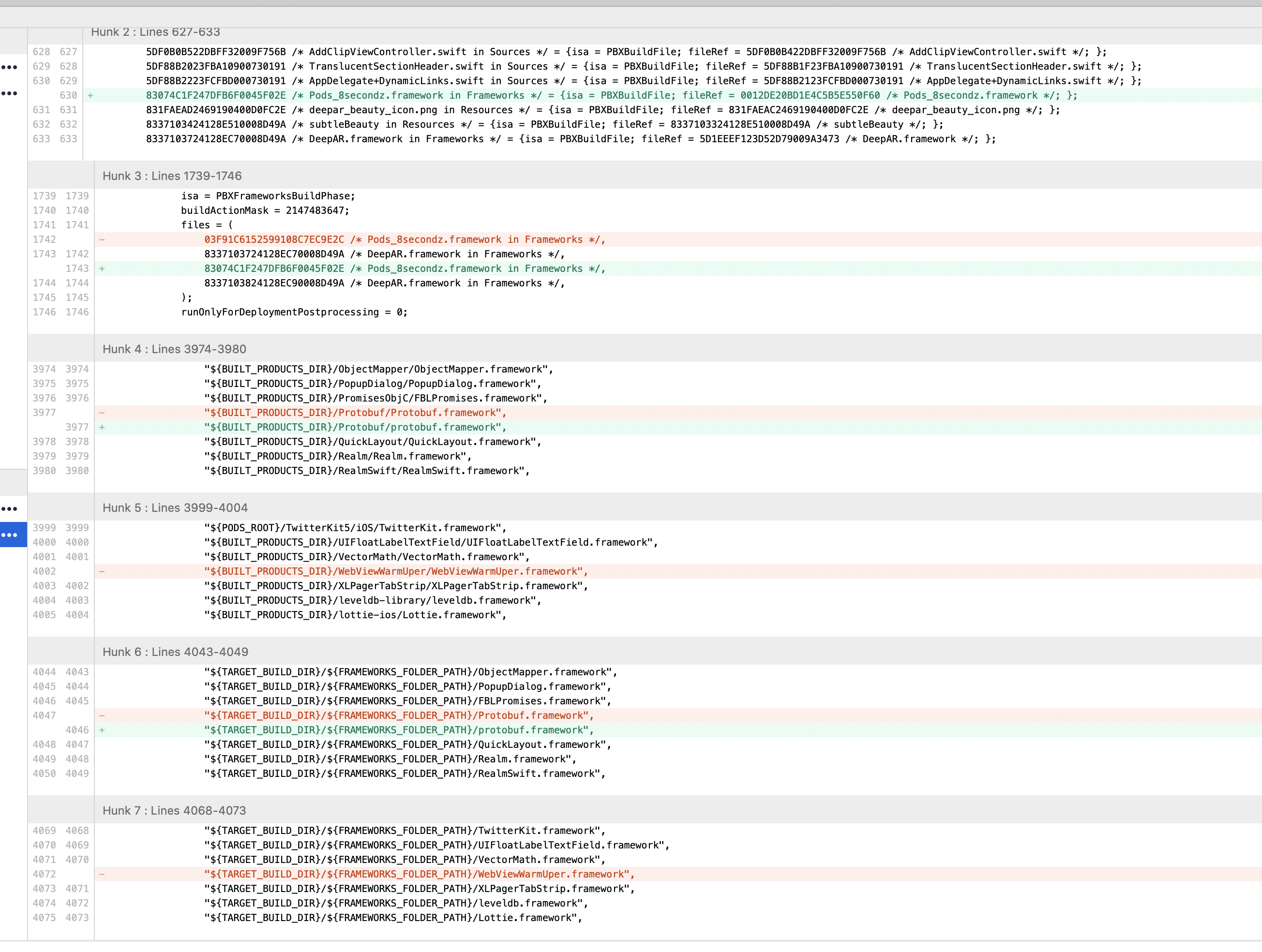
I'm seeing this as of this morning running "pod update"
I had to dig through git to find a previous working podfile.lock to recover - it seems one of these updates below broke something. Rolling back fixed it.
Installing AWSCore 2.13.3 (was 2.13.4 and source changed to https://cdn.cocoapods.org/ from trunk)
Installing AWSS3 2.13.3 (was 2.13.4 and source changed to https://cdn.cocoapods.org/ from trunk)
Installing Firebase 6.24.0 (was 6.25.0)
Installing FirebaseAnalytics 6.5.0 (was 6.5.1 and source changed to https://cdn.cocoapods.org/ from trunk)
Installing FirebaseCore 6.7.0 (was 6.7.1 and source changed to https://cdn.cocoapods.org/ from trunk)
Installing FirebaseMessaging 4.4.0 (was 4.4.1 and source changed to https://cdn.cocoapods.org/ from trunk)
Installing GoogleAppMeasurement 6.5.0 (was 6.5.1 and source changed to https://cdn.cocoapods.org/ from trunk)
Installing GoogleDataTransport 6.1.0 (was 6.1.1 and source changed to https://cdn.cocoapods.org/ from trunk)
Installing ObjectMapper 3.5.2 (was 3.5.3 and source changed to https://cdn.cocoapods.org/ from trunk)
Installing Protobuf 3.11.4 (was 3.12.0 and source changed to https://cdn.cocoapods.org/ from trunk)
Installing SDWebImage 5.7.4 (was 5.8.0 and source changed to https://cdn.cocoapods.org/ from trunk)
Installing TwitterKit5 5.1.0 (was 5.2.0 and source changed to https://cdn.cocoapods.org/ from trunk)
Can see that the protobuf.framework was dropped - it would seem that a corresponding podspec file changed....
 8secz-johndpope
on 27 May 2020
8secz-johndpope
on 27 May 2020
I got this issue after i run "pod update", to fix this issue you just try clean derived data on your xcode. It works for me.
 freakandstein
on 9 Aug 2020
freakandstein
on 9 Aug 2020
I got this issue after i run "pod update", to fix this issue you just try clean derived data on your xcode. It works for me.
xcode -> product -> clean build folder
helped me
 gregor-srdic
on 2 Sep 2020
gregor-srdic
on 2 Sep 2020
Related issues
 dawnnnnn
·
3Comments
dawnnnnn
·
3Comments
 steffendsommer
·
3Comments
steffendsommer
·
3Comments
 evermeer
·
3Comments
evermeer
·
3Comments
 tlandsmancars
·
3Comments
tlandsmancars
·
3Comments
 gerchicov-bp
·
3Comments
gerchicov-bp
·
3Comments
Most helpful comment
xcode -> product -> clean build folder
helped me