Cocoapods: Add support for dSYMs when using XCFrameworks in CocoaPods 1.9.0.beta.x
- [x] I've read and understood the CONTRIBUTING guidelines and have done my best effort to follow.
- [x] I've searched the opened (and closed) issues and I found https://github.com/CocoaPods/CocoaPods/issues/1698, which is a different issue.
CocoaPods 1.9.3.beta.x added support for XCFrameworks (see https://github.com/CocoaPods/CocoaPods/issues/9148 and https://github.com/CocoaPods/CocoaPods/pull/9334). However, dSYMs are not currently supported.
At PSPDFKit, we currently bundle the CocoaPods artifact as the old fat .frameworks, and we plan on distributing XCFrameworks as soon as CocoaPods supports dSYMs in its latest stable version, as dSYM support is crucial for our customers.
How the Manual Integration with dSYM supports works:
You can manually integrate XCFrameworks into your project and add the dSYMs using an .xcfilelist, as described in the second step of this guide here: https://pspdfkit.com/guides/ios/current/getting-started/integrating-pspdfkit/#integrating-the-xcframework
How to Test:
Create the Local PSPDFKit CocoaPods Artifacts:
- If you’re an existing customer, download PSPDFKit for iOS from the customer portal. Otherwise, if you don’t already have PSPDFKit, sign up for our 60-day trial and you will receive an email with the download instructions.
- Copy
PSPDFKit.xcframework,PSPDFKitUI.xcframework,PSPDFKit-dSYMs, andPSPDFKitUI-dSYMsin a writable location. - Remove
strip-bitcode.shandstrip-framework.shfromPSPDFKit.xcframework/*/PSPDFKit.framework:
rm PSPDFKit.xcframework/*/PSPDFKit.framework/strip-*.sh
- Rename the
PSPDFKit-dSYMsandPSPDFKitUI-dSYMsfolderstoPSPDFKit.dSYMs, andPSPDFKitUI.dSYMsrespectively. - Create an archive (
.zipfile) by compressingPSPDFKit.xcframework,PSPDFKitUI.xcframework,PSPDFKit.dSYMs, andPSPDFKitUI.dSYMsintoPSPDFKit.zip. - Rename the resulting
Archive.ziptoPSPDFKit.zip.
Integrate PSPDFKit using CocoaPods Beta in a Sample Project:
- Install CocoaPods beta on your Mac:
sudo gem install cocoapods --pre. In my tests, I used 1.9.3.beta.3 in my tests - Download the attached sample project (CocoaPods-dSYM-Support.zip) and unzip it.
cdinto the project directory:cd CocoaPods-dSYM-Support/SwiftExample- Copy the CocoaPods artifacts (
PSPDFKit.zip) in the root folder (CocoaPods-dSYM-Support). - run
pod install. - Open the sample project in Xcode 11.3.1:
open SwiftExample/SwiftExample.xcworkspace. - Create an archive: In Xcode UI go to Product > Archive.
- Inspect the dSYMs in the archive an notice that the PSPDFKit dSYMs are not present.

Proposed Outcome:
- dSYMs should be automatically added when using XCFrameworks, just like when using fat
.frameworks.
 radazzouz
All 13 comments
@amorde didnt we add dSYM support for xcframeworks in 1.9.x?
 dnkoutso
on 11 Feb 2020
dnkoutso
on 11 Feb 2020
Hi @radazzouz 👋
dSYM support was added by including a folder in the format FrameworkName.dSYMs, so in this case if the folders PSPDFKit.dSYMs and PSPDFKitUI.dSYMs exist, CocoaPods should pick those up and include it during the build. Did you try that and, if so, did it not work correctly?
 amorde
on 11 Feb 2020
amorde
on 11 Feb 2020
Thanks for the prompt response, @amorde! 👍
I just tested with the dSYM folders named PSPDFKit.dSYMs, and PSPDFKitUI.dSYMs instead of PSPDFKit-dSYMs and PSPDFKitUI-dSYMs and they dSYMS are still not present in the archive.
I also updated the instructions and the sample project's Podspec from the main comment so you can conveniently test it on your side.
radazzouz
on 11 Feb 2020
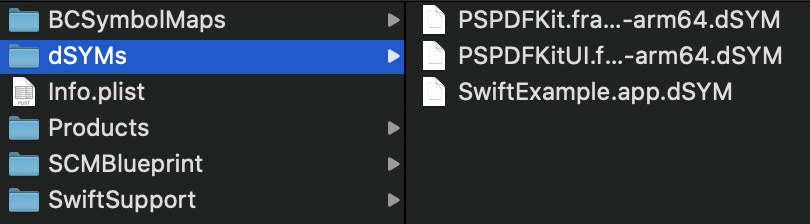
BTW, when using the manual integration (see the Manual-Integration-dSYM-Support.zip sample project), the dSYMs can be found in the archive on both iOS and Mac Catalyst:
| iOS | Mac Catalyst |
| --- | --- |
|  |
|  |
|
radazzouz
on 11 Feb 2020
Hmm ok will need some time to look into this, thanks for the detailed report!
amorde
on 11 Feb 2020
The names of the dSYMs are messing with the logic of finding the binary inside the dSYM bundle.
This is something we can fix, hopefully I'll have a PR up soon in time for 1.9. Thanks for the report!
amorde
on 12 Feb 2020
@radazzouz I've pushed up a WIP fix for this on the amorde/xcframework-dsyms branch - if you get the chance, check it out and let me know if it works for you. I tested it against PSPDFKit and it worked for me.
amorde
on 12 Feb 2020
Thanks @amorde! 👍
I just pulled your branch and it did not work for me. Did you use the same sample project and the updated integration steps from the main comment?
radazzouz
on 12 Feb 2020
Yes I did, thanks so much for the sample + detailed instructions!
What happened when you tried my branch? did it you see "Selected dsym [path]" in the build output?
amorde
on 12 Feb 2020
What happened when you tried my branch?
Everything worked except for the dSYMs.Just like on 1.9.0.beta.3.
BTW, I used these instructions to build locally.
did it you see "Selected dsym [path]" in the build output?
No. Unfortunately, I did not.
radazzouz
on 12 Feb 2020
Looks like I had some local changes that didn't get included in that commit - I pushed again, please give it another try when you can
amorde
on 13 Feb 2020
Thank you so much, @amorde!
I confirm that it now works on both iOS and Mac Catalyst! 🎉
| iOS | Mac Catalyst |
| --- | --- |
|  |
|  |
|
radazzouz
on 13 Feb 2020
Will ship with final 1.9.0 release.
dnkoutso
on 20 Feb 2020
Related issues
 luhui
·
3Comments
luhui
·
3Comments
 Curtis-Halbrook
·
3Comments
Curtis-Halbrook
·
3Comments
 dawnnnnn
·
3Comments
dawnnnnn
·
3Comments
 gerchicov-bp
·
3Comments
gerchicov-bp
·
3Comments
 pronebird
·
3Comments
pronebird
·
3Comments
Most helpful comment
Will ship with final 1.9.0 release.