Cocoapods: `MODULEMAP_FILE` build setting set incorrectly
- [x] I've read and understood the CONTRIBUTING guidelines and have done my best effort to follow.
Report
What did you do?
After adding the following code to the Podfile file, execute the pod install command
install! 'cocoapods',
         :generate_multiple_pod_projects => true,
         :incremental_installation => true
What did you expect to happen?
Project compiled successfully
What happened instead?
Xcode error:
RxCocoaRuntime.h file not fount at Rxcocoa-umbrella.h, and Could not build Objective-C module RxCcocoa
CocoaPods Environment
Stack
   CocoaPods : 1.7.0
        Ruby : ruby 2.4.0p0 (2016-12-24 revision 57164) [x86_64-darwin18]
    RubyGems : 2.7.7
        Host : Mac OS X 10.14.5 (18F132)
       Xcode : 10.2.1 (10E1001)
         Git : git version 2.18.0
Ruby lib dir : /Users/mbcore/.rvm/rubies/ruby-2.4.0/lib
Repositories : master - https://github.com/CocoaPods/Specs.git @ a290235db195ad9de49821f755a45b4aa475d617
               MBCModuleSpecs - https://git.mbcore.com/iOSModuleSwift/MBCModuleSpecs.git @ 27f2ff008593d4994e99640b56db2a52e95cb932
               mbcore-iosmodule-mbcspecs - https://git.mbcore.com/iOSModule/MBCSpecs.git @ f1f8fe3c2aae39c08e8b5f3de41b277a258c66eb
               MBCSpecs - [email protected]:iOSModule/MBCSpecs.git @ f1f8fe3c2aae39c08e8b5f3de41b277a258c66eb
Installation Source
Executable Path: /Users/mbcore/.rvm/rubies/ruby-2.4.0/bin/pod
Plugins
cocoapods-deintegrate : 1.0.4
cocoapods-playgrounds : 1.2.2
cocoapods-plugins     : 1.0.0
cocoapods-search      : 1.0.0
cocoapods-stats       : 1.0.0
cocoapods-trunk       : 1.3.1
cocoapods-try         : 1.1.0
Other
I think I need to provide my Podfile file.
source 'https://git.mbcore.com/iOSModuleSwift/MBCModuleSpecs.git'
source 'https://github.com/CocoaPods/Specs.git'

platform :ios, '10.0'

use_modular_headers!
inhibit_all_warnings!

install! 'cocoapods',
         :generate_multiple_pod_projects => true
         :incremental_installation => true

target 'MBCHelper' do

  pod 'MBCExtension.swift'

end
Where MBCExtension.swift is a private library that relies on RxCocoa.
The podspec file of MBCExtension.swift is as follows (I omitted some unimportant information.)
Pod::Spec.new do |extension|

  extension.name          = 'MBCExtension.swift'

  extension.version       = '1.3.2'

  extension.homepage      = 'git url'

  extension.license       = 'MIT'

  extension.source        = { :git => 'git url', :tag => extension.version.to_s }

  extension.requires_arc  = true

  extension.platform      = :ios, '10.0'

  extension.swift_version = '5.0'

  extension.static_framework = true

  extension.module_name   = 'MBCExtension'

  extension.default_subspecs = 'Extendable', 'Extension'

  extension.subspec 'Extendable' do |extendable|
      extendable.source_files = 'MBCExtension/MBCExtension/Core/Extendable/'
  end

  extension.subspec 'Extension' do |extension|

      extension.source_files = 'MBCExtension/MBCExtension/Core/Object/', 'MBCExtension/MBCExtension/Core/UI/'

      extension.dependency 'MBCExtension.swift/Extendable'
      extension.dependency 'MBCLog.swift/MBC'

      extension.dependency 'RxCocoa'
  end

  extension.subspec 'YYText' do |text|

      text.source_files = 'MBCExtension/MBCExtension/Core/YYText/*.swift'

      text.dependency 'MBCExtension.swift/Extension'

      text.dependency 'YYText'
  end

end
Where YYText is an Objective-C library
So how can I make my program run successfully?
 rakuyoMo
All 38 comments
In my other project, RxCocoa was added directly to the podfile file instead of being introduced via dependencies. In this case the program can run. But when I introduce RxCocoa via MBCExtension.swift, I get an error.
When I remove the following code, the program can run
install! 'cocoapods',
         :generate_multiple_pod_projects => true,
         :incremental_installation => true
But I want to use these features
This problem does not seem to have much to do with incremental_installation. When I don't enable this function, only open generate_multiple_pod_projects, the project still can't run.
I think it might be that the podspec file of MBCExtension.swift went wrong, but I can't find this error...
rakuyoMo
on 28 May 2019
@rakuyoMo Do you mind attaching a sample project we can use to debug?
 sebastianv1
on 28 May 2019
sebastianv1
on 28 May 2019
@sebastianv1 I can provide an example, please wait a moment. First I will streamline my project and upload it to the public Cocoapods and make sure this bug will be reproduced.
rakuyoMo
on 29 May 2019
@sebastianv1 I have already done the demo and reproduced the bug.
Create a project (either Swift or Objective-C), then add RKOSimpleExample.swift to the podfile as shown below:
source 'https://github.com/CocoaPods/Specs.git'

platform :ios, '10.0'

use_modular_headers!
inhibit_all_warnings!

install! 'cocoapods',
         :generate_multiple_pod_projects => true,
         :incremental_installation => true

target 'Example' do

  pod 'RKOSimpleExample.swift' # Like MBCExtension.swift

end
Run this project and you will see the error
rakuyoMo
on 29 May 2019
@rakuyoMo RKOSimpleExample.swift is not a pod available anywhere.
 dnkoutso
on 29 May 2019
dnkoutso
on 29 May 2019
@dnkoutso I guarantee that it is a usable pod, as shown below. How are you integrated?
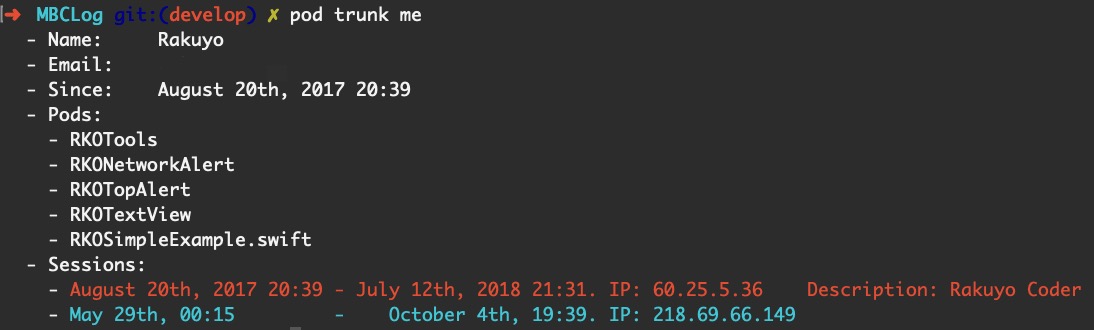
Or you can use this project, which is the data source for RKOSimpleExample.swift
rakuyoMo
on 30 May 2019
My problem was solved by modifying use_modular_headers! in the Podfile file to use_frameworks!.
@dnkoutso @sebastianv1
It seems that this problem lies in the Swift environment, some connection between use_modular_headers! and generate_multiple_pod_projects.
But actually I don't want to make the above changes, I still want to use use_modular_headers!...
rakuyoMo
on 5 Jun 2019
@dnkoutso @sebastianv1
I am very sorry to bother you many times, but this question is really important to me and you have not responded to me for a long time.
I want to know the current status of this problem, is my example not working, or you have no time to troubleshoot this problem?
I don't quite understand the meaning of
is not a pod available anywhere.
If my example doesn't work, I would be happy to re-provide a demo.
Can you give me a reply, thank you!
rakuyoMo
on 10 Jun 2019
@rakuyoMo Apologies for the delay. I'll take a look into this today.
sebastianv1
on 10 Jun 2019
@rakuyoMo Apologies for the delay. I'll take a look into this today.
@sebastianv1 thank you very much! Look forward to your good news
rakuyoMo
on 12 Jun 2019
It appears that the MODULEMAP_FILE build setting is getting set incorrectly (irregardless of generate_multiple_pod_projects installation option). When using modular headers it is set as Headers/Public/RKOSimpleExample/RKOSimpleExample.swift.modulemap, but the file exists in: Target Support Files/RKOSimpleExample.swift/RKOSimpleExample.swift.modulemap.
Seems like the root of this issue is because inside target_installer.rb we write to target.module_map_path_to_write but read from target.module_map_path when setting the build setting. Thoughts @dnkoutso or @segiddins ?
sebastianv1
on 12 Jun 2019
Seems like we should fix that. We are writing the file to a different path compared to the one the build setting points to.
dnkoutso
on 13 Jun 2019
It’s great to be able to find the problem, I hope to fix it as soon as possible.
Express my thanks again
@sebastianv1 @dnkoutso
rakuyoMo
on 13 Jun 2019
@sebastianv1 did we ever ship a fix for this?
dnkoutso
on 24 Jun 2019
@sebastianv1 since this is not a 1.7 issue with multi pods generator I am moving to 1.8.x
dnkoutso
on 28 Jun 2019
This is really bad news. I have to wait until 1.8.0 to fix this bug.
It seems that I still need to wait a few more months.😭
rakuyoMo
on 1 Jul 2019
it's not months but it could be 1-3 weeks from now.
dnkoutso
on 9 Jul 2019
We use symlinks for this currently, here's some code that handles this
not sure why it is done this way (although I have touched this code myself) but this was last modified as part of #8196
 amorde
on 9 Jul 2019
amorde
on 9 Jul 2019
@amorde is this maybe about a custom module map file?
dnkoutso
on 9 Jul 2019
Oh yep, but the generated module map behaves similarly as well
amorde
on 9 Jul 2019
@dnkoutso @amorde Is this problem fixed?
rakuyoMo
on 30 Jul 2019
We haven’t made any changes here - we currently write the module map to a particular directory and then symlink it to the build setting value. I haven’t gotten the chance to look into this further
amorde
on 30 Jul 2019
Manually copying the module map into the location specified by MODULEMAP_FILE (in this case Headers/Public/RKOSimpleExample/RKOSimpleExample.swift.modulemap) doesn't solve the issue, so I don't think this is related to the symlinking of module maps.
amorde
on 31 Jul 2019
In this example I believe the issue is with HEADER_SEARCH_PATHS, adding ${PODS_ROOT}/Headers/Public/RxCocoa to HEADER_SEARCH_PATHS to the .xcconfig of the pod target resolves the issue. I'm not familiar enough with this to know why this might not be setup correctly.
@segiddins any ideas here?
amorde
on 31 Jul 2019
In my Podfile, i define a function to solve this problem.
...

def append_header_search_path(target, path)
    target.build_configurations.each do |config|
        # Note that there's a space character after `$(inherited)`.
        config.build_settings["HEADER_SEARCH_PATHS"] ||= "$(inherited) "
        config.build_settings["HEADER_SEARCH_PATHS"] << path
    end
end

post_install do |installer|
  installer.pod_target_subprojects.flat_map { |p| p.targets }.each do |t|
    # `RxDataSources` is a pod lib which depends the `RxCocoa` lib.
    if t.name == "RxDataSources"
        append_header_search_path(t, "${PODS_ROOT}/Headers/Public/RxCocoa")
    end
  end
end
 ArmsZhou
on 31 Jul 2019
ArmsZhou
on 31 Jul 2019
In my Podfile, i define a function to solve this problem.
...

def append_header_search_path(target, path)
    target.build_configurations.each do |config|
        # Note that there's a space character after `$(inherited)`.
        config.build_settings["HEADER_SEARCH_PATHS"] ||= "$(inherited) "
        config.build_settings["HEADER_SEARCH_PATHS"] << path
    end
end

post_install do |installer|
  installer.pod_target_subprojects.flat_map { |p| p.targets }.each do |t|
    # `RxDataSources` is a pod lib which depends the `RxCocoa` lib.
    if t.name == "RxDataSources"
        append_header_search_path(t, "${PODS_ROOT}/Headers/Public/RxCocoa")
    end
  end
end
@amorde Maybe you can refer to this?
rakuyoMo
on 31 Jul 2019
Thanks, but it's more that I'd like someone else on the CocoaPods team to weigh in on _why_ this might be happening
amorde
on 31 Jul 2019
I hope this problem can be solved in a beta version of 1.8.0 - I hope the author has not forgotten this bug
@amorde @dnkoutso
rakuyoMo
on 28 Aug 2019
While adding ${PODS_ROOT}/Headers/Public/RxCocoa to the library's HEADER_SEARCH_PATHS works, it doesn't seem to be necessary when using single project generation. I haven't quite figured out why that's the case though
amorde
on 4 Sep 2019
There hasn't been any activity on this issue recently. Due to the high number of incoming GitHub notifications, we have to clean some of the old issues, as many of them have already been resolved with the latest updates.
![stale[bot] picture](https://avatars.githubusercontent.com/in/1724?v=4&s=40) stale[bot]
on 22 Dec 2019
stale[bot]
on 22 Dec 2019
There is no mention in the latest 1.9.0 beta update that addresses this issue.
I am not convenient to upgrade to the test version now, have you solved this problem @dnkoutso @amorde ? Or has anyone else verified this after upgrading to the beta?
rakuyoMo
on 23 Dec 2019
The issue is not fixed. We are in 1.9.0 beta phase so it might be fixed for 1.9.0.
dnkoutso
on 23 Dec 2019
Is this problem fixed? Does anyone has solution?
 Nemocdz
on 22 May 2020
Nemocdz
on 22 May 2020
Is this problem fixed? Does anyone has solution?
I also want to know
rakuyoMo
on 22 May 2020
No, it’s still open which means it’s not fixed
amorde
on 22 May 2020
Is this problem fixed? Does anyone has solution?
I also want to know
I add use_frameworks! :linkage => :static' from Cocoapods 1.9. And it can solve this problem magically. But it will cause another archived problem if you use different subspec in multiple targets. It's a bug caused by Xcode and Cocoapods together, more information in #8206.
Nemocdz
on 22 May 2020
There hasn't been any activity on this issue recently. Due to the high number of incoming GitHub notifications, we have to clean some of the old issues, as many of them have already been resolved with the latest updates.
stale[bot]
on 20 Sep 2020
This issue will be auto-closed because there hasn't been any activity for a few months. Feel free to open a new one if you still experience this problem :+1:
stale[bot]
on 4 Oct 2020
Related issues
 evermeer
·
3Comments
evermeer
·
3Comments
 sonu5
·
3Comments
sonu5
·
3Comments
 5SMNOONMS5
·
3Comments
5SMNOONMS5
·
3Comments
 marzapower
·
3Comments
marzapower
·
3Comments
 lzwjava
·
3Comments
lzwjava
·
3Comments
Most helpful comment
It appears that the
MODULEMAP_FILEbuild setting is getting set incorrectly (irregardless ofgenerate_multiple_pod_projectsinstallation option). When using modular headers it is set asHeaders/Public/RKOSimpleExample/RKOSimpleExample.swift.modulemap, but the file exists in:Target Support Files/RKOSimpleExample.swift/RKOSimpleExample.swift.modulemap.Seems like the root of this issue is because inside
target_installer.rbwe write totarget.module_map_path_to_writebut read fromtarget.module_map_pathwhen setting the build setting. Thoughts @dnkoutso or @segiddins ?