Cocoapods: xcodebuild pulls in wrong platform resources
Report
What did you do?
In a project with a multiplatform dependency (say ios and tvos) when building the ios target, tvos dependencies get pulled into the output folder and the build breaks. Building any dependency inside xcode works fine.
That started happening with xcodebuild 10.2 (and 10.2.1).
I have a dummy project reproducing the error.
I'm opening the ticket here, as I'm not sure if it is an issue with xcodebuild, fastlane or cocoapods. There are open tickets with apple and fastlane as well.
What did you expect to happen?
xcodebuild to work perfectly as it does inside xcode.
What happened instead?
Dependencies from the wrong platform gets copied into the output release folder and the build fails.
CocoaPods Environment
Stack
   CocoaPods : 1.6.1
        Ruby : ruby 2.3.3p222 (2016-11-21 revision 56859) [x86_64-darwin18]
    RubyGems : 3.0.3
        Host : Mac OS X 10.14.4 (18E226)
       Xcode : 10.2.1 (10E1001)
         Git : git version 2.21.0
Ruby lib dir : /Users/rcaval/.rbenv/versions/2.3.3/lib
Repositories : globoi - https://github.com/globoi/pods-repository @ 23df14270cb216dd6c08867436b44b5a03f87eef
               master - https://github.com/CocoaPods/Specs.git @ dce2fe14e18416ecc429d83dbf778b9612421fac
               penthera - https://github.com/penthera/Cache-and-Carry-specs.git @ 1099e1497eb656ea55045c58ac8a16cf506e25c1
Installation Source
Executable Path: /Users/rcaval/.rbenv/versions/2.3.3/bin/pod
Plugins
cocoapods-deintegrate : 1.0.4
cocoapods-plugins     : 1.0.0
cocoapods-search      : 1.0.0
cocoapods-stats       : 1.1.0
cocoapods-trunk       : 1.3.1
cocoapods-try         : 1.1.0
Podfile
use_frameworks!
inhibit_all_warnings!

workspace 'Example'

def shared_pods
  pod 'Clappr', '0.11.41'
end

def ios_pods
    platform :ios, '9.3'
    shared_pods
end

target 'Example' do
    ios_pods
end

target 'ExampleTests' do
  ios_pods
end

target 'Example_tvOS' do
    platform :tvos, '10.0'
    shared_pods
end


target 'Example_tvOSTests' do
  platform :tvos, '10.0'
  shared_pods
end
Project that demonstrates the issue
 rcavaltw
All 22 comments
This issue is blocking Firebase's move to Xcode 10.2 for Travis CI. I've done some investigation, but haven't fully isolated it. The CocoaPods generated project works fine in the IDE but fails with xcodebuild. It really seems like an Xcode issue since the project is fine with Xcode 10.1, but still TBD.
 paulb777
on 22 Apr 2019
paulb777
on 22 Apr 2019
So is this issue on Xcode or CocoaPods?
 dnkoutso
on 13 May 2019
dnkoutso
on 13 May 2019
This issue will be auto-closed because there hasn't been any activity for a few months. Feel free to open a new one if you still experience this problem :+1:
![stale[bot] picture](https://avatars.githubusercontent.com/in/1724?v=4&s=40) stale[bot]
on 20 May 2019
stale[bot]
on 20 May 2019
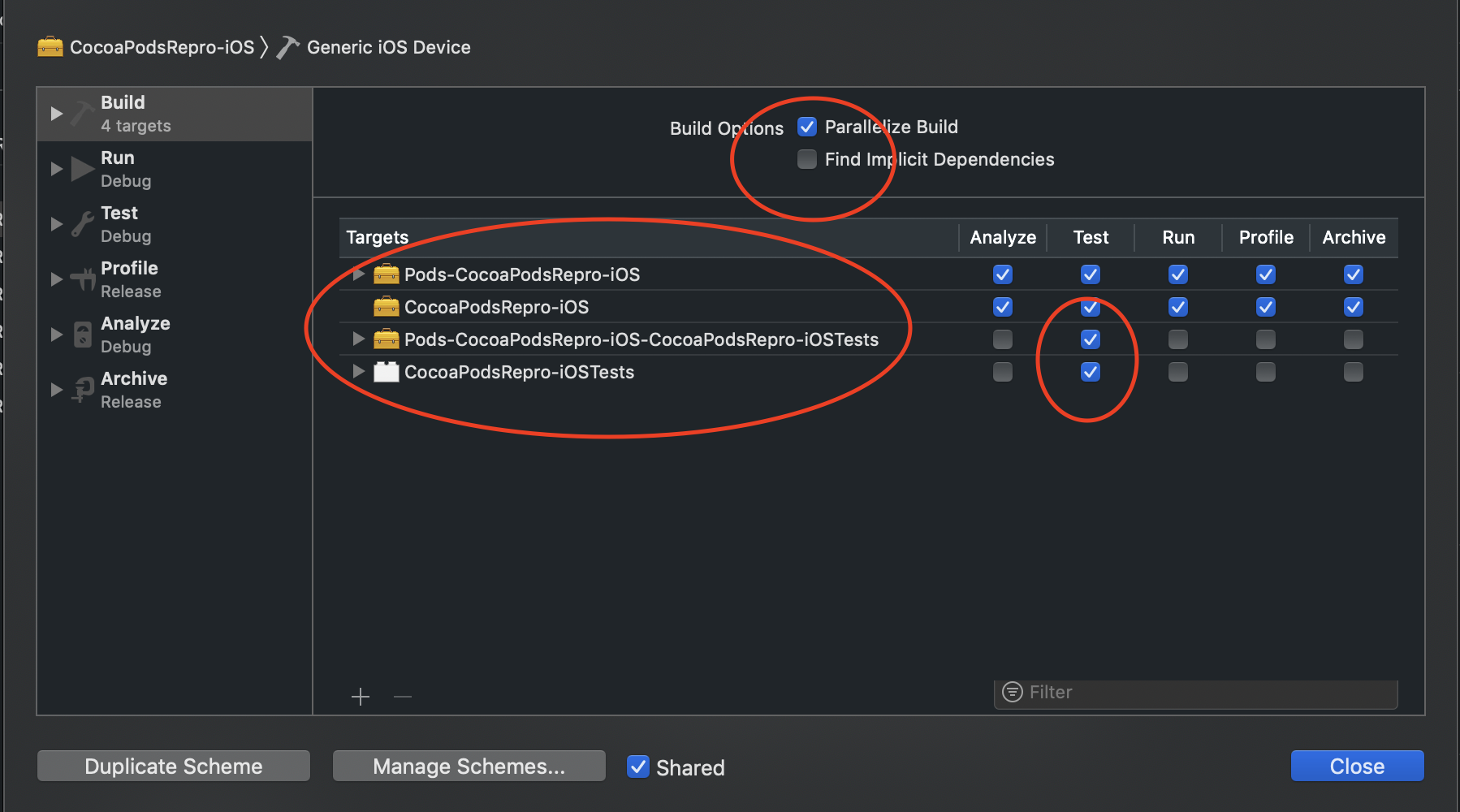
We've found out that if you disable "Find implicit dependencies" in the main lib build schemes the problem goes away. The downside is that you must build the Pod-target before you build your main lib.
It's not a big deal in the command line, but one needs to add a script to the build process.
rcavaltw
on 28 May 2019
We've also learned that if you use the legacy build system the issue goes away.
rcavaltw
on 31 May 2019
For anyone getting here due to build errors, this seems to be an Xcode build system issue that could also manifest itself as a multiple commands produce error if you are building for multiple platforms.
This is the output of trying to build a workspace/project fully configured with Cocoapods (1.7.2). Interestingly if I retry the command a couple of times, the build succeeds.
As indicated above, Disabling finding implicit dependencies for the offending schemes, then explicitly adding them fixes the problem.
I should add that I haven't been able to repro this issue on Xcode 11.x so fingers crossed it has been fixed.
Full xcodebuild command:
xcodebuild -workspace /Users/username/Dev/Work/iOS/MyProject/MyProduct.xcworkspace -scheme MyProduct-iOS -configuration Release -sdk iphoneos ONLY_ACTIVE_ARCH=NO CODE_SIGNING_REQUIRED=NO CODE_SIGN_IDENTITY= archive -archivePath /var/folders/73/lnfrs9hx1nn6khr3r3lzh5600000gp/T/MyProduct SKIP_INSTALL=YES GCC_INSTRUMENT_PROGRAM_FLOW_ARCS=NO CLANG_ENABLE_CODE_COVERAGE=NO STRIP_INSTALLED_PRODUCT=NO
Output when it errors:
User defaults from command line:
    IDEArchivePathOverride = /var/folders/73/lnfrs9hx1nn6khr3r3lzh5600000gp/T/MyProduct

Build settings from command line:
    CLANG_ENABLE_CODE_COVERAGE = NO
    CODE_SIGN_IDENTITY =
    CODE_SIGNING_REQUIRED = NO
    GCC_INSTRUMENT_PROGRAM_FLOW_ARCS = NO
    ONLY_ACTIVE_ARCH = NO
    SDKROOT = iphoneos12.2
    SKIP_INSTALL = YES
    STRIP_INSTALLED_PRODUCT = NO

note: Using new build system
note: Planning build
note: Constructing build description
Build system information

error: Multiple commands produce '/Users/username/Library/Developer/Xcode/DerivedData/MyProduct-fkcauarxdrxrsfeqiindboplchhz/Build/Intermediates.noindex/ArchiveIntermediates/MyProduct-iOS/IntermediateBuildFilesPath/UninstalledProducts/iphoneos/AFNetworking.framework':

1) Target 'AFNetworking-iOS' has create directory command with output '/Users/username/Library/Developer/Xcode/DerivedData/MyProduct-fkcauarxdrxrsfeqiindboplchhz/Build/Intermediates.noindex/ArchiveIntermediates/MyProduct-iOS/IntermediateBuildFilesPath/UninstalledProducts/iphoneos/AFNetworking.framework'

2) Target 'AFNetworking-tvOS' has create directory command with output '/Users/username/Library/Developer/Xcode/DerivedData/MyProduct-fkcauarxdrxrsfeqiindboplchhz/Build/Intermediates.noindex/ArchiveIntermediates/MyProduct-iOS/IntermediateBuildFilesPath/UninstalledProducts/iphoneos/AFNetworking.framework'
 rpassis
on 12 Jul 2019
rpassis
on 12 Jul 2019
@rpassis The issue you're describing is more like #8206. This issue is about projects with multiple platforms failing to build only with xcodebuild. And I still see it in the Xcode 11 betas.
paulb777
on 12 Jul 2019
From https://openradar.appspot.com/20490378:
This is because Xcode is trying to find the implicit dependency that iOSFramework depends on by name, and there are two targets with products of the same name, so it winds up picking one at random. You can resolve this ambiguity by making an explicit dependency on the correct one in the "Target Dependencies" build phase.
paulb777
on 12 Jul 2019
Reopening since, while the issue is exposed by Xcode 10.2 and later, it seems to be a result of CocoaPods relying upon implicit dependencies to resolve pod dependencies. And that reliance fails when there are multiple platforms in the workspace.
paulb777
on 12 Jul 2019
Hey @paulb777 I believe that's exactly the issue I am having.
1) Target 'AFNetworking-iOS' has create directory command with output '/Users/username/Library/Developer/Xcode/DerivedData/MyProduct-fkcauarxdrxrsfeqiindboplchhz/Build/Intermediates.noindex/ArchiveIntermediates/MyProduct-iOS/IntermediateBuildFilesPath/UninstalledProducts/iphoneos/AFNetworking.framework'

2) Target 'AFNetworking-tvOS' has create directory command with output '/Users/username/Library/Developer/Xcode/DerivedData/MyProduct-fkcauarxdrxrsfeqiindboplchhz/Build/Intermediates.noindex/ArchiveIntermediates/MyProduct-iOS/IntermediateBuildFilesPath/UninstalledProducts/iphoneos/AFNetworking.framework
You can see in the output above that the targets are for different platforms but they happen to generate the same create directory command, which causes the multiple commands produce build error (which also only happens when building with xcodebuild).
rpassis
on 12 Jul 2019
why re-open this since its the same as #8206 ?
dnkoutso
on 12 Jul 2019
This issue isn't the multiple commands produce error. That one is #8206. This issue is the wrong target dependency (from the wrong platform) is chosen by Xcode.
8206 is triggered by CocoaPods subspec differences. #8729 is triggered by a Podfile that has multiple platform variations building a single xcworkspace.
paulb777
on 12 Jul 2019
Hi @paulb777 FWIW even if the errors are different the issue I am experiencing is definitely more closely related to this one than #8206.
In fact I have seen the same warning about a tvOS Info.plist being pulled in while trying to build the iOS target. I am unable to reliably reproduce that but my repro project, in particular the Podfile configuration, is pretty much a mirror of the reproducible example in this issue.
rpassis
on 13 Jul 2019
@rpassis Thanks, I see now. Sorry I missed it at first. The key point in your example is the difference between 'AFNetworking-iOS' and 'AFNetworking-tvOS'. An iOS target should not be seeing tvOS dependencies.
paulb777
on 13 Jul 2019
No worries at all. I have also attached a couple of error logs that I've been able to observe while experimenting. You will notice that the error messages differ but the underlying issue is the same - the OS is inferring the wrong dependency with mismatching platforms.
rpassis
on 13 Jul 2019
And one of the workarounds to fix this issue is disabling Find implicit dependencies and adding them explicitly as part of the schemes build configuration.
rpassis
on 13 Jul 2019
Using the legacy build system is alao am alternative
On Sat, 13 Jul 2019 at 13:26 Rogerio de Paula Assis <
[email protected]> wrote:
And one of the workarounds to fix this issue is disabling Find implicit
dependencies and adding them explicitly as part of the schemes build
configuration.[image: Screen Shot 2019-07-13 at 12 24 46 PM]
https://user-images.githubusercontent.com/387079/61174079-6966ba80-a569-11e9-8350-ae57c08becfd.png—
You are receiving this because you authored the thread.
Reply to this email directly, view it on GitHub
https://github.com/CocoaPods/CocoaPods/issues/8729?email_source=notifications&email_token=ALVTMWVGMPSGNCCLA3IEG43P7H64LA5CNFSM4HHQ3MY2YY3PNVWWK3TUL52HS4DFVREXG43VMVBW63LNMVXHJKTDN5WW2ZLOORPWSZGODZ3U3NY#issuecomment-511135159,
or mute the thread
https://github.com/notifications/unsubscribe-auth/ALVTMWT5DIHE7TECN4NE2W3P7H64LANCNFSM4HHQ3MYQ
.>
Ricardo CavalcantiPrincipal Consultant
[email protected]
Telephone+55 81 8896 9699
[image: ThoughtWorks] http://www.thoughtworks.com/
rcavaltw
on 14 Jul 2019
Still an issue with Xcode 10.3
paulb777
on 24 Jul 2019
Hi guys,
the same happens to me with Xcode 11. Is there any news about that issue?
Thanks a lot.
 Parabak
on 6 Nov 2019
Parabak
on 6 Nov 2019
There hasn't been any activity on this issue recently. Due to the high number of incoming GitHub notifications, we have to clean some of the old issues, as many of them have already been resolved with the latest updates.
stale[bot]
on 4 Feb 2020
This issue will be auto-closed because there hasn't been any activity for a few months. Feel free to open a new one if you still experience this problem :+1:
stale[bot]
on 11 Feb 2020
And one of the workarounds to fix this issue is disabling Find implicit dependencies and adding them explicitly as part of the schemes build configuration.
This isn't working as a workaround and I'm unable to use the legacy build system as I'm trying to make an XCFramework. Could this be looked into further please?
 nikitaame
on 9 Jul 2020
nikitaame
on 9 Jul 2020
Related issues
 Curtis-Halbrook
·
3Comments
Curtis-Halbrook
·
3Comments
 intelliot
·
3Comments
intelliot
·
3Comments
 spencerkohan
·
3Comments
spencerkohan
·
3Comments
 sonu5
·
3Comments
sonu5
·
3Comments
 dawnnnnn
·
3Comments
dawnnnnn
·
3Comments
Most helpful comment
Hi guys,
the same happens to me with Xcode 11. Is there any news about that issue?
Thanks a lot.