Cocoapods: post_install is not called - trying to set Swift version of pods
- ☑ I've read and understood the CONTRIBUTING guidelines and have done my best effort to follow.
Report
I use post_install in most of my Objective-C projects Podfiles, but today none of them work. When running pod install, I got the error regarding Swift version (Unable to determine Swift version for the following pods: ...). My post_install is exactly here for this purpose, but I've noticed that it is not even called anymore (I've added some puts).
I don't have made any changes to my Podfiles and they were all working properly before.
Do you know if there has been recent changes that makes my Podfile wrong ?
Thanks in advance for your help !
What did you do?
Run pod install
What did you expect to happen?
Install all pod dependencies correctly and set Swift version of selected pods.
What happened instead?
Error :
[!] Unable to determine Swift version for the following pods:

- `PopOverMenu` does not specify a Swift version and none of the targets (`Test`) integrating it have the `SWIFT_VERSION` attribute set. Please contact the author or set the `SWIFT_VERSION` attribute in at least one of the targets that integrate this pod.
CocoaPods Environment
Stack
   CocoaPods : 1.7.0.beta.2
        Ruby : ruby 2.3.7p456 (2018-03-28 revision 63024) [universal.x86_64-darwin18]
    RubyGems : 2.5.2.3
        Host : Mac OS X 10.14.3 (18D109)
       Xcode : 10.1 (10B61)
         Git : git version 2.17.2 (Apple Git-113)
Ruby lib dir : /System/Library/Frameworks/Ruby.framework/Versions/2.3/usr/lib
Repositories : master - https://github.com/CocoaPods/Specs.git @ 365936bd6407ce55dbbf597f0ec6798001380a4e
Installation Source
Executable Path: /usr/local/bin/pod
Plugins
cocoapods-deintegrate : 1.0.3
cocoapods-plugins     : 1.0.0
cocoapods-search      : 1.0.0
cocoapods-stats       : 1.0.0
cocoapods-trunk       : 1.3.1
cocoapods-try         : 1.1.0
Podfile
# Uncomment the next line to define a global platform for your project
platform :ios, '9.0'

target 'Test' do
  # Uncomment the next line if you're using Swift or would like to use dynamic frameworks
  use_frameworks!

  # Pods for Test

  pod 'PopOverMenu', '2.1.0'
end

post_install do |installer|
  puts 'Why it is not called ?!'
  # Your list of targets here.
  myTargets = ['PopOverMenu-iOS10.0']
  installer.pods_project.targets.each do |target|
    if myTargets.include? target.name
      target.build_configurations.each do |config|
        config.build_settings['SWIFT_VERSION'] = '4.0'
      end
    end
  end
end
 AnthoPakPak
All 26 comments
After hours searching, downgrading Cocoapods, cleaning caches etc, I've found a workaround.
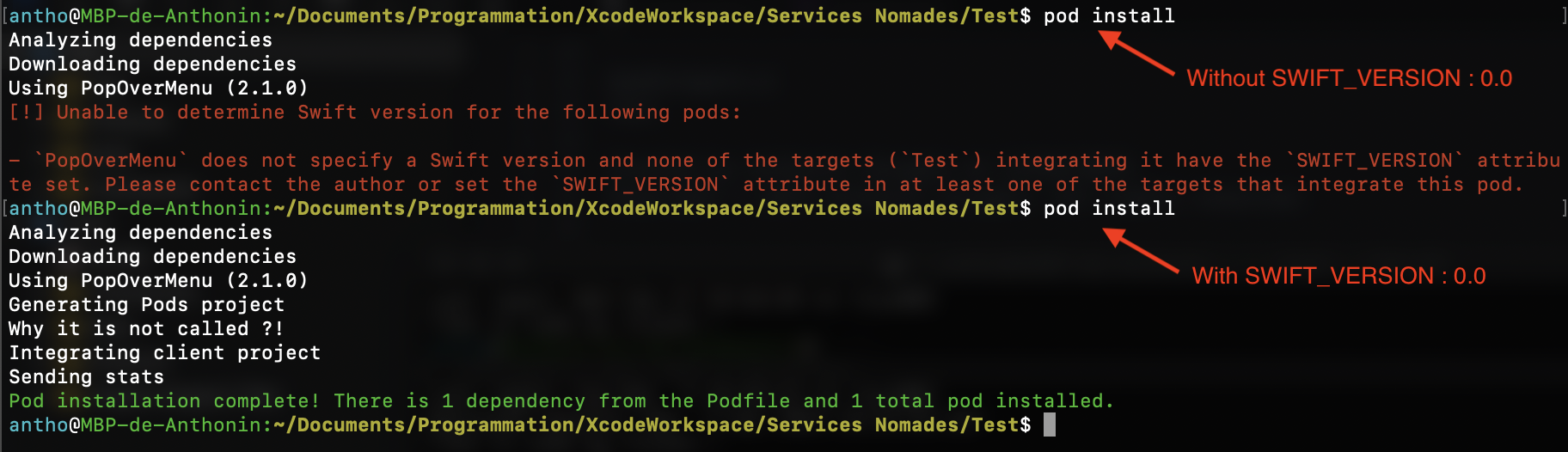
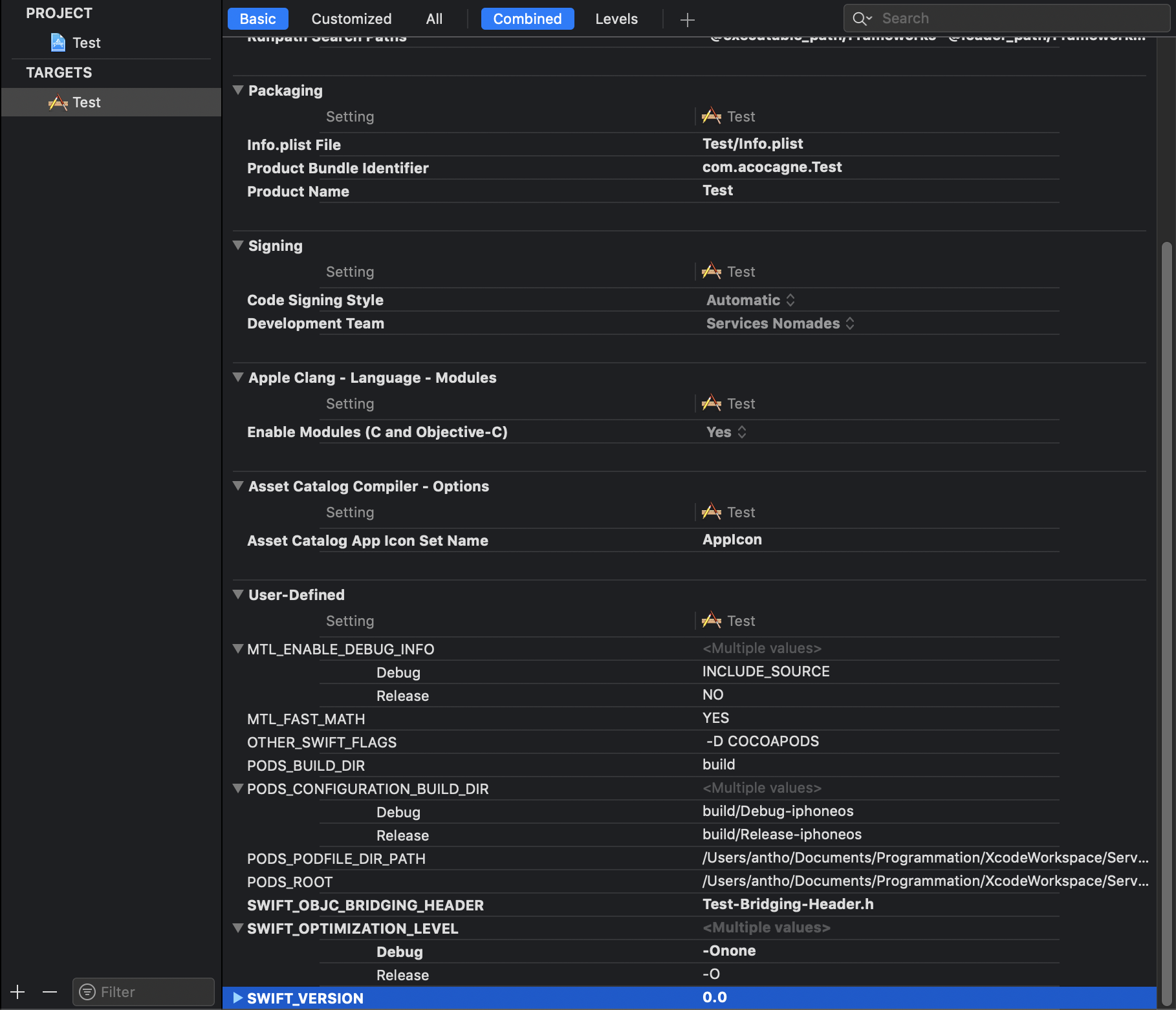
Adding SWIFT_VERSION manually in project target's Build Settings seems to solve the issue (for this project…). Even setting a wrong value to SWIFT_VERSION works, I've tried with 0.0 and it goes well.
What is very weird is that all my projects haven't got this User Defined Setting and they used to work well with Cocoapods.
I've tried on another machine and it works without this workaround… So this should be related to my machine. The only thing I've done that could have break something is creating a new Obj-C project, creating a Swift file in it, and follow these steps in order to use Swift files in Obj-C project. But all of this is only project-related, and shouldn't have broke other projects…
So basically, currently my workaround is to add SWIFT_VERSION to every single project to the main project target, but I'm really searching for a real fix, and an explanation…
Do someone has an idea of a possible reason that could lead to this weird issue ? Thanks in advance for your help 🙏
Some screenshots :
Output of pod install without and with the workaround :
The workaround :
AnthoPakPak
on 13 Mar 2019
Yes if a pod does not specify a Swift version then the version is derived from the target that is integrating it.
I don't think there is much for us to change here.
 dnkoutso
on 13 Mar 2019
dnkoutso
on 13 Mar 2019
I don't understand. How do you explain that when I set a dumb SWIFT_VERSION to my target, post_install is called and without it it isn't called ? The goal of my post_install IS to set the swift version... But why it isn't called ?
And how to explain that it used to work before ?
AnthoPakPak
on 13 Mar 2019
There is a check in CocoaPods 1.7.x about Swift that happens _before_ post_install is invoked and it early exits.
You can try using a pre_install hook.
@AnthoPakPak I think i am going to close this as I do not expect us to make any changes here.
dnkoutso
on 13 Mar 2019
"You can try using a pre_install hook." ? That's exactly what I do isn't it ? Please see my attached Podfile.
I understand that there is a change in CocoaPods 1.7.x, but I've tried running pod _1.5.3_ install and the behavior is the same.
Please don't close yet, I really need additional information on this.
What is the goal of this new check ? As setting Swift version on project level isn't necessary, why preventing me to set it to each Pod level ?
AnthoPakPak
on 13 Mar 2019
"You can try using a pre_install hook." ? That's exactly what I do isn't it ? Please see my attached Podfile.
I said pre_install not post_install as your Podfile and your issue description says.
1.7.x is more strict on Swift version rules I believe the error msg is very clear and there is no issue on the library itself right?
dnkoutso
on 13 Mar 2019
Oh sorry, didn't see that you said pre…
I've tried with pre_install but as I expected it doesn't work, as pods_project is null at this point.
What about the fact I've tried pod _1.5.3_ install and see the same behavior ? It shouldn't have the more strict things of 1.7.x isn't it ? Unless 1.7.x has installed something somewhere else that pod _1.5.3_ install also uses…
The post_install method I use to set Swift version is used a lot (I've seen it everywhere on the web). If 1.7.x actually breaks this implementation, a lot of people will do the same report as me.
AnthoPakPak
on 13 Mar 2019
Your case is that your user targets do not set Swift versions which is not the case for majority of people. CocoaPods is unable to find which Swift version to set and we cannot depend or derive that something else will set it by then. This will cause a compilation issue so CocoaPods catches it earlier.
You can also ask the author to specify s.swift_version.
dnkoutso
on 13 Mar 2019
You can also edit the podspecs in pre_install hook to set their Swift version attribute.
Again sorry I do not see an issue here.
dnkoutso
on 13 Mar 2019
Ok, so to conclude, setting SWIFT_VERSION of my project target is not a workaround, it's a new requirement and is the proper way to do it ?
I don't understand when you say that this will cause a compilation issue, as all my projects compiled fine without SWIFT_VERSION set.
I really don't think I'm the only one that would have this issue, as new Obj-C projects in Xcode comes without SWIFT_VERSION setting.
Still no clue of why pod _1.5.3_ install has the same behavior as 1.7.x ?
AnthoPakPak
on 13 Mar 2019
Ok, so to conclude, setting SWIFT_VERSION of my project target is not a workaround, it's a new requirement and is the proper way to do it ?
yes at the very least, or ask pod author to specify s.swift_version.
I don't understand when you say that this will cause a compilation issue, as all my projects compiled fine without SWIFT_VERSION set.
if a pod uses Swift but no Swift version is set Xcode will not compile it.
I really don't think I'm the only one that would have this issue, as new Obj-C projects in Xcode comes without SWIFT_VERSION setting.
Thats true but OK and the error msg says exactly this. Again this happens if multiple conditions are true...
dnkoutso
on 13 Mar 2019
if a pod uses Swift but no Swift version is set Xcode will not compile it.
It works if Swift version is set at Pod level. I've always done this way (so as lots of people I think). I don't really see the point in setting the Swift version at project level, whereas it was working well at Pod level and was more obvious in my opinion, but okay…
Thats true but OK and the error msg says exactly this. Again this happens if multiple conditions are true...
In fact even if the error message is pretty straightforward, when I got it I was "Wow WTF, I've got my post_install which is exactly here for this purpose !". In fact I was remembering getting this message earlier and setting Swift version in post_install was the solution to this, so that's why I was so lost.
As the error message states "PopOverMenu does not specify a Swift version…", my initial goal is indeed to specify a Swift version for it, but Cocoapods doesn't give me enough time, as it breaks before post_install…
AnthoPakPak
on 13 Mar 2019
There is no way for CocoaPods to know or guarantee that you will do this in your post_install hook.
We want folks to keep moving to the DSL anyway.
dnkoutso
on 13 Mar 2019
Ok I see your point. And your goal is that authors include the s.swift_version parameter in their podspecs that's it ?
Just for the record, you have no clue why pod _1.5.3_ install has the same behavior as 1.7.x ? From my point of view, if this "issue" is 1.7.x related, it shouldn't happened with 1.5.3 ? Or can I conclude that pod _version-number_ isn't that reliable ?
AnthoPakPak
on 13 Mar 2019
So I checked. 1.5.x does not include such check as I do not see it here:
https://github.com/CocoaPods/CocoaPods/blob/1.5.3/lib/cocoapods/installer/xcode/target_validator.rb
It is available in 1.6.x though:
https://github.com/CocoaPods/CocoaPods/blob/1.6.1/lib/cocoapods/installer/xcode/target_validator.rb#L94-L117
dnkoutso
on 13 Mar 2019
It becomes more strict for cases in which people integrated pods that do not specify a swift version and none of their targets did as well therefore they were getting a compilation issue. The error suggests what to do.
dnkoutso
on 13 Mar 2019
So I checked. 1.5.x does not include such check as I do not see it here:
https://github.com/CocoaPods/CocoaPods/blob/1.5.3/lib/cocoapods/installer/xcode/target_validator.rb
Ok so it's weird that pod _1.5.3_ install command gives the same message as pod install (which uses 1.7.x)... It should use v1.5.3 with this syntax but it seems it doesn't. Maybe a bug here ?
It becomes more strict for cases in which people integrated pods that do not specify a swift version and none of their targets did as well therefore they were getting a compilation issue. The error suggests what to do.
Ok I understand your point. I'm pretty sure I will see an issue related to this on SO soon as I think it's not that obvious, but okay.
AnthoPakPak
on 13 Mar 2019
try pod _1.5.3_ --version? not sure if its actually invoking what you think but the check does not exist in 1.5.x.
dnkoutso
on 13 Mar 2019
You're right, pod _1.5.3_ --version returns 1.7.x version ! I understand now.
What does this syntax is supposed to do ? I've seen lots of people suggesting using it to use previous Cocoapods versions !
AnthoPakPak
on 13 Mar 2019
I havent used it, I use Bundler to switch versions.
@AnthoPakPak I am going to close this issue right now and monitor if people have more problems.
dnkoutso
on 13 Mar 2019
Ok, it may be disabled if it is not reliable.
Thanks for your help and investigations 🙏
AnthoPakPak
on 13 Mar 2019
Having issues here. I have tried both Pre and Post install hooks. I am using 1.7.0 beta 3. I get the same error:
[!] Unable to determine Swift version for the following pods:

- `AuthorizeNetAccept` does not specify a Swift version and none of the targets (`Unity-iPhone`) integrating it have the `SWIFT_VERSION` attribute set. Please contact the author or set the `SWIFT_VERSION` attribute in at least one of the targets that integrate this pod.
 Fyb3roptik
on 29 Mar 2019
Fyb3roptik
on 29 Mar 2019
Setting the User-Defined variable SWIFT_VERSION at the project level fixed it for me
 jlubeck
on 23 Jul 2019
jlubeck
on 23 Jul 2019
@jlubeck
I'm also struggled with this issue using ver 1.7.5.
Could you give me more detailed information about what you did to fix this problem.
 yoshifumi4423
on 15 Sep 2019
yoshifumi4423
on 15 Sep 2019
Sure @yoshifumi4423 ! Just go to the Build Settings for your Target, and add a new User-Defined variable (click on the plus button)
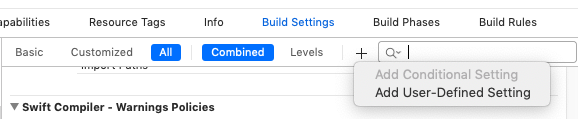
Call it SWIFT_VERSION and put the version that you want to use
Then re-run pod install
jlubeck
on 16 Sep 2019
For the record, I managed to set the default swift version for pods that do not have one by placing the following code in my Podfile (cocoapods 1.8.4):
pre_install do |installer|
  installer.analysis_result.specifications.each do |s|
    s.root.swift_versions << '5' if s.root.swift_versions.empty?
  end
end
 acecilia
on 19 Sep 2020
acecilia
on 19 Sep 2020
Related issues
 pronebird
·
3Comments
pronebird
·
3Comments
 Curtis-Halbrook
·
3Comments
Curtis-Halbrook
·
3Comments
 luhui
·
3Comments
luhui
·
3Comments
 spencerkohan
·
3Comments
spencerkohan
·
3Comments
 iosdev-republicofapps
·
3Comments
iosdev-republicofapps
·
3Comments
Most helpful comment
After hours searching, downgrading Cocoapods, cleaning caches etc, I've found a workaround.
Adding
SWIFT_VERSIONmanually in project target'sBuild Settingsseems to solve the issue (for this project…). Even setting a wrong value toSWIFT_VERSIONworks, I've tried with0.0and it goes well.What is very weird is that all my projects haven't got this
User Defined Settingand they used to work well with Cocoapods.I've tried on another machine and it works without this workaround… So this should be related to my machine. The only thing I've done that could have break something is creating a new
Obj-Cproject, creating aSwiftfile in it, and follow these steps in order to useSwiftfiles inObj-Cproject. But all of this is only project-related, and shouldn't have broke other projects…So basically, currently my workaround is to add
SWIFT_VERSIONto every single project to the main project target, but I'm really searching for a real fix, and an explanation…Do someone has an idea of a possible reason that could lead to this weird issue ? Thanks in advance for your help 🙏
Some screenshots :
Output of

pod installwithout and with the workaround :The workaround :
