Cocoapods: Multiple .xcconfig options for targets
- [x] I've read and understood the CONTRIBUTING guidelines and have done my best effort to follow.
Report
What did you do?
Run pod install
Run pod update
What did you expect to happen?
Install & update all pod dependencies correctly without producing a _build error_.
What happened instead?
After installing and updating the pods the project won't build successfully, here's the output:
error: /Users/jonathan/Projects/MyProject-iOS/Pods/Pods/Target Support Files/Pods-MyProject-iOS/Pods-MyProject-iOS.debug.xcconfig: unable to open file (in target "MyProject-iOS" in project "MyProject-iOS") (in target 'MyProject-iOS')
Also at the project Configurations there are two configurations listed for _debug_ and other two for _release_:
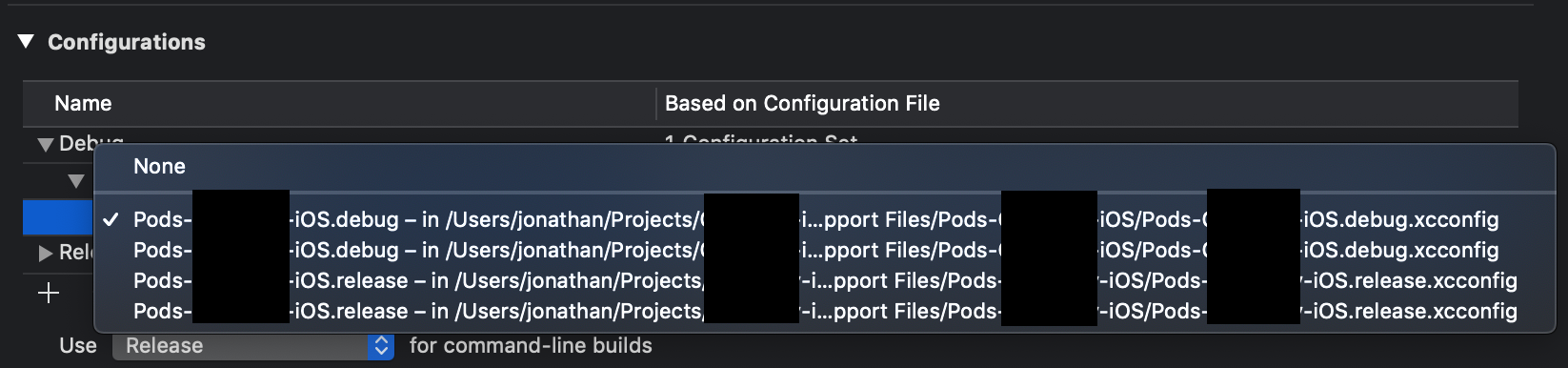
If I select the second file it builds successfully, but when I install or update a pod again it happens again, and currently after some installs and updates I don't get the two .xcconfig options listed, only one, but with the one selected my project doesn't build.
CocoaPods Environment
xcode-select: error: tool 'xcodebuild' requires Xcode, but active developer directory '/Library/Developer/CommandLineTools' is a command line tools instance
Stack
   CocoaPods : 1.5.3
        Ruby : ruby 2.3.7p456 (2018-03-28 revision 63024) [universal.x86_64-darwin18]
    RubyGems : 2.5.2.3
        Host : Mac OS X 10.14.3 (18D42)
       Xcode :  ()
         Git : git version 2.20.1
Ruby lib dir : /System/Library/Frameworks/Ruby.framework/Versions/2.3/usr/lib
Repositories : master - https://github.com/CocoaPods/Specs.git @ 09e4df6af2c3d994ea43d956d85013d14ece1fce
Installation Source
Executable Path: /usr/local/bin/pod
Plugins
cocoapods-clean       : 0.0.1
cocoapods-deintegrate : 1.0.2
cocoapods-plugins     : 1.0.0
cocoapods-search      : 1.0.0
cocoapods-stats       : 1.0.0
cocoapods-trunk       : 1.3.1
cocoapods-try         : 1.1.0
Podfile
platform :ios, '11.0'
inhibit_all_warnings!

target 'MyProject-iOS' do
  use_frameworks!

  pod 'Fabric'
  pod 'Crashlytics'

  pod 'Firebase/Core'
  pod 'Firebase/Auth'
  pod 'Firebase/Storage'

  pod 'GoogleSignIn'
  pod 'GoogleAnalytics'

  pod 'FBSDKCoreKit'
  pod 'FBSDKLoginKit'

  pod 'Reusable'
  pod 'IGListKit'
#  pod 'RealmSwift'
  pod 'AlamofireImage'
  pod 'IQKeyboardManagerSwift'

  pod 'RxFlow'
  pod 'RxCocoa',    '~> 4.0'
  pod 'RxSwift',    '~> 4.0'
  pod 'RxGesture'
  pod 'RxOptional'
  pod 'Moya/RxSwift', '~> 11.0'
  pod 'RxDataSources'

  pod 'Cosmos'
  pod 'Presentr'
  pod 'PieCharts', '0.0.6'
  pod 'CountryKit', '~> 1.3'
  pod 'TGPControls'
  pod 'IBAnimatable'
  pod 'XLPagerTabStrip', :git => 'https://github.com/felixsolorzano/XLPagerTabStrip'
  pod 'SwiftRangeSlider'
  pod 'ActionSheetPicker-3.0'
  pod 'FZAccordionTableView'
  pod 'MessageViewController'
  pod 'SkyFloatingLabelTextField', '~> 3.0'

end

# post_install do |installer|
#   installer.pods_project.build_configurations.each do |config|
#       config.build_settings.delete('CODE_SIGNING_ALLOWED')
#       config.build_settings.delete('CODE_SIGNING_REQUIRED')
#   end
# end
 fenixsolorzano
All 28 comments
Do you have a quick sample app?
 dnkoutso
on 27 Jan 2019
dnkoutso
on 27 Jan 2019
I saw this issue recently probably a real bug.
dnkoutso
on 27 Jan 2019
Here's the link to the sample project @dnkoutso
fenixsolorzano
on 27 Jan 2019
thank you!
dnkoutso
on 28 Jan 2019
Marking for 1.6.0 now since it might be a regression there. I will investigate and it might be for 1.7.0 instead.
dnkoutso
on 28 Jan 2019
error: /Users/jonathan/Projects/MyProject-iOS/Pods/Pods/Target Support Files/Pods-MyProject-iOS/Pods-MyProject-iOS.debug.xcconfig: unable to open file (in target "MyProject-iOS" in project "MyProject-iOS") (in target 'MyProject-iOS')
Is it possible you are using multiple versions of CocoaPods on this project? Note the double Pods/ folder in the path - this looks related to #8091
 amorde
on 28 Jan 2019
amorde
on 28 Jan 2019
sorry I haven't gotten the chance to try out your sample project just noticed the error looked familiar
amorde
on 28 Jan 2019
@amorde I've only used _stable_ version of cocoapods on this project.
fenixsolorzano
on 28 Jan 2019
@dnkoutso What could I do to fix my current project?
fenixsolorzano
on 28 Jan 2019
 paulb777
on 28 Jan 2019
paulb777
on 28 Jan 2019
Wonder how get to this point to begin with?
dnkoutso
on 28 Jan 2019
I think I got into that state once after switching between CocoaPods versions, but haven't reproduced recently.
paulb777
on 28 Jan 2019
Thanks @paulb777 I ended up creating a new project and moving all files to the new project, I'll try out your solution and tell you how it goes
fenixsolorzano
on 28 Jan 2019
@fenixsolorzano I was able to get your project working by deleting the Pods group under the Sample-iOS project and then re-running pod install
It seems there is something else going on, as the project also had unrecovered references when I opened it with Xcode 10.1
amorde
on 28 Jan 2019
So is this an issue that happens when a group called 'Pods' is present?
dnkoutso
on 30 Jan 2019
No, the Pods group on the example project had .xcconfig references that 1.5.3 doesn't recognize - it looks very similar to #8091 but the author said they didn't use the beta so I'm not entirely sure.
The problem is 1.5.3 expects the Pods group in the user project to not have a path set, whereas 1.6.0 sets the path (see https://github.com/CocoaPods/CocoaPods/pull/7886). Haven't dug into this any further just wanted to help them get their project up an running
amorde
on 31 Jan 2019
Yeap definitely an issue. Can push to 1.7.0.beta.1
dnkoutso
on 3 Feb 2019
See my comment here regarding the Pods group issue - if this related to downgrading from 1.6.0 then pod deintegrate followed by pod install should fix the bad config references
amorde
on 4 Feb 2019
Based on the above I'm going to close this, but if there are reproducible steps that indicate this is a bug in CocoaPods then I will re-open. Thanks!
amorde
on 4 Feb 2019
@amorde I haven't upgrade the project to 1.6.0, also, I tried to reintegrate and install all pods without luck. Here I linked a GitHub repo of a project with the issue
fenixsolorzano
on 4 Feb 2019
Yes I checked out the sample - the project was already in a weird state (ex. see the "Recovered References" and references to non-existing target "Coffunity" in below screenshot)
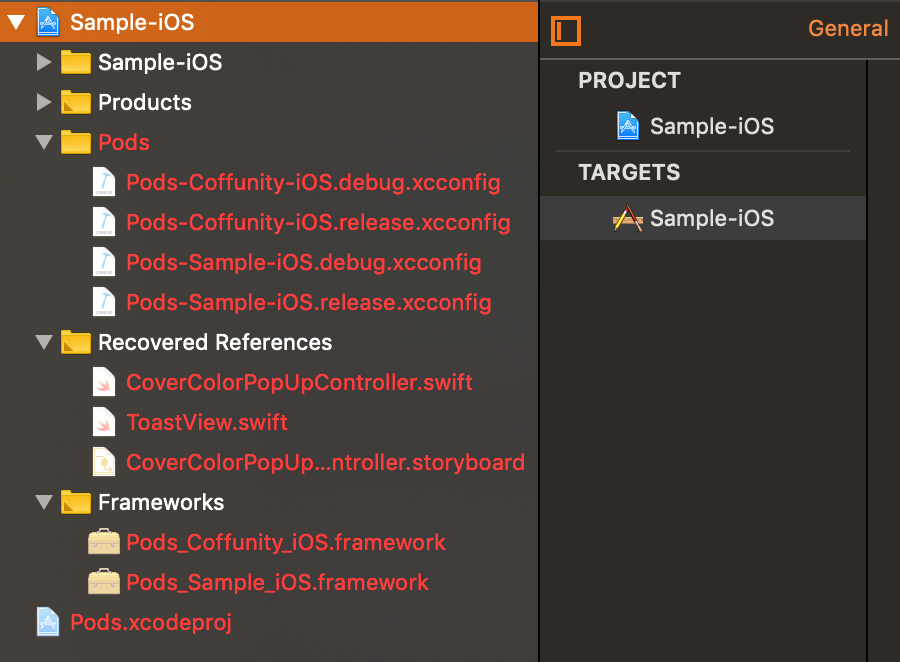
So as far as reproducible steps, if you create a new project from scratch are you able to get it into the state this project is in now?
amorde
on 4 Feb 2019
My issue was solved by upgrading to the latest version of cocoapods! For whatever reason, the version I was on was looking for a "Pods" folder inside of the "Pods" folder ios/Pods/Pods which didnt exist. After I upgraded the issue was resolved
To get the latest pods version:
sudo gem uninstall cocoapods
sudo gem install cocoapods
NOTE: respond "y" (yes) to all overwrites
 CorinneKelly
on 14 Nov 2019
CorinneKelly
on 14 Nov 2019
Run pod install
 MirkoCity
on 5 Sep 2020
MirkoCity
on 5 Sep 2020
Executable Path: /usr/local/bin/pod
MirkoCity
on 5 Sep 2020
platform :ios, '11.0'
inhibit_all_warnings!
target 'MyProject-iOS' do
use_frameworks!
pod 'Fabric'
pod 'Crashlytics'
MirkoCity
on 5 Sep 2020
platform :ios, '11.0'
inhibit_all_warnings!
target 'MyProject-iOS' do
use_frameworks!
pod 'Fabric'
pod 'Crashlytics'
pod 'Firebase/Core'
pod 'Firebase/Auth'
pod 'Firebase/Storage'
pod 'GoogleSignIn'
pod 'GoogleAnalytics'
pod 'FBSDKCoreKit'
pod 'FBSDKLoginKit'
pod 'Reusable'
MirkoCity
on 5 Sep 2020
platform :ios, '11.0'
inhibit_all_warnings!
target 'MyProject-iOS' do
use_frameworks!
pod 'Fabric'
pod 'Crashlytics'
pod 'Firebase/Core'
pod 'Firebase/Auth'
pod 'Firebase/Storage'
pod 'GoogleSignIn'
pod 'GoogleAnalytics'
pod 'FBSDKCoreKit'
pod 'FBSDKLoginKit'
pod 'Reusable'
MirkoCity
on 5 Sep 2020
sudo gem uninstall cocoapods
sudo gem install cocoapods
MirkoCity
on 5 Sep 2020
Related issues
 lzwjava
·
3Comments
lzwjava
·
3Comments
 tlandsmancars
·
3Comments
tlandsmancars
·
3Comments
 dawnnnnn
·
3Comments
dawnnnnn
·
3Comments
 sonu5
·
3Comments
sonu5
·
3Comments
 evermeer
·
3Comments
evermeer
·
3Comments