Cocoapods: `inhibit_all_warnings!` not work for header files in CocoaPods v1.6.0.beta.2
I have a project with CocoaPods v1.5.3, and everything is OK. I use the inhibit_all_warnings! in my Podfile. There are some warnings in my project and development pods, and there is not any warning in the Pods group.
I upgrade the CocoaPods to v1.6.0.beta.2, there are too many warnings:
-Wnullability-completeness: many completeness nullability warnings from the Pods will show in my project.-Wdocument-comments: many document params warning in the header files from the Pods will show in my project.-Wstrict-prototypes: many interface method with block paramter have this warning in the Pods. likethis block declaration is not a prototype.
These warnings are in the header files from the Pods, and show in my project. Because my project set treat warning as error, it will cause too many error when I build.
 Whirlwind
All 21 comments
Probably related to https://github.com/CocoaPods/CocoaPods/pull/6401 /cc @guillaumealgis
 dnkoutso
on 24 Oct 2018
dnkoutso
on 24 Oct 2018
Hi @Whirlwind, thank you for taking the time to test the beta and report this :)
Are you using use_modular_headers! in your Podfile?
Also, would you be able to share your project and / or your Podfile? Thanks!
 guillaumealgis
on 24 Oct 2018
guillaumealgis
on 24 Oct 2018
I do not use the use_modular_headers! or use_frameworks!.
My project is too large and it could not be shared. : (
Whirlwind
on 24 Oct 2018
@Whirlwind is sharing your Podfile a possibility though? I think that would help me reproduce the issue and understand what is wrong.
Also, couple more questions:
- Is your project written in Swift / Objective-C / Both?
- If in Objective-C, how are you including the headers producing warnings?
#import "ThePodHeader.h",#import <ThePodHeader.h>, or@import "ThePodHeader.h"? - Have you tried doing a clean build / completely removing
~/Library/Developer/Xcode/DerivedData?
Thank your for your time!
guillaumealgis
on 24 Oct 2018
- My project is written in Objective-C only.
- Use
#import "xxx.h"and#import <xx/xx.h>. - Clean done.
But I create a new project, and I could not reproduce it. I will check again.
There are some screenshots in my project:
First, I use inhibit_all_warnings!.
The BDSimplePlayer is a pod, it get a warning:

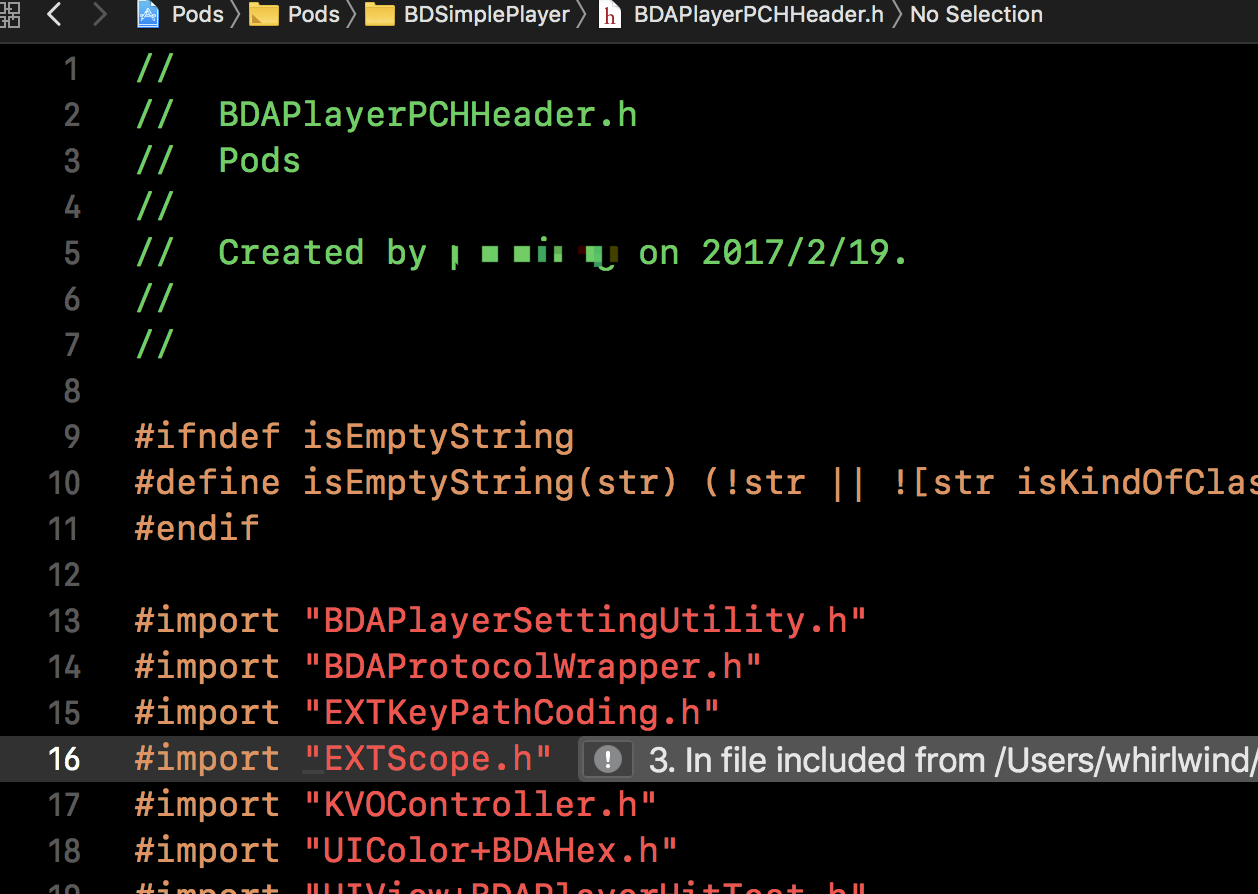
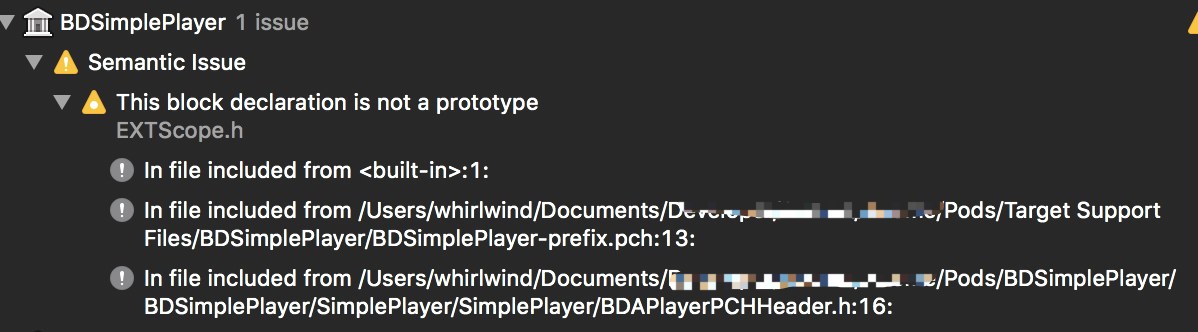
The AWECommerca.default-Alipay is a development pod, it get many warnings:


Whirlwind
on 24 Oct 2018
@Whirlwind libextobjc being one of the Pods I tested while working on this patch I'm surprised it doesn't work.
I tested just now with a minimal project with the following Podfile, and warnings are silenced as expected :
source 'https://github.com/CocoaPods/Specs.git'

platform :ios, '12.0'
inhibit_all_warnings!

target 'CocoaPodsIssue8219' do
  pod 'libextobjc'
end
Since you cannot reproduce either with a fresh project, I'm thinking this a cache somewhere in your Xcode's internals not being cleared.
Did you try closing Xcode, fully removing ~/Library/Developer/Xcode/DerivedData (with rm -rf), opening your project and building again?
If you're still getting the warnings, would you mind copying the content of the .xcconfig of the problematic Pods here please? These should be in the Pods/Target Support Files/<name of the Pod> folders.
For example for libextobjc the .xcconfig is at Pods/Target Support Files/libextobjc/libextobjc.xcconfig.
Thank you for your help!
guillaumealgis
on 24 Oct 2018
And thank you @guillaumealgis for the follow up!
dnkoutso
on 24 Oct 2018
ping @Whirlwind
dnkoutso
on 1 Nov 2018
I still get these warning (treat as error) from the Pods.xcodeproj, but I could not get them in a demo app. Others in my team get these error, too. And everything is OK in CocoaPods v1.5.3. I will wait other people to report same issue.
Whirlwind
on 6 Nov 2018
@Whirlwind can you please share the .xcconfig of the Pods emitting warnings in your project (see my previous comment)? That would help me diagnose the problem and fix it.
Thanks!
guillaumealgis
on 6 Nov 2018
I check very many test files, and I found that #import <xx/yy.h> works, and #import <yy.h>, #import "yy.h" not works.
Whirlwind
on 6 Dec 2018
Thank you for the follow up @Whirlwind. The 3 syntaxes you listed should work as expected on the 1.6.0 beta. What you're observing is not a normal behavior.
Unfortunately, without a sample project reproducing the issue or your .xcconfig files, I can't really help you get rid of the warnings. Could you please share the .xcconfig files Cocoapods is generating for your project please?
These are located in Pods/Target Support Files/ and do not contain any sensible / private data on your project.
Thank you!
guillaumealgis
on 6 Dec 2018
Still need sample here.
dnkoutso
on 12 Dec 2018
This issue will be auto-closed because there hasn't been any activity for a few months. Feel free to open a new one if you still experience this problem :+1:
![stale[bot] picture](https://avatars.githubusercontent.com/in/1724?v=4&s=40) stale[bot]
on 19 Dec 2018
stale[bot]
on 19 Dec 2018
i have same issues。
this is UMCAnalytics.xcconfig.
CONFIGURATION_BUILD_DIR = ${PODS_CONFIGURATION_BUILD_DIR}/UMCAnalytics
FRAMEWORK_SEARCH_PATHS = $(inherited) "${PODS_ROOT}/UMCAnalytics" "${PODS_ROOT}/UMCCommon"
GCC_PREPROCESSOR_DEFINITIONS = $(inherited) COCOAPODS=1
PODS_BUILD_DIR = ${BUILD_DIR}
PODS_CONFIGURATION_BUILD_DIR = ${PODS_BUILD_DIR}/$(CONFIGURATION)$(EFFECTIVE_PLATFORM_NAME)
PODS_ROOT = ${SRCROOT}
PODS_TARGET_SRCROOT = ${PODS_ROOT}/UMCAnalytics
PRODUCT_BUNDLE_IDENTIFIER = org.cocoapods.${PRODUCT_NAME:rfc1034identifier}
SKIP_INSTALL = YES
 shixiaoda
on 28 Jan 2019
shixiaoda
on 28 Jan 2019
I am seeing the same issue when upgrading from 1.5.3 to 1.6.1. It only happens when using Xcode 10.2.
You can see the issue on this PR for the WordPress iOS app.
From the build log:
/Users/distiller/Library/Developer/Xcode/DerivedData/WordPress-anjhhjuqxtausqfqfoyxdzfcolgc/Build/Products/Debug-iphonesimulator/WPMediaPicker/WPMediaPicker.framework/Headers/WPMediaPickerViewController.h:315:21: pointer is missing a nullability type specifier (_Nonnull, _Nullable, or _Null_unspecified)

- (UIViewController *)defaultEmptyViewController;
Here are the contents of WPMediaPicker.xcconfig:
CONFIGURATION_BUILD_DIR = ${PODS_CONFIGURATION_BUILD_DIR}/WPMediaPicker
GCC_PREPROCESSOR_DEFINITIONS = $(inherited) COCOAPODS=1
OTHER_LDFLAGS = $(inherited) -framework "AVFoundation" -framework "ImageIO" -framework "Photos" -framework "UIKit"
PODS_BUILD_DIR = ${BUILD_DIR}
PODS_CONFIGURATION_BUILD_DIR = ${PODS_BUILD_DIR}/$(CONFIGURATION)$(EFFECTIVE_PLATFORM_NAME)
PODS_ROOT = ${SRCROOT}
PODS_TARGET_SRCROOT = ${PODS_ROOT}/WPMediaPicker
PRODUCT_BUNDLE_IDENTIFIER = org.cocoapods.${PRODUCT_NAME:rfc1034identifier}
SKIP_INSTALL = YES
This is just one example. I am seeing warnings from several pods.
A similar issue is described in https://github.com/launchdarkly/ios-client/issues/167.
 jtreanor
on 1 Apr 2019
jtreanor
on 1 Apr 2019
If you can narrow it down to a small sample project that would be super helpful! It's difficult to try to dig through issues & PRs from other projects to figure out what we need to do to reproduce the bug, and self-contained example project really help in narrowing down what the bug might be
 amorde
on 8 Apr 2019
amorde
on 8 Apr 2019
I still haven't been able to reproduce this in a sample project but I have learned a little more so sharing here.
The warnings are only appearing on our test target, which does not directly depend on the pod. Here is a simplified version of the Podfile:
target 'WordPress' do
  pod 'WPMediaPicker', '1.3.2'

  target 'WordPressTest' do
        inherit! :search_paths
  end
end
As expected from https://github.com/CocoaPods/CocoaPods/pull/6401, WordPress has -isystem "${PODS_CONFIGURATION_BUILD_DIR}/WPMediaPicker/WPMediaPicker.framework/Headers" in OTHER_CFLAGS and this seems to be preventing the warnings from appearing on that target.
However, since WordPressTest does not directly depend on WPMediaPicker it doesn't have the -isystem flag and the warnings are still shown.
As some confirmation, if I change the Podfile to this it seems to work:
target 'WordPress' do
  pod 'WPMediaPicker', '1.3.2'

  target 'WordPressTest' do
      inherit! :search_paths
      pod 'WPMediaPicker', '1.3.2'
  end
end
Should the -isystem changes from https://github.com/CocoaPods/CocoaPods/pull/6401 be extended to test targets like this?
jtreanor
on 15 Apr 2019
There hasn't been any activity on this issue recently. Due to the high number of incoming GitHub notifications, we have to clean some of the old issues, as many of them have already been resolved with the latest updates.
stale[bot]
on 14 Jul 2019
This issue will be auto-closed because there hasn't been any activity for a few months. Feel free to open a new one if you still experience this problem :+1:
stale[bot]
on 21 Jul 2019
Just in case anyone else has this issue, I found that this workaround worked for me: https://github.com/CocoaPods/CocoaPods/issues/209#issuecomment-509558469
I edited the snippet a bit as it wasn't working for my cocoapods version as it was. I ended up with:
post_install do |installer|
    installer.pods_project.targets.each do |target|
        target.build_configurations.each do |config|
            config.build_settings['GCC_WARN_INHIBIT_ALL_WARNINGS'] = "YES"
            config.build_settings['IBC_WARNINGS'] = "NO"
            config.build_settings['CLANG_WARN_DOCUMENTATION_COMMENTS'] = "NO"
            config.build_settings['WARNING_CFLAGS'] ||= ['"-Wno-nullability-completeness"']
            config.build_settings['WARNING_CFLAGS'] ||= ['"-Wno-nonnull"']

            # Disable nullability completeness warning for all headers
            pod_framework_umbrella_file = File.join(installer.config.project_pods_root, "Target\ Support\ Files/#{target.name}/#{target.name}-umbrella.h")
            if File.exist?(pod_framework_umbrella_file)
                pod_framework_umbrella_content = File.read(pod_framework_umbrella_file)
                pod_framework_umbrella_content.prepend(
                    <<~END
                    #pragma GCC diagnostic push
                    #pragma GCC diagnostic ignored \"-Wnullability-completeness\"\n
                    #pragma GCC diagnostic ignored \"-Wdocumentation\"\n
                    #pragma GCC diagnostic ignored \"-Wstrict-prototypes\"\n
                    END
                )
                pod_framework_umbrella_content.concat(
                    <<~END
                    #pragma GCC diagnostic pop
                    END
                )
                File.open(pod_framework_umbrella_file, "w") { |file| file.puts pod_framework_umbrella_content }
            end
        end
    end
end
Hope this helps someone! 😄
 blastervla
on 2 Dec 2019
blastervla
on 2 Dec 2019
Related issues
 intelliot
·
3Comments
intelliot
·
3Comments
 marzapower
·
3Comments
marzapower
·
3Comments
 sonu5
·
3Comments
sonu5
·
3Comments
 pronebird
·
3Comments
pronebird
·
3Comments
 iosdev-republicofapps
·
3Comments
iosdev-republicofapps
·
3Comments
Most helpful comment
@Whirlwind libextobjc being one of the Pods I tested while working on this patch I'm surprised it doesn't work.
I tested just now with a minimal project with the following Podfile, and warnings are silenced as expected :
Since you cannot reproduce either with a fresh project, I'm thinking this a cache somewhere in your Xcode's internals not being cleared.
Did you try closing Xcode, fully removing
~/Library/Developer/Xcode/DerivedData(withrm -rf), opening your project and building again?If you're still getting the warnings, would you mind copying the content of the
.xcconfigof the problematic Pods here please? These should be in thePods/Target Support Files/<name of the Pod>folders.For example for libextobjc the
.xcconfigis atPods/Target Support Files/libextobjc/libextobjc.xcconfig.Thank you for your help!