Cocoapods: Test target with inherit! :search_paths missing framework search paths
- [x] I've read and understood the *CONTRIBUTING guidelines and have done my best effort to follow.
Report
What did you do?
I updated our project to use proper target inheritance; in doing this, I used inherit! :search_paths for the test target.
What did you expect to happen?
I expected the project to build successfully when building for testing.
What happened instead?
The build fails when precompiling the bridging header for the test target because it can't find the headers (for FMDB in the attached test project). If I remove inherit! :search_paths from the test targets, this fixes the build.
CocoaPods Environment
Stack
   CocoaPods : 1.4.0
        Ruby : ruby 2.4.0p0 (2016-12-24 revision 57164) [x86_64-darwin16]
    RubyGems : 2.6.10
        Host : Mac OS X 10.13.3 (17D102)
       Xcode : 9.3 (9Q127n)
         Git : git version 2.15.1 (Apple Git-101)
Ruby lib dir : /Users/basher/.rvm/rubies/ruby-2.4.0/lib
Repositories : master - https://github.com/CocoaPods/Specs.git @ 0864611ad37eb0f6134278ba484f35906c2eda0b
Installation Source
Executable Path: /Users/basher/.rvm/gems/ruby-2.4.0/bin/pod
Plugins
cocoapods-deintegrate : 1.0.2
cocoapods-plugins     : 1.0.0
cocoapods-search      : 1.0.0
cocoapods-stats       : 1.0.0
cocoapods-trunk       : 1.3.0
cocoapods-try         : 1.1.0
Project that demonstrates the issue
 benasher44
All 24 comments
I also noticed that when I remove inherit! :search_paths, the pods test target xcconfigs get properly scoped under the abstract_target (i.e. they have names like Pods-AbstractTarget-TestTarget). I would only expect the scoping to go away with inherit! :none, but maybe this could be a fundamental misunderstanding on my part. It's been awhile 😉
All of this behavior is demonstrated in the attached sample project by opening up its workspace and building for testing (command + shift + u). I've also tried with the beta release, and I got the same result.
benasher44
on 29 Mar 2018
@benasher44 its probably because there is logic that dedups what gets linked into the test target if its part of the parent target to avoid "duplicate class" warnings found when booting up the test bundle.
Havent looked at the sample yet.
 dnkoutso
on 29 Mar 2018
dnkoutso
on 29 Mar 2018
Hm what I said above is for linking, header paths should be there. Let me see.
dnkoutso
on 29 Mar 2018
Right! Avoiding the duplicate class warnings makes sense. That should be solved by ensuring that linker flags are not inherited. Framework search paths should still be there though.
benasher44
on 29 Mar 2018
@benasher44 one more thing I cant open your sample I get an error that Xcode proj is not working:
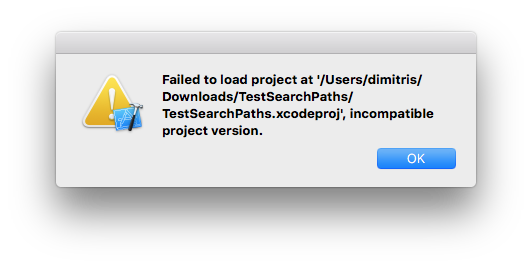
I am on Xcode 9.2
edit: worked with Xcode 9.3 beta
dnkoutso
on 29 Mar 2018
@benasher44 confirmed. Only happens when using use_frameworks!, works with static libs.
dnkoutso
on 29 Mar 2018
Ah I made the project with Xcode 9b4.3, but the same happens for Xcode 9.2. @dnkoutso want me to remake it for you, or do you feel like you have a good handle on this?
benasher44
on 29 Mar 2018
I got it from here thanks, will need to figure out whats the bug.
dnkoutso
on 29 Mar 2018
Awesome. Thanks! <3
benasher44
on 29 Mar 2018
@benasher44 yes the issue is that a target with inherit search paths does not include the abstract target as part of its targets to inherit from and therefore everything trickles down from there including the name but also the paths of frameworks...
dnkoutso
on 29 Mar 2018
@benasher44 can confirm this works:
platform :ios, '9.0'
use_frameworks!
inhibit_all_warnings!
pod 'CocoaLumberjack'
abstract_target 'TestSearchPathsShared' do
pod 'FMDB'
target 'TestSearchPaths' do
pod 'SSZipArchive'
target 'TestSearchPathsTests' do
inherit! :search_paths
end
end
end
The way above is for the intended way I think of inherit! :search_paths to work. It makes more sense to me. Basically you have an app target and the test bundle that is using this app target as the host and therefore should not link dependencies linked by the parent and just inherit the search paths.
In your original case there is no target to inherit from since the parent is abstract.
dnkoutso
on 29 Mar 2018
I am not certain if the other one is intended to work, perhaps it should error out?
dnkoutso
on 29 Mar 2018
I think it was intended to work. The guide has a good example of when this is particularly useful:
https://guides.cocoapods.org/syntax/podfile.html#abstract_target
benasher44
on 29 Mar 2018
You are right. I figured out why it works on static libs mode...its a bit by "luck" again because we blindly add header search paths for ALL things for aggregate target xcconfigs. Seems like two bugs here.
dnkoutso
on 29 Mar 2018
@benasher44 this change https://github.com/CocoaPods/CocoaPods/pull/7559 makes it so it actually breaks for static libraries which given the current integration it is correct be broken.
I think the actual fix now is to properly figure out that this target is inheriting from an abstract target.
dnkoutso
on 29 Mar 2018
@benasher44 I tried to surface this issue from the dead....its still exist on latest master and you are right the docs do mention this as a valid use case.
I still don't know how to fix it and whether the fix is to remove the docs and that this case is not supported or "works as expected".
dnkoutso
on 15 Aug 2018
@dnkoutso inherit! :search_paths main use case is test targets that are injected into the bundle under test though right?
benasher44
on 28 Aug 2018
correct but in the initial report it was not nested under an app bundle for example
dnkoutso
on 28 Aug 2018
Oh I see what you mean. We recently removed the abstract_target, which explains why this is working for us now.
This still feels like something we should fix though. What did you mean about not being nested under an app bundle?
benasher44
on 29 Aug 2018
target 'TestSearchPaths' do
pod 'SSZipArchive'
target 'TestSearchPathsTests' do
inherit! :search_paths
end
end
I will keep it open and discuss internally if it needs to be fixed.
dnkoutso
on 29 Aug 2018
But that is nested, no?
benasher44
on 29 Aug 2018
Tried 1.6.0.beta.2, and some inherit :search_path lines we had in place and working had to be removed.
benasher44
on 14 Nov 2018
I have the same issue with CocoaPods v 1.7.3
here is my Podfile
platform :ios, '11.0'
use_frameworks!
inhibit_all_warnings!

workspace 'myApp'
project 'myApp.xcodeproj'

def ui_helpers
  pod 'Kingfisher'
  pod 'NotificationBannerSwift', '2.0.1'

  # keyboard handling
  pod 'IQKeyboardManagerSwift'

  # Animation
  pod 'lottie-ios'

  # Collection diffing
  pod 'IGListKit'

  # Layout
  pod 'SnapKit'

  # Payment
  pod 'CardIO', '~> 5.4'
end

def facebook
  pod 'FBSDKCoreKit', '~> 4.38.1'
  pod 'FBSDKShareKit', '~> 4.38.1'
  pod 'FBSDKLoginKit', '~> 4.38.1'
end

def reactive
  pod 'MERLin', '~> 2.0.0'
end

def analytics
  pod 'Fabric'
  pod 'Crashlytics'
  pod 'Firebase/Core'

  pod 'Zaius', '~>  2.0'
  pod 'Analytics', '~> 3.0'

  pod 'Segment-Appboy', '~> 2.0.3'

  pod 'GoogleAnalytics', '~> 3.17'
end

def other_utils
    # Paypal
    pod 'Braintree', '~>  4.9'

    #A/B Testing
    pod 'Split', '~> 2.3.0'
end

target 'myApp' do
  pod 'SwiftFormat/CLI', '0.39.4'
  pod 'GooglePlaces', '~> 2.5'

  ui_helpers
  facebook
  reactive
  analytics
  other_utils

  target 'myAppTests' do
    inherit! :search_paths
  end
end

abstract_target 'Modules' do
  ui_helpers
  reactive
  other_utils

  pod 'RxDataSources'

  # - Targets
  # Parent modules
  target 'myAppFoundation' do
    target 'myAppFoundationTests' do
      inherit! :search_paths
    end
  end

end

post_install do |installer|
  installer.pods_project.targets.each do |target|
    target.build_configurations.each do |config|
      config.build_settings['DEBUG_INFORMATION_FORMAT'] = 'DWARF'
      config.build_settings['ALWAYS_EMBED_SWIFT_STANDARD_LIBRARIES'] = '$(inherited)'
    end
  end
end
what happens to me is that myAppTests works just fine. what fails is the myAppFoundationTests with the following error:
2019-08-01 11:22:02.840300+0100 xctest[52740:5159767] The bundle “myAppFoundationTests” couldn’t be loaded because it is damaged or missing necessary resources. Try reinstalling the bundle.
2019-08-01 11:22:02.840438+0100 xctest[52740:5159767] (dlopen_preflight(/Users/aaaaa/Library/Developer/Xcode/DerivedData/myApp-ckayahdterphykbuvlunituyshxo/Build/Products/Debug-Prod-iphonesimulator/MOFoundationTests.xctest/myAppFoundationTests): Library not loaded: @rpath/Braintree.framework/Braintree
  Referenced from: /Users/aaaaa/Library/Developer/Xcode/DerivedData/consumer-ckayahdterphykbuvlunituyshxo/Build/Products/Debug-Prod-iphonesimulator/myAppFoundationTests.xctest/myAppFoundationTests
  Reason: image not found)
Program ended with exit code: 82
If I set the test host application to be the main target, then it all works, but this will cause the app to be launched which is time consuming.
can anyone help?
 gringoireDM
on 1 Aug 2019
gringoireDM
on 1 Aug 2019
This is still an issue when using targets. Any plans to fix it?
 alouanemed
on 12 Mar 2021
alouanemed
on 12 Mar 2021
Related issues
 marzapower
·
3Comments
marzapower
·
3Comments
 dawnnnnn
·
3Comments
dawnnnnn
·
3Comments
 spencerkohan
·
3Comments
spencerkohan
·
3Comments
 5SMNOONMS5
·
3Comments
5SMNOONMS5
·
3Comments
 pronebird
·
3Comments
pronebird
·
3Comments
Most helpful comment
I have the same issue with CocoaPods v 1.7.3
here is my Podfile
what happens to me is that
myAppTestsworks just fine. what fails is themyAppFoundationTestswith the following error:If I set the test host application to be the main target, then it all works, but this will cause the app to be launched which is time consuming.
can anyone help?