Cocoapods: error: include of non-modular header inside framework module
- [x] I've read and understood the *CONTRIBUTING guidelines and have done my best effort to follow.
Report
What did you do?
Run pod spec lint
What did you expect to happen?
It should pass validation
What happened instead?
It spit out an error: "error: include of non-modular header inside framework module"
CocoaPods Environment
Stack
   CocoaPods : 1.4.0
        Ruby : ruby 2.3.3p222 (2016-11-21 revision 56859) [x86_64-darwin16]
    RubyGems : 2.6.12
        Host : Mac OS X 10.13.2 (17C88)
       Xcode : 9.2 (9C40b)
         Git : git version 2.14.3 (Apple Git-98)
Ruby lib dir : /Users/saravanan_vij/.rvm/rubies/ruby-2.3.3/lib
Repositories : master - https://github.com/CocoaPods/Specs.git @ f7e4c263375bb1f4d8ae53852106237d09b7766a
Installation Source
Executable Path: /Users/saravanan_vij/.rvm/gems/ruby-2.3.3/bin/pod
Plugins
cocoapods-deintegrate : 1.0.2
cocoapods-plugins     : 1.0.0
cocoapods-search      : 1.0.0
cocoapods-stats       : 1.0.0
cocoapods-trunk       : 1.3.0
cocoapods-try         : 1.1.0
Podfile
# Uncomment the next line to define a global platform for your project
platform :ios, '9.0'

target 'SARUnArchiveANY' do
  # Uncomment the next line if you're using Swift or would like to use dynamic frameworks
  use_frameworks!

  pod "UnrarKit"
  pod 'SSZipArchive', '~> 0.3.2'
  pod 'LzmaSDK-ObjC', :inhibit_warnings => true

  # Pods for SARUnArchiveANY

end
Project that demonstrates the issue
Here is the repo of the lib itself
Note: I've referred/tried several(this, this) other issues as well, but none of them seems to be working.
I've been trying to release a new pod version of this lib, but am stuck.
Any help would be appreciated. Thanks!
 saru2020
All 18 comments
In SARUnArchiveANY.h change #import "SSZipArchive.h" to #import <SSZipArchive/SSZipArchive.h>
This does not appear a cocoapods integration or library issue.
** BUILD SUCCEEDED **
 dnkoutso
on 13 Feb 2018
dnkoutso
on 13 Feb 2018
I tried changing that as well. Still getting the same error.
saru2020
on 13 Feb 2018
It worked for me I was able to successfully lint. Remember pod spec lint actually clones the tag you have specified so its possible you are getting older code.
Try pod lib lint to ensure it passes locally as it did for me then add a tag and push the tag and then pod spec lint.
dnkoutso
on 13 Feb 2018
pod lib lint => Local
pod spec lint => Remote
I pushed the new tag(0.0.2) that's referred in podspec, but still I see this error:
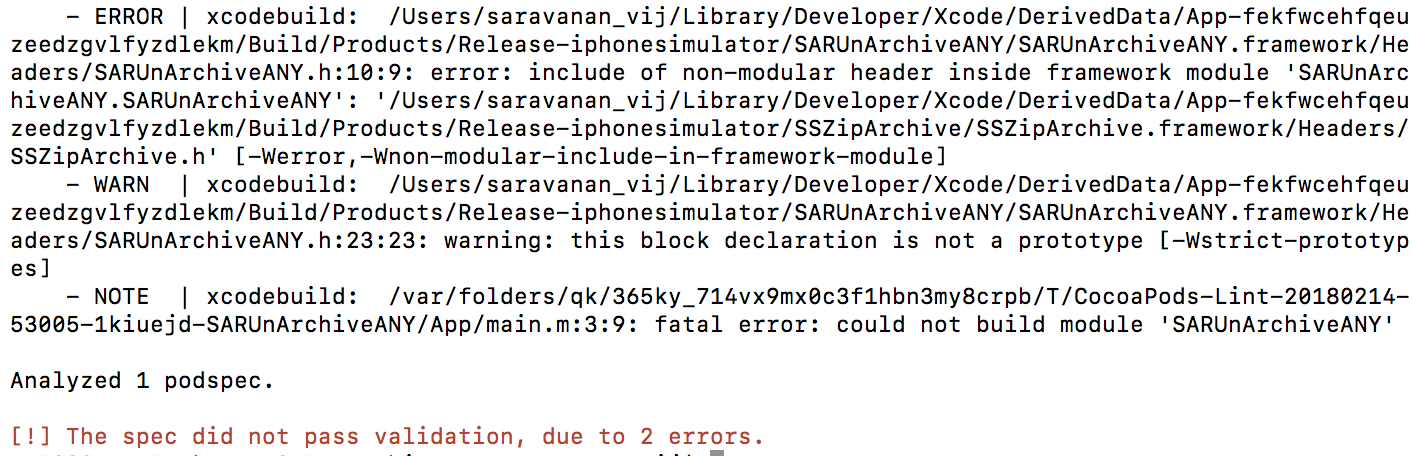
Am I still missing something?
saru2020
on 13 Feb 2018
Does pod lib lint pass?
dnkoutso
on 13 Feb 2018
Because it does work for me.
dnkoutso
on 13 Feb 2018
Yes pod lib lint passed,
but pod spec lint is failing, and that's where I'm stuck.
saru2020
on 13 Feb 2018
I checked out the 0.0.2 and ran pod spec lint and worked for me.
    /usr/bin/codesign --force --sign - --timestamp=none /Users/dimitris/Library/Developer/Xcode/DerivedData/App-hfwziuempzrkueawtyozeivegnwx/Build/Products/Release-iphonesimulator/App.app

** BUILD SUCCEEDED **
I am on Xcode 9.2 and cocoapods 1.4.0. not sure whats going on here.
dnkoutso
on 13 Feb 2018
Not sure sir.
I'm still facing the same issue, I even tried cleaning up everything, but still no luck. It's very strange.
Any other suggestions?
saru2020
on 13 Feb 2018
Unfortunately no. I also can't come up with anything since it works for me using your actual project.
dnkoutso
on 13 Feb 2018
Try running pod spec lint --no-clean and then open the generated workspace and try to build there, check the file contents to ensure there is no caching occurs and maybe you get a different version of the source than you think.
dnkoutso
on 13 Feb 2018
Also use --verbose to see exactly what gets cloned.
dnkoutso
on 13 Feb 2018
I did try --verbose & --no-clean together.
Here's the log:
When I look into:
"Pods workspace available at /var/folders/qk/365ky_714vx9mx0c3f1hbn3my8crpb/T/CocoaPods-Lint-20180214-6167-30t93i-SARUnArchiveANY/App.xcworkspace for inspection."
It has nothing, but still build succeeds. I'm not sure what it exactly does, though.
saru2020
on 13 Feb 2018
Can you try pod cache clean SARUnArchiveANY and try again?
It shouldnt have just nothing...there should be a Pods.xcodeproj in there and add the scheme for SARUnArchiveANY
dnkoutso
on 13 Feb 2018
Sure, I'll try that too.
P.S: I also tried re-starting tools and even my Mac, but still, it is throwing me the same error.
Pretty sure that I'm doing some silly mistake. But, not sure what.
saru2020
on 13 Feb 2018
OKAY... So, that was the issue.
Doing pod cache clean SARUnArchiveANY, SOLVED it.
So, Cocoapods internally has this cache and was not clearing up, right?
saru2020
on 13 Feb 2018
Most likely, probably a bad cache during your attempts to lint. Glad you figured it out.
dnkoutso
on 13 Feb 2018
Man, you figured it.
Anyways, thanks for this lively help.
But, I suppose this should be there somewhere as part of the Cocoapods documentation so that not another whole day of someone is wasted again cause of it.
saru2020
on 13 Feb 2018
Related issues
 Mingmingmew
·
3Comments
Mingmingmew
·
3Comments
 marzapower
·
3Comments
marzapower
·
3Comments
 soleares
·
3Comments
soleares
·
3Comments
 iosdev-republicofapps
·
3Comments
iosdev-republicofapps
·
3Comments
 lzwjava
·
3Comments
lzwjava
·
3Comments
Most helpful comment
Man, you figured it.
Anyways, thanks for this lively help.
But, I suppose this should be there somewhere as part of the Cocoapods documentation so that not another whole day of someone is wasted again cause of it.