Cocoapods: pod install does not pull down latest commit from master
I'm pointed at master for a repo's podspec :branch => 'master', this repo is used by a project of mine. I made some changes to master and pushed them upstream, but when I did a pod install the changes were not reflected in the project that's using the repo. I had to manually delete the cocoapods cache and then pod install for the changes to show.
 rex-remind101
All 6 comments
pod install will not update your dependencies, you would need to use pod update to update them.
 kylef
on 8 Mar 2014
kylef
on 8 Mar 2014
@kylef, Why don't I have the latest code which is in my release?
Github: https://github.com/hemangshah/printer
CocoaPods: https://cocoapods.org/pods/printer-logger
Thanks!
 hemangshah
on 5 Jun 2017
hemangshah
on 5 Jun 2017
@kylef pod update won't pull the new commit either.
 reitzig
on 24 Nov 2017
reitzig
on 24 Nov 2017
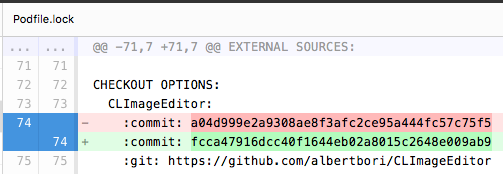
You can force it to update by changing the target :commit: value in your Podfile.lock:
 albertbori
on 23 Mar 2018
albertbori
on 23 Mar 2018
@albertbori Sure, but that's missing the point. I don't expect to do something manually if you point to a branch. I expect the dependency to be at the same state as the sources I get when cloning the repo, checking out that branch, and building.
In terms of use cases, developing a module and one of its dependencies at the same time is a huge annoyance: full pod cache clean; rm -rf Podfile.lock Pods; pod install and rebuild takes a _lot_ more time than a plain pod install that just pulls the latest revision of a single dependency.
reitzig
on 24 Mar 2018
Here's how I did:
- remove
pod 'library'from Podfile - run
pod install - add
pod 'library'back - run
pod installagain
 KimiChiu
on 31 Mar 2018
KimiChiu
on 31 Mar 2018
Related issues
 Curtis-Halbrook
·
3Comments
Curtis-Halbrook
·
3Comments
 dawnnnnn
·
3Comments
dawnnnnn
·
3Comments
 soleares
·
3Comments
soleares
·
3Comments
 marzapower
·
3Comments
marzapower
·
3Comments
 iosdev-republicofapps
·
3Comments
iosdev-republicofapps
·
3Comments
Most helpful comment
@albertbori Sure, but that's missing the point. I don't expect to do something manually if you point to a branch. I expect the dependency to be at the same state as the sources I get when cloning the repo, checking out that branch, and building.
In terms of use cases, developing a module and one of its dependencies at the same time is a huge annoyance: full
pod cache clean; rm -rf Podfile.lock Pods; pod installand rebuild takes a _lot_ more time than a plainpod installthat just pulls the latest revision of a single dependency.