Cocoapods: Remove a pod causes Linker Error
Removing Lookback pod caused this:
ld: framework not found LookBack
clang: error: linker command failed with exit code 1 (use -v to see invocation)
Not sure if I'm doing something wrong or there is something wrong with the pod.
 wolffan
All 15 comments
did you do a pod install after?
 orta
on 14 Feb 2014
orta
on 14 Feb 2014
I did
wolffan
on 14 Feb 2014
The same happens if I remove reveal and do a pod install (with the reveal linker).
Dunno what I might be doing wrong
wolffan
on 14 Feb 2014
Did you add or remove a target? I.e.
Went from
target "Your_Target" do
    # pod ... add some pods
end
to simply
# pod ... add some pods
Or vice versa? Think I may be seeing a bug here... looking to see if dup...
 JRG-Developer
on 18 Feb 2014
JRG-Developer
on 18 Feb 2014
Hello @JRG-Developer ,
no, just removed the lines in podfile.
The linker flags remain there (I remove them manually)
wolffan
on 20 Feb 2014
where are those flags in Xcode so I can manually remove them. I am having the same problem. no changes other than I removed a dependency. After a pod install things were messed up.
 newmanw
on 27 Feb 2014
newmanw
on 27 Feb 2014
This has really screwed my project and I have no idea how to fix it. Bringing up another point can I 'reset' all the stuff pods did. I.E. start over without having to create a new project? I have removed Pods dir and xcworkspace and Podfile.lock but that did not help. I cannot even get back to regular xcode, when I do that its look for Pod specific stuff.
newmanw
on 27 Feb 2014
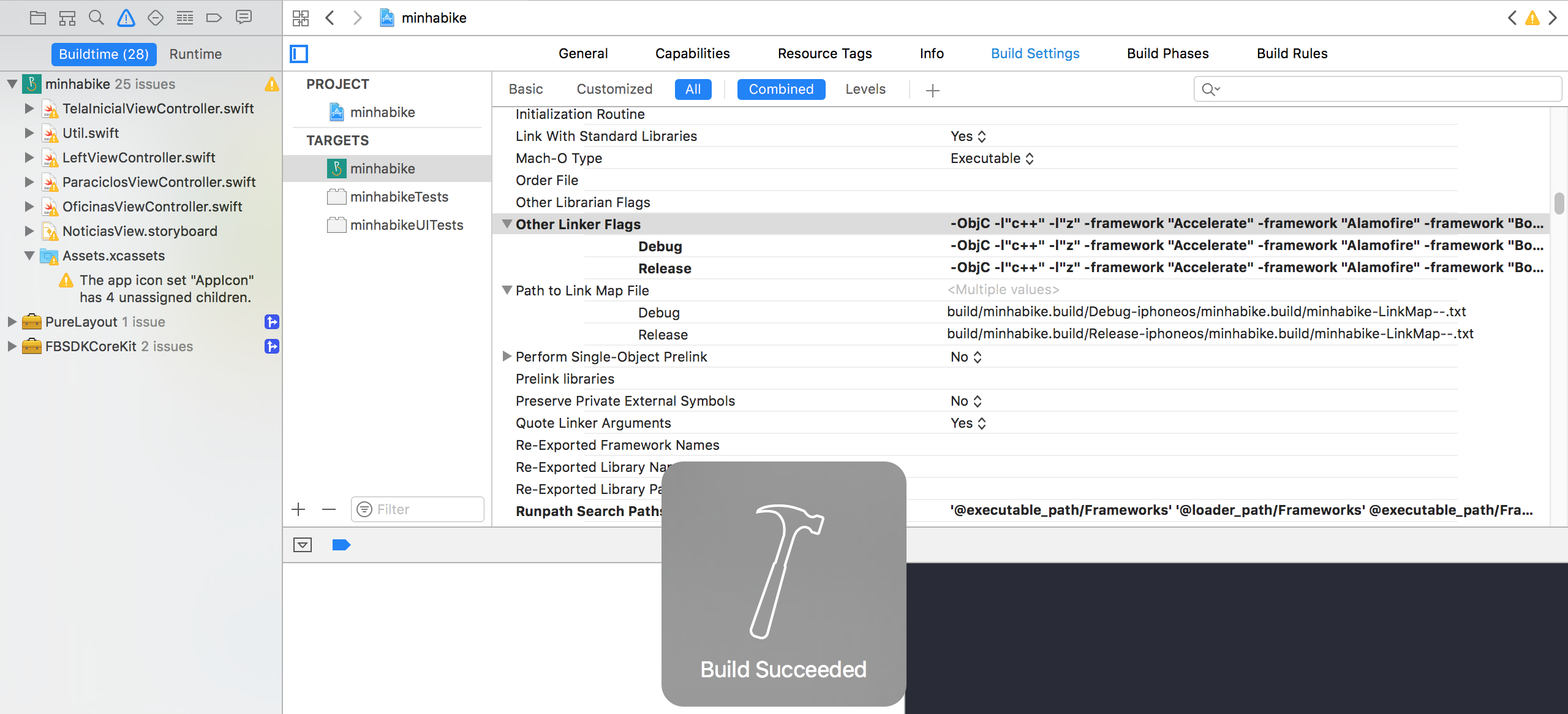
@newmanw you have to remove the linkers.
This means that in "Other Linker Flags" in you target "Build Settings", will have a list of linkers related to your pods.
Search for the pods that you want to delete and for each one you have to delete 2 things. First the linker with the pod name, and after, the "-framework" linker just below it.
So 2 linkers for each pod.
That fixed things for me
wolffan
on 28 Feb 2014
I've came across this before myself. Temporary fix: rm -fr Pods && pod install.
 kylef
on 11 Mar 2014
kylef
on 11 Mar 2014
@confidenceJuice closed with reason "original problem is not reproduceable as of at least 0.30. a new issue raised in the comments (https://github.com/CocoaPods/CocoaPods/issues/1823#issuecomment-35434174) has been created see #1954"
 CocoaPodsBot
on 29 Mar 2014
CocoaPodsBot
on 29 Mar 2014
This just happened to me as well with cocoapods 1.1.1.
I had to manually remove the linker flags from my target.
I just removed the line from the Pod file and did pod install. Nothing more, nothing less.
 jlubeck
on 2 Nov 2016
jlubeck
on 2 Nov 2016
This is happening to me wiht cocoapods 1.2.0 and I'm not finding any way out.
ld: framework not found LookBack
clang: error: linker command failed with exit code 1 (use -v to see invocation)
I've tried manually removing the flags from my pod file and doing pod install but it's not working
 Rnorback
on 31 Jan 2017
Rnorback
on 31 Jan 2017
To make sure which pod is giving you trouble you need to:
- Right click the message
"Linker command failed with exit code 1" - Choose the option
"Reveal in Log", - A mensage in the right window will appear showing the framework causing you trouble
- Delete
-frameworkandFrameworkNamein"Other Linker Flags"from your project target's"Build Settings"


 ElyDantas
on 28 Jul 2017
ElyDantas
on 28 Jul 2017
Just got bit by this after removing PaymillSDK. Cocoapods does not seem to update the "Other Linker Flags" setting?
 alper
on 18 Aug 2017
alper
on 18 Aug 2017
@newmanw you have to remove the linkers.
This means that in "Other Linker Flags" in you target "Build Settings", will have a list of linkers related to your pods.Search for the pods that you want to delete and for each one you have to delete 2 things. First the linker with the pod name, and after, the "-framework" linker just below it.
So 2 linkers for each pod.That fixed things for me
i would consider not doing this operation by cocoapods is there fault only. I tried all the answers everywhere on stackoverflow. This only solved my case.. :)
Thanks!!
 amberkatyal
on 16 Oct 2018
amberkatyal
on 16 Oct 2018
Related issues
 iosdev-republicofapps
·
3Comments
iosdev-republicofapps
·
3Comments
 gerchicov-bp
·
3Comments
gerchicov-bp
·
3Comments
 hmistry
·
3Comments
hmistry
·
3Comments
 Mingmingmew
·
3Comments
Mingmingmew
·
3Comments
 lzwjava
·
3Comments
lzwjava
·
3Comments
Most helpful comment
I've came across this before myself. Temporary fix:
rm -fr Pods && pod install.