Cocoapods: pod install does not install latest version
- [x] I've read and understood the *CONTRIBUTING guidelines and have done my best effort to follow.
🌈
Report
I submitted a new version of my pod (Gloss) to CocoaPods yesterday - this is version 2.0.0-beta.1. However, upon doing a pod install with just pod Gloss in the Podfile (which I expect would install the latest version), it installs the previous version 1.2.4.
Also, I see on cocoapods.org that it says 2.0.0-beta.1, but various details are not up-to-date, including the CHANGELOG and Swift version.
What did you do?
Submitted a new version of my pod to CocoaPods yesterday. Tested out installation by including pod Gloss in a Podfile and running pod install.
What did you expect to happen?
I expected the latest version of the pod (2.0.0-beta.1) to be installed in the application.
What happened instead?
The latest version was not installed, rather the previous version 1.2.4 was installed.
CocoaPods Environment
Project that demonstrates the issue
Any project can be used; enter pod Gloss in the Podfile then install.
 hkellaway
All 7 comments
Whenever you use a suffix it is being treated as a pre-release version. Ask explicitly in your podfile:
pod 'Gloss', '2.0.0-beta.1'
Worked for me.
This is not an issue with the CocoaPods library so I am closing.
 dnkoutso
on 28 Sep 2017
dnkoutso
on 28 Sep 2017
yes @dnkoutso that works - but not including a specific version number should default to the latest; and that does not work
hkellaway
on 28 Sep 2017
@hkellaway this dates way back and precedes me. https://github.com/CocoaPods/CocoaPods/issues/1489
The version of the pod you have published is a pre-release by semver definition. Someone asking for the "latest" version would automatically switch to them to a pre-release version which does not sound ideal for production environments.
I am sorry but I don't think it will change and in my opinion it is better to ask consumers to explicitly request pre-release version of pods.
dnkoutso
on 28 Sep 2017
im not trying to convince you otherwise. i did not realize that is the way it worked and did not find that issue. thanks for clarifying.
hkellaway
on 28 Sep 2017
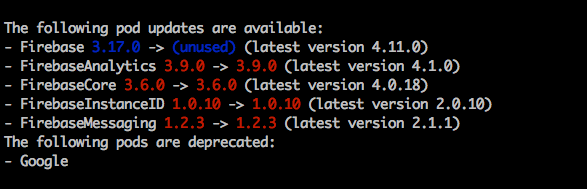
@hkellaway did you found the solution. I got the same one. cocoapods always install the same version of Firebase, and clearly It's not the latest version right now.
 luongs3
on 8 Apr 2018
luongs3
on 8 Apr 2018
@luongs3 it was because my latest version was a pre-release version (as indicated by the version structure - i.e. 2.0.0-beta.1). If no version is specified, cocoapods will use the latest release version.
Looks like you have a different problem. Perhaps try specifying the version of Firebase you want. Or, if Firebase is being installed because it is the dependency of another pod, use a newer version of the pod that depends on it
Good luck
hkellaway
on 8 Apr 2018
@luongs3 Use pod update instead of pod install and check Podfile.lock to see if you have something in the Podfile that forces a dependency on Firebase 3.x.x.
 paulb777
on 8 Apr 2018
paulb777
on 8 Apr 2018
Related issues
 5SMNOONMS5
·
3Comments
5SMNOONMS5
·
3Comments
 Curtis-Halbrook
·
3Comments
Curtis-Halbrook
·
3Comments
 soleares
·
3Comments
soleares
·
3Comments
 hmistry
·
3Comments
hmistry
·
3Comments
 spencerkohan
·
3Comments
spencerkohan
·
3Comments
Most helpful comment
@luongs3 Use
pod updateinstead ofpod installand checkPodfile.lockto see if you have something in thePodfilethat forces a dependency on Firebase 3.x.x.