Cocoapods: Pod defined "SWIFT_ACTIVE_COMPILATION_CONDITIONS" are overridden in debug builds
🌈
- [x] I've read and understood the *CONTRIBUTING guidelines and have done my best effort to follow.
Report
When using Xcodeproj 1.4.3, the build setting SWIFT_ACTIVE_COMPILATION_CONDITIONS is set to DEBUG for Swift debug builds as per Apple's default. This overrides any other flags that are potentially set by a pod. Please note that release builds don't have this issue.
Podfile to test:
target 'Test' do
  use_frameworks!
  pod 'Permission/Camera'
end
Including the following code will trigger an error in a debug build:
let camera = PermissionButton(.camera)
This is because the compilation of Permission/Camera is determined by a compiler flag.
(see PermissionConfiguration.xcconfig for more info)
Cause
The Xcodeproj dependency version was bumped by 5d471d6e1a9290b8d3c74cdc726c3493673c33d9, however, even with CocoaPods 1.2.0 (version before this commit) this can cause an issue because the dependency version was defined as (>= 1.4.1, < 2.0).
Current CocoaPod installations can also break this if the user updates/installs Xcodeproj separately (1.4.3 is deemed an official, stable, release).
Solution
The solution is to add $(inherited) to this build setting. As noted by @segiddins in CocoaPods/Xcodeproj#479, it's probably best to keep the Xcodeproj project in sync with Apple's defaults and override the setting in CocoaPods.
I'm currently taking a look at how to fix this efficiently, so consider this issue a heads up that CocoaPods 1.2.1.rc.1 broke some pods.
Original report from: CocoaPods/Xcodeproj#478
 louisdh
All 17 comments
This seems trickier than first thought. Simply adding $(inherited) to the pod's .xcconfig doesn't affect the debug value. As a matter of fact, any value set in the pod's .xcconfig doesn't affect the debug value from project.pbxproj.
Using SWIFT_ACTIVE_COMPILATION_CONDITIONS[config=Debug] is also a no-go, since Xcode creates a subset for the "config" specifier.
A great explanation for this can be found here: https://pewpewthespells.com/blog/xcconfig_guide.html#CondVarConfig
louisdh
on 5 Apr 2017
What I think needs to happen here:
In the generated project.pbxproj:
for every pod's debug (not release!) config build settings,
set value of SWIFT_ACTIVE_COMPILATION_CONDITIONS from DEBUG to "$(inherited) DEBUG".
@segiddins Any pointers for easily implementing this? (I'm not that familiar with the CocoaPods code base)
louisdh
on 5 Apr 2017
Maybe in Pod::Project#add_build_configuration?
 segiddins
on 5 Apr 2017
segiddins
on 5 Apr 2017
The settings there seems to point to the wrong group in project.pbxproj.
louisdh
on 5 Apr 2017
Fixed in #6629
louisdh
on 6 Apr 2017
Any news on this? Seems like we got stuck waiting for cocoapods-integration-specs/#105 to land?
 phlippieb
on 20 Apr 2017
phlippieb
on 20 Apr 2017
Hello, I have the same question as @phlippieb. Is there any workaround for CocoaPods 1.2.1? Should we downgrade to 1.1.1?
 groue
on 21 Apr 2017
groue
on 21 Apr 2017
For anyone who has that issue, here is a workaround for CocoaPods 1.2.1.
⚠️ the workaround modifies the project generated by CocoaPods: the patch is thus fragile, and may have to be reapplied after CocoaPods has regenerated its project.
- Click on the Pods project in your workspace
- Click on the target of the pod that misses correct compilation options
- Click the Build Settings tab, and display all settings by levels
- Set the SWIFT_ACTIVE_COMPILATION_CONDITIONS of the Debug configuration to
$(inherited) DEBUG(between Resolved and Config.File).
groue
on 21 Apr 2017
If you, like me, ran into this from the Permission pod, there's another workaround for that pod on this issue.
phlippieb
on 21 Apr 2017
Thanks @phlippieb. Less frustration in this world.
groue
on 21 Apr 2017
How do we get this fix on homebrew? Do we wait for the next release?
phlippieb
on 3 May 2017
@phlippieb - hey, also facing this issue with Permission, but none of the above — including the suggestion in the relevant Permission’s thread — worked for me. Still getting the same build error. Perhaps you have any other suggestion? Also tried to include the library without pods — i.e., directly dragging it to my project — but same status.
 oferRounds
on 14 Jun 2017
oferRounds
on 14 Jun 2017
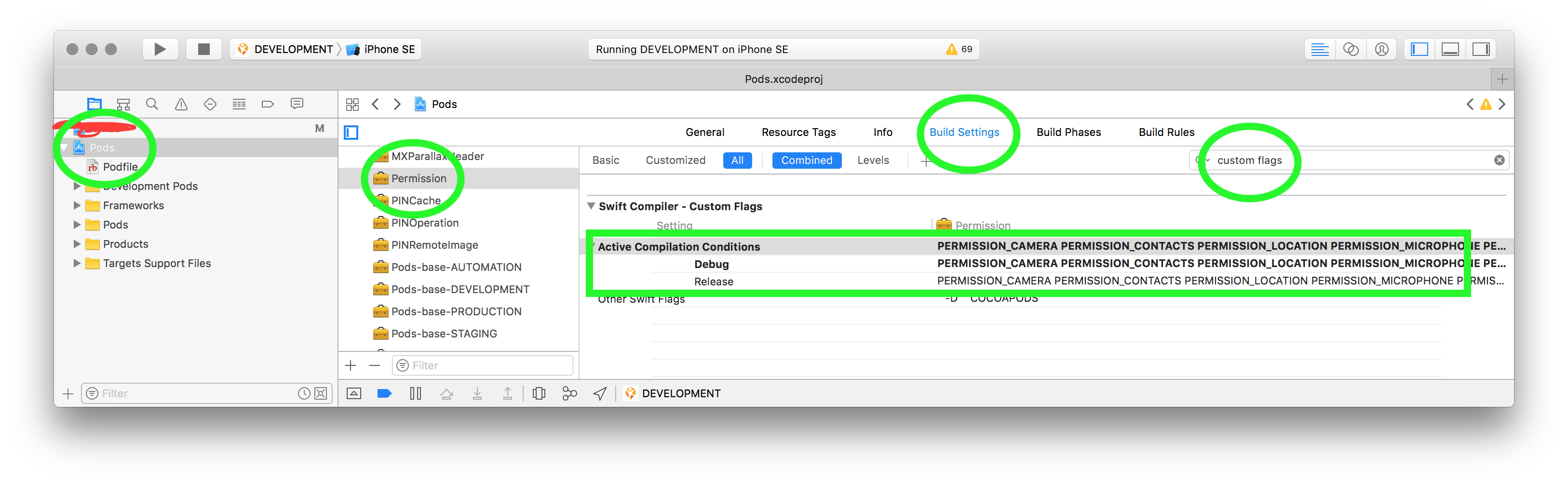
@oferRounds Here's what I do:
- In XCode, go to the project navigator (press cmd+1, or click on the folder icon on the left)
- Click on the blue Pods project icon
- In the pane just to the right of the project navigator, you should see a list of targets. Click on Permission.
- In the pane just to the right of that, at the top, click on Build settings
- Search for "custom flags"
- You should see an entry called "Active compilation conditions", with two sub-entries named "Debug" and "Release".
- Copy the contents of "Release"
- Paste it into "Debug"
You have to do this every time after you run pod install. Luckily, XCode remembers where you were in the Pods project pane, so after the first time, you only really have to do step 7 and 8. It's still very tedious though, and I wish Cocoapods would release their fix already.
phlippieb
on 14 Jun 2017
phlippieb
on 14 Jun 2017
Seems fixed in 1.3.1! Thanks Cocoapods team :)
phlippieb
on 22 Aug 2017
Confirmation, it's fixed in Cocoapods 1.3.1 great work
 franckclement
on 23 Aug 2017
franckclement
on 23 Aug 2017
@phlippieb – missed your answer! THANK YOU!
oferRounds
on 23 Aug 2017
Related issues
 k06a
·
3Comments
k06a
·
3Comments
 pallaviMN
·
3Comments
pallaviMN
·
3Comments
 gerchicov-bp
·
3Comments
gerchicov-bp
·
3Comments
 sonu5
·
3Comments
sonu5
·
3Comments
 marzapower
·
3Comments
marzapower
·
3Comments
Most helpful comment
For anyone who has that issue, here is a workaround for CocoaPods 1.2.1.
⚠️ the workaround modifies the project generated by CocoaPods: the patch is thus fragile, and may have to be reapplied after CocoaPods has regenerated its project.
$(inherited) DEBUG(between Resolved and Config.File).