Cocoapods: Using different pod version in different pod target
=
What did you do?
Tried to use different pod version in different pod target
For this I created a pod file with:
def normalPods
pod c
pod d
end
def oldPod
pod a, :path => "xxxx", :branch => 'master'
end
def newPod
pod 'b, :path => "xxxx", :branch => 'test'
end
target 'a' do
normalPods
oldPod
end
target 'b' do
normalPods
newPod
end
What did you expect to happen?
Install all pod dependencies correctly.
What happened instead?
got an error:
[!] There are multiple dependencies with different sources for pod A in Podfile:
 frranck
All 20 comments
Hi @frranck! Can you please show the rest of that output? Thanks!
[!] There are multiple dependencies with different sources for pod A in Podfile:
 benasher44
on 11 Jan 2017
benasher44
on 11 Jan 2017
[!] There are multiple dependencies with different sources for pod A in Podfile:
a (from /Users/xxx/a)
a (from /Users/xxx/a)
but i just released my problem description is wrong: it's:
def normalPods
pod c
pod d
end
def oldPod
pod a, :path => "xxxx", :branch => 'master'
end
def newPod
pod 'a, :path => "xxxx", :branch => 'test'
end
target 'a' do
normalPods
oldPod
end
target 'b' do
normalPods
newPod
end
frranck
on 11 Jan 2017
Ah I see. As far as I know, you can't use 2 difference sources for the same pod in the same Podfile. You could get around this by copying the podspec of pod A locally, modifying the local copy of pod A to change the pod's name, adjusting the source in the local copy to point to the branch you want, and then using the :podspec argument to point at the local copy of the podspec in your Podfile.
benasher44
on 11 Jan 2017
@benasher44 Thanks for the input, so If I understand right, the only solution is to rename all the dependencies project name ?
frranck
on 17 Jan 2017
The wall you're hitting is related to the naming, at least during pod install. If you can get the pod names to be different, that should let you get past pod install. After that though, you may hit other issues with regard to duplicate symbols, etc. (depending on how your project is laid out).
benasher44
on 17 Jan 2017
@benasher44 Could you please elaborate on the duplicate symbols aspect ? If I link with only one version of the dependency for a given target, why do you think that could happen ?
frranck
on 17 Jan 2017
CocoaPods doesn't know that the 2 targets aren't related. One target could be a framework included by the other. I'm just trying to color a bit why this generally works this way.
benasher44
on 17 Jan 2017
I'm circling back to this, and I'm going to close this one. Adding the ability to support different versions of the same pod in the same project for different targets would likely add a lot more complexity to CocoaPods (need some way to tell CP that 2 targets aren't related which will also increase the possible complexity of a single Podfile). This can all be worked around by separating the targets into different projects with a shared sub-project for shared code. Then, you can have one Podfile per project. Thanks for your patience here and have a great day!
benasher44
on 31 Jan 2017
Hey what about this feature ?
 gorbat-o
on 23 Mar 2018
gorbat-o
on 23 Mar 2018
@benasher44
I have two target ,one is app and another is app's extension, this two target can not separate in different project, So , is cocoapods can resolve this question?
 wellcheng
on 13 Jul 2018
wellcheng
on 13 Jul 2018
I have similar question, I want to isolate dependecies of app and extension. As if I add them now, it will trigger "Allow app extension API only" for host app, which is relevant only for extension !
 radvansky-tomas
on 3 Dec 2018
radvansky-tomas
on 3 Dec 2018
Hi,
I don´t know what I should do to solve it here...
Two libs with same dependency but different versions...
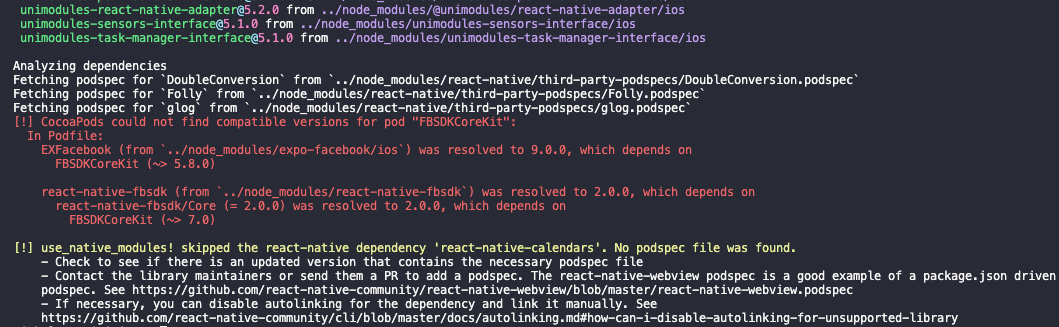
CocoaPods could not find compatible versions for pod "FBSDKCoreKit":
In Podfile:
EXFacebook (from ../node_modules/expo-facebook/ios) was resolved to 9.0.0, which depends on
FBSDKCoreKit (~> 5.8.0)
react-native-fbsdk (from ../node_modules/react-native-fbsdk) was resolved to 2.0.0, which depends on
react-native-fbsdk/Core (= 2.0.0) was resolved to 2.0.0, which depends on
FBSDKCoreKit (~> 7.0)
 theoneit
on 7 Oct 2020
theoneit
on 7 Oct 2020
Hi,
I don´t know what I should do to solve it here...
Two libs with same dependency but different versions...
CocoaPods could not find compatible versions for pod "FBSDKCoreKit":
In Podfile:
EXFacebook (from ../node_modules/expo-facebook/ios) was resolved to 9.0.0, which depends on
FBSDKCoreKit (~> 5.8.0)react-native-fbsdk (from ../node_modules/react-native-fbsdk) was resolved to 2.0.0, which depends on
react-native-fbsdk/Core (= 2.0.0) was resolved to 2.0.0, which depends on
FBSDKCoreKit (~> 7.0)
Try specifying the FBSDKCoreKit version manually in your podfile. LMK
gorbat-o
on 7 Oct 2020
Hi,
I don´t know what I should do to solve it here...
Two libs with same dependency but different versions...
CocoaPods could not find compatible versions for pod "FBSDKCoreKit":
In Podfile:
EXFacebook (from ../node_modules/expo-facebook/ios) was resolved to 9.0.0, which depends on
FBSDKCoreKit (~> 5.8.0)
react-native-fbsdk (from ../node_modules/react-native-fbsdk) was resolved to 2.0.0, which depends on
react-native-fbsdk/Core (= 2.0.0) was resolved to 2.0.0, which depends on
FBSDKCoreKit (~> 7.0)Try specifying the
FBSDKCoreKitversion manually in your podfile. LMK
Thanks for your reply.
It didn´t work. It created more issues with others libs
theoneit
on 7 Oct 2020
@theoneit mmh, is there breaking change in the version of FBSDKCoreKit for each library depending of the version? I guess yes since you said it is creating more issue.. :/ check if the EXFacebook have a PR/branch on going with an updated FBSDKCoreKit (7.0). if not, you could create a PR on the repo by update the FBSDKCoreKit library and fix anything that needs to be fix, and the specify your branch in your own repo and wait for your PR to be merge.
gorbat-o
on 7 Oct 2020
@theoneit mmh, is there breaking change in the version of
FBSDKCoreKitfor each library depending of the version? I guess yes since you said it is creating more issue.. :/ check if the EXFacebook have a PR/branch on going with an updatedFBSDKCoreKit(7.0). if not, you could create a PR on the repo by update theFBSDKCoreKitlibrary and fix anything that needs to be fix, and the specify your branch in your own repo and wait for your PR to be merge.
@gorbat-o let me try to explain what I got:
expo-facebook needs FBSDKCoreKit (> 5.8.0)
react-native-fbsdk needs FBSDKCoreKit (> 7.0)
Both packages are being used on the project (react native).
Android works fine but on ios I run 'pod install' then I got those errors
theoneit
on 7 Oct 2020
@theoneit
please could you share your podfile with the two pod lines?
gorbat-o
on 7 Oct 2020
@theoneit
please could you share your podfile with the two pod lines?
@gorbat-o Podfile does not have them... look those package in my package.json
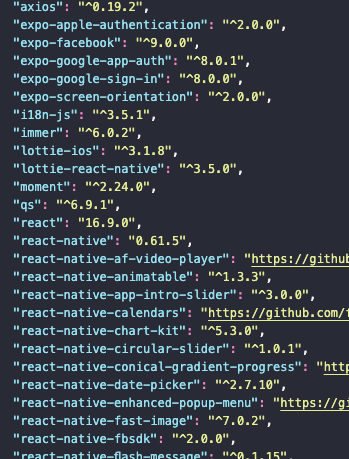
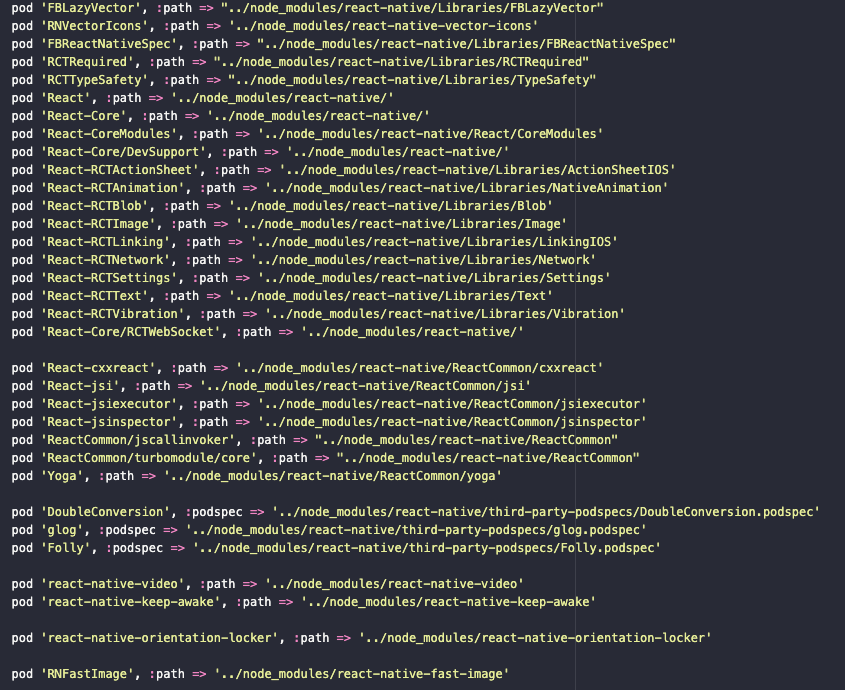
pod install
theoneit
on 8 Oct 2020
I am not really familiar with this type of environment.
Since it is local, I believe a quick fix here could be to edit the podspec from either EXFacebook or react-native-fbsdk and set the minimum version to either 5.8.0 or 7.0.0.
https://github.com/expo/expo/blob/master/packages/expo-facebook/ios/EXFacebook.podspec
edit this file or this one
https://github.com/facebook/react-native-fbsdk/blob/master/react-native-fbsdk.podspec
Do this only to unlock yourself atm until you find a cleaner way. If it doesn't work, I am unfortunately no help here :/
gorbat-o
on 8 Oct 2020
Yes, you're right. That should work for now.
Thanks a lot.
theoneit
on 8 Oct 2020
Related issues
 k06a
·
3Comments
k06a
·
3Comments
 iosdev-republicofapps
·
3Comments
iosdev-republicofapps
·
3Comments
 soleares
·
3Comments
soleares
·
3Comments
 luhui
·
3Comments
luhui
·
3Comments
 pallaviMN
·
3Comments
pallaviMN
·
3Comments