Cocoapods: Undefined symbols for architecture i386 even with --use-libraries
- [x ] I've read and understood the *CONTRIBUTING guidelines and have done my best effort to follow.
Report
What did you do?
pod spec lint --use-libraries cocoapods/libmorda.podspec --sources=https://github.com/igagis/cocoapods-repo.git,https://github.com/CocoaPods/Specs.git --verbose
What did you expect to happen?
Spec validates
What happened instead?
Spec did not validate. There were linker errors like "Undefined symbols for architecture i386" and for x86_64 too. It was complaining about missing symbols from all dependency pods.
piece of build log:
Undefined symbols for architecture x86_64:
  "_OBJC_CLASS_$_GLKViewController", referenced from:
      _OBJC_CLASS_$_ViewController in liblibmorda.a(main-2DAD2A9D83562E83.o)
  "_OBJC_METACLASS_$_GLKViewController", referenced from:
      _OBJC_METACLASS_$_ViewController in liblibmorda.a(main-2DAD2A9D83562E83.o)
  "morda::createApp(int, char const**, utki::Buf<unsigned char>)", referenced from:
      -[AppDelegate application:didFinishLaunchingWithOptions:] in liblibmorda.a(main-2DAD2A9D83562E83.o)
  "std::__1::basic_string<char, std::__1::char_traits<char>, std::__1::allocator<char> >::find(char, unsigned long) const", referenced from:
      (anonymous namespace)::Parser::getNamespace(std::__1::basic_string<char, std::__1::char_traits<char>, std::__1::allocator<char> > const&) in liblibsvgdom.a(dom.o)
  "std::__1::basic_string<char, std::__1::char_traits<char>, std::__1::allocator<char> >::rfind(char, unsigned long) const", referenced from:
      papki::File::ext() const in liblibpapki.a(File.o)
      papki::File::dir() const in liblibpapki.a(File.o)
      papki::File::notDir() const in liblibpapki.a(File.o)
  "std::__1::basic_string<char, std::__1::char_traits<char>, std::__1::allocator<char> >::compare(char const*) const", referenced from:
      papki::FSFile::listDirContents(unsigned long) const in liblibpapki.a(FSFile.o)
      morda::ResourceManager::findResourceInScript(std::__1::basic_string<char, std::__1::char_traits<char>, std::__1::allocator<char> > const&) in liblibmorda.a(ResourceManager.o)
CocoaPods Environment
Stack
   CocoaPods : 1.0.1
        Ruby : ruby 2.0.0p648 (2015-12-16 revision 53162) [universal.x86_64-darwin15]
    RubyGems : 2.0.14.1
        Host : Mac OS X 10.11.5 (15F34)
       Xcode : 7.3.1 (7D1014)
         Git : git version 2.7.4 (Apple Git-66)
Ruby lib dir : /System/Library/Frameworks/Ruby.framework/Versions/2.0/usr/lib
Repositories : igagis - https://github.com/igagis/cocoapods-repo.git @ 26d94c8bda341c6001f8e9877d5c94b9cfac134d
               master - https://github.com/CocoaPods/Specs.git @ e32b4165d722333dba6dce4f17962ead50d3dd21
Installation Source
Executable Path: /usr/local/bin/pod
Plugins
cocoapods-deintegrate  : 1.0.0
cocoapods-dependencies : 0.5.1
cocoapods-plugins      : 1.0.0
cocoapods-search       : 1.0.0
cocoapods-stats        : 1.0.0
cocoapods-trunk        : 1.0.0
cocoapods-try          : 1.0.0
Project that demonstrates the issue
Github project https://github.com/igagis/morda
- Clone https://github.com/igagis/morda.git
- checkout commit ce96b0040b185b8e68e2e067f5f3bb828a4abecb
- from the root project directory run 'pod spec lint' as above in "What did you do?" section
 igagis
All 17 comments
try add this to your podspec:
s.libraries = 'c++'
 skyline75489
on 25 Jul 2016
skyline75489
on 25 Jul 2016
@skyline75489 It almost solved it. There are only two unresolved externals left:
Undefined symbols for architecture i386:
  "_OBJC_CLASS_$_GLKViewController", referenced from:
      _OBJC_CLASS_$_ViewController in liblibmorda.a(main-4C88288672468D6C.o)
  "_OBJC_METACLASS_$_GLKViewController", referenced from:
      _OBJC_METACLASS_$_ViewController in liblibmorda.a(main-4C88288672468D6C.o)
I guess I need to link against GLKit framework also.
What does this s.libraries = 'c++' mean?
igagis
on 25 Jul 2016
issue solved
igagis
on 25 Jul 2016
Dear igagis,
I have exactly the same problem : undefined symbols far architecture x86_64 for an objective-c class and some C functions included in a static library.
Can you explain how you resolved the "_OBJC_CLASS_$" undefined symbol ?
Thanks a lot !
 ghost
on 9 Aug 2016
ghost
on 9 Aug 2016
@LeT0C You need to link against correct static library. Check your Library Search Path.
skyline75489
on 9 Aug 2016
@LeT0C I didn't have problems with Obj-c classes in my case, only with C++ classes, so I think your problem is a bit different than mine was.
And those which I had with Obj-c was that I didn't link against GLKit, which is unrelated to the original problem of this issue. In my case, the solution was just to add spec.frameworks = 'GLKit' to my podspec.
igagis
on 9 Aug 2016
@skyline75489
Thank you. My problem is that I'm trying to push a pod B depending on another pod A containing a static library. So when I "pod repo push" pod B, I don't have the possibility to set the Library Search Path, it should me automatic, right ?
Precision : everything was (and is still) working well with cocoapods 0.39.0, I started to have some troubles with cocoapods 1.0.0.
ghost
on 9 Aug 2016
@LeT0C I would suggest you to submit a separate issue and give example of your podspec there
igagis
on 9 Aug 2016
Hi can you explain how u resolved this error?
Undefined symbols for architecture i386:
"_OBJC_CLASS_$_GLKViewController", referenced from:
_OBJC_CLASS_$_ViewController in liblibmorda.a(main-4C88288672468D6C.o)
"_OBJC_METACLASS_$_GLKViewController", referenced from:
_OBJC_METACLASS_$_ViewController in liblibmorda.a(main-4C88288672468D6C.o)
 Girishav
on 17 Mar 2017
Girishav
on 17 Mar 2017
@Girishav try adding spec.frameworks = 'GLKit' to your podspec
igagis
on 17 Mar 2017
@Girishav I hanve the same problem,u resolved this error?
 xx-li
on 12 Sep 2017
xx-li
on 12 Sep 2017
@igagis
I have added
s.libraries = 'c++' in podspec and library search path is also correct pointing to folder where libXXX.a is present.
I am having the same error. Did you get any update?
Here is the error:
Undefined symbols for architecture x86_64:
"_OBJC_CLASS_$_XXX", referenced from:
objc-class-ref in libCoreServices.a(Logger.o)
ld: symbol(s) not found for architecture x86_64
clang: error: linker command failed with exit code 1 (use -v to see invocation)
 rahulOYO
on 11 Apr 2019
rahulOYO
on 11 Apr 2019
@rahulOYO What exactly does it print in those errors on place of XXX? I suppose you need to add a dependency on some framework, the one which provides those XXX Obj-C classes
igagis
on 11 Apr 2019
@igagis Thanks for responding.
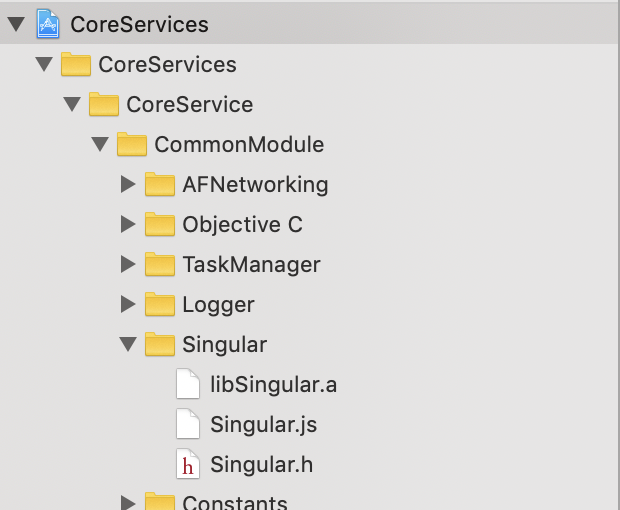
Singular is a library that is manually added in the project
Attaching Screenshot for reference.
It prints this.
defined symbols for architecture x86_64:
"_OBJC_CLASS_$_Singular", referenced from:
objc-class-ref in libCoreServices.a(Logger.o)
ld: symbol(s) not found for architecture x86_64
clang: error: linker command failed with exit code 1 (use -v to see invocation)

rahulOYO
on 11 Apr 2019
does build succeed if you do it manually from xcode? The library is 64bit, I suppose?
igagis
on 11 Apr 2019
yes it always run successfully from Xcode
rahulOYO
on 11 Apr 2019
Fixed Now: Needed to add vendors library path in podspec file
s.vendored_libraries = 'CoreServices/CoreService/Singular/libSingular.a'
rahulOYO
on 16 Apr 2019
Related issues
 pronebird
·
3Comments
pronebird
·
3Comments
 dawnnnnn
·
3Comments
dawnnnnn
·
3Comments
 intelliot
·
3Comments
intelliot
·
3Comments
 sonu5
·
3Comments
sonu5
·
3Comments
 spencerkohan
·
3Comments
spencerkohan
·
3Comments
Most helpful comment
try add this to your podspec: