Cocoapods: FBSDKLoginKit can not find headers under 1.0.0
The 1.0.0 beta breaks the Facebook SDK. If you wither include the pod FBSDKCoreKit you can not reference the header files using "#import
If you include the pod FBSDKLoginKit, it will not compile because it can not access the FBSDKCoreKit headers.
I downgraded to 0.39.0 and it works with no errors.
 fcobia
All 20 comments
Please share a project we can use to debug the issue :)
 segiddins
on 2 Jan 2016
segiddins
on 2 Jan 2016
All you have to do is create an empty swift project and add "pod 'FBSDKLoginKit" to the Podfile.
I did create an empty project that you can see: https://github.com/fcobia/CocoaPodsTest
fcobia
on 2 Jan 2016
Thanks!
segiddins
on 2 Jan 2016
Took a quick look, seems like the issue is that the wrong copy headers build phases are being generated, e.g a "Copy .. Public Headers" which copies most of the SDK's headers into "$(PUBLIC_HEADERS_FOLDER_PATH)/.."
 neonichu
on 3 Jan 2016
neonichu
on 3 Jan 2016
actually, Facebook’s podspec is wrong
it wouldn’t even lint using the beta
they have to push a new version with a fix
since they have headers that arent in the header_mappings_dir
segiddins
on 4 Jan 2016
ah, totally missed that they are using header_mappings_dir somehow. Might make sense to warn/error in that case?
neonichu
on 4 Jan 2016
The linter already checks for that
segiddins
on 4 Jan 2016
:+1:
neonichu
on 4 Jan 2016
(Already as in, as of the 1.0 beta)
segiddins
on 4 Jan 2016
Hi, I updated the header_mappings_dir one level higher which seems to resolve the issue initially,
pod 'FBSDKCoreKit', :podspec => 'https://raw.githubusercontent.com/chrisp-fb/facebook-ios-sdk/master/FBSDKCoreKit.podspec'
but it causes non-modular import errors with Cocoapods 0.39 (in a sample that uses FBSDKLoginKit and FBSDKShareKit as well)
"/Pods/FBSDKCoreKit/FBSDKCoreKit/FBSDKCoreKit/FBSDKAppLinkResolver.h:26:10: Include of non-modular header inside framework module ‘FBSDKCoreKit.FBSDKAppLinkResolver’ "
We've run into this before for different reasons (and it's odd that it breaks in 0.39). I tried a couple things include making Bolts an explicit of our LoginKit and ShareKit as well as removing header_mappings_dir in favor or proper private_header_files without luck. So, for now I'm going to simply set CLANG_ALLOW_NON_MODULAR_INCLUDES_IN_FRAMEWORK_MODULES to YES for our LoginKit and ShareKit specs to be compatible for both Cocoapods 0.39 and 1.0-beta2. Let me know if you have other ideas.
 chrisp-fb
on 12 Jan 2016
chrisp-fb
on 12 Jan 2016
@chrisp-fb this might just be an instance of #4420
neonichu
on 12 Jan 2016
Interesting thread - but there's definitely something with header_mappings_dir as well; i.e., I'm using Xcode 7.2 consistently. Our current published podspec works fine with Cocoapods 0.39. It fails with Cocoapods 1.0-beta2 with the header_mappings_dir validation. So modifying the header_mappings_dir fixes it for Cocoapods 1.0-beta2 but then causes the non-modular import error in 0.39.
chrisp-fb
on 12 Jan 2016
Yah, header_mappings_dir was deliberately changed for 1.0 since it was working inconsistently before, see #4267.
neonichu
on 12 Jan 2016
@chrisp-fb Is there any anywhere I can track the work on this?
 cday
on 27 Feb 2016
cday
on 27 Feb 2016
FBSDK was working for me in the Beta 1.0 release, but is now broken in the 1.0 release. I have FBSDKShareKit/CoreKit 4.11.0 installed but get the 'FBSDKShareKit/FBSDKShareKit.h' file not found
 btelintelo
on 17 May 2016
btelintelo
on 17 May 2016
Having this issue as well with Cocoapods 1.0 and FBSDKCoreKit 4.12.0 and 4.11.0.
 Noobish1
on 24 May 2016
Noobish1
on 24 May 2016
Having the same issue, please help!
 hijamoya
on 26 May 2016
hijamoya
on 26 May 2016
I'm not able to reproduce the problem and am able to create and build a new swift app with a Podfile that installs all the FBSDK pods correctly. Can you file a report to developers.facebook.com/bugs with additional details like the Podfile and versions of all the tools you're using? If possible, try to include a sample project that reproduces the issue.
I'm using Xcode 7.3.1 and Cocoapods 1.0.0
chrisp-fb
on 26 May 2016
This appears to be some issue between CocoaPods and XCode. I tried to reproduce the problem I was seeing with a new project and was unsuccessful. Given that I tried removing the FBSDK from my project entirely. Once the FBSDK was removed I built and now a different Pod was failing to build due to a missing header. At this point I started digging through the active CocoaPod issues and found #4950. The solution seems to be remove all pods, nuke pod cache, nuke XCode's derived data for the project, and reinstall Pods.
TL;DR
rm -rfd *.xcworkspace
rm -rfd Pods
rm Podfile.lock
pod cache clean --all
rm -rfd ~/Library/Developer/Xcode/DerivedData/*
pod install
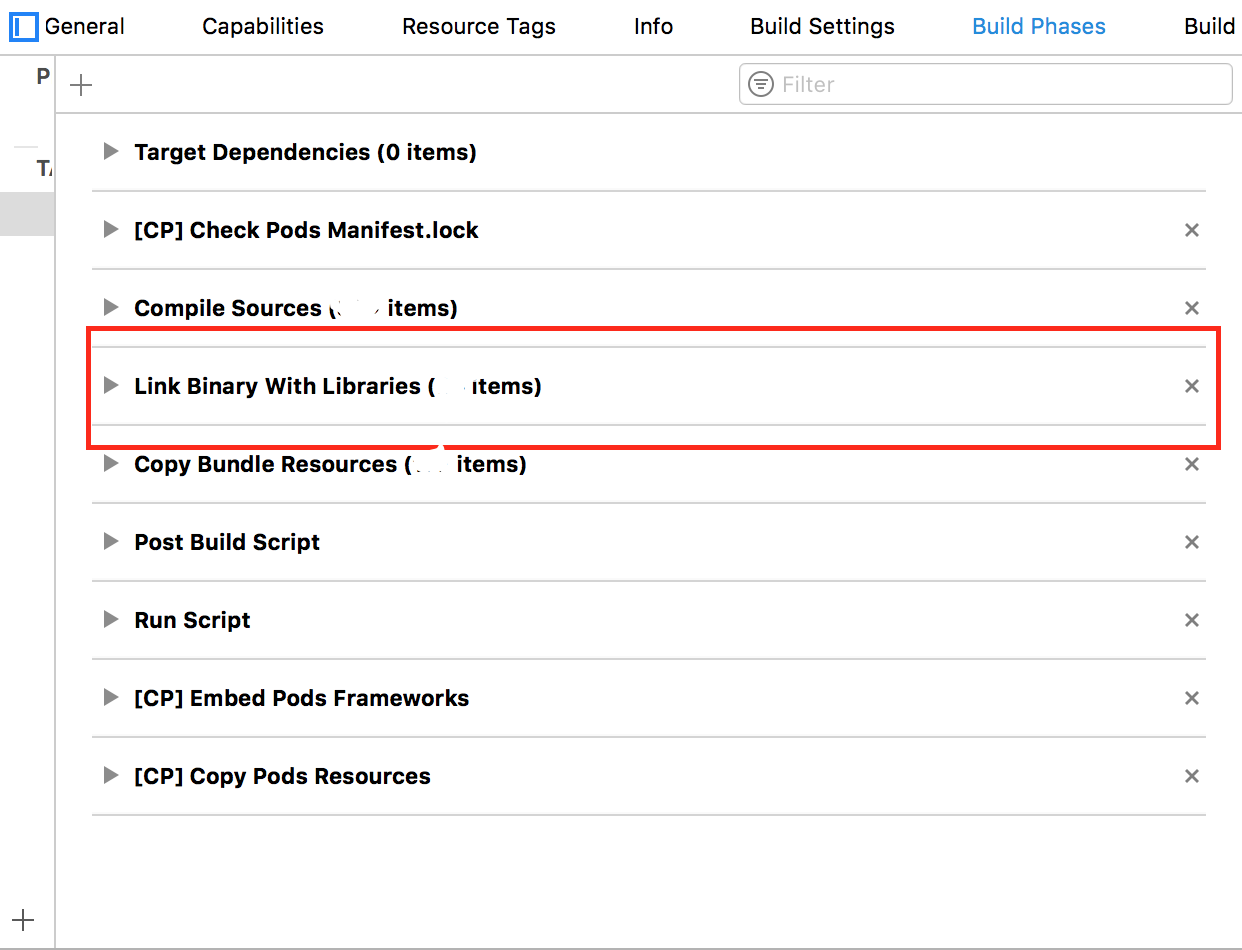
For people moving from Carthage to Cocoapods make sure to remove the Carthage references of the FBSDKCoreKit from the Link Binary With Libraries under Build Phases option.
 samratshaw
on 27 Jul 2017
samratshaw
on 27 Jul 2017
Related issues
 steffendsommer
·
3Comments
steffendsommer
·
3Comments
 iosdev-republicofapps
·
3Comments
iosdev-republicofapps
·
3Comments
 sonu5
·
3Comments
sonu5
·
3Comments
 gerchicov-bp
·
3Comments
gerchicov-bp
·
3Comments
 soleares
·
3Comments
soleares
·
3Comments
Most helpful comment
This appears to be some issue between CocoaPods and XCode. I tried to reproduce the problem I was seeing with a new project and was unsuccessful. Given that I tried removing the FBSDK from my project entirely. Once the FBSDK was removed I built and now a different Pod was failing to build due to a missing header. At this point I started digging through the active CocoaPod issues and found #4950. The solution seems to be remove all pods, nuke pod cache, nuke XCode's derived data for the project, and reinstall Pods.
TL;DR