Cockroach: broken/blank network diagnostics page
Describe the problem
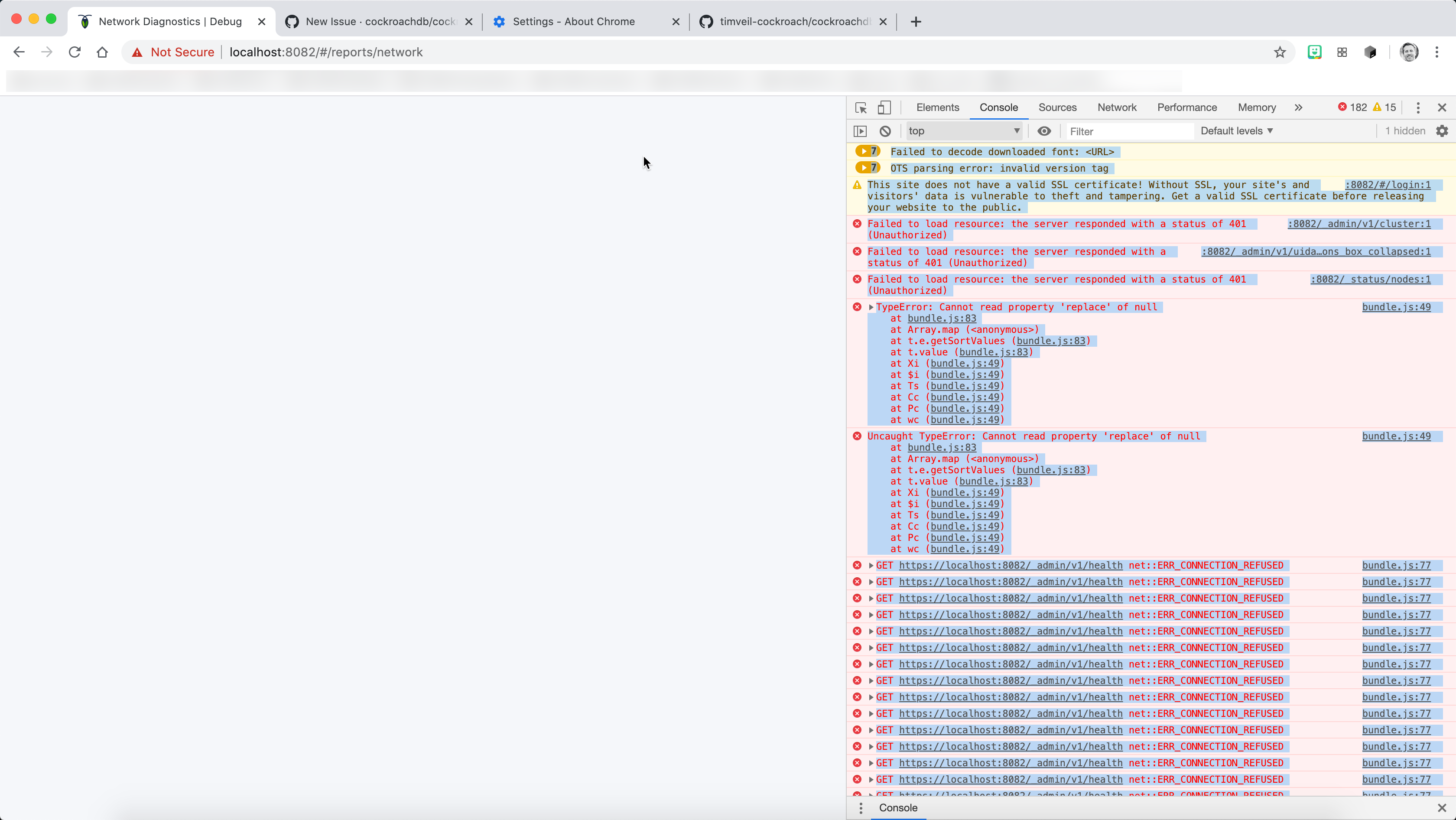
when navigating to the "Network Diagnostics" page the screen is entirely blank with the following errors in the Chrome developer console. I'm using Chrome Version 81.0.4044.129 (Official Build) (64-bit) on the latest mac os.
7Failed to decode downloaded font: <URL>
7OTS parsing error: invalid version tag
:8082/#/login:1 This site does not have a valid SSL certificate! Without SSL, your site's and visitors' data is vulnerable to theft and tampering. Get a valid SSL certificate before releasing your website to the public.
:8082/_admin/v1/cluster:1 Failed to load resource: the server responded with a status of 401 (Unauthorized)
:8082/_admin/v1/uidata?keys=version_dismissed&keys=clusterviz_instructions_box_collapsed:1 Failed to load resource: the server responded with a status of 401 (Unauthorized)
:8082/_status/nodes:1 Failed to load resource: the server responded with a status of 401 (Unauthorized)
bundle.js:49 TypeError: Cannot read property 'replace' of null
    at bundle.js:83
    at Array.map (<anonymous>)
    at t.e.getSortValues (bundle.js:83)
    at t.value (bundle.js:83)
    at Xi (bundle.js:49)
    at $i (bundle.js:49)
    at Ts (bundle.js:49)
    at Cc (bundle.js:49)
    at Pc (bundle.js:49)
    at wc (bundle.js:49)
gs @ bundle.js:49
bundle.js:49 Uncaught TypeError: Cannot read property 'replace' of null
    at bundle.js:83
    at Array.map (<anonymous>)
    at t.e.getSortValues (bundle.js:83)
    at t.value (bundle.js:83)
    at Xi (bundle.js:49)
    at $i (bundle.js:49)
    at Ts (bundle.js:49)
    at Cc (bundle.js:49)
    at Pc (bundle.js:49)
    at wc (bundle.js:49)
To Reproduce
I've attached the necessary docker/docker-compose files to reproduce the issue (see docker.zip). The code for timveil/cockroachdb-remote-client:unstable, which is referenced by the docker compose file, can be found here: https://github.com/timveil-cockroach/cockroachdb-remote-client/tree/unstable
Expected behavior
I expected to see the network diagnostics page or a clear explanation of why i can't.
Additional data / screenshots
Environment:
- CockroachDB version:
cockroachdb/cockroach-unstable:v20.1.0
Additional context
 timveil
All 7 comments
Hi @timveil, please add a C-ategory label to your issue. Check out the label system docs.
While you're here, please consider adding an A- label to help keep our repository tidy.
:owl: Hoot! I am a Blathers, a bot for CockroachDB. My owner is otan.
![blathers-crl[bot] picture](https://avatars2.githubusercontent.com/in/59700?v=4&s=40) blathers-crl[bot]
on 4 May 2020
blathers-crl[bot]
on 4 May 2020
whats also odd is that hitting the browser back button does not resolve the issue. I need to do a hard refresh to fix.
timveil
on 4 May 2020
cc @dhartunian and @elkmaster
 piyush-singh
on 4 May 2020
piyush-singh
on 4 May 2020
Seeing user reports of this breaking after the 20.1.0 launch. Will probably want to prioritize a fix for 20.1.1 if possible.
piyush-singh
on 12 May 2020
@dhartunian file repro steps for non-docker setup in here.
 dhartunian
on 14 May 2020
dhartunian
on 14 May 2020
@piyush-singh I was able to reproduce quite easily and have started isolating the problem. I think it's to do with missing "locality" tags on the nodes in the cluster. When a locality is blank, the page fails to render because it's assuming that a multi-node cluster will have localities defined.
I think this may need a 2-pass solution. One for 20.1.1 to get this page working again and a second pass to test and refine this feature with a wider variety of configurations.
I'll have a PR ready for Monday that can at least get it rendering more reliably.
dhartunian
on 15 May 2020
Excellent, thank you for the investigation! In general, most clusters do not have localities defined, so definitely makes sense to start adding tests there. I think this is another symptom of my preference to acceptance test on roachprod and using cockroach demo where these flags are set automatically.
piyush-singh
on 15 May 2020
Related issues
 awoods187
·
3Comments
awoods187
·
3Comments
 richardanaya
·
3Comments
richardanaya
·
3Comments
 lwsanty
·
4Comments
lwsanty
·
4Comments
 tim-o
·
3Comments
tim-o
·
3Comments
 rafiss
·
3Comments
rafiss
·
3Comments
Most helpful comment
@piyush-singh I was able to reproduce quite easily and have started isolating the problem. I think it's to do with missing "locality" tags on the nodes in the cluster. When a locality is blank, the page fails to render because it's assuming that a multi-node cluster will have localities defined.
I think this may need a 2-pass solution. One for 20.1.1 to get this page working again and a second pass to test and refine this feature with a wider variety of configurations.
I'll have a PR ready for Monday that can at least get it rendering more reliably.