Cockroach: How to force start cockroach insecure statefulset with istio mutual TLS authentication? Error: connection refused
I have a issue with cockroach run under GKE with istio install. It failed connect using "cockroach sql --insecure"
I followed link https://github.com/cockroachdb/cockroach/tree/master/cloud/kubernetes to start statefulset on kubernetes cluster(with istio install)
It's running
Every 2.0s:
kubectl get pods -n cockroachdb-ns                                                                                                                                      Mon Oct 30 16:05:03 2017

NAME            READY     STATUS    RESTARTS   AGE
cockroachdb-0   2/2       Running   0          5h
cockroachdb-1   2/2       Running   0          5h
cockroachdb-2   2/2       Running   0          5h
kubectl logs cockroachdb-0 cockroachdb -n cockroachdb-ns

+ CRARGS=("start" "--logtostderr" "--insecure" "--host" "$(hostname -f)" "--http-host" "0.0.0.0")
++ hostname -f
++ hostname
+ '[' '!' cockroachdb-0 == cockroachdb-0 ']'
+ '[' -e /cockroach/cockroach-data/cluster_exists_marker ']'
+ exec /cockroach/cockroach start --logtostderr --insecure --host cockroachdb-0.cockroachdb.cockroachdb-ns.svc.cluster.local --http-host 0.0.0.0
W171030 17:32:11.427643 1 cli/start.go:777  **RUNNING IN INSECURE MODE!**

- Your cluster is open for any client that can access cockroachdb-0.cockroachdb.cockroachdb-ns.svc.cluster.local.
- Any user, even root, can log in without providing a password.
- Any user, connecting as root, can read or write any data in your cluster.
- There is no network encryption nor authentication, and thus no confidentiality.

Check out how to secure your cluster: https://www.cockroachlabs.com/docs/stable/secure-a-cluster.html
I171030 17:32:11.429089 1 server/config.go:312  available memory from cgroups (8.0 EiB) exceeds system memory 3.6 GiB, using system memory
W171030 17:32:11.429157 1 cli/start.go:697  Using the default setting for --cache (128 MiB).
  A significantly larger value is usually needed for good performance.
  If you have a dedicated server a reasonable setting is --cache=25% (926 MiB).
I171030 17:32:11.457274 1 cli/start.go:785  CockroachDB CCL v1.1.0 (linux amd64, built 2017/10/12 14:50:18, go1.8.3)
I171030 17:32:11.557959 1 server/config.go:312  available memory from cgroups (8.0 EiB) exceeds system memory 3.6 GiB, using system memory
I171030 17:32:11.558127 1 server/config.go:425  system total memory: 3.6 GiB
I171030 17:32:11.558293 1 server/config.go:427  server configuration:
max offset                500000000
cache size                128 MiB
SQL memory pool size      128 MiB
scan interval             10m0s
scan max idle time        200ms
metrics sample interval   10s
event log enabled         true
linearizable              false
I171030 17:32:11.558447 13 cli/start.go:503  starting cockroach node
I171030 17:32:11.563819 13 storage/engine/rocksdb.go:411  opening rocksdb instance at "/cockroach/cockroach-data/local"
I171030 17:32:11.603856 13 storage/engine/rocksdb.go:411  opening rocksdb instance at "/cockroach/cockroach-data"
I171030 17:32:11.625439 13 server/config.go:528  [n?] 1 storage engine initialized
I171030 17:32:11.625650 13 server/config.go:530  [n?] RocksDB cache size: 128 MiB
I171030 17:32:11.625690 13 server/config.go:530  [n?] store 0: RocksDB, max size 0 B, max open file limit 1043576
I171030 17:32:11.689320 13 server/node.go:344  [n?] **** cluster 1dbff390-bb71-429e-a79f-65963196ee7d has been created
I171030 17:32:11.689359 13 server/server.go:835  [n?] **** add additional nodes by specifying --join=cockroachdb-0.cockroachdb.cockroachdb-ns.svc.cluster.local:26257
I171030 17:32:11.693574 13 storage/store.go:1199  [n1,s1] [n1,s1]: failed initial metrics computation: [n1,s1]: system config not yet available
I171030 17:32:11.693785 13 server/node.go:461  [n1] initialized store [n1,s1]: disk (capacity=976 MiB, available=906 MiB, used=16 KiB, logicalBytes=3.2 KiB), ranges=1, leases=0, writes=0.00, bytesPerReplica={p10=3266.00 p25=3266.00 p50=3266.00 p75=3266.00 p90=3266.00}, writesPerReplica={p10=0.00 p25=0.00 p50=0.00 p75=0.00 p90=0.00}
I171030 17:32:11.693813 13 server/node.go:326  [n1] node ID 1 initialized
I171030 17:32:11.693919 13 gossip/gossip.go:327  [n1] NodeDescriptor set to node_id:1 address:<network_field:"tcp" address_field:"cockroachdb-0.cockroachdb.cockroachdb-ns.svc.cluster.local:26257" > attrs:<> locality:<> ServerVersion:<major_val:1 minor_val:0 patch:0 unstable:3 >
I171030 17:32:11.694027 13 storage/stores.go:303  [n1] read 0 node addresses from persistent storage
I171030 17:32:11.694149 13 server/node.go:606  [n1] connecting to gossip network to verify cluster ID...
I171030 17:32:11.700556 13 server/node.go:631  [n1] node connected via gossip and verified as part of cluster "1dbff390-bb71-429e-a79f-65963196ee7d"
I171030 17:32:11.700597 13 server/node.go:403  [n1] node=1: started with [<no-attributes>=/cockroach/cockroach-data] engine(s) and attributes []
I171030 17:32:11.768784 70 storage/replica_command.go:2716  [split,n1,s1,r1/1:/M{in-ax}] initiating a split of this range at key /System/"" [r2]
I171030 17:32:11.965298 13 sql/executor.go:408  [n1] creating distSQLPlanner with address {tcp cockroachdb-0.cockroachdb.cockroachdb-ns.svc.cluster.local:26257}
E171030 17:32:12.054979 71 storage/queue.go:656  [replicate,n1,s1,r1/1:/{Min-System/}] range requires a replication change, but lacks a quorum of live replicas (0/1)
I171030 17:32:12.075802 13 server/server.go:945  [n1] starting http server at 0.0.0.0:8080
I171030 17:32:12.075953 13 server/server.go:946  [n1] starting grpc/postgres server at cockroachdb-0.cockroachdb.cockroachdb-ns.svc.cluster.local:26257
I171030 17:32:12.075987 13 server/server.go:947  [n1] advertising CockroachDB node at cockroachdb-0.cockroachdb.cockroachdb-ns.svc.cluster.local:26257
W171030 17:32:12.076046 13 sql/jobs/registry.go:156  [n1] unable to get node liveness: node not in the liveness table
I171030 17:32:12.104170 13 sql/event_log.go:102  [n1] Event: "alter_table", target: 12, info: {TableName:eventlog Statement:ALTER TABLE system.eventlog ALTER COLUMN "uniqueID" SET DEFAULT uuid_v4() User:node MutationID:0 CascadeDroppedViews:[]}
I171030 17:32:12.115588 13 sql/lease.go:342  [n1] publish: descID=12 (eventlog) version=2 mtime=2017-10-30 17:32:12.115377279 +0000 UTC
I171030 17:32:12.156344 70 storage/replica_command.go:2716  [split,n1,s1,r2/1:/{System/-Max}] initiating a split of this range at key /System/NodeLiveness [r3]
E171030 17:32:12.179447 54 storage/replica_proposal.go:538  [n1,s1,r2/1:/{System/-Max}] could not load SystemConfig span: must retry later due to intent on SystemConfigSpan
W171030 17:32:12.183483 239 storage/intent_resolver.go:332  [n1,s1,r3/1:/{System/NodeL…-Max}]: failed to push during intent resolution: failed to push "sql txn implicit" id=7d6aac47 key=/Table/SystemConfigSpan/Start rw=true pri=0.05680644 iso=SERIALIZABLE stat=PENDING epo=0 ts=1509384732.152291503,0 orig=1509384732.152291503,0 max=1509384732.152291503,0 wto=false rop=false seq=7
I171030 17:32:12.196852 13 sql/event_log.go:102  [n1] Event: "set_cluster_setting", target: 0, info: {SettingName:diagnostics.reporting.enabled Value:true User:node}
I171030 17:32:12.225025 13 sql/event_log.go:102  [n1] Event: "set_cluster_setting", target: 0, info: {SettingName:version Value:1.0-3 User:node}
I171030 17:32:12.239060 13 sql/event_log.go:102  [n1] Event: "set_cluster_setting", target: 0, info: {SettingName:trace.debug.enable Value:false User:node}
I171030 17:32:12.248155 13 server/server.go:1089  [n1] done ensuring all necessary migrations have run
I171030 17:32:12.248260 13 server/server.go:1091  [n1] serving sql connections
I171030 17:32:12.248415 13 cli/start.go:582  node startup completed:
CockroachDB node starting at 2017-10-30 17:32:12.248318556 +0000 UTC (took 0.9s)
build:      CCL v1.1.0 @ 2017/10/12 14:50:18 (go1.8.3)
admin:      http://0.0.0.0:8080
sql:        postgresql://[email protected]:26257?application_name=cockroach&sslmode=disable
logs:       /cockroach/cockroach-data/logs
store[0]:   path=/cockroach/cockroach-data
status:     initialized new cluster
clusterID:  1dbff390-bb71-429e-a79f-65963196ee7d
nodeID:     1
I171030 17:32:12.276049 315 sql/event_log.go:102  [n1] Event: "node_join", target: 1, info: {Descriptor:{NodeID:1 Address:{NetworkField:tcp AddressField:cockroachdb-0.cockroachdb.cockroachdb-ns.svc.cluster.local:26257} Attrs: Locality: ServerVersion:1.0-3} ClusterID:1dbff390-bb71-429e-a79f-65963196ee7d StartedAt:1509384731700570261 LastUp:1509384731700570261}
I171030 17:32:12.283920 70 storage/replica_command.go:2716  [split,n1,s1,r3/1:/{System/NodeL…-Max}] initiating a split of this range at key /System/NodeLivenessMax [r4]
I171030 17:32:12.313276 70 storage/replica_command.go:2716  [split,n1,s1,r4/1:/{System/NodeL…-Max}] initiating a split of this range at key /System/tsd [r5]
I171030 17:32:12.341291 70 storage/replica_command.go:2716  [split,n1,s1,r5/1:/{System/tsd-Max}] initiating a split of this range at key /System/"tse" [r6]
I171030 17:32:12.366075 70 storage/replica_command.go:2716  [split,n1,s1,r6/1:/{System/tse-Max}] initiating a split of this range at key /Table/SystemConfigSpan/Start [r7]
I171030 17:32:12.389927 70 storage/replica_command.go:2716  [split,n1,s1,r7/1:/{Table/System…-Max}] initiating a split of this range at key /Table/11 [r8]
I171030 17:32:12.414481 70 storage/replica_command.go:2716  [split,n1,s1,r8/1:/{Table/11-Max}] initiating a split of this range at key /Table/12 [r9]
I171030 17:32:12.438495 70 storage/replica_command.go:2716  [split,n1,s1,r9/1:/{Table/12-Max}] initiating a split of this range at key /Table/13 [r10]
I171030 17:32:12.463358 70 storage/replica_command.go:2716  [split,n1,s1,r10/1:/{Table/13-Max}] initiating a split of this range at key /Table/14 [r11]
I171030 17:32:12.486815 70 storage/replica_command.go:2716  [split,n1,s1,r11/1:/{Table/14-Max}] initiating a split of this range at key /Table/15 [r12]
I171030 17:32:12.522748 70 storage/replica_command.go:2716  [split,n1,s1,r12/1:/{Table/15-Max}] initiating a split of this range at key /Table/16 [r13]
I171030 17:32:12.560342 70 storage/replica_command.go:2716  [split,n1,s1,r13/1:/{Table/16-Max}] initiating a split of this range at key /Table/17 [r14]
I171030 17:32:12.597999 70 storage/replica_command.go:2716  [split,n1,s1,r14/1:/{Table/17-Max}] initiating a split of this range at key /Table/18 [r15]
I171030 17:32:12.626744 70 storage/replica_command.go:2716  [split,n1,s1,r15/1:/{Table/18-Max}] initiating a split of this range at key /Table/19 [r16]
I171030 17:32:21.855919 78 storage/store.go:4174  [n1,s1] sstables (read amplification = 0):
I171030 17:32:21.857009 78 storage/store.go:4175  [n1,s1]
** Compaction Stats [default] **
Level    Files   Size     Score Read(GB)  Rn(GB) Rnp1(GB) Write(GB) Wnew(GB) Moved(GB) W-Amp Rd(MB/s) Wr(MB/s) Comp(sec) Comp(cnt) Avg(sec) KeyIn KeyDrop
----------------------------------------------------------------------------------------------------------------------------------------------------------
 Sum      0/0    0.00 KB   0.0      0.0     0.0      0.0       0.0      0.0       0.0   0.0      0.0      0.0         0         0    0.000       0      0
 Int      0/0    0.00 KB   0.0      0.0     0.0      0.0       0.0      0.0       0.0   0.0      0.0      0.0         0         0    0.000       0      0
When inside one of pods, I tried
root@cockroachdb-0:/cockroach# ./cockroach sql --insecure --host $(hostname -f)
# Welcome to the cockroach SQL interface.
# All statements must be terminated by a semicolon.
# To exit: CTRL + D.
#
Error: unable to connect or connection lost.

Please check the address and credentials such as certificates (if attempting to
communicate with a secure cluster).

unexpected EOF
Failed running "sql"
I want to using istio mutual TLS authentication with cockroach insecure model. Need help.
 Waterwolf-C4
All 23 comments
Does it work for you without the Istio mutual TLS authentication? I don't think anyone on our team is particularly familiar with Istio, so we may not be in a great position to help you with issues caused by it.
 a-robinson
on 31 Oct 2017
a-robinson
on 31 Oct 2017
I might try setting up crdb+istio-auth over the weekend and let you know how it goes, but some official docs from the team would be fantastic
edit: no friggin' way to find space for this in the next couple of weeks, but I'll update this if I get the time to do it
 andreis
on 22 Nov 2017
andreis
on 22 Nov 2017
Same problem here. Tried it with Mutual TLS and also without it, but no luck so far.
@Waterwolf-C4 did you find a solution?
 SebastianM
on 22 Dec 2017
SebastianM
on 22 Dec 2017
Follow latest link https://www.cockroachlabs.com/docs/stable/orchestrate-cockroachdb-with-kubernetes.html
Without Mutual TLS either secure mode or insecure mode works.@SebastianM
With Mutual TLS i tired cockroach secure mode get error when using build-in SQL pods
error message:
Error: pq: SSL is not enabled on the server
Failed running "sql"
it seems Mutual TLS is conflict with Cockroach Certs.
when i start cockroach insecure mode with mutual TLS using build-in sql connect. Logs as Error: pq: node is running secure mode, SSL connection required. (ck running in insecure mode but it detect mutual tls and grpc port communicate at ssl mode)
Waterwolf-C4
on 27 Dec 2017
Edit: I just read the issue topic, and it isn't exactly relevant since I'm using the Secure CRDB installation.
Hey guys!
I'm working on this issue right now, I really want to get CRDB working internally with Istio.
Some pain points:
- Istio's Envyor sidecar does not support apps with multiple services; CRDB expects multiple services for inter-cluster and intra-cluster communication.
Service association: The pod must belong to a single Kubernetes Service (pods that belong to multiple services are not supported as of now).
https://istio.io/docs/setup/kubernetes/sidecar-injection.html
In the meatime, you can follow that doc and add
spec:
  template:
    metadata:
      annotations:
        sidecar.istio.io/inject: "false"
to the statefulset's podtemplate to keep the Istio Autoinjector from creating sidecars on your cockroachdb pods.
Yeah, it'd be nice to have cockroachdb sidecarred with Istio, but it's not going to happen until the
sidecar supports pods with multiple Services.
- When using the install guide, the name of the port for "26257" is "grpc", which causes the Istio sidecar to do _something_, I'm not sure what, to connections to that service's port.
Changing that "grpc" port name from "grpc" to "cockroachdb" causes Envoy to just treat it like TCP, which fixes any "Error: pq: SSL is not enabled on the server" errors.
What I have so far:
NAME                                                   AGE       REQUESTOR                                   CONDITION
default.client.root                                    55m       system:serviceaccount:default:cockroachdb   Approved,Issued
default.node.cockroachdb-0                             59m       system:serviceaccount:default:cockroachdb   Approved,Issued
default.node.cockroachdb-1                             59m       system:serviceaccount:default:cockroachdb   Approved,Issued
default.node.cockroachdb-2                             59m       system:serviceaccount:default:cockroachdb   Approved,Issued
NAME                                                              READY     STATUS    RESTARTS   AGE
cockroachdb-0                                                     1/1       Running   0          1m
cockroachdb-1                                                     1/1       Running   0          3m
cockroachdb-2                                                     1/1       Running   0          4m
cockroachdb-client-secure                                         2/2       Running   0          30m
cockroachdb-client-secure is side-carred.
» kubectl exec -it cockroachdb-client-secure -- ./cockroach sql --certs-dir=/cockroach-certs --host=cockroachdb-public
Defaulting container name to cockroachdb-client.
Use 'kubectl describe pod/cockroachdb-client-secure' to see all of the containers in this pod.
# Welcome to the cockroach SQL interface.
# All statements must be terminated by a semicolon.
# To exit: CTRL + D.
#
# Server version: CockroachDB CCL v2.0.0 (x86_64-unknown-linux-gnu, built 2018/04/03 20:56:09, go1.10) (same version as client)
# Cluster ID: f39fde43-ab26-46f1-b5e4-9b6b096c964c
#
# Enter \? for a brief introduction.
#
warning: no current database set. Use SET database = <dbname> to change, CREATE DATABASE to make a new database.
root@cockroachdb-public:26257/>
This resolves the main issue I was having with sidecarred apps not being able to connect to CRDB.
 kminehart
on 20 Apr 2018
kminehart
on 20 Apr 2018
Awesome work, @kminehart!
a-robinson
on 20 Apr 2018
@kminehart I followed your work and was able to connect to cockroachdb pods from the client with sidecar. When using cluster-init-secure.yaml to initialize the cockroach cluster, I noticed the cluster-init-secure pod hanging with 1/2 containers being ready. Despite this, it appears the job completed successfully and cockroach was initialized. Did you run into the same issue or make changes to cluster-init-secure.yaml to prevent auto injection?
 bnate
on 20 Apr 2018
bnate
on 20 Apr 2018
Yeah, the problem there is that the "istio-proxy" container never terminates, resulting in a Job that never ends. You'll have the same issue with cloudsql-proxy if you use Google Cloud SQL.
Under spec you can add:
template:
metadata:
annotations:
sidecar.istio.io/inject: "false"
(https://istio.io/docs/setup/kubernetes/sidecar-injection.html)
to prevent automatic sidecar injection. The idea here is that the pod (and not the job, which is why you're editing the metadata under template) will obtain the metadata.annotations["sidecar.istio.io/inject"] property.
This _should_ work, I can't test it as I'm not on my work computer right now and won't be until Monday.
I pulled this from https://raw.githubusercontent.com/cockroachdb/cockroach/master/cloud/kubernetes/cluster-init-secure.yaml
apiVersion: batch/v1
kind: Job
metadata:
name: cluster-init-secure
labels:
app: cockroachdb
spec:
  template:
    metadata:
      annotations:
        sidecar.istio.io/inject: "false"
spec:
serviceAccountName: cockroachdb
initContainers:
# The init-certs container sends a certificate signing request to the
# kubernetes cluster.
# You can see pending requests using: kubectl get csr
# CSRs can be approved using: kubectl certificate approve <csr name>
#
# In addition to the client certificate and key, the init-certs entrypoint will symlink
# the cluster CA to the certs directory.
- name: init-certs
image: cockroachdb/cockroach-k8s-request-cert:0.3
imagePullPolicy: IfNotPresent
command:
- "/bin/ash"
- "-ecx"
- "/request-cert -namespace=${POD_NAMESPACE} -certs-dir=/cockroach-certs -type=client -user=root -symlink-ca-from=/var/run/secrets/kubernetes.io/serviceaccount/ca.crt"
env:
- name: POD_NAMESPACE
valueFrom:
fieldRef:
fieldPath: metadata.namespace
volumeMounts:
- name: client-certs
mountPath: /cockroach-certs
containers:
- name: cluster-init
image: cockroachdb/cockroach:v2.0.0
imagePullPolicy: IfNotPresent
volumeMounts:
- name: client-certs
mountPath: /cockroach-certs
command:
- "/cockroach/cockroach"
- "init"
- "--certs-dir=/cockroach-certs"
- "--host=cockroachdb-0.cockroachdb"
restartPolicy: OnFailure
volumes:
- name: client-certs
emptyDir: {}
We have a several jobs in our cluster for migrations and backups that are deployed with these same annotations, so I have no doubt that this would work.
If you've deployed the init-cluster job without the automatic sidecar inject, you'll need to remember to delete that pod, because it's probably still running
kminehart
on 20 Apr 2018
I tried that myself, but when running kubectl apply -f cluster-init-secure.yaml, I receive the following error:
The Job "cluster-init-secure" is invalid: spec.template: Invalid value: core.PodTemplateSpec{ObjectMeta:v1.ObjectMeta{Name:"", GenerateName:"", Namespace:"", SelfLink:"", UID:"", ResourceVersion:"", Generation:0, CreationTimestamp:v1.Time{Time:time.Time{wall:0x0, ext:0, loc:(*time.Location)(nil)}}, DeletionTimestamp:(*v1.Time)(nil), DeletionGracePeriodSeconds:(*int64)(nil), Labels:map[string]string{"job-name":"cluster-init-secure", "controller-uid":"b7750d9f-44d2-11e8-b1b9-42010a8a001f"}, Annotations:map[string]string{"sidecar.istio.io/inject":"false"}, OwnerReferences:[]v1.OwnerReference(nil), Initializers:(*v1.Initializers)(nil), Finalizers:[]string(nil), ClusterName:""}, Spec:core.PodSpec{Volumes:[]core.Volume{core.Volume{Name:"client-certs", VolumeSource:core.VolumeSource{HostPath:(*core.HostPathVolumeSource)(nil), EmptyDir:(*core.EmptyDirVolumeSource)(0xc42d364460), GCEPersistentDisk:(*core.GCEPersistentDiskVolumeSource)(nil), AWSElasticBlockStore:(*core.AWSElasticBlockStoreVolumeSource)(nil), GitRepo:(*core.GitRepoVolumeSource)(nil), Secret:(*core.SecretVolumeSource)(nil), NFS:(*core.NFSVolumeSource)(nil), ISCSI:(*core.ISCSIVolumeSource)(nil), Glusterfs:(*core.GlusterfsVolumeSource)(nil), PersistentVolumeClaim:(*core.PersistentVolumeClaimVolumeSource)(nil), RBD:(*core.RBDVolumeSource)(nil), Quobyte:(*core.QuobyteVolumeSource)(nil), FlexVolume:(*core.FlexVolumeSource)(nil), Cinder:(*core.CinderVolumeSource)(nil), CephFS:(*core.CephFSVolumeSource)(nil), Flocker:(*core.FlockerVolumeSource)(nil), DownwardAPI:(*core.DownwardAPIVolumeSource)(nil), FC:(*core.FCVolumeSource)(nil), AzureFile:(*core.AzureFileVolumeSource)(nil), ConfigMap:(*core.ConfigMapVolumeSource)(nil), VsphereVolume:(*core.VsphereVirtualDiskVolumeSource)(nil), AzureDisk:(*core.AzureDiskVolumeSource)(nil), PhotonPersistentDisk:(*core.PhotonPersistentDiskVolumeSource)(nil), Projected:(*core.ProjectedVolumeSource)(nil), PortworxVolume:(*core.PortworxVolumeSource)(nil), ScaleIO:(*core.ScaleIOVolumeSource)(nil), StorageOS:(*core.StorageOSVolumeSource)(nil)}}}, InitContainers:[]core.Container{core.Container{Name:"init-certs", Image:"cockroachdb/cockroach-k8s-request-cert:0.3", Command:[]string{"/bin/ash", "-ecx", "/request-cert -namespace=${POD_NAMESPACE} -certs-dir=/cockroach-certs -type=client -user=root -symlink-ca-from=/var/run/secrets/kubernetes.io/serviceaccount/ca.crt"}, Args:[]string(nil), WorkingDir:"", Ports:[]core.ContainerPort(nil), EnvFrom:[]core.EnvFromSource(nil), Env:[]core.EnvVar{core.EnvVar{Name:"POD_NAMESPACE", Value:"", ValueFrom:(*core.EnvVarSource)(0xc42d364540)}}, Resources:core.ResourceRequirements{Limits:core.ResourceList(nil), Requests:core.ResourceList(nil)}, VolumeMounts:[]core.VolumeMount{core.VolumeMount{Name:"client-certs", ReadOnly:false, MountPath:"/cockroach-certs", SubPath:"", MountPropagation:(*core.MountPropagationMode)(nil)}}, VolumeDevices:[]core.VolumeDevice(nil), LivenessProbe:(*core.Probe)(nil), ReadinessProbe:(*core.Probe)(nil), Lifecycle:(*core.Lifecycle)(nil), TerminationMessagePath:"/dev/termination-log", TerminationMessagePolicy:"File", ImagePullPolicy:"IfNotPresent", SecurityContext:(*core.SecurityContext)(nil), Stdin:false, StdinOnce:false, TTY:false}}, Containers:[]core.Container{core.Container{Name:"cluster-init", Image:"cockroachdb/cockroach:v2.0.0", Command:[]string{"/cockroach/cockroach", "init", "--certs-dir=/cockroach-certs", "--host=cockroachdb-0.cockroachdb"}, Args:[]string(nil), WorkingDir:"", Ports:[]core.ContainerPort(nil), EnvFrom:[]core.EnvFromSource(nil), Env:[]core.EnvVar(nil), Resources:core.ResourceRequirements{Limits:core.ResourceList(nil), Requests:core.ResourceList(nil)}, VolumeMounts:[]core.VolumeMount{core.VolumeMount{Name:"client-certs", ReadOnly:false, MountPath:"/cockroach-certs", SubPath:"", MountPropagation:(*core.MountPropagationMode)(nil)}}, VolumeDevices:[]core.VolumeDevice(nil), LivenessProbe:(*core.Probe)(nil), ReadinessProbe:(*core.Probe)(nil), Lifecycle:(*core.Lifecycle)(nil), TerminationMessagePath:"/dev/termination-log", TerminationMessagePolicy:"File", ImagePullPolicy:"IfNotPresent", SecurityContext:(*core.SecurityContext)(nil), Stdin:false, StdinOnce:false, TTY:false}}, RestartPolicy:"OnFailure", TerminationGracePeriodSeconds:(*int64)(0xc43ad7ad40), ActiveDeadlineSeconds:(*int64)(nil), DNSPolicy:"ClusterFirst", NodeSelector:map[string]string(nil), ServiceAccountName:"cockroachdb", AutomountServiceAccountToken:(*bool)(nil), NodeName:"", SecurityContext:(*core.PodSecurityContext)(0xc422b35240), ImagePullSecrets:[]core.LocalObjectReference(nil), Hostname:"", Subdomain:"", Affinity:(*core.Affinity)(nil), SchedulerName:"default-scheduler", Tolerations:[]core.Toleration(nil), HostAliases:[]core.HostAlias(nil), PriorityClassName:"", Priority:(*int32)(nil), DNSConfig:(*core.PodDNSConfig)(nil)}}: field isimmutable``
Although I'm content with things working the way they are now, any insight would be great.
bnate
on 20 Apr 2018
The error you're seeing, field isimmutable, while it may be ugly and bundled with a lot of useless information, means you're trying to modify an existing Job.
Make sure to either delete the old Job (even if none of its pods are running) or rename it.
kminehart
on 20 Apr 2018
@a-robinson There is an update to istio documentation for istio:
Service association: If a pod belongs to multiple Kubernetes services, the services cannot use the same port number for different protocols, for instance HTTP and TCP.
https://github.com/istio/istio.io/pull/1971
Is there any chance to run it inside istio now?
Insecure cockroachdb clusters are discouraged. Does is holds even with istio mutual tls, istio authorization and cockroachdb passwords? I'm asking because handling certificates isn't nice and makes setup for an app a little bit complicated. Furthermore, run it inside istio mutual tls (if it works some day), fells a little bit strange.
@kminehart @Waterwolf-C4 thank you very much for your input. Do you have any news on this topic?
 Bessonov
on 29 Jan 2019
Bessonov
on 29 Jan 2019
Interesting, after I've finished my previous comment, the insecure cluster goes up with istio authorization (but with "allow all" rule for testing).
Bessonov
on 29 Jan 2019
Found this one: https://github.com/cockroachdb/cockroach/issues/16188 . Yeah, that's a showstopper.
Bessonov
on 29 Jan 2019
Are there any new updates on this issue?
I tried following what was mentioned above by @kminehart and set the CRDB to install with istio side car injection set to false for the statefulsets and the init job. The statefulsets started after the certificate approval steps and the init job completed.
I then created the cockroachdb-client-secure with the istio side car injection. After the client-secure started I am trying to exec into it and connect to my public service for the statefulsets and getting errors.
NAME                                 READY   STATUS                  RESTARTS
cockroachdb-client-secure            2/2     Running                 0
zeroed-worm-cockroachdb-0            1/1     Running                 0
zeroed-worm-cockroachdb-1            1/1     Running                 0
zeroed-worm-cockroachdb-2            1/1     Running                 0
zeroed-worm-cockroachdb-init-8bnn9   0/1     Completed               0
I am attempting to run the client secure like this
kubectl -n poc-istio exec -it cockroachdb-client-secure -c cockroachdb-client  \
-- ./cockroach sql \
--certs-dir=/cockroach-certs \
--host=zeroed-worm-cockroachdb-public.poc-istio.svc.cluster.local
And getting the following result:
# Welcome to the cockroach SQL interface.
# All statements must be terminated by a semicolon.
# To exit: CTRL + D.
#
Error: cannot dial server.
Is the server running?
If the server is running, check --host client-side and --advertise server-side.

read tcp 10.20.9.86:38384->10.0.24.109:26257: read: connection reset by peer
Failed running "sql"
command terminated with exit code 1
I am not quite sure how to continue now.
 mmosttler
on 22 May 2019
mmosttler
on 22 May 2019
I'm still using @kminehart's solution. Have you changed the name of the GRPC port? In @kminehart's original response he says:
When using the install guide, the name of the port for "26257" is "grpc", which causes the Istio sidecar to do something, I'm not sure what, to connections to that service's port.
Changing that "grpc" port name from "grpc" to "cockroachdb" causes Envoy to just treat it like TCP, which fixes any "Error: pq: SSL is not enabled on the server" errors.
Both services and statefulset need their "grpc" ports renamed to "cockroachdb". This can be done quickly by doing a find and replace of all instances of "grpc" in https://github.com/cockroachdb/cockroach/blob/master/cloud/kubernetes/cockroachdb-statefulset-secure.yaml with "cockroachdb".
bnate
on 22 May 2019
@bnate thanks for the quick response. I used the helm charts for the install and thought the values I had set would update both the services and statefulsets. Now looking at the result it appears it only updates the services.
So I manually updated the statefulsets grpc port to cockroachdb. After the statefulset pods finished restarting I ran the same command for the secure client from above and got the same result as above.
possibly i need to start over on the install
mmosttler
on 22 May 2019
@mmosttler Are you running Istio with mTLS enabled? If so, you'll need to create a destination rule that targets the cockroachdb-public service, disabling mTLS.
This yaml should do it.
kind: "DestinationRule"
metadata:
  name: "crdb-no-mtls"
  namespace: "poc-istio"
spec:
  host: "zeroed-worm-cockroachdb-public.poc-istio.svc.cluster.local"
  trafficPolicy:
    tls:
      mode: DISABLE
Thank you that seems to have made a difference. I was able to connect crdb from the secure client.
Now to just get a spring data client to work as well...
mmosttler
on 22 May 2019
@kminehart One detail that may have been overlooked here is that using StatefulSets with headless service with istio-injection requires the creation of a ServiceEntry resource (with spec.location: MESH_INTERNAL) with a wildcard(*).service address listed in spec.hosts, eg:
apiVersion: networking.istio.io/v1alpha3
kind: ServiceEntry
metadata:
  name: svcEntry-name
  namespace: namespace
spec:
  hosts:
  - *.headlessSvcName.namespace.svc.cluster.local
  location: MESH_INTERNAL
  ports:
  - number: 7024               # some port
    name: grpc-headless        # use istio port naming conventions
    protocol: GRPC             # some protocol
  resolution: NONE
see this thread from istio issues: https://github.com/istio/istio/issues/10659
I am going to be giving this a shot this week, I will see if this maybe helps to get CRDB working with istio sidecar injection enabled. I may elect to use CRDB secure implementation without istio mTLS, as this seems redundant to CRDBs own built-in TLS flow. It is my understanding that having the istio sidecar injected provides other benefits, such as network policy enforcement, request routing, load balancing, telemetry, etc... 🤔
As for @kminehart 's comment about pods with multiple services not working: I have previously deployed a StatefulSet (not CRDB) with istio-injection that uses both a headless service (for app-internal communication) and a standard service (for load-balanced access from other services) on separate ports and that is working fine.
Make sure to name the ports using unique names, and according to istio port naming conventions, in {protocol-lowecasename} format: https://istio.io/docs/setup/kubernetes/additional-setup/requirements/
 mike-holberger
on 24 Jun 2019
mike-holberger
on 24 Jun 2019
I can confirm that it is possible to deploy cockroachDB in secure mode inside an istio-injected namespace without istio mTLS.
As I stated previously, statefulSet deployments with istio-injection require a separate service entry resource be deployed. Mine looks like this:
https://gist.github.com/mike-holberger/6ba7d8ec65934d0c4532bfaf12d9e516#file-svcentry-crdb-yaml
Deploy the service entry resource before deploying/initializing cockroachDB.
I have altered the deployment manifests provided in the cockroachDB install documentation slightly. I simply adjusted some of the port names and labeled all resources for namespace: crdb which is labeled for istio sidecar injection:
https://gist.github.com/mike-holberger/6ba7d8ec65934d0c4532bfaf12d9e516
I was able to deploy the test client command line and run through the test CRUDs from the install docs. I was also able to launch and view the web dashboard.
mike-holberger
on 7 Jul 2019
I'm also experiencing a similar issue and I'm not sure if that's 100% what's described in here.
I'm also trying to deploy cockroachdb in kubernetes with istio injection enabled using https://github.com/cockroachdb/cockroach/blob/master/cloud/kubernetes/cockroachdb-statefulset.yaml but I'm getting
failed to connect to `host=cockroachdb-public user=roach database=roach`: failed to receive message (unexpected EOF)
Trying to run (mentioned here https://github.com/cockroachdb/cockroach/tree/master/cloud/kubernetes#accessing-the-database):
kubectl run cockroachdb -it --image=cockroachdb/cockroach --rm --restart=Never
-- sql --insecure --host=cockroachdb-public
also fails with the following logs:
2020-06-21T13:39:12.598630282Z #
2020-06-21T13:39:12.598657069Z # Welcome to the CockroachDB SQL shell.
2020-06-21T13:39:12.598661394Z # All statements must be terminated by a semicolon.
2020-06-21T13:39:12.598664165Z # To exit, type: \q.
2020-06-21T13:39:12.598666821Z #
2020-06-21T13:39:12.599757844Z ERROR: cannot dial server.
2020-06-21T13:39:12.599770881Z Is the server running?
2020-06-21T13:39:12.599776622Z If the server is running, check --host client-side and --advertise server-side.
2020-06-21T13:39:12.599780976Z
2020-06-21T13:39:12.599785165Z dial tcp 10.96.21.65:26257: connect: connection refused
2020-06-21T13:39:12.599789907Z Failed running "sql"
What I want, is to make the connection successful regardless if that's with istio's mutual TLS on or off.
What's interesting my cluster's view looks like so in Kiali:
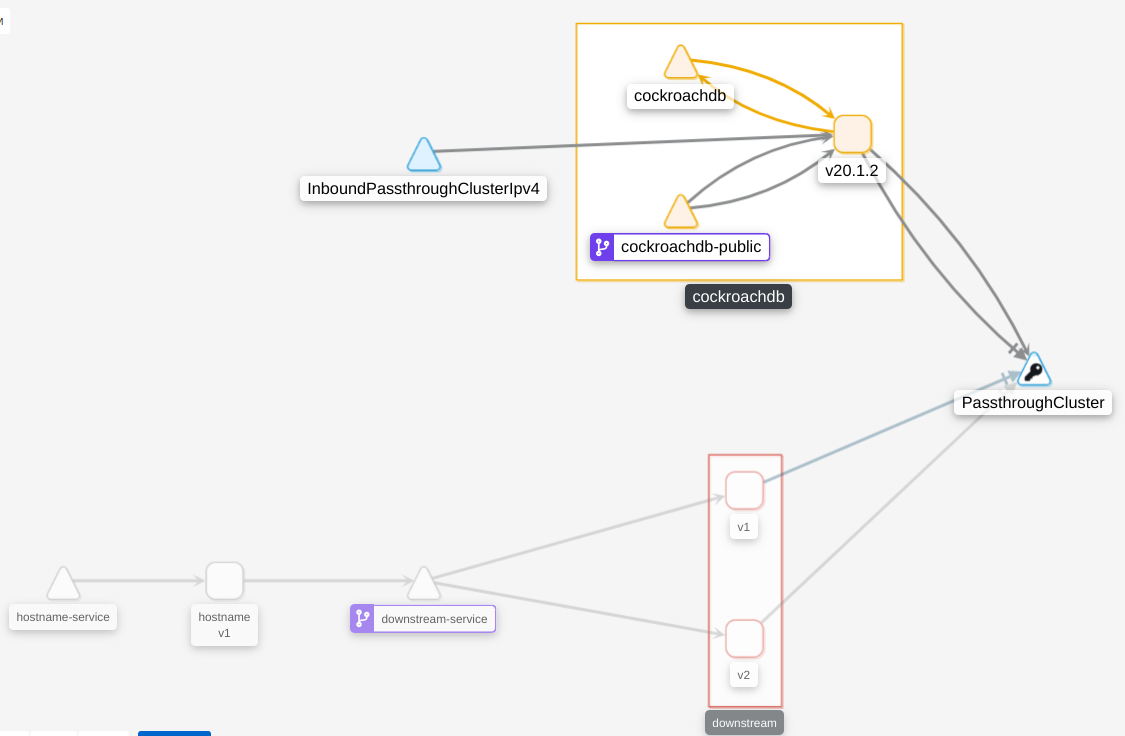
Adding istio's logs from downstream-service (which is supposed to connect to cockroachdb via cockroachdb-public)
2020-06-21T13:49:00.857610814Z 2020-06-21T13:49:00.857536Z  info    parsed scheme: ""
2020-06-21T13:49:00.857622208Z 2020-06-21T13:49:00.857556Z  info    scheme "" not registered, fallback to default scheme
2020-06-21T13:49:00.857655116Z 2020-06-21T13:49:00.857596Z  info    ccResolverWrapper: sending update to cc: {[{istiod.istio-system.svc:15012  <nil> 0 <nil>}] <nil> <nil>}
2020-06-21T13:49:00.857673478Z 2020-06-21T13:49:00.857610Z  info    ClientConn switching balancer to "pick_first"
2020-06-21T13:49:00.857677546Z 2020-06-21T13:49:00.857615Z  info    Channel switches to new LB policy "pick_first"
2020-06-21T13:49:00.857704927Z 2020-06-21T13:49:00.857644Z  info    Subchannel Connectivity change to CONNECTING
2020-06-21T13:49:00.857857266Z 2020-06-21T13:49:00.857822Z  info    sds SDS gRPC server for workload UDS starts, listening on "./etc/istio/proxy/SDS"
2020-06-21T13:49:00.857864158Z
2020-06-21T13:49:00.857901011Z 2020-06-21T13:49:00.857874Z  info    Starting proxy agent
2020-06-21T13:49:00.858168331Z 2020-06-21T13:49:00.858072Z  info    pickfirstBalancer: HandleSubConnStateChange: 0xc000e60c70, {CONNECTING <nil>}
2020-06-21T13:49:00.858185778Z 2020-06-21T13:49:00.858072Z  info    Opening status port 15020
2020-06-21T13:49:00.858190846Z
2020-06-21T13:49:00.85820345Z 2020-06-21T13:49:00.858149Z   info    Channel Connectivity change to CONNECTING
2020-06-21T13:49:00.858270872Z 2020-06-21T13:49:00.858159Z  info    Subchannel picks a new address "istiod.istio-system.svc:15012" to connect
2020-06-21T13:49:00.85827897Z 2020-06-21T13:49:00.858118Z   info    Received new config, creating new Envoy epoch 0
2020-06-21T13:49:00.858310875Z 2020-06-21T13:49:00.858027Z  info    sds Start SDS grpc server
2020-06-21T13:49:00.858365651Z 2020-06-21T13:49:00.858298Z  info    Epoch 0 starting
2020-06-21T13:49:00.863264481Z 2020-06-21T13:49:00.863176Z  info    Subchannel Connectivity change to READY
2020-06-21T13:49:00.863283355Z 2020-06-21T13:49:00.863224Z  info    pickfirstBalancer: HandleSubConnStateChange: 0xc000e60c70, {READY <nil>}
2020-06-21T13:49:00.863304576Z 2020-06-21T13:49:00.863232Z  info    Channel Connectivity change to READY
2020-06-21T13:49:00.903923764Z 2020-06-21T13:49:00.903755Z  info    Envoy command: [-c etc/istio/proxy/envoy-rev0.json --restart-epoch 0 --drain-time-s 45 --parent-shutdown-time-s 60 --service-cluster downstream.default --service-node sidecar~10.244.1.111~downstream-deployment-v2-55776d5f77-lwfnh.default~default.svc.cluster.local --max-obj-name-len 189 --local-address-ip-version v4 --log-format %Y-%m-%dT%T.%fZ   %l  envoy %n    %v -l warning --component-log-level misc:error --concurrency 2]
2020-06-21T13:49:00.978926971Z 2020-06-21T13:49:00.978743Z  warning envoy config    [bazel-out/k8-opt/bin/external/envoy/source/common/config/_virtual_includes/grpc_stream_lib/common/config/grpc_stream.h:92] StreamAggregatedResources gRPC config stream closed: 14, no healthy upstream
2020-06-21T13:49:00.978952388Z 2020-06-21T13:49:00.978802Z  warning envoy config    [bazel-out/k8-opt/bin/external/envoy/source/common/config/_virtual_includes/grpc_stream_lib/common/config/grpc_stream.h:54] Unable to establish new stream
2020-06-21T13:49:00.986331835Z 2020-06-21T13:49:00.986260Z  info    sds resource:default new connection
2020-06-21T13:49:00.986358506Z 2020-06-21T13:49:00.986324Z  info    sds Skipping waiting for ingress gateway secret
2020-06-21T13:49:01.084464333Z 2020-06-21T13:49:01.084381Z  info    cache   Root cert has changed, start rotating root cert for SDS clients
2020-06-21T13:49:01.084485909Z 2020-06-21T13:49:01.084413Z  info    cache   GenerateSecret default
2020-06-21T13:49:01.08455985Z 2020-06-21T13:49:01.084516Z   info    sds resource:default pushed key/cert pair to proxy
2020-06-21T13:49:01.659119526Z 2020-06-21T13:49:01.659044Z  info    sds resource:ROOTCA new connection
2020-06-21T13:49:01.659151619Z 2020-06-21T13:49:01.659117Z  info    sds Skipping waiting for ingress gateway secret
2020-06-21T13:49:01.659169961Z 2020-06-21T13:49:01.659144Z  info    cache   Loaded root cert from certificate ROOTCA
2020-06-21T13:49:01.659727135Z 2020-06-21T13:49:01.659208Z  info    sds resource:ROOTCA pushed root cert to proxy
2020-06-21T13:49:01.785183856Z 2020-06-21T13:49:01.785096Z  warning envoy filter    [src/envoy/http/authn/http_filter_factory.cc:83] mTLS PERMISSIVE mode is used, connection can be either plaintext or TLS, and client cert can be omitted. Please consider to upgrade to mTLS STRICT mode for more secure configuration that only allows TLS connection with client cert. See https://istio.io/docs/tasks/security/mtls-migration/
2020-06-21T13:49:01.786287015Z 2020-06-21T13:49:01.786241Z  warning envoy filter    [src/envoy/http/authn/http_filter_factory.cc:83] mTLS PERMISSIVE mode is used, connection can be either plaintext or TLS, and client cert can be omitted. Please consider to upgrade to mTLS STRICT mode for more secure configuration that only allows TLS connection with client cert. See https://istio.io/docs/tasks/security/mtls-migration/
2020-06-21T13:49:01.793090815Z 2020-06-21T13:49:01.793036Z  warning envoy filter    [src/envoy/http/authn/http_filter_factory.cc:83] mTLS PERMISSIVE mode is used, connection can be either plaintext or TLS, and client cert can be omitted. Please consider to upgrade to mTLS STRICT mode for more secure configuration that only allows TLS connection with client cert. See https://istio.io/docs/tasks/security/mtls-migration/
2020-06-21T13:49:01.795810504Z 2020-06-21T13:49:01.795760Z  warning envoy filter    [src/envoy/http/authn/http_filter_factory.cc:83] mTLS PERMISSIVE mode is used, connection can be either plaintext or TLS, and client cert can be omitted. Please consider to upgrade to mTLS STRICT mode for more secure configuration that only allows TLS connection with client cert. See https://istio.io/docs/tasks/security/mtls-migration/
2020-06-21T13:49:02.25427526Z 2020-06-21T13:49:02.254166Z   info    Envoy proxy is ready
2020-06-21T13:49:20.179460597Z [2020-06-21T13:49:19.161Z] "- - -" 0 - "-" "-" 35 66 1018 - "-" "-" "-" "-" "10.96.21.65:26257" PassthroughCluster 10.244.1.111:53168 10.96.21.65:26257 10.244.1.111:53166 - -
2020-06-21T13:49:50.178941507Z [2020-06-21T13:49:46.179Z] "- - -" 0 - "-" "-" 35 66 999 - "-" "-" "-" "-" "10.96.21.65:26257" PassthroughCluster 10.244.1.111:53900 10.96.21.65:26257 10.244.1.111:53898 - -
10.96.21.65 is the IP assigned to cockroachdb-public.
 pmalek
on 21 Jun 2020
pmalek
on 21 Jun 2020
Based on what @mike-holberger wrote last year, it sounds like if you've deployed istio with mTLS disabled, you should be able to connect using the modified cockroach manifests that he provided. Have you tried using his setup yet?
bnate
on 21 Jun 2020
Ok, so I've figured it out thanks to @mike-holberger's post at https://discuss.istio.io/t/sucessful-deployment-of-cockroachdb-in-istio-injected-namespace/3010/2.
Basically the thing that made it work for me was the change from grpc to tcp in cockroachdb's service and statefulset definitions.
pmalek
on 21 Jun 2020
Related issues
 richardanaya
·
3Comments
richardanaya
·
3Comments
 HeikoOnnebrink
·
4Comments
HeikoOnnebrink
·
4Comments
 otan
·
4Comments
otan
·
4Comments
 bdarnell
·
4Comments
bdarnell
·
4Comments
 petermattis
·
4Comments
petermattis
·
4Comments
Most helpful comment
Edit: I just read the issue topic, and it isn't exactly relevant since I'm using the Secure CRDB installation.
Hey guys!
I'm working on this issue right now, I really want to get CRDB working internally with Istio.
Some pain points:
https://istio.io/docs/setup/kubernetes/sidecar-injection.html
In the meatime, you can follow that doc and add
to the statefulset's podtemplate to keep the Istio Autoinjector from creating sidecars on your cockroachdb pods.
Yeah, it'd be nice to have cockroachdb sidecarred with Istio, but it's not going to happen until the
sidecar supports pods with multiple Services.
Changing that "grpc" port name from "grpc" to "cockroachdb" causes Envoy to just treat it like TCP, which fixes any "Error: pq: SSL is not enabled on the server" errors.
What I have so far:
cockroachdb-client-secureis side-carred.This resolves the main issue I was having with sidecarred apps not being able to connect to CRDB.