Cockpit: Focal Point not working, if not the full url path to the image
I have an vertical image and I set the focal point in the asset interface to the top, because the face is in the top section of the image.
I need to create a square thumbnail image. To generate the thumbnail I use https://example.com/api/cockpit/image and the direct output o=1.
The collection returns a relative path to the image like /storage/uploads/2018/10/04/image.jpg. So this must be the url to the thumb (of course... src url encoded):
https://example.com/api/cockpit/image?token=XXX&q=80&w=200&h=200&m=thumbnail&src=/storage/uploads/2018/10/04/image.jpg&o=1
But this url does not affected the focal point. If i add the full path of cockpit to the src, it works:
https://example.com/api/cockpit/image?token=XXX&q=80&w=200&h=200&m=thumbnail&src=https://example.com/storage/uploads/2018/10/04/image.jpg&o=1
It seems, that cockpit does not recognize that the image is an asset:
With relative path to the asset $fp is always center
 poldixd
All 4 comments
if you're using assets, then please use the asset _id as src e.g:
https://example.com/api/cockpit/image?token=XXX&q=80&w=200&h=200&m=thumbnail&src=5a00e80002ac8doc1362529026&o=1
cockpit then also get the focal point settings
 aheinze
on 9 Nov 2018
aheinze
on 9 Nov 2018
if you're using assets, then please use the asset
_idassrce.g:https://example.com/api/cockpit/image?token=XXX&q=80&w=200&h=200&m=thumbnail&src=5a00e80002ac8doc1362529026&o=1cockpit then also get the focal point settings
That's great @aheinze , was not aware that fp would be handled by the thumbnail function automatically.
Updated the image styles addon so when generating styles for assets they will take the fp in consideration.
Think the asset field could be improved by providing a quick way to access the asset details (and set there the focal point), or at least provide some events that can handled:
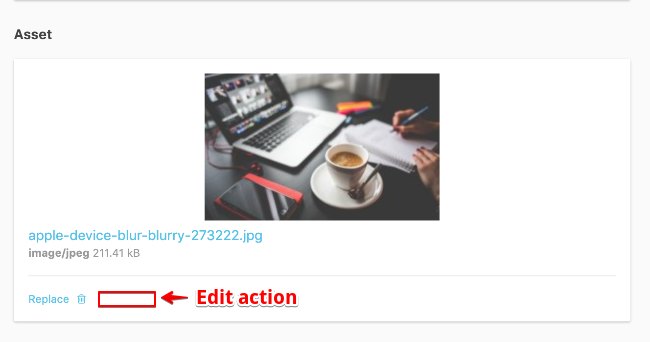
otherwise, you need to click on replace and use the edit from the listing
what do you think?
 pauloamgomes
on 10 Nov 2018
pauloamgomes
on 10 Nov 2018
@pauloamgomes yes, I think that would be a great improvement. I'll add it to my todo list
aheinze
on 10 Nov 2018
@aheinze I did something on PR #921 that extracts the editing functionality from cp-assets into cp-asset, so it can be reused in the field. From my tests, it seems to work well, but kindly review and see if that make sense.
pauloamgomes
on 10 Nov 2018
Related issues
 HausOfAlejandro
·
4Comments
HausOfAlejandro
·
4Comments
 dragosdydy
·
3Comments
dragosdydy
·
3Comments
 elpeyotl
·
3Comments
elpeyotl
·
3Comments
 gryphonmyers
·
6Comments
gryphonmyers
·
6Comments
 AienTech
·
3Comments
AienTech
·
3Comments
Most helpful comment
if you're using assets, then please use the asset
_idassrce.g:cockpit then also get the focal point settings