Cockpit: storage: design issues trying to grow a logical volume
In the usability testing conducted on 21 people recently, one thing that came up was that was that it was hard to grow a logical volume.
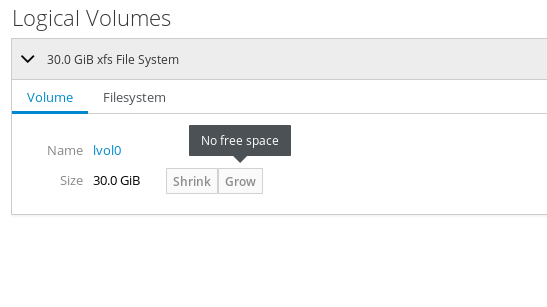
A lot of participants failed to realize they had to add another physical volume, due to the error message being to vague and unspecific.
 andreasn
All 10 comments
Something along the lines of this might work:
"No free space. You can free up space by shrinking or deleting another logical volume in this group, or by adding another physical volume"
andreasn
on 6 Sep 2018
I mentioned having a resize button on one of the calls instead.
Then the dialog would have a slider and a text entry box. Move it to the left to shrink (if it's possible). Move it to the right to grow.
(Keep it the same, and the button to resize is disabled, forcing a cancel action.)
I'm happy to mock this up, and would include the XFS case of non-shrinking too.
 garrett
on 12 Sep 2018
garrett
on 12 Sep 2018
I'm working on this issue as well as the combined resize dialog.
For this issue, I present:
- a default state
- a tooltip with a bunch of text crammed in (first pass, left in for comparison)
- finally, a mockup with info text that:
- replaces the button
- has solution text in the popup
- treats it as an info aside instead of a warning
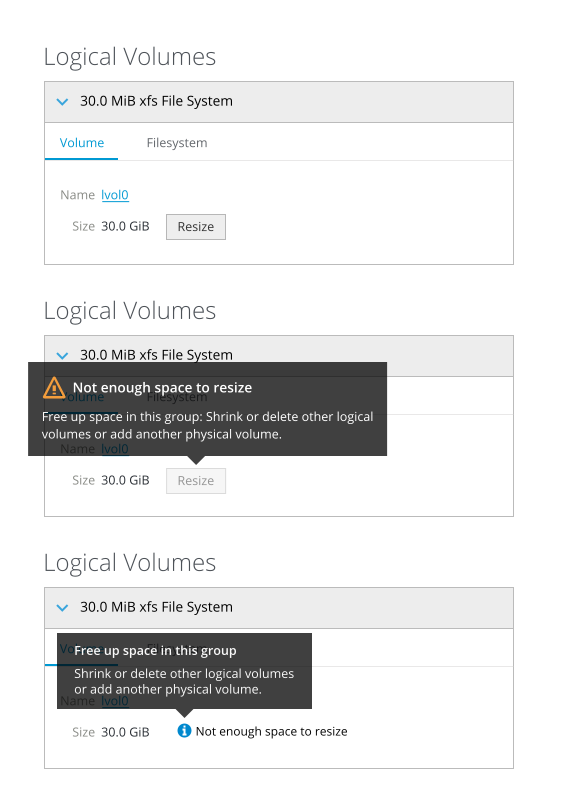
I had an interim mockup that was scrapped where everything was inline (without a popup), but then it makes it appear as though a fully used volume is an error, when it's actually what people often want.
Additionally, I have a slightly modified text string to make it clear that it's about resizing:
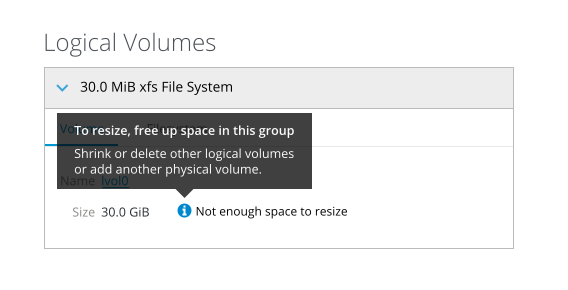
garrett
on 25 Sep 2018
Ready for implementation
andreasn
on 17 Oct 2018
@andreasn @garrett I am a bit confused with this.
According to the mockup, we want one single button [Resize]. In case growing the volume is not possible due to lack of available space, we should show the tooltip instead of the button. But how we know that the user wants to grow the volume and not shrink it? Growing volume might now be possible without further actions, but shrinking can be possible for the same volume.
In other words, this tooltip text is implying that we need somehow to free some space to grow the volume, even though we can't know what the user wants to do.
 KKoukiou
on 3 Dec 2018
KKoukiou
on 3 Dec 2018
If I understand things correctly, shrinking of Logical Volumes is not possible on XFS filesystems, but that doesn't quite cover the case where you have other filesystems.
We could also just leave the shrink and grow buttons as is, and just replace the No free space tooltip with the new tooltip about adding new LVs.
andreasn
on 3 Dec 2018
@andreasn you 're right, we can't shrink xfs filesystems. Disabling the grow/shrink in case is not possible, and providing tooltip is easy. Let me know if this two actions are enough to improve usability.
KKoukiou
on 3 Dec 2018
I think it is. Nothing in the study hinted that having two action buttons was a problem, so I think we get away with just changing the tooltip of the grow button. So let's change No free space to:
Not enough space to grow (line-break) Free up space in this group: Shrink or delete other logical volumes or add another physical volume.
andreasn
on 3 Dec 2018
Nothing in the study hinted that having two action buttons was a problem
Excellent point.
@KKoukiou: Yep, go with what @andreasn says.
garrett
on 4 Dec 2018
Nothing in the study hinted that having two action buttons was a problem
We used to have a single button, but shrinking and growing are different enough that that has caused problems, see #8201.
For example, if a filesystem needs to be unmounted before shrinking but it is busy and can thus not be unmounted, the user gets a error dialog straight away. If we don't know yet whether the user wants to shrink or grow when the dialog opens, we have to delay that error message until the use hits "Apply", and then the reaction is "stupid computer you could have told me earlier".
 mvollmer
on 5 Dec 2018
mvollmer
on 5 Dec 2018
Related issues
 q2dg
·
6Comments
q2dg
·
6Comments
 FireDrunk
·
6Comments
FireDrunk
·
6Comments
 851d229
·
6Comments
851d229
·
6Comments
 MauriceNorden
·
3Comments
MauriceNorden
·
3Comments
 Discusal
·
4Comments
Discusal
·
4Comments
Most helpful comment
I think it is. Nothing in the study hinted that having two action buttons was a problem, so I think we get away with just changing the tooltip of the grow button. So let's change No free space to:
Not enough space to grow (line-break) Free up space in this group: Shrink or delete other logical volumes or add another physical volume.