Cockpit: docs: List of Events for webhooks
Hi,
I'm trying to create a webhook, that will shoot whenever a specific collection has been changed (e.g a collection of posts, and whenever a new post is created, an exisiting one is updated or something is deleted then fire webhook)
However the documentation is horrendously lacking and i can't find out what to write in the 'add events' portion of creating a webhook.
I've tried simply writing whats suggested at the bottom of the docs page.
collections.save.after
collections.remove.after
regions.update
regions.remove
However it doesn't appear to work. Also is there a more comprehensive list of events available?
Any helps appreciated!
 TechnicallyJoe
All 6 comments
Hi,
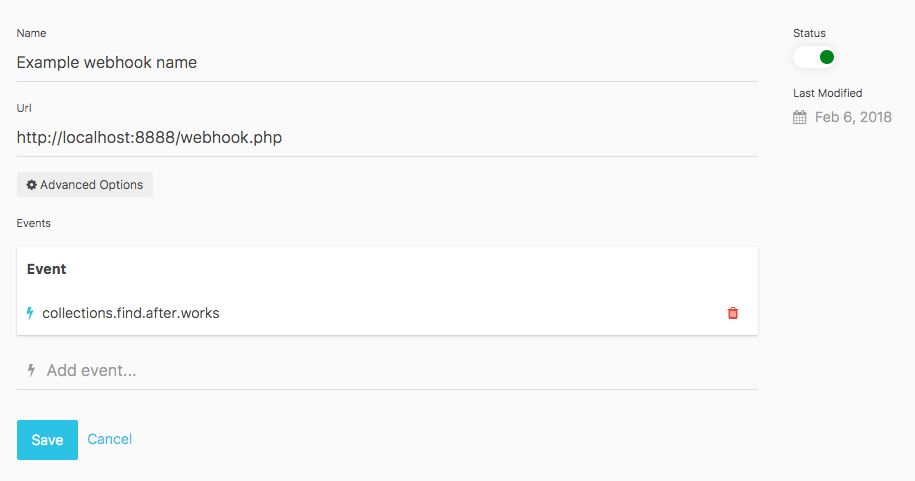
I tested it successful with this setup:
- My collection name is "works"
- Make sure the webhook is active/on
- Make sure you press the enter key to submit your event to the event list (this is a thing I missed)
 tomdupont
on 6 Feb 2018
tomdupont
on 6 Feb 2018
That actually did the trick of submitting them to event list. That was not obvious at all. - Thanks! - Perhaps that should be noted somewhere.
Is there a list of events somewhere? - and - Can i target a specific collection e.q - Whenever a post collection gets updated, fire event, but not when products collection gets updated
TechnicallyJoe
on 6 Feb 2018
Hi TechnicallyJoe,
I did have the same problem, it's indeed not obvious. I will look if I have the javascript knowledge to add a button and make a pull request.
Here is a list of all the available events for collections I found in the latest release. Replace the ones with name, with a specific collection name you have to target only that collection.
- collections.createcollection
- collections.updatecollection
- collections.updatecollection.name
- collections.removecollection
- collections.removecollection.name
- collections.find.before
- collections.find.before.name
- collections.find.after
- collections.find.after.name
- collections.save.before
- collections.save.before.name
- collections.save.after
- collections.save.after.name
- collections.remove.before
- collections.remove.before.name
- collections.remove.after
- collections.remove.after.name
There are many more, but I'm afraid there isn't a documented list of them anywhere yet.
tomdupont
on 6 Feb 2018
I'll upvote the heck out of your PR, if you'll toss what you have right now, into the wiki. Thanks! - Much appreciated.
I'll revise the issue to include asking for documentation on this. Then you can reference this issue with the PR, if you feel up for it! :)
TechnicallyJoe
on 6 Feb 2018
what about sending the data of a fresh created collection entry along to the hook destination? Does anyone know how to do so?
*edit
never mind - found out my self.
(The data is already posted along with/by the hook but for its type is raw post data $_POST is empty. One needs to use file_get_contents("php://input") in order to recive the raw post data)
 bassauer-storms-media
on 20 Jul 2018
bassauer-storms-media
on 20 Jul 2018
I wrote a script to find all events/triggers
Maybe there are some more... the scripts crawls /modules, /lib/Lime, /index.php and /bootstrap.php for all appearences of "trigger(...)". It's a modified version of https://github.com/agentejo/cockpit/blob/next/modules/Cockpit/cli/create-lang.php
Output from cli ./cp get-triggers --print triggers (next branch, 2018-09-17)
edit: fixed missing files
array (
  0 => 'admin.dashboard.bottom',
  1 => 'admin.dashboard.top',
  2 => 'admin.dashboard.widgets',
  3 => 'admin.init',
  4 => 'after',
  5 => 'app.layout.contentafter',
  6 => 'app.layout.contentbefore',
  7 => 'app.layout.footer',
  8 => 'app.layout.header',
  9 => 'app.{$controller}.init',
  10 => 'before',
  11 => 'cockpit.account.editview',
  12 => 'cockpit.account.login',
  13 => 'cockpit.account.logout',
  14 => 'cockpit.api.authenticate',
  15 => 'cockpit.api.erroronrequest',
  16 => 'cockpit.api.js',
  17 => 'cockpit.assets.list',
  18 => 'cockpit.assets.remove',
  19 => 'cockpit.assets.save',
  20 => 'cockpit.bootstrap',
  21 => 'cockpit.clearcache',
  22 => 'cockpit.export',
  23 => 'cockpit.filestorages.init',
  24 => 'cockpit.import',
  25 => 'cockpit.media.removefiles',
  26 => 'cockpit.media.rename',
  27 => 'cockpit.media.upload',
  28 => 'cockpit.menu.aside',
  29 => 'cockpit.menu.main',
  30 => 'cockpit.request.error',
  31 => 'cockpit.rest.init',
  32 => 'cockpit.search',
  33 => 'cockpit.settings.infopage.aside',
  34 => 'cockpit.settings.infopage.main',
  35 => 'cockpit.update.after',
  36 => 'cockpit.update.before',
  37 => 'cockpit.view.settings',
  38 => 'cockpit.view.settings.item',
  39 => 'collections.createcollection',
  40 => 'collections.entry.aside',
  41 => 'collections.find.after',
  42 => 'collections.find.after.{$name}',
  43 => 'collections.find.before',
  44 => 'collections.find.before.{$name}',
  45 => 'collections.remove.after',
  46 => 'collections.remove.after.{$name}',
  47 => 'collections.remove.before',
  48 => 'collections.remove.before.{$name}',
  49 => 'collections.removecollection',
  50 => 'collections.removecollection.{$name}',
  51 => 'collections.save.after',
  52 => 'collections.save.after.{$name}',
  53 => 'collections.save.before',
  54 => 'collections.save.before.{$name}',
  55 => 'collections.updatecollection',
  56 => 'collections.updatecollection.{$name}',
  57 => 'duplicate-entry',
  58 => 'field.layout.components',
  59 => 'forms.save.after',
  60 => 'forms.save.after.{$name}',
  61 => 'forms.save.before',
  62 => 'forms.save.before.{$name}',
  63 => 'forms.submit.after',
  64 => 'forms.submit.before',
  65 => 'init-html-editor',
  66 => 'init-wysiwyg-editor',
  67 => 'ready',
  68 => 'remove-entry',
  69 => 'selectionchange',
  70 => 'shutdown',
  71 => 'singleton.getData.after',
  72 => 'singleton.getData.after.{$name}',
  73 => 'singleton.remove',
  74 => 'singleton.remove.{$name}',
  75 => 'singleton.save.after',
  76 => 'singleton.save.after.{$name}',
  77 => 'singleton.save.before',
  78 => 'singleton.save.before.{$name}',
  79 => 'singleton.saveData.after',
  80 => 'singleton.saveData.after.{$name}',
  81 => 'singleton.saveData.before',
  82 => 'singleton.saveData.before.{$name}',
  83 => 'singletons.form.aside',
  84 => 'sort-update',
  85 => 'submit',
  86 => 'update',
)
 raffaelj
on 10 Sep 2018
raffaelj
on 10 Sep 2018
Related issues
 AienTech
·
3Comments
AienTech
·
3Comments
 victormoretti
·
5Comments
victormoretti
·
5Comments
 dragosdydy
·
3Comments
dragosdydy
·
3Comments
 jesperlandberg
·
5Comments
jesperlandberg
·
5Comments
 Hughp135
·
4Comments
Hughp135
·
4Comments
Most helpful comment
Hi TechnicallyJoe,
I did have the same problem, it's indeed not obvious. I will look if I have the javascript knowledge to add a button and make a pull request.
Here is a list of all the available events for collections I found in the latest release. Replace the ones with name, with a specific collection name you have to target only that collection.
There are many more, but I'm afraid there isn't a documented list of them anywhere yet.