Cockatrice: how can i install a 32bit version of cockatrice? unable to do it
System Information:
 msi1289
All 18 comments
If you go to the "releases" page: https://github.com/Cockatrice/Cockatrice/releases
you'll see that a -win32.exe is still available. It requires Windows 7, anyway.
 ctrlaltca
on 5 Apr 2018
ctrlaltca
on 5 Apr 2018
thanks but i install the last version,the 2/3/18 release but it doesn't finish the install process
msi1289
on 5 Apr 2018
If you have a problem, please explain it. Eg. if you receive an error, report it here or attach a screenshot.
ctrlaltca
on 5 Apr 2018
okay so i logged in to the server and cocka told me that some items were missing
the message was this: recover password button missing,to solve push help-update cockatrice.
everytime i try to update the client crashes.So i unistalled the program,downloaded the 32bit version released on 2/03/18 but is impossible to finish the installing process.
Any suggest for me? thanks in advance for your kindness.
msi1289
on 5 Apr 2018
I'm sorry, but i can't understand the problem. Why the installing process is impossible to finish?
Reopening the ticket hoping for someone else hopping in to help.
ctrlaltca
on 5 Apr 2018
The installation process includes the needed vcredist packages in recent versions.
Installing them takes a while and you might think the installation freezes. Try giving it some minutes and let it finish without closing the installer manually.
 tooomm
on 5 Apr 2018
tooomm
on 5 Apr 2018
thanks for the suggest,so better to wait a while.so the release of 02/03/18 it's ok right? thanks a lot
msi1289
on 5 Apr 2018
Yes, download the win32 file from here:
https://github.com/Cockatrice/Cockatrice/releases/tag/2018-03-02-Release-2.5.0
tooomm
on 5 Apr 2018
ok thanks a lot,i'll try again later and let u know.Cheers
msi1289
on 5 Apr 2018
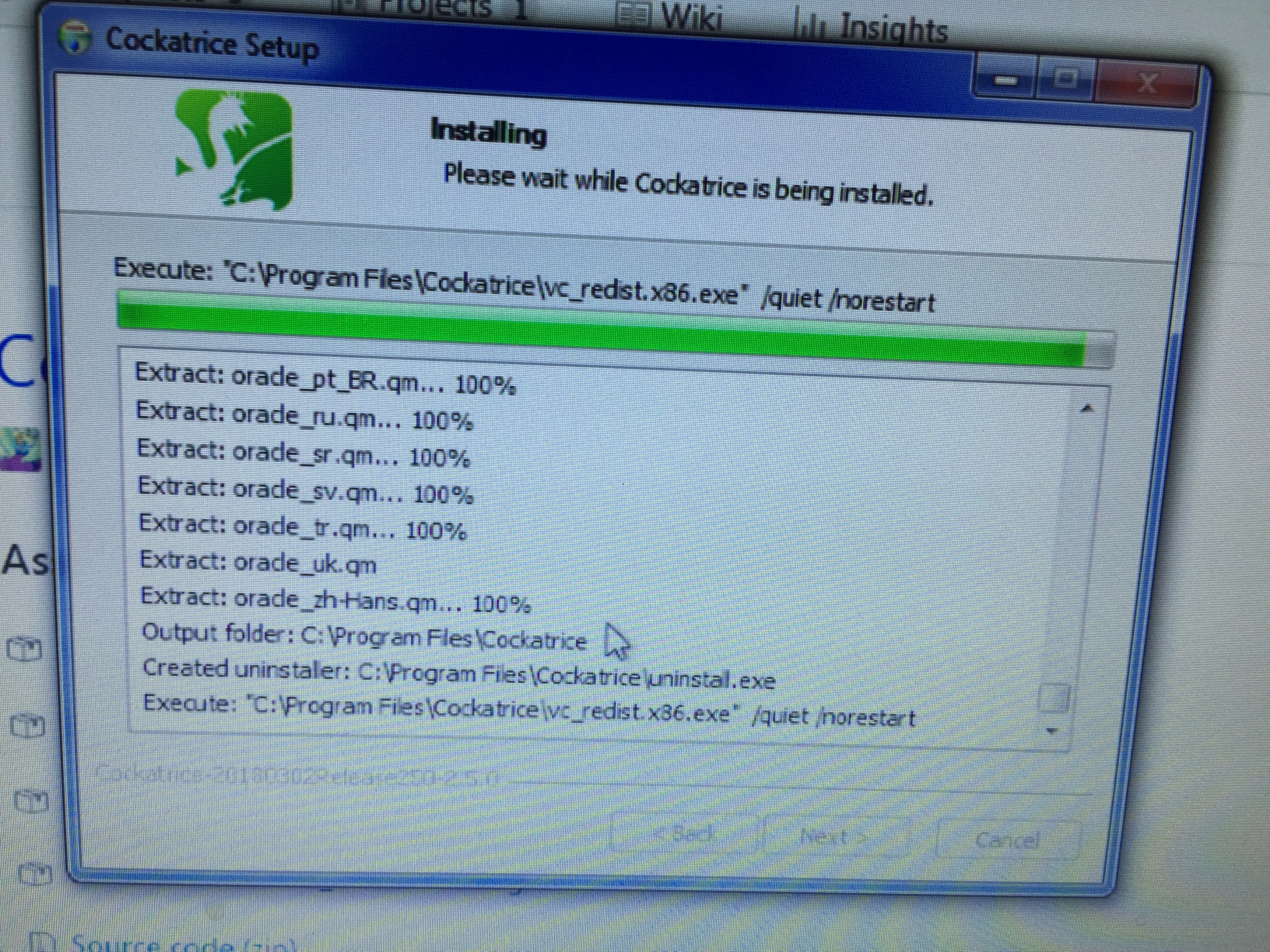
So that's the problem,i left it install for 3 hours and the result is the one on the screenshot.this is the only version i'm not able tp install but all the others require me to update the version
msi1289
on 6 Apr 2018
Can you please try to download and run vc_redist.x86.exe from
https://support.microsoft.com/en-sg/help/2977003/the-latest-supported-visual-c-downloads ?
The version you want is:
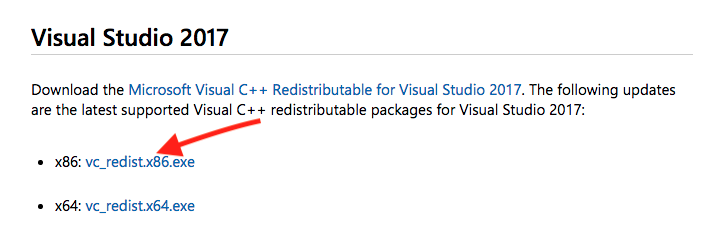
After installing the vcredist package, please try to install again cockatrice.
ctrlaltca
on 6 Apr 2018
Sounds like a duplicate of #3125
@Cockatrice/developers, do we want to remove the /quiet switch from the vcredist installation so that users can see if there's any problem?
ctrlaltca
on 6 Apr 2018
Guyssss solved!!! thanks thanks a lot for your help,have a nice weekend!
msi1289
on 6 Apr 2018
That are good news, thanks for letting us know @msi1289 👍
@ctrlaltca I triggered a build with no \quiet option for testing: https://ci.appveyor.com/project/Daenyth/cockatrice/build/2.4.1-branch-tooomm-loud-build-957
Will give it a try to see what it changes exactly.
tooomm
on 6 Apr 2018
The result is that one sees this dialog to repair or uninstall the package, which is also not what we want. I'm sure a lot of users would be confused by that and in the end that is exactly the opposite of what we want. :)
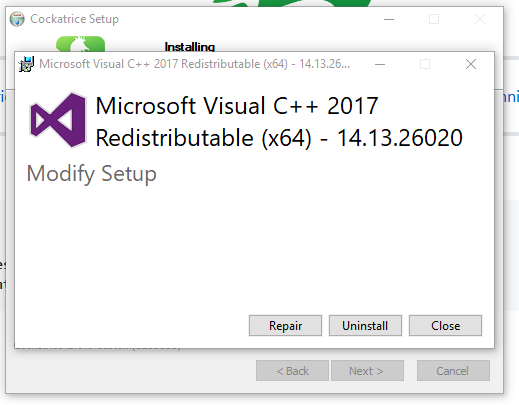
Only for the first time when no (or an outdated) package is available and a new one gets actually installed it might be a better user experience...
Though, I didn't test what the workflow would exactly look like.
tooomm
on 6 Apr 2018
There should be a /passive option that is halfway between normal and quiet, showing a progressbar only:
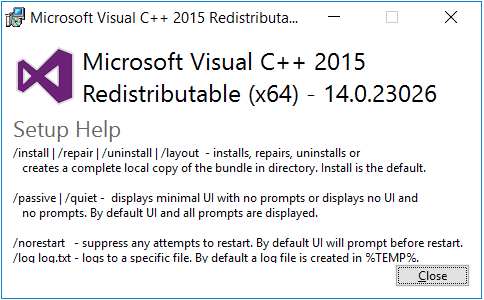
ctrlaltca
on 6 Apr 2018
@ctrlaltca check with /passive:
https://ci.appveyor.com/project/Daenyth/cockatrice/build/2.4.1-branch-tooomm-loud-build-960
It pops up a dialog which immediately closes again if it's already installed...
Otherwise it'll show you a dialog with the install progress which automatically closes after it's done.
In @msi1289's case he probably would have seen some kind of error there without the need to check some logs which are placed in the TEMP folder regarding your last screen.
If you like the passive option and think it's an improvement i'll put up a PR! 👍
tooomm
on 7 Apr 2018
Thank you for the time testing @tooomm , if you feel like it's an improvement go with the PR!
ctrlaltca
on 7 Apr 2018
Related issues
 Gibidinp
·
7Comments
Gibidinp
·
7Comments
 micomicoa
·
5Comments
micomicoa
·
5Comments
 ShrewMaster
·
6Comments
ShrewMaster
·
6Comments
 shackra
·
4Comments
shackra
·
4Comments
 ebbit1q
·
7Comments
ebbit1q
·
7Comments