Coc.nvim: Better float window support for v0.0.80
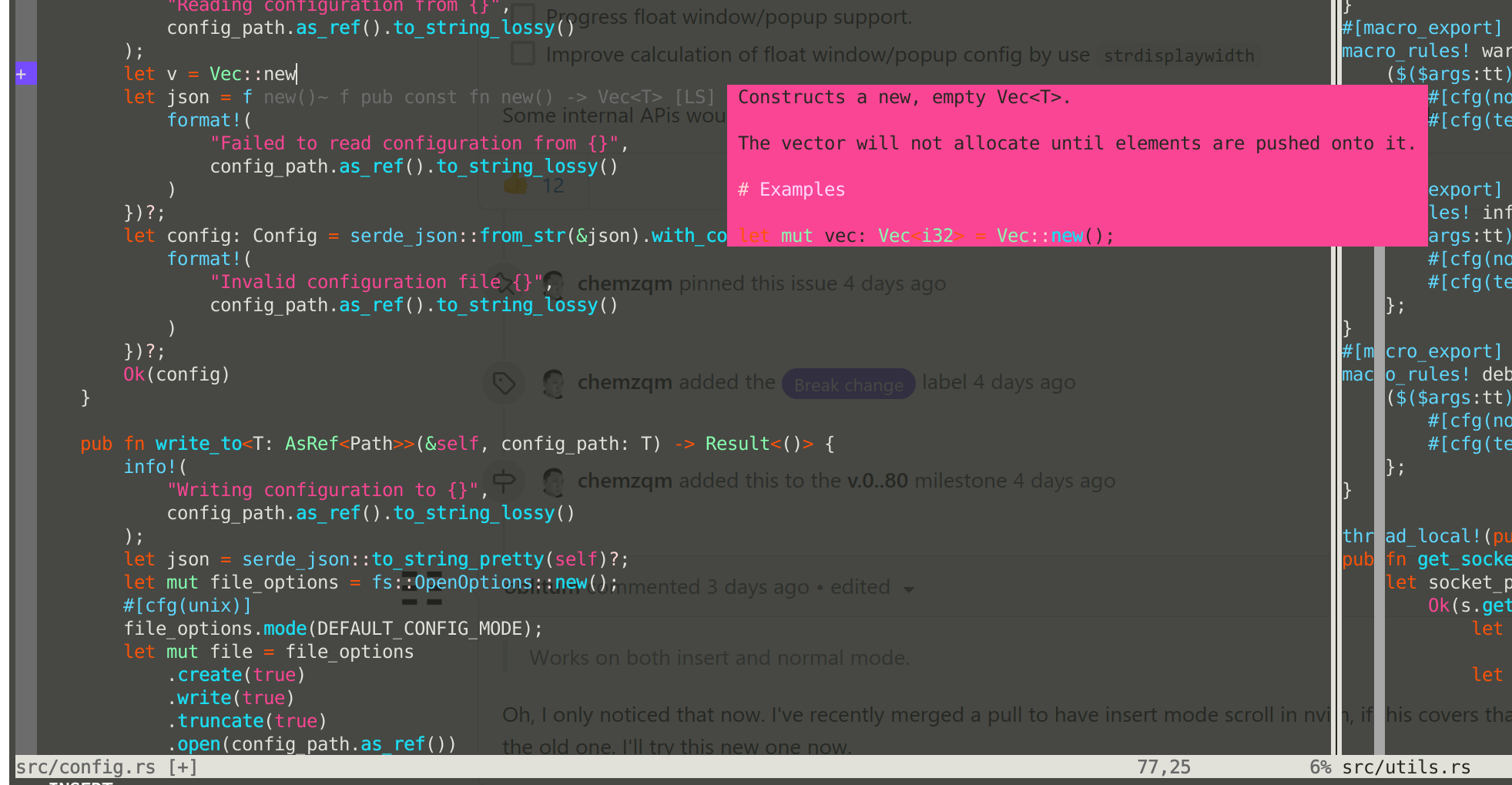
We've done some work with float window/popup support recently, but there're still more work remains.
New dialog features works on neovim >= 0.4.0 or vim >= 8.2.750
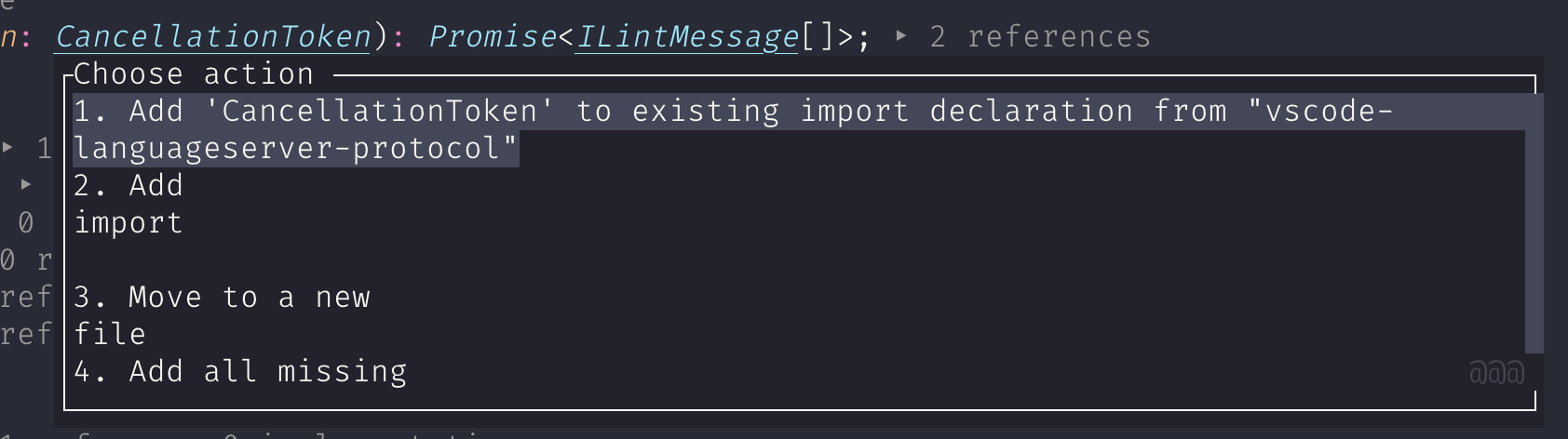
Border and title on both vim and neovim, like new action menu:

Type number to select or use
jkGto navigate and<CR>for confirm, use<esc>to cancel.New input prompt avoid the need to move your eyes.

You can use keys including
<c-u><c-e><c-a>, it's using normal buffer on neovim and terminal buffer on vim, so the experience could be a bit differrent.Functions for scroll float window and popups, checkout
:h coc#float#has_scroll(), new functions have improved for:- Works on both vim and neovim.
- Works on both all modes, including normal, insert and visual.
- Scroll all scrollable float windows/popups at the same time.
- Works with wrapped buffer.
Configuration
signature.floatMaxWidthchanged tosignature.maxWindowWidthwith detault 80.Create diaglog support:
Use vim's api like:
call coc#float#create_dialog(['你好', 'vim'], #{close: 0, title: 'hello world', buttons: ['yes', 'no']})
Or usewindow.showDiaglog(config)
Buttons accept mouse click on neovim only, vim users have to type specific keys.
Notifications:

Plans:
- [x] Support border config as numbers on neovim (like vim).
- [x] Support scrollbar and close button on neovim (like vim).
- [x] Improve calculation of float window/popup config by use
strdisplaywidth - [x] Use float window for prompt confirm on neovim.
- [x] Support float window/popup with buttons, like a dialog.
- [x] Support dialog for multiple selection.
- [x] Notifications support.
- [ ] Progress float window/popup support.
Some internal APis would be changed and you'll probably have something wired, give us feedback.
 chemzqm
All 36 comments
Works on both insert and normal mode.
Oh, I only noticed that now. I've recently merged a pull to have insert mode scroll in nvim, if this covers that then please just remove the old one. I'll try this new one now.
 oblitum
on 18 Oct 2020
oblitum
on 18 Oct 2020
checkout
:h coc#float#has_scroll()
When trying to scroll as suggested I'm getting lots of <Ignore><Ignore><Ignore><Ignore><Ignore> in the buffer, on neovim 0.4.4. My current mapping is:
inoremap <silent><expr>      <c-j> coc#float#has_scroll() ? coc#float#scroll(1) : "\<c-j>"
inoremap <silent><expr>      <c-k> coc#float#has_scroll() ? coc#float#scroll(0) : "\<c-k>"
vnoremap <silent><expr>      <c-j> coc#float#has_scroll() ? coc#float#scroll(1) : "\<c-j>"
vnoremap <silent><expr>      <c-k> coc#float#has_scroll() ? coc#float#scroll(0) : "\<c-k>"
coc#util#float_scroll_i has a smoother scroll, so I've changed back to it. I'd suggest to use the argument for scroll to give an amount, instead of direction solely, like done for coc#util#float_scroll_i, so users can control how much it scrolls on each step. Maybe check arg is float or number to scroll by window percentage or line count.
oblitum
on 18 Oct 2020
I'm getting lots of
in the buffer, on neovim 0.4.4.
<Ignore> is required when we need timer, it works on neovim >= 0.5.0
chemzqm
on 19 Oct 2020
I've made some fixes for coc#float#has_scroll(), now it works on neovim >= 0.4.3.
The bad news is key-mappings need to be changed.
" Note coc#float#scroll works on neovim >= 0.4.3 or vim >= 8.2.0750
nnoremap <nowait><expr> <C-f> coc#float#has_scroll() ? coc#float#scroll(1) : "\<C-f>"
nnoremap <nowait><expr> <C-b> coc#float#has_scroll() ? coc#float#scroll(0) : "\<C-b>"
inoremap <nowait><expr> <C-f> coc#float#has_scroll() ? "\<c-r>=coc#float#scroll(1)\<cr>" : "\<Right>"
inoremap <nowait><expr> <C-b> coc#float#has_scroll() ? "\<c-r>=coc#float#scroll(0)\<cr>" : "\<Left>"
@chemzqm
I tried it, but it's not behaving well:
- Bad scrollbar for small windows:

- Error when leaving signatureHelp, makes coc exit (I call
"quickfixes"action onInsertLeave, if diagnostic changes, I can share the code if needed, this error doesn't happen on release branch):
Error on request (CocAutocmd): Vim(return):Error invoking 'CocAutocmd' on channel 3 (coc): ch 3 returned a response with an unknown request id. Ensure the client is properly synchronized Error on request (quickfixes): Vim(return):Error invoking 'quickfixes' on channel 3 (coc): [coc] server connection lost - Doesn't scroll doc floating window (tried in insert mode):

oblitum
on 20 Oct 2020
Sorry, closed it by mistake.
this error doesn't happen on release branch
I want to reword that, I see that release branch was updated, so now all these issues are happening on release branch too. The last working release commit is 9ba22e4aa390bc0b7955352c00f0b76db2a9a016.
oblitum
on 20 Oct 2020
May I know how I can have consistent Ctrl-j/k or S-/Tab mappings for both floating windows (e.g. actions) and pop-ups?
 Frederick888
on 21 Oct 2020
Frederick888
on 21 Oct 2020
@Frederick888 please ask on gitter as it may derail the topic.
oblitum
on 21 Oct 2020
May I know how I can have consistent Ctrl-j/k or S-/Tab mappings for both floating windows (e.g. actions) and pop-ups?
Configuration for action menu not available yet, it's recommended to just type number.
chemzqm
on 21 Oct 2020
@oblitum I can't reproduce any of your issue on neovim 0.4.4 and neovim 0.4.3, please open new issue with minimal vimrc.
chemzqm
on 21 Oct 2020
Not sure if this is related but the completions now don't clean up themselves properly from time to time when using split windows.


I can open a new issue if needed.
Frederick888
on 21 Oct 2020
@Frederick888 it could happen when you're not using neovim 0.5.0 and the float window is not closed by coc.nvim, please provide vim version with minimal vimrc.
chemzqm
on 21 Oct 2020
@chemzqm Thanks for the quick response and yup I'm using neovim v0.4.4 so this is probably the reason.
Currently I'm able to reproduce this issue using the minimal vimrc in bug report template.
set nocompatible
set runtimepath^=/home/frederick/.vim/plugged/coc.nvim
filetype plugin indent on
syntax on
set hidden
@chemzqm Actually I just installed neovim v0.5.0 and I still have this problem using the minimal vimrc from bug report template:

NVIM v0.5.0-765-g75996a2cd
Build type: RelWithDebInfo
LuaJIT 2.1.0-beta3
Compilation: /usr/bin/gcc-5 -U_FORTIFY_SOURCE -D_FORTIFY_SOURCE=1 -O2 -g -Og -g -Wall -Wextra -pedantic -Wno-unused-parameter -Wstrict-prototypes -std=gnu99 -Wshadow -Wconversion -Wmissing-prototypes -Wvla -fstack-protector-strong -fno-common -fdiagnostics-color=auto -DINCLUDE_GENERATED_DECLARATIONS -D_GNU_SOURCE -DNVIM_MSGPACK_HAS_FLOAT32 -DNVIM_UNIBI_HAS_VAR_FROM -DMIN_LOG_LEVEL=3 -I/home/travis/build/neovim/bot-ci/build/neovim/build/config -I/home/travis/build/neovim/bot-ci/build/neovim/src -I/home/travis/build/neovim/bot-ci/build/neovim/.deps/usr/include -I/usr/include -I/home/travis/build/neovim/bot-ci/build/neovim/build/src/nvim/auto -I/home/travis/build/neovim/bot-ci/build/neovim/build/include
Compiled by travis@travis-job-3016a55c-515c-44fe-9085-50cddd40396e

Features: +acl +iconv +tui
See ":help feature-compile"

   system vimrc file: "$VIM/sysinit.vim"
  fall-back for $VIM: "/share/nvim"
@Frederick888 I can't reproduce.
chemzqm
on 21 Oct 2020
@chemzqm It's been 15 minutes and I've been repetitively doing:
- Start neovim, split window
- Trigger a completion
- Navigate through all options
- Close neovim
And it happened... once lol. I guess I'll need to get back to you later when I have a stable way to reproduce this.
Frederick888
on 21 Oct 2020
@Frederick888 try latest release branch.
chemzqm
on 22 Oct 2020
@chemzqm
 fannheyward
on 22 Oct 2020
fannheyward
on 22 Oct 2020
@fannheyward shoud be fixed
chemzqm
on 22 Oct 2020
I'm using this setup to replace the usage of coc#util#float_scroll_i:
let g:coc_snippet_next = '<c-l>'
let g:coc_snippet_prev = '<c-h>'
inoremap <silent><nowait><expr> <c-j> coc#float#has_scroll() ? "\<c-r>=coc#float#scroll(1, 1)\<cr>" : "\<c-j>"
inoremap <silent><nowait><expr> <c-k> coc#float#has_scroll() ? "\<c-r>=coc#float#scroll(0, 1)\<cr>" : "\<c-k>"
vnoremap <silent><nowait><expr> <c-j> coc#float#has_scroll() ? "\<c-r>=coc#float#scroll(1, 1)\<cr>" : "\<c-j>"
vnoremap <silent><nowait><expr> <c-k> coc#float#has_scroll() ? "\<c-r>=coc#float#scroll(0, 1)\<cr>" : "\<c-k>"
And it's working great now that the issues I was having are now gone. It seems there's one thing left though, visual mode mappings are not working (either "\<c-r>=coc#float#scroll(1, 1)\<cr>" or coc#float#scroll(1, 1)). Is there a way to support that, as it works fine on coc#util#float_scroll_i? Otherwise it'll miss a killer feature which is to scroll signatureHelp on snippet expansion and jump placeholder.
oblitum
on 22 Oct 2020
If there's some way for that to work then I think coc#util#float_scroll_i could be simply deprecated or removed, as coc#float#scroll can do everything the other can do.
oblitum
on 22 Oct 2020
New input prompt on neovim >= 0.4.3 avoid the need to move your eyes.
I get :=coc#float#close_i(1004) in command line after exiting the prompt without changing variable name.
oblitum
on 23 Oct 2020
You can use <silent>
chemzqm
on 23 Oct 2020
@chemzqm it's <silent> already, it shows up solely on leaving prompt without changing variable name, which happens much after the mapping.
oblitum
on 23 Oct 2020
@chemzqm With latest release branch and neovim 0.5.0, I can still see those completion window leftovers using my vimrc but not the minimal one. But to properly test this I should probably check out AutoKey etc (it's stopped working under Arch atm...).
But now I see something similar to #2491 almost every time (not using split windows this time):

Frederick888
on 23 Oct 2020
After last commits it seems "signature.maxWindowHeight" stopped being respected and signature help windows can become very big.
oblitum
on 23 Oct 2020
Must comment that names are not consistent. While you have signature.maxWindowHeight for height, there's signature.floatMaxWidth for width (this last one is still being respected).
oblitum
on 23 Oct 2020
I've been using it for the last few days and although sometimes it needs a bit patience, the artifacts can be eventually cleaned up. My last comment mentioned that 'can still see those completion window leftovers using my vimrc' but I guess it's simply because I didn't give it enough time.
Thanks for the good work.
Frederick888
on 27 Oct 2020
This is a great improvement but the new input prompt is not working for me. The text input is cleared and ignored whenever I press Enter (I'm constantly pressing <CR> in the cast below). I'm on Neovim 0.4.4 btw.

Another (minor) thing I noticed is that the prompt title gets truncated if the (eg) the variable you're renaming is at the first line of a buffer:

 obxhdx
on 30 Oct 2020
obxhdx
on 30 Oct 2020
The text input is cleared and ignored whenever I press Enter
I can't reproduce, try minimal vimRc.
chemzqm
on 30 Oct 2020
Oh, it turns out this only happens when I have tmsvg/pear-tree enabled. 🤦♂️
obxhdx
on 30 Oct 2020
Update: input prompt work on vim as well.
chemzqm
on 24 Nov 2020
I used to ctrl-f to open the command-line window when _renaming_. Is it possible to configure off the new _rename_ floating window to get back the previous behaviour ?
 VincentCordobes
on 25 Nov 2020
VincentCordobes
on 25 Nov 2020
I used to
ctrl-fto open the command-line window when _renaming_. Is it possible to configure off the new _rename_ floating window to get back the previous behaviour ?
coc.preferences.promptInput
chemzqm
on 25 Nov 2020
Update: coc#float#scroll now support all modes, including visual mode, coc#float#nvim_scroll is deprecated.
chemzqm
on 26 Nov 2020
Update: add notifications support, not on release branch yet.
chemzqm
on 28 Nov 2020
Related issues
 zhou13
·
3Comments
zhou13
·
3Comments
 lanox
·
3Comments
lanox
·
3Comments
 czepluch
·
3Comments
czepluch
·
3Comments
 hackingcat
·
3Comments
hackingcat
·
3Comments
 npearson72
·
3Comments
npearson72
·
3Comments
Most helpful comment
coc.preferences.promptInput