Coc.nvim: Autocomplete inserts function text in some file types.
Result from CocInfo
  ## versions

  vim version: NVIM v0.4.3
  node version: v12.16.1
  coc.nvim version: 0.0.74-cd348f4905
  term: iTerm.app
  platform: darwin

  ## Messages

  ## Output channel: prettier
Describe the bug
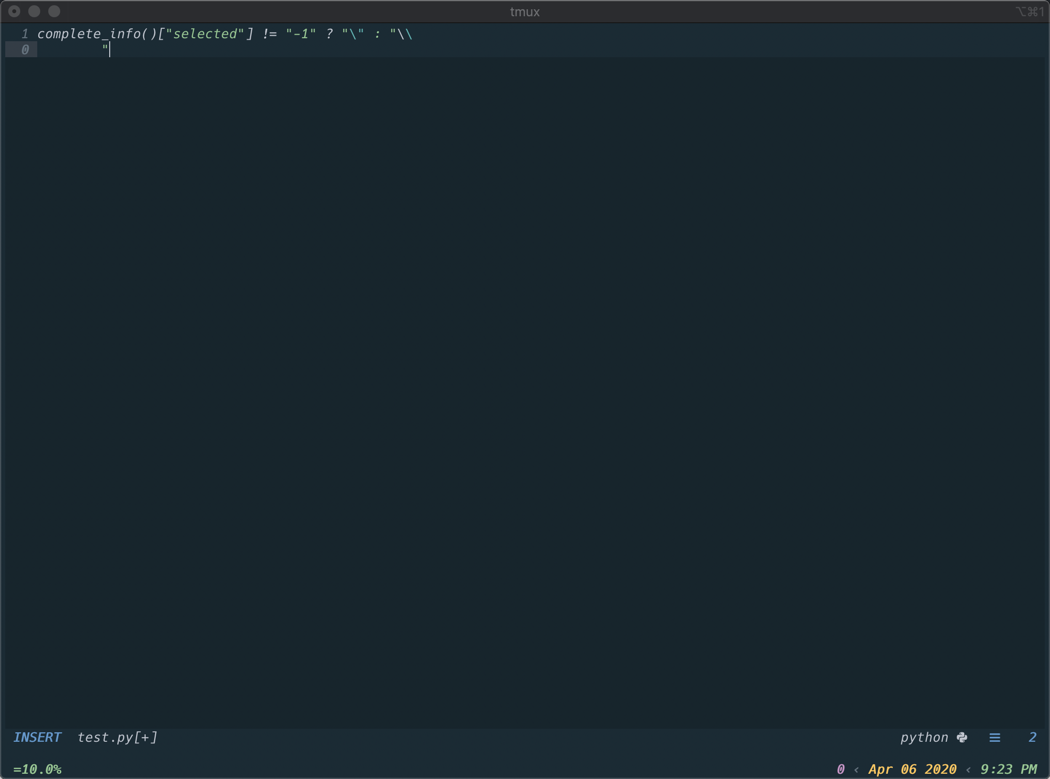
When editing certain file types (.py and .js for sure, haven't tested all others). Hitting return to create a new line in insert mode adds the function text "complete_info()["selected"] != "-1" ? "\" : "\
It appears it is attempting to autocomplete but there are no completions available. In this instance, I'm only hitting <cr> for a newline and would not expect it to trigger auto-completion.
This does not happen on all file types. For example, if I edit a .txt or .html file, the auto-completion works as expected and I can enter
Reproduce the bug
We will close your issue when you don't provide minimal vimrc and we can't
reproduce it
I'm essentially using Caleb Taylor's Jarvis setup here:
https://github.com/ctaylo21/jarvis
I open vim using vim test.py - hit 'I' to enter insert mode and hit
## My vimrc:
let &viewdir=expand("$HOME") . "/.loacal/share/nvim/view"
if !isdirectory(expand(&viewdir))|call mkdir(expand(&viewdir), "p", 451)|endif

scriptencoding utf-8
 source ~/.config/nvim/plugins.vim

" ============================================================================ "
" ===                           EDITING OPTIONS                            === "
" ============================================================================ "

" Remap leader key to ,
let g:mapleader=','

" make vsplits open to the right
set splitright

" Keep at least 10 lines on screen
set scrolloff=10

" Don't show last command
set noshowcmd

" Save text folding
autocmd BufWinLeave * mkview
autocmd BufWinEnter * silent! loadview

" Yank and paste with the system clipboard
set clipboard=unnamed

" Hides buffers instead of closing them
set hidden

" === TAB/Space settings === "
" Insert spaces when TAB is pressed.
set expandtab

" Change number of spaces that a <Tab> counts for during editing ops
set softtabstop=2

" Indentation amount for < and > commands.
set shiftwidth=2

" do not wrap long lines by default
set nowrap

" Don't highlight current cursor line
set nocursorline

" Disable line/column number in status line
" Shows up in preview window when airline is disabled if not
set noruler

" Only one line for command line
set cmdheight=1

" === Completion Settings === "

" Don't give completion messages like 'match 1 of 2'
" or 'The only match'
set shortmess+=c

" ============================================================================ "
" ===                           PLUGIN SETUP                               === "
" ============================================================================ "

" Wrap in try/catch to avoid errors on initial install before plugin is available
try
" === Denite setup ==="
" Use ripgrep for searching current directory for files
" By default, ripgrep will respect rules in .gitignore
"   --files: Print each file that would be searched (but don't search)
"   --glob:  Include or exclues files for searching that match the given glob
"            (aka ignore .git files)
"
call denite#custom#var('file/rec', 'command', ['rg', '--files', '--glob', '!.git'])

" Use ripgrep in place of "grep"
call denite#custom#var('grep', 'command', ['rg'])

" Custom options for ripgrep
"   --vimgrep:  Show results with every match on it's own line
"   --hidden:   Search hidden directories and files
"   --heading:  Show the file name above clusters of matches from each file
"   --S:        Search case insensitively if the pattern is all lowercase
call denite#custom#var('grep', 'default_opts', ['--hidden', '--vimgrep', '--heading', '-S'])

" Recommended defaults for ripgrep via Denite docs
call denite#custom#var('grep', 'recursive_opts', [])
call denite#custom#var('grep', 'pattern_opt', ['--regexp'])
call denite#custom#var('grep', 'separator', ['--'])
call denite#custom#var('grep', 'final_opts', [])

" Remove date from buffer list
call denite#custom#var('buffer', 'date_format', '')

" Open file commands
call denite#custom#map('insert,normal', "<C-t>", '<denite:do_action:tabopen>')
call denite#custom#map('insert,normal', "<C-v>", '<denite:do_action:vsplit>')
call denite#custom#map('insert,normal', "<C-h>", '<denite:do_action:split>')

" Custom options for Denite
"   auto_resize             - Auto resize the Denite window height automatically.
"   prompt                  - Customize denite prompt
"   direction               - Specify Denite window direction as directly below current pane
"   winminheight            - Specify min height for Denite window
"   highlight_mode_insert   - Specify h1-CursorLine in insert mode
"   prompt_highlight        - Specify color of prompt
"   highlight_matched_char  - Matched characters highlight
"   highlight_matched_range - matched range highlight
let s:denite_options = {'default' : {
\ 'split': 'horizontal',
\ 'start_filter': 0,
\ 'auto_resize': 1,
\ 'source_names': 'short',
\ 'prompt': 'λ:',
\ 'statusline': 0,
\ 'highlight_matched_char': 'WildMenu',
\ 'highlight_matched_range': 'Visual',
\ 'highlight_window_background': 'Visual',
\ 'highlight_filter_background': 'StatusLine',
\ 'highlight_prompt': 'StatusLine',
\ 'winrow': 1,
\ 'vertical_preview': 1
\ }}

" Loop through denite options and enable them
function! s:profile(opts) abort
  for l:fname in keys(a:opts)
    for l:dopt in keys(a:opts[l:fname])
      call denite#custom#option(l:fname, l:dopt, a:opts[l:fname][l:dopt])
    endfor
  endfor
endfunction

call s:profile(s:denite_options)
catch
  echo 'Denite not installed. It should work after running :PlugInstall'
endtry

" === Coc.nvim === "
" use <tab> for trigger completion and navigate to next complete item
function! s:check_back_space() abort
  let col = col('.') - 1
  return !col || getline('.')[col - 1]  =~ '\s'
endfunction

inoremap <silent><expr> <TAB>
      \ pumvisible() ? "\<C-n>" :
      \ <SID>check_back_space() ? "\<TAB>" :
      \ coc#refresh()
inoremap <expr><S-TAB> pumvisible() ? "\<C-p>" : "\<C-h"

inoremap <silent><expr> <c-space> coc#refresh()

" Use <cr> to confirm completion, `<C-g>u` means break undo chain at current
" position. Coc only does snippet and additional edit on confirm.
if has('patch8.1.1068')
  " Use `complete_info` if your (Neo)Vim version supports it.
  inoremap <expr> <cr> complete_info()["selected"] != "-1" ? "\<C-y>" : "\<C-g>u\<CR>"
else
  imap <expr> <cr> pumvisible() ? "\<C-y>" : "\<C-g>u\<CR>"
endif


"Close preview window when completion is done.
autocmd! CompleteDone * if pumvisible() == 0 | pclose | endif

" === NeoSnippet === "
" Map <C-k> as shortcut to activate snippet if available
imap <C-k> <Plug>(neosnippet_expand_or_jump)
smap <C-k> <Plug>(neosnippet_expand_or_jump)
xmap <C-k> <Plug>(neosnippet_expand_target)

" Load custom snippets from snippets folder
let g:neosnippet#snippets_directory='~/.config/nvim/snippets'

" Hide conceal markers
let g:neosnippet#enable_conceal_markers = 0

" === NERDTree === "
" Show hidden files/directories
 let g:NERDTreeShowHidden = 1

" Remove bookmarks and help text from NERDTree
 let g:NERDTreeMinimalUI = 1

" Custom icons for expandable/expanded directories
 let g:NERDTreeDirArrowExpandable = '⬏'
 let g:NERDTreeDirArrowCollapsible = '⬎'

" Hide certain files and directories from NERDTree
 let g:NERDTreeIgnore = ['^\.DS_Store$', '^tags$', '\.git$[[dir]]', '\.idea$[[dir]]', '\.sass-cache$']

 " Make NERDTree window wider by default
let g:NERDTreeWinSize=35
 " Wrap in try/catch to avoid errors on initial install before plugin is available
try

" === Vim airline ==== "
" Enable extensions
let g:airline_extensions = ['branch', 'hunks', 'coc']

" Update section z to just have line number
let g:airline_section_z = airline#section#create(['linenr'])

" Do not draw separators for empty sections (only for the active window) >
let g:airline_skip_empty_sections = 1

" Smartly uniquify buffers names with similar filename, suppressing common parts of paths.
let g:airline#extensions#tabline#formatter = 'unique_tail'

" Custom setup that removes filetype/whitespace from default vim airline bar
let g:airline#extensions#default#layout = [['a', 'b', 'c'], ['x', 'z', 'warning', 'error']]

let airline#extensions#coc#stl_format_err = '%E{[%e(#%fe)]}'

let airline#extensions#coc#stl_format_warn = '%W{[%w(#%fw)]}'

" Configure error/warning section to use coc.nvim
let g:airline_section_error = '%{airline#util#wrap(airline#extensions#coc#get_error(),0)}'
let g:airline_section_warning = '%{airline#util#wrap(airline#extensions#coc#get_warning(),0)}'

" Hide the Nerdtree status line to avoid clutter
let g:NERDTreeStatusline = ''

" Disable vim-airline in preview mode
let g:airline_exclude_preview = 1

" Enable powerline fonts
let g:airline_powerline_fonts = 1

" Enable caching of syntax highlighting groups
let g:airline_highlighting_cache = 1

" Define custom airline symbols
if !exists('g:airline_symbols')
 let g:airline_symbols = {}
endif

" Don't show git changes to current file in airline
let g:airline#extensions#hunks#enabled=0

catch
   echo 'Airline not installed. It should work after running :PlugInstall'
endtry

" === echodoc === "
" Enable echodoc on startup
let g:echodoc#enable_at_startup = 1

" === vim-javascript === "
" Enable syntax highlighting for JSDoc
let g:javascript_plugin_jsdoc = 1

" === vim-jsx === "
" Highlight jsx syntax even in non .jsx files
let g:jsx_ext_required = 0

" === javascript-libraries-syntax === "
let g:used_javascript_libs = 'underscore,requirejs,chai,jquery'

" === Signify === "
let g:signify_sign_delete = '-'

" ============================================================================ "
" ===                                UI                                    === "
" ============================================================================ "

" Enable true color support
set termguicolors

" Editor theme
set background=dark
try
  colorscheme OceanicNext
catch
  colorscheme slate
endtry

" Vim airline theme
let g:airline_theme='space'

" Add custom highlights in method that is executed every time a colorscheme is sourced
" See https://gist.github.com/romainl/379904f91fa40533175dfaec4c833f2f for details
function! MyHighlights() abort
  " Hightlight trailing whitespace
  highlight Trail ctermbg=red guibg=red
  call matchadd('Trail', '\s\+$', 100)
endfunction

augroup MyColors
  autocmd!
  autocmd ColorScheme * call MyHighlights()
augroup END

" Change vertical split character to be a space (essentially hide it)
set fillchars+=vert:.

" Set preview window to appear at bottom
set splitbelow

" Don't dispay mode in command line (airilne already shows it)
set noshowmode

" Set floating window to be slightly transparent
set winbl=5

" coc.nvim color changes
hi! link CocErrorSign WarningMsg
hi! link CocWarningSign Number
hi! link CocInfoSign Type

" Make background transparent for many things
hi! Normal ctermbg=NONE guibg=NONE
hi! NonText ctermbg=NONE guibg=NONE
hi! LineNr ctermfg=NONE guibg=NONE
hi! SignColumn ctermfg=NONE guibg=NONE
hi! StatusLine guifg=#16252b guibg=#6699CC
hi! StatusLineNC guifg=#16252b guibg=#16252b

" Try to hide vertical spit and end of buffer symbol
hi! VertSplit gui=NONE guifg=#17252c guibg=#17252c
hi! EndOfBuffer ctermbg=NONE ctermfg=NONE guibg=#17252c guifg=#17252c

" Customize NERDTree directory
hi! NERDTreeCWD guifg=#99c794

" Make background color transparent for git changes
hi! SignifySignAdd guibg=NONE
hi! SignifySignDelete guibg=NONE
hi! SignifySignChange guibg=NONE

" Highlight git change signs
hi! SignifySignAdd guifg=#99c794
hi! SignifySignDelete guifg=#ec5f67
hi! SignifySignChange guifg=#c594c5

" Call method on window enter
augroup WindowManagement
  autocmd!
  autocmd WinEnter * call Handle_Win_Enter()
augroup END

" Change highlight group of preview window when open
function! Handle_Win_Enter()
  if &previewwindow
    setlocal winhighlight=Normal:MarkdownError
  endif
endfunction

" ============================================================================ "
" ===                             KEY MAPPINGS                             === "
" ============================================================================ "

" === Denite shorcuts === "
"   ;         - Browser currently open buffers
"   <leader>t - Browse list of files in current directory
"   <leader>g - Search current directory for occurences of given term and close window if no results
"   <leader>j - Search current directory for occurences of word under cursor
nmap ; :Denite buffer<CR>
nmap <leader>t :DeniteProjectDir file/rec<CR>
nnoremap <leader>g :<C-u>Denite grep:. -no-empty<CR>
nnoremap <leader>j :<C-u>DeniteCursorWord grep:.<CR>

" Define mappings while in 'filter' mode
"   <C-o>         - Switch to normal mode inside of search results
"   <Esc>         - Exit denite window in any mode
"   <CR>          - Open currently selected file in any mode
autocmd FileType denite-filter call s:denite_filter_my_settings()
function! s:denite_filter_my_settings() abort
  imap <silent><buffer> <C-o>
  \ <Plug>(denite_filter_quit)
  inoremap <silent><buffer><expr> <Esc>
  \ denite#do_map('quit')
  nnoremap <silent><buffer><expr> <Esc>
  \ denite#do_map('quit')
  inoremap <silent><buffer><expr> <CR>
  \ denite#do_map('do_action')
endfunction

" Define mappings while in denite window
"   <CR>        - Opens currently selected file
"   q or <Esc>  - Quit Denite window
"   d           - Delete currenly selected file
"   p           - Preview currently selected file
"   <C-o> or i  - Switch to insert mode inside of filter prompt
autocmd FileType denite call s:denite_my_settings()
function! s:denite_my_settings() abort
  nnoremap <silent><buffer><expr> <CR>
  \ denite#do_map('do_action')
  nnoremap <silent><buffer><expr> q
  \ denite#do_map('quit')
  nnoremap <silent><buffer><expr> <Esc>
  \ denite#do_map('quit')
  nnoremap <silent><buffer><expr> d
  \ denite#do_map('do_action', 'delete')
  nnoremap <silent><buffer><expr> p
  \ denite#do_map('do_action', 'preview')
  nnoremap <silent><buffer><expr> i
  \ denite#do_map('open_filter_buffer')
  nnoremap <silent><buffer><expr> <C-o>
  \ denite#do_map('open_filter_buffer')
endfunction

" === Nerdtree shorcuts === "
"  <leader>n - Toggle NERDTree on/off
"  <leader>f - Opens current file location in NERDTree
nmap <leader>n :NERDTreeToggle<CR>
nmap <leader>f :NERDTreeFind<CR>

"   <Space> - PageDown
"   -       - PageUp
noremap <Space> <PageDown>
noremap - <PageUp>

" === coc.nvim === "
nmap <silent> <leader>dd <Plug>(coc-definition)
nmap <silent> <leader>dr <Plug>(coc-references)
nmap <silent> <leader>dj <Plug>(coc-implementation)

" === vim-better-whitespace === "
"   <leader>y - Automatically remove trailing whitespace
nmap <leader>y :StripWhitespace<CR>

" === Search shorcuts === "
"   <leader>h - Find and replace
"   <leader>/ - Claer highlighted search terms while preserving history
map <leader>h :%s///<left><left>
nmap <silent> <leader>/ :nohlsearch<CR>

" === Easy-motion shortcuts ==="
"   <leader>w - Easy-motion highlights first word letters bi-directionally
map <leader>w <Plug>(easymotion-bd-w)

" Allows you to save files you opened without write permissions via sudo
cmap w!! w !sudo tee %

" === vim-jsdoc shortcuts ==="
" Generate jsdoc for function under cursor
nmap <leader>z :JsDoc<CR>

" Delete current visual selection and dump in black hole buffer before pasting
" Used when you want to paste over something without it getting copied to
" Vim's default buffer
vnoremap <leader>p "_dP

inoremap <leader>i <Plug>(JsFileImport)
nnoremap <leader>i <Plug>(JsFileImport)

nnoremap <leader>it :TsuImport<CR>
vnoremap <leader>it :TsuImport<CR>

" ============================================================================ "
" ===                                 MISC.                                === "
" ============================================================================ "

" Automaticaly close nvim if NERDTree is only thing left open
autocmd bufenter * if (winnr("$") == 1 && exists("b:NERDTree") && b:NERDTree.isTabTree()) | q | endif

" === Search === "
" ignore case when searching
set ignorecase

" if the search string has an upper case letter in it, the search will be case sensitive
set smartcase

" Automatically re-read file if a change was detected outside of vim
set autoread

" Enable line numbers
set relativenumber

" Set backups
if has('persistent_undo')
  set undofile
  set undolevels=3000
  set undoreload=10000
endif
set backupdir=~/.local/share/nvim/backup " Don't put backups in current dir
set backup
set noswapfile

" Reload icons after init source
if exists('g:loaded_webdevicons')
  call webdevicons#refresh()
endif

" allow Tsuquyomi to import the shortest path instead of the complete one
let g:tsuquyomi_shortest_import_path=1

"set word wrap when in a .txt file
autocmd  BufNewFile,BufRead *.txt set wrap
autocmd  BufNewFile,BufRead *.txt set spell
Screenshots (optional)
If applicable, add screenshots to help explain your problem.
 phileagleson
All 5 comments
Please provide a _minimal_ vimrc to reproduce this issue.
 fannheyward
on 7 Apr 2020
fannheyward
on 7 Apr 2020
I still have the issue with the mini.vim below. If I remove the auto-pairs plugin, vim seems to hang at the same function, I have to hit ctrl+c to break in order to get control back.
mini.vim
call plug#begin('~/.config/nvim/plugged')
Plug 'rstacruz/vim-closer'
Plug 'neoclide/coc.nvim', {'branch': 'release'}
Plug 'Shougo/denite.nvim'
Plug 'jiangmiao/auto-pairs'
call plug#end()

set nocompatible
set runtimepath^=/path/to/coc.nvim
filetype plugin indent on
syntax on
set hidden
let g:mapleader=','
function! s:check_back_space() abort
  let col = col('.') - 1
  return !col || getline('.')[col - 1]  =~ '\s'
endfunction

inoremap <silent><expr> <TAB>
      \ pumvisible() ? "\<C-n>" :
      \ <SID>check_back_space() ? "\<TAB>" :
      \ coc#refresh()
inoremap <expr><S-TAB> pumvisible() ? "\<C-p>" : "\<C-h"

inoremap <silent><expr> <c-space> coc#refresh()

" Use <cr> to confirm completion, `<C-g>u` means break undo chain at current
" position. Coc only does snippet and additional edit on confirm.
if has('patch8.1.1068')
  " Use `complete_info` if your (Neo)Vim version supports it.
  inoremap <expr> <cr> complete_info()["selected"] != "-1" ? "\<C-y>" : "\<C-g>u\<CR>"
else
  imap <expr> <cr> pumvisible() ? "\<C-y>" : "\<C-g>u\<CR>"
endif


"Close preview window when completion is done.
autocmd! CompleteDone * if pumvisible() == 0 | pclose | endif
Some plugin overwrite your <CR> to broken key-mapping, check out :verbose imap <CR>
 chemzqm
on 7 Apr 2020
chemzqm
on 7 Apr 2020
I've had the same issue. The problem in my case was endwise plugin. Maybe it's worth adding reminder about :verbose imap <CR> to README?
 ests
on 29 Apr 2020
ests
on 29 Apr 2020
I've had the same issue. The problem in my case was
endwiseplugin. Maybe it's worth adding reminder about:verbose imap <CR>toREADME?
Done.
chemzqm
on 29 Apr 2020
Related issues
 tom-james-watson
·
3Comments
tom-james-watson
·
3Comments
 zhou13
·
3Comments
zhou13
·
3Comments
 skylite21
·
3Comments
skylite21
·
3Comments
 MacGuffinLife
·
4Comments
MacGuffinLife
·
4Comments
 rkulla
·
3Comments
rkulla
·
3Comments
Most helpful comment
Some plugin overwrite your
<CR>to broken key-mapping, check out:verbose imap <CR>