Coc.nvim: Not able to install coc-components on FreeBSD
Result from CocInfo
versions
vim version: NVIM v0.4.3
node version: v13.3.0
coc.nvim version: 0.0.74
term: xterm-256color
platform: freebsd
Describe the bug
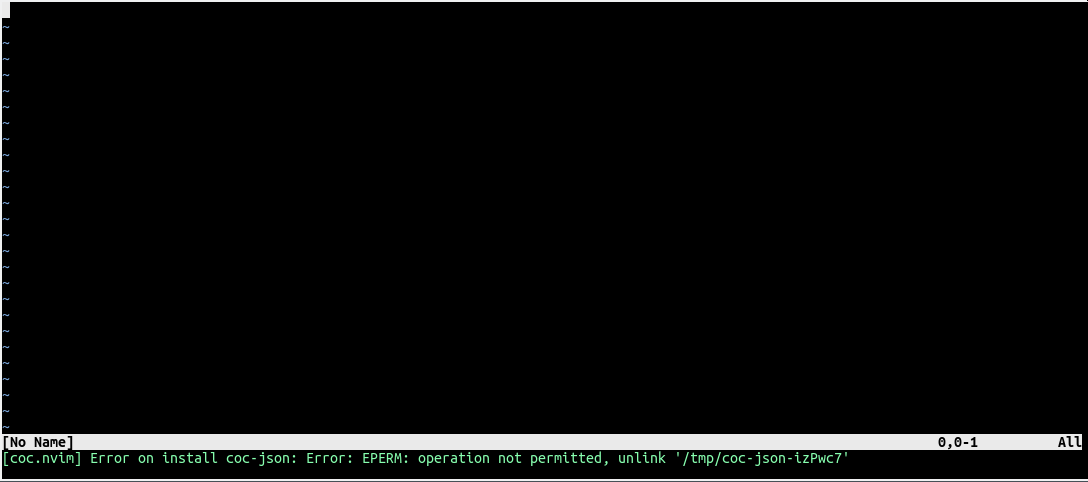
Installing of coc-components (coc-rls, coc-git, coc-json) is not possible. The error message is like:
[coc.nvim] Error on install coc-json: Error: EPERM: operation not permitted, unlink '/tmp/coc-json-FflZaU'
But the user is actually allowed and able to delete this folder in /tmp. This error occurs on every invocation of either
:CocInstall coc-json
or
:CocInstall coc-rls
or
:CocInstall coc-git
Reproduce the bug
Steps done:
Create new user and switch to that user:
valinor% pwd
/home/vimuser
valinor% mkdir -p .config/nvim
valinor% nvim .config/nvim/init.vim
valinor% cat ~/.config/nvim/init.vim
  set nocompatible
  set runtimepath^=~/.config/nvim/coc.nvim
  filetype plugin indent on
  syntax on
  set hidden
valinor% cd .config/nvim
valinor% git clone https://github.com/neoclide/coc.nvim
Cloning into 'coc.nvim'...
remote: Enumerating objects: 24078, done.
remote: Total 24078 (delta 0), reused 0 (delta 0), pack-reused 24078
Receiving objects: 100% (24078/24078), 10.89 MiB | 592.00 KiB/s, done.
Resolving deltas: 100% (17434/17434), done.
valinor% ls
coc.nvim    init.vim
valinor% pwd
/home/vimuser/.config/nvim
valinor% cd coc.nvim
valinor% yarn install --frozen-lockfile
yarn install v1.19.1
[1/4] Resolving packages...
[2/4] Fetching packages...
info [email protected]: The platform "freebsd" is incompatible with this module.
info "[email protected]" is an optional dependency and failed compatibility check. Excluding it from installation.
[3/4] Linking dependencies...
[4/4] Building fresh packages...
warning Your current version of Yarn is out of date. The latest version is "1.21.1", while you're on "1.19.1".
$ npm-run-all clean build
yarn run v1.19.1
$ rimraf lib build
Done in 0.56s.
yarn run v1.19.1
$ tsc -p tsconfig.json
Done in 12.03s.
Done in 33.97s.
Screenshots (optional)
 mstuehn
All 5 comments
I'm getting the same error with vim8
## versions
vim version: VIM - Vi IMproved 8.2 (2019 Dec 12, compiled Feb 6 2020 08:56:12)
node version: v13.7.0
coc.nvim version: 0.0.74-98a709ec3f
term: dumb
platform: freebsd
## Messages
Messages maintainer: Bram Moolenaar <[email protected]>
"coc-settings.json" 10L, 165C
[coc.nvim] Run :CocInstall coc-json for json intellisense
[coc.nvim] Error on install coc-json: Error: EPERM: operation not permitted, unlink '/tmp/coc-json-FBKDpR'
 vendion
on 13 Feb 2020
vendion
on 13 Feb 2020
I'm able to install the plugins by hand:
# cd ~/.config/coc/extensions
# yarn add  coc-rls coc-json coc-python
yarn add v1.19.1
warning package.json: No license field
info No lockfile found.
warning No license field
[1/4] Resolving packages...
[2/4] Fetching packages...
warning [email protected]: The engine "coc" appears to be invalid.
warning [email protected]: The engine "coc" appears to be invalid.
warning [email protected]: The engine "coc" appears to be invalid.
[3/4] Linking dependencies...
[4/4] Building fresh packages...
success Saved lockfile.
warning No license field
warning Your current version of Yarn is out of date. The latest version is "1.22.0", while you're on "1.19.1".
success Saved 3 new dependencies.
info Direct dependencies
├─ [email protected]
├─ [email protected]
└─ [email protected]
info All dependencies
├─ [email protected]
├─ [email protected]
└─ [email protected]
Done in 5.41s.
#
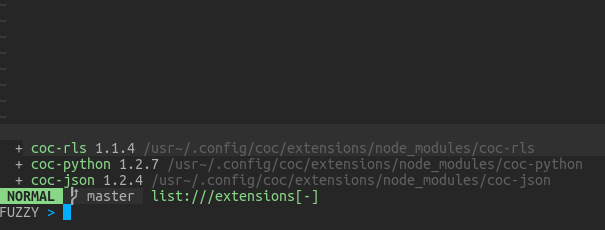
Afterwards they are recognized by coc:
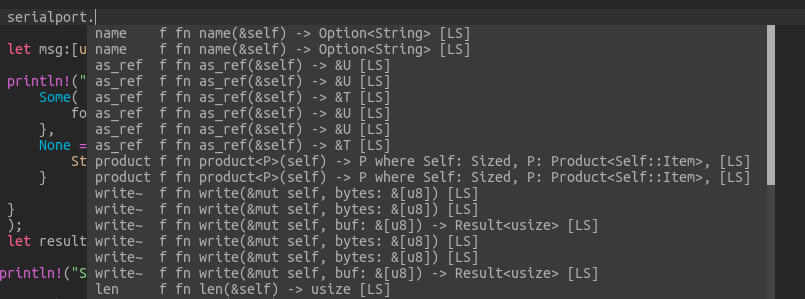
and provide functionality:
mstuehn
on 13 Feb 2020
I can confirm the workaround of manually installing the extensions with yarn as @mstuehn pointed out works as well.
vendion
on 14 Feb 2020
I think this is a known issue and general problem, not particular of FreeBSD. Often on first setup, coc will download all the extensions you have on global list, but some may fail download, and you have to reinstall those that fail, otherwise they won't work and will give similar errors.
 oblitum
on 14 Feb 2020
oblitum
on 14 Feb 2020
Should be fixed by using rimraf module.
 chemzqm
on 19 May 2020
chemzqm
on 19 May 2020
Related issues
 andys8
·
3Comments
andys8
·
3Comments
 tom-james-watson
·
3Comments
tom-james-watson
·
3Comments
 iago-lito
·
3Comments
iago-lito
·
3Comments
 marene
·
3Comments
marene
·
3Comments
 cvlmtg
·
3Comments
cvlmtg
·
3Comments
Most helpful comment
I'm able to install the plugins by hand:
Afterwards they are recognized by coc:


and provide functionality: