Coc.nvim: Auto suggestion pop up remains after Ctrl-C (and not clearable by redraw!)
Result from CocInfo
versions
vim version: VIM - Vi IMproved 8.1 (2018 May 18, compiled Jul 28 2019 01:07:30)
node version: v10.16.3
coc.nvim version: 0.0.74-a52dec0522
term: iTerm.app
platform: darwin
Messages
Messages maintainer: Bram Moolenaar Bram@vim.org
[coc.nvim] No ESLint configuration (e.g .eslintrc) found for file: /Users/jacobsandlund/dev/dotfiles/test.ts
1 change; before #13 4 seconds ago
[coc.nvim] No ESLint configuration (e.g .eslintrc) found for file: /Users/jacobsandlund/dev/dotfiles/other.ts
Output channel: tsserver
[Info - 11:29:47 AM] Forking TSServer
PATH: /Users/jacobsandlund/.rbenv/shims:/Users/jacobsandlund/.cargo/bin:/Users/jacobsandlund/go/bin:/Applications/MacVim.app/Contents/bin:/usr/local/opt/[email protected]/bin:/usr/local/opt/python@2/libexec/bin:/usr/local/bin:/usr/bin:/bin:/usr/sbin:/sbin:/Users/jacobsandlund/.rbenv/shims:/Users/jacobsandlund/.cargo/bin:/Users/jacobsandlund/go/bin:/Applications/MacVim.app/Contents/bin:/usr/local/opt/[email protected]/bin:/usr/local/opt/python@2/libexec/bin:/Users/jacobsandlund/.fzf/bin·
[Info - 11:29:47 AM] Started TSServer
{
"path": "/Users/jacobsandlund/.config/coc/extensions/node_modules/coc-tsserver/node_modules/typescript/lib",
"_pathLabel": "",
"_api": {
"versionString": "3.7.3",
"version": "3.7.3"
}
}
Output channel: eslint
[Info - 11:29:47 AM] ESLint server running in node v10.16.3
[Info - 11:29:47 AM] ESLint library loaded from: /usr/local/lib/node_modules/eslint/lib/api.js
Describe the bug
Quite often if I Ctrl-C to exit insert mode, some of the helpful auto-suggestions that appear in the pop up near the cursor (what's that thing called?) don't go away. They stay there even if I Ctrl-L or :redraw! The only way to get them to go away is to trigger another auto-suggestion (by pressing tab or a key that triggers auto-complete).
Reproduce the bug
The vanilla mini.vim was enough to reproduce the bug, but it took using the arrow keys to select a very long suggestion option, and then Ctrl-C'ing in order to reproduce it. But it did reproduce after a while. Screenshots below.
vim
  set nocompatible
  set runtimepath^=/path/to/coc.nvim
  filetype plugin indent on
  syntax on
  set hidden
Start (neo)vim with command:
vim -u mini.vimOperate vim.
Screenshots (optional)
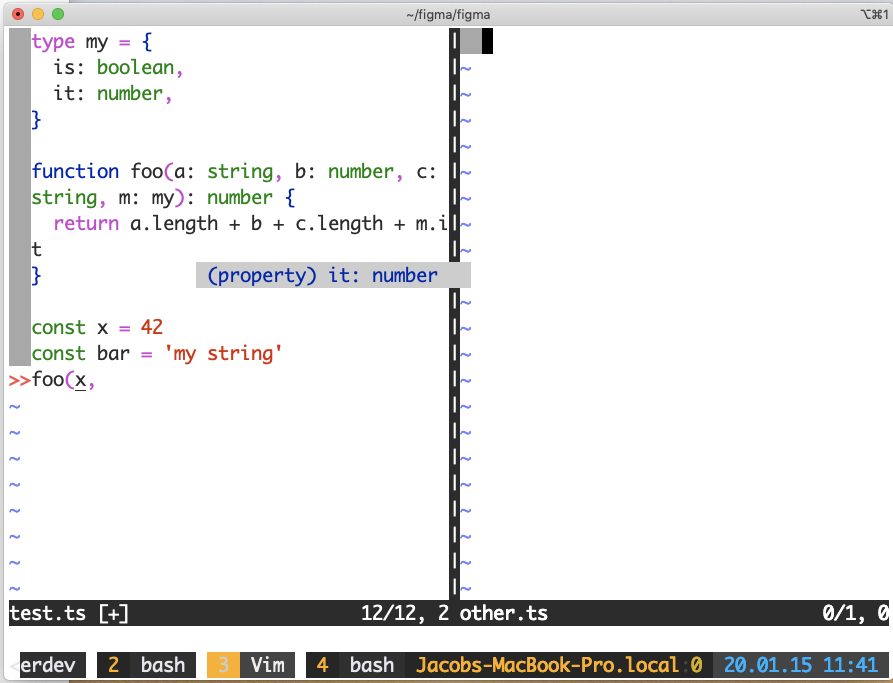
With mini.vim:
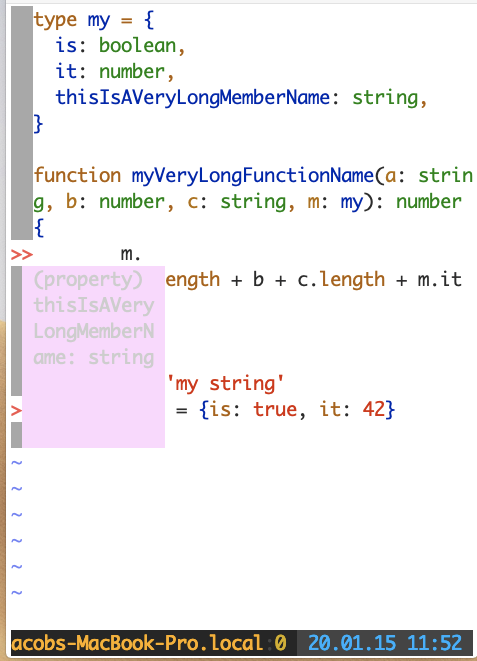
Sometimes it seems like it's most often a problem with the extra pop up providing additional information on the side. This was taken before Ctrl-C:
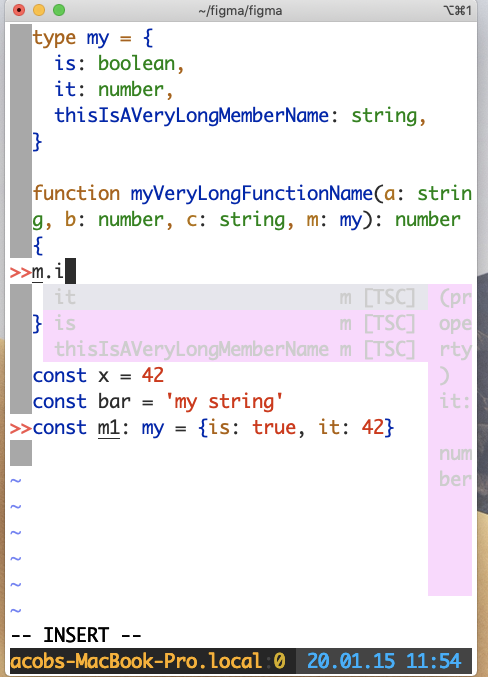
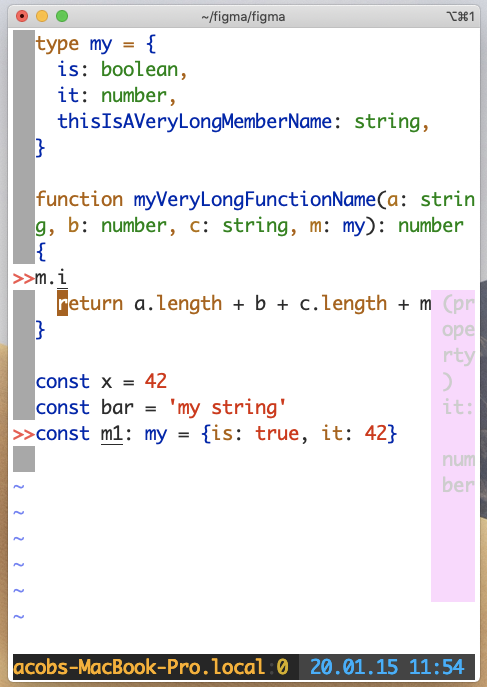
And after:
Thanks for an awesome plugin! I use it all the time and it is a huge improvement to my workflow.
 jacobsandlund
All 6 comments
I've had this happen too, if you click on the suggestion and bring it into focus you can ':q' and it will close the suggestion but keep the other stuff open.
 kyle-mccarthy
on 15 Jan 2020
kyle-mccarthy
on 15 Jan 2020
@kyle-mccarthy oh interesting, and is there a way to navigate to the suggestion without using the mouse?
jacobsandlund
on 16 Jan 2020
Try :call popup_clear(), it could be failed to get closed because the async manner of coc.nvim.
 chemzqm
on 16 Jan 2020
chemzqm
on 16 Jan 2020
Ah, that works for me. I also realized I could inoremap Ctrl-C to hit escape. Even with that mapping to escape it still leaves a small window on rare occasion. But this works for me now.
jacobsandlund
on 27 Jan 2020
Try
:call popup_clear(), it could be failed to get closed because the async manner of coc.nvim.
:call popup_clear() returns E117: Unknown function: popup_clear. This function has been removed?
vim version: NVIM v0.4.3
node version: v12.13.1
coc.nvim version: 0.0.77-817efd5108
term: iTerm.app
platform: darwin
And I find that :call coc#util#close_popup() can work.
https://github.com/neoclide/coc.nvim/blob/c8f5e8adad36358f88f33ecbce121b6522a875f5/autoload/coc/util.vim#L132
 adoyle-h
on 31 Mar 2020
adoyle-h
on 31 Mar 2020
@adoyle-h popup_clear only exists on vim8
chemzqm
on 31 Mar 2020
Related issues
 andys8
·
3Comments
andys8
·
3Comments
 marene
·
3Comments
marene
·
3Comments
 cvlmtg
·
3Comments
cvlmtg
·
3Comments
 skylite21
·
3Comments
skylite21
·
3Comments
 ctaylo21
·
4Comments
ctaylo21
·
4Comments
Most helpful comment
Try
:call popup_clear(), it could be failed to get closed because the async manner of coc.nvim.