coc.nvim breaks undopoints in NeoVim
Result from CocInfo
versions
vim version: NVIM v0.4.3
node version: v13.3.0
coc.nvim version: 0.0.74
term: tmux-256color
platform: linux
Messages
Output channel: snippets
[Info - 12:33:12 PM] watchman watching project: /home/francisco/.config/coc/ultisnips
[Info - 12:33:12 PM] subscribing "*/.snippets" in /home/francisco/.config/coc/ultisnips
Describe the bug
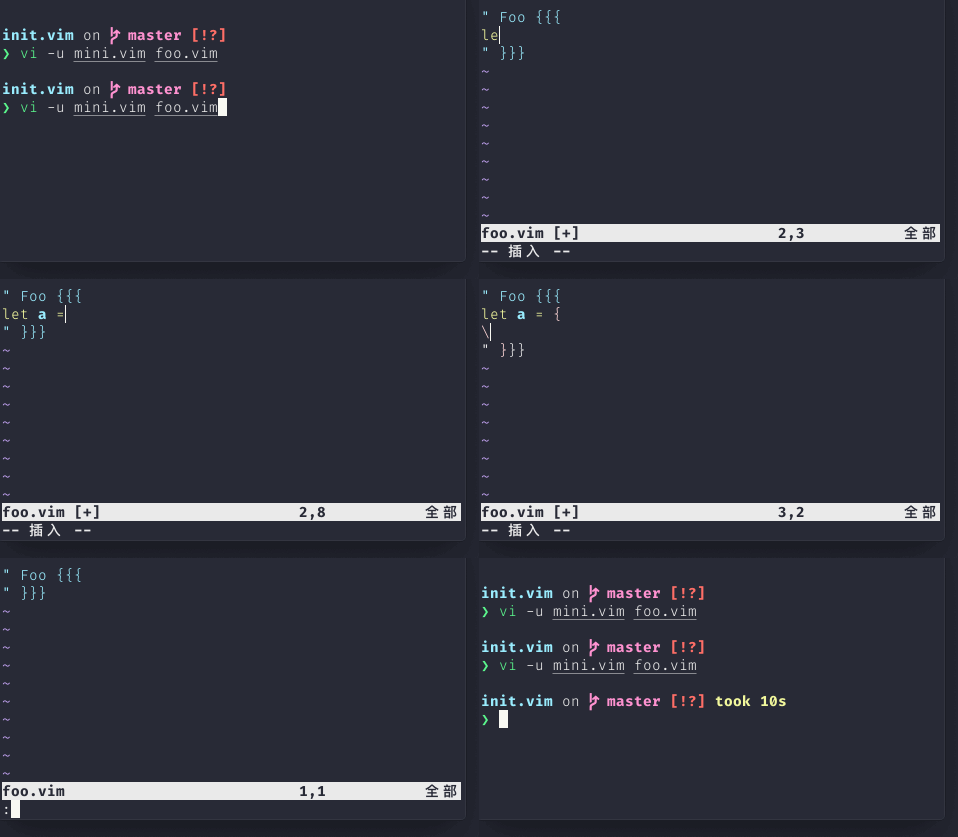
When coc.nvim is enabled together with snippets in vim code, it breaks undo points when typing \. There's no way to undo all that has been inserted. Check gif at the bottom.
Reproduce the bug
Create file
mini.vimwith:augroup vimrc | autocmd! | augroup end if empty(glob('~/.vim/autoload/plug.vim')) silent !curl -fLo "$HOME/.vim/autoload/plug.vim" --create-dirs 'https://raw.githubusercontent.com/junegunn/vim-plug/master/plug.vim' autocmd vimrc VimEnter * PlugInstall --sync | source $MYVIMRC endif set nocompatible call plug#begin('~/.vim/plugged') Plug 'tpope/vim-sensible' call plug#load('vim-sensible') let g:coc_global_extensions = ['coc-snippets'] Plug 'neoclide/coc.nvim', {'branch': 'release'} Plug 'honza/vim-snippets' call plug#end() set expandtab shiftwidth=4 tabstop=4 softtabstop=4Create file
foo.vimwith:" Foo {{{ " }}}Start neovim with command:
neovim -u mini.vim foo.vim(only happens in neovim)Trigger automatic indentation when typing
\(check gif bellow).Undo text changes
Screenshots (optional)
Here I typed u many times before closing the file, but it didn't revert all changes. When reopening the file, the changes have actually been reverted.

 oblitum
All 10 comments
Can't reproduce.
let $NVIM_COC_LOG_LEVEL = 'debug'
set expandtab shiftwidth=4 tabstop=4 softtabstop=4
set runtimepath=$HOME/.config/nvim/plugged/vim-snippets
set runtimepath=$HOME/.config/nvim/plugged/coc.nvim
filetype plugin indent off

let g:coc_global_extensions = ['coc-snippets']
vim version: NVIM v0.5.0-241-g9f3d483c7
node version: v13.3.0
coc.nvim version: 0.0.74
term: iTerm.app
platform: darwin
 fannheyward
on 18 Dec 2019
fannheyward
on 18 Dec 2019
@fannheyward I can't reproduce with a minimal vim similar to yours either, it has completely different behavior, I don't get any auto indent and coc completion with it.
oblitum
on 18 Dec 2019
I have edited your minimal file to the following, now it works (and reproduces the issue), it was important to use +=:
let $NVIM_COC_LOG_LEVEL = 'debug'
set expandtab shiftwidth=4 tabstop=4 softtabstop=4
set runtimepath+=$HOME/.vim/plugged/vim-snippets
set runtimepath+=$HOME/.vim/plugged/coc.nvim
filetype plugin indent off

let g:coc_global_extensions = ['coc-snippets']
There's no auto indent with this .vimrc, like in the gif, but that's not important, the issue is still present.
oblitum
on 18 Dec 2019
Unable to reproduce on neovim 0.5.0
 chemzqm
on 19 Dec 2019
chemzqm
on 19 Dec 2019
mini.vim
let $NVIM_COC_LOG_LEVEL = 'debug'
set expandtab shiftwidth=4 tabstop=4 softtabstop=4
set runtimepath+=$HOME/.vim/plugged/vim-snippets
set runtimepath+=$HOME/.vim/plugged/coc.nvim
filetype plugin indent off

let g:coc_global_extensions = ['coc-snippets']
@fannheyward your gif is not right, it's not presenting any snippet. To reproduce the issue it's necessary that coc.nvim popups shows up. You have set set runtimepath+=$HOME/.vim/plugged/vim-snippets, which should have had the honza snippets.
oblitum
on 19 Dec 2019
I just tested the issue on latest master of NeoVim.
oblitum
on 19 Dec 2019

Reproduced.
mini.vim
let $NVIM_COC_LOG_LEVEL = 'debug'
set expandtab shiftwidth=4 tabstop=4 softtabstop=4
set runtimepath+=$HOME/.config/nvim/plugged/coc.nvim
set runtimepath+=$HOME/.config/nvim/plugged/vim-snippets
filetype plugin indent off

let g:coc_global_extensions = ['coc-snippets']
After some debug and git bisect, this issue is caused by preselect feature on Neovim. When disable suggest.enablePreselect, the issue is gone.
https://github.com/neoclide/coc.nvim/commit/ca3e3892596a40451b6c2016dab8c6b794c19b4c is the first broken commit.
fannheyward
on 20 Dec 2019
I've made suggest.enablePreselect default to false
chemzqm
on 6 Mar 2020
Related issues
 ctaylo21
·
4Comments
ctaylo21
·
4Comments
 tom-james-watson
·
3Comments
tom-james-watson
·
3Comments
 iago-lito
·
3Comments
iago-lito
·
3Comments
 npearson72
·
3Comments
npearson72
·
3Comments
 andys8
·
3Comments
andys8
·
3Comments
Most helpful comment
After some debug and
git bisect, this issue is caused bypreselectfeature on Neovim. When disablesuggest.enablePreselect, the issue is gone.https://github.com/neoclide/coc.nvim/commit/ca3e3892596a40451b6c2016dab8c6b794c19b4c is the first broken commit.