Result from CocInfo
versions
vim version: VIM - Vi IMproved 8.1 (2018 May 18, compiled May 30 2019 19:25:43)
node version: v12.4.0
coc.nvim version: 0.0.73-1ea838ee4e
term: Apple_Terminal
platform: darwin
Messages
Messages maintainer: Bram Moolenaar Bram@vim.org
"build.sbt" 809L, 24987C
Describe the bug
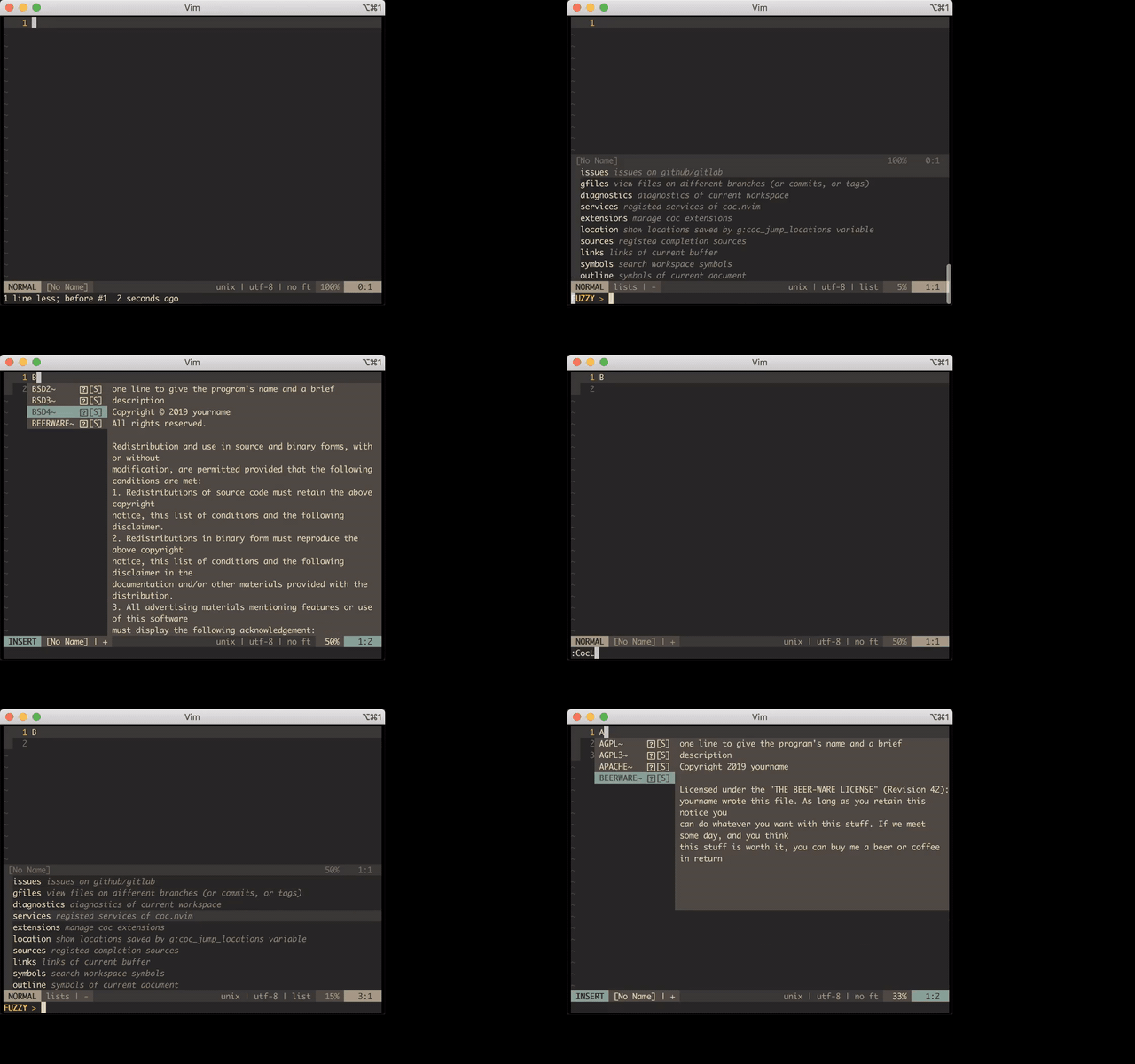
:CocList window suddenly closes leaving a new line with B in the current buffer.
Reproduce the bug
- Open
vim - Run
:CocList - Scroll back and forth with UP & DOWN keys several times
- Window suddenly closes & a new line with
A(in case of UP) orB(DOWN) appears
I believe A's & B's that appear are related to how UP & DOWN keys are encoded in terminal, something like ^[[A & ^[[B.
- Repoducible with
mini.vim:
vim
set nocompatible
set runtimepath^=/path/to/coc.nvim
filetype plugin indent on
syntax on
set hidden
 arbitrary-dev
All 14 comments
Should be problem of your terminal/plugin, it send <esc> to vim, so the list get closed.
 chemzqm
on 25 Jul 2019
chemzqm
on 25 Jul 2019
To improve reproducibility, <Up> or <Down> could be hold while scrolling the item list.
arbitrary-dev
on 13 Aug 2019
Also, the problem manifests itself differently when scrolling up with <C-k> on hold, there are console error sounds (term: Apple_Terminal), but not when holding <C-j> while scrolling down.
arbitrary-dev
on 13 Aug 2019
Encounter the same problem.
termimals: terminal.app | alacritty | item2
macOS 10.14.6
vim 8.1.1722
nodejs v12.10.0
coc.nvim 0.0.74
 xinhangliu
on 7 Sep 2019
xinhangliu
on 7 Sep 2019
Also reproducible in Linux, when holding the DOWN key...
versions
vim version: VIM - Vi IMproved 8.1 (2018 May 18, compiled Aug 30 2019 20:40:47)
node version: v8.12.0
coc.nvim version: 0.0.74-c97d41aa1e
term: dumb (actually it's rxvt-unicode)
platform: linux
arbitrary-dev
on 9 Sep 2019
Probably some race condition due to asyncronously handling complex keys (the ones which consist of two elements <esc>B)
arbitrary-dev
on 9 Sep 2019
I have the same issue on both Linux and Mac.
 arashm
on 3 Oct 2019
arashm
on 3 Oct 2019
Happens for me on ArchLinux too, but just on Vim, only when holding DOWN/UP (or <c-j>/<c-k>).
 oblitum
on 3 Nov 2019
oblitum
on 3 Nov 2019
For me this also sometimes happens when:
- vim is in insert mode
- I press
Escand then quicklyUporDown - After this new line is inserted with symbol
AorB. Vim is still in insert mode and coc's autocompletion menu appears
This behavior seems to be bound to the vim's buffer somehow. For example at the moment of writing this I have several cpp files open in vim. For some of those files this happens every time I press Esc-Up or Esc-Down. For other files this does not happen at all. I tried to open buffer in other window or tab but this weird behavior moves with the buffer.
 igorsol
on 16 Nov 2019
igorsol
on 16 Nov 2019
I press Esc
The list will always be closed after <exc>, you have to use <C-o>
chemzqm
on 17 Nov 2019
Should be bug of vim, the window get closed by vim when coc.nvim send commands to vim frequently.
chemzqm
on 17 Nov 2019
I understand that issues like this are difficult to address, but I want to point out that this currently breaks the list feature altogether for me. If this really can't be fixed that would to me seem to raise the question whether coc should really have its own list implementation at all, rather than focusing on providing a clean API for existing tools like fzf (see also the heavily upvoted #307 ).
 gmolau
on 17 Nov 2019
gmolau
on 17 Nov 2019
@gmolau there're apis provided, it's your choice to use list feature or not.
chemzqm
on 18 Nov 2019
The list will always be closed after
<exc>, you have to use<C-o>
Sorry if I was not clear enough but what I've described in my comment was not in the list. That was in insert mode in ordinary source code buffer. I just tried to add more information hoping it might help with debugging the issue.
Nevertheless I can also reproduce the issue in the list as it is described above (no need for insert mode in this case).
igorsol
on 18 Nov 2019
Related issues
 tom-james-watson
·
3Comments
tom-james-watson
·
3Comments
 svenstaro
·
4Comments
svenstaro
·
4Comments
 skylite21
·
3Comments
skylite21
·
3Comments
 LinArcX
·
4Comments
LinArcX
·
4Comments
 MaskRay
·
3Comments
MaskRay
·
3Comments
Most helpful comment
I understand that issues like this are difficult to address, but I want to point out that this currently breaks the list feature altogether for me. If this really can't be fixed that would to me seem to raise the question whether coc should really have its own list implementation at all, rather than focusing on providing a clean API for existing tools like fzf (see also the heavily upvoted #307 ).