Coc.nvim: auto import for closed files
I just discovered that coc auto import files just like VSCode 😱. However after playing around a bit, it seems like for the auto import to work, the file has to be opened (in the buffer)
My question is, is there a way to get the auto-import working even if the file is not opened (on the buffer)

Thanks in advance
cheers,
Sam
 sameera207
All 16 comments
Auto import can work with none opened buffer. could be issue of your tsserver,try VSCode to see if you have same issue.
 chemzqm
on 16 Jul 2019
chemzqm
on 16 Jul 2019
@sameera207 I'm facing the exact similar problem, Did you by any chance find a solution for this, if so, do share. Thanks !
 PezCoder
on 16 May 2020
PezCoder
on 16 May 2020
It's problem of your language server
chemzqm
on 17 May 2020
@chemzqm I've been using vim for around 3 years now, but no so fluent with the VIM language. Will you be able to help me debug this ? Will really appreciate any help.
PezCoder
on 17 May 2020
Should be problem of your language server, checkout https://github.com/neoclide/coc.nvim/wiki/Debug-language-server#using-output-channel
chemzqm
on 17 May 2020
So I tried this but I'm not sure how to proceed with this:
:CocList services

  * tsserver [running] typescript, typescriptreact, typescript.tsx, typescript.jsx, javascript, javascriptreact
:CocConfig

{
    "tsserver.trace.server": "verbose",
    "tsserver.execArgv": ["--nolazy", "--inspect-brk=6045"]
}
Attaching the log file when trying to search for a component (named: Modal) the file for which isn't opened yet.
typescript.log
I tried to visualize it with https://microsoft.github.io/language-server-protocol/inspector/ as mentioned & chrome inspectors, but both are not working.
@chemzqm Can you help with what can be wrong possibly wrong with the ts-server ?
PezCoder
on 20 May 2020
@PezCoder looks like your vim is too old so coc.nvim can't send request for completion details.
chemzqm
on 20 May 2020
@chemzqm That's strange.. I'm using the latest version of neovim:
vi --version
NVIM v0.4.3
Build type: Release
LuaJIT 2.0.5
Compilation: /usr/local/Homebrew/Library/Homebrew/shims/mac/super/clang -U_FORTIFY_SOURCE -D_FORTIFY_SOURCE=1 -DNDEBUG -DMIN_LOG_LEVEL=3 -Wall -Wextra -pedantic -Wno-unused-parameter -Wstrict-prototypes -std=gnu99 -Wshadow -Wconversion -Wmissing-prototypes -Wimplicit-fallthrough -Wvla -fstack-protector-strong -fdiagnostics-color=auto -DINCLUDE_GENERATED_DECLARATIONS -D_GNU_SOURCE -DNVIM_MSGPACK_HAS_FLOAT32 -DNVIM_UNIBI_HAS_VAR_FROM -I/tmp/neovim-20191107-85913-1wbgqz6/neovim-0.4.3/build/config -I/tmp/neovim-20191107-85913-1wbgqz6/neovim-0.4.3/src -I/usr/local/include -I/tmp/neovim-20191107-85913-1wbgqz6/neovim-0.4.3/deps-build/include -I/usr/local/opt/gettext/include -I/Applications/Xcode.app/Contents/Developer/Platforms/MacOSX.platform/Developer/SDKs/MacOSX10.15.sdk/usr/include -I/tmp/neovim-20191107-85913-1wbgqz6/neovim-0.4.3/build/src/nvim/auto -I/tmp/neovim-20191107-85913-1wbgqz6/neovim-0.4.3/build/include
Compiled by [email protected]

Features: +acl +iconv +tui
See ":help feature-compile"

   system vimrc file: "$VIM/sysinit.vim"
  fall-back for $VIM: "/usr/local/Cellar/neovim/0.4.3/share/nvim"
Also my completion does work. For example if the file is open in another buffer, then the completion on typing Component name suggests [v] & it does auto imports. The same doesn't happen when the file is not opened in the buffer though.
It must be something else. Attaching the success auto import logs. I noticed tsserver logs adds up when my file is opened. We somehow want to tell tsserver to load all the files in the project up-front as soon as the neovim launches probably ?
PezCoder
on 20 May 2020
neovim 0.4.3 should work, but I didn't see completionEntryDetails request in your first log.
chemzqm
on 20 May 2020
For javascript files some feature of tsserver may not work, use typescript could fix.
chemzqm
on 20 May 2020
Interesting. I'll try it out on the typescript project & get back with how the behavior is there for auto imports.
I know that VS code does auto imports for javascript projects like react as well, Is there a way to enable it with coc.nvim somehow?
PezCoder
on 20 May 2020
The previous log file doesn't have completionEntryDetails probably because I didn't accept any suggestions provided since it didn't have [v] type completion.
Here's the failure logs again but this time I accepted the first result [f], although it doesn't auto import.
tsserver-failure-autoimport.log
Also here are the screenshots for failure vs success options:
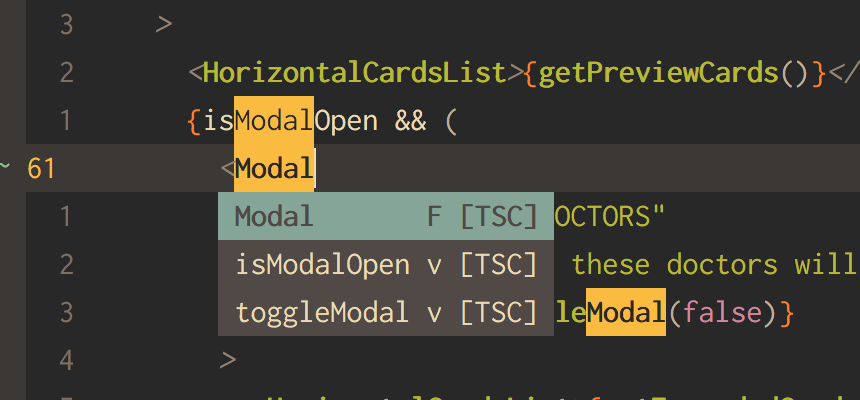
Failure
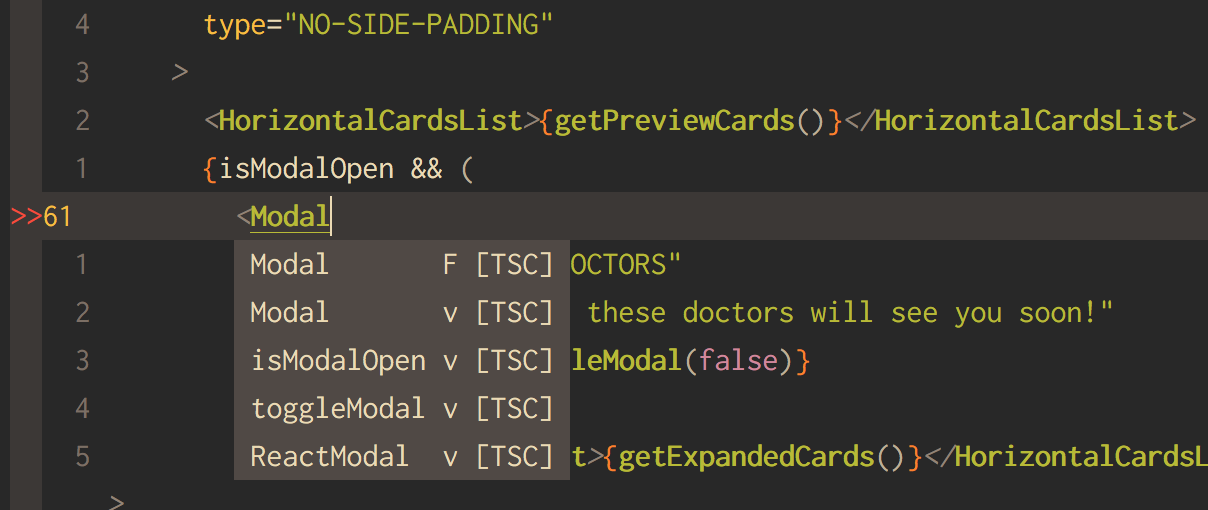
Success
PezCoder
on 20 May 2020
[Trace  - 2:48:29 PM] Response received: completionEntryDetails (9). Request took 180 ms. Success: true
Result: []
it's limitation of tsserver.
chemzqm
on 20 May 2020
I had the same issue and adding a jsconfig.json to the root of my project with these contents inside seems to have resolved it. I just started a fresh nvim and opened a random file and my autocomplete is now able to see other files in my repo and auto-import the reference.
{
  "compilerOptions": {},
  "exclude": ["dist"]
}
 timtyrrell
on 8 Jun 2020
timtyrrell
on 8 Jun 2020
@timtyrrell Thank you so much for this, works like a charm. 🎉
I read about What is jsconfig.json
The presence of jsconfig.json file in a directory indicates that the directory is the root of a JavaScript Project. The jsconfig.json file specifies the root files and the options for the features provided by the JavaScript language service.
& it makes sense, I think tsserver need a little help to determine the root of the directory for those completions to work.
I wish if coc.nvim could provide it the current directory by default as the root, but this solution works for now. 🤘
PezCoder
on 8 Jun 2020
You have to create jsconfig.json if you want tsserver work as expected for javascript.
chemzqm
on 9 Jun 2020
Related issues
 marene
·
3Comments
marene
·
3Comments
 skylite21
·
3Comments
skylite21
·
3Comments
 aareman
·
3Comments
aareman
·
3Comments
 npearson72
·
3Comments
npearson72
·
3Comments
 rkulla
·
3Comments
rkulla
·
3Comments