Is there a way to show a better error message in typescript files ?
I know that recently typescript since the 3.0 version ships with an improved error message.
However although I'm using the 3.4 version I can't see any improvement.
this is the error:
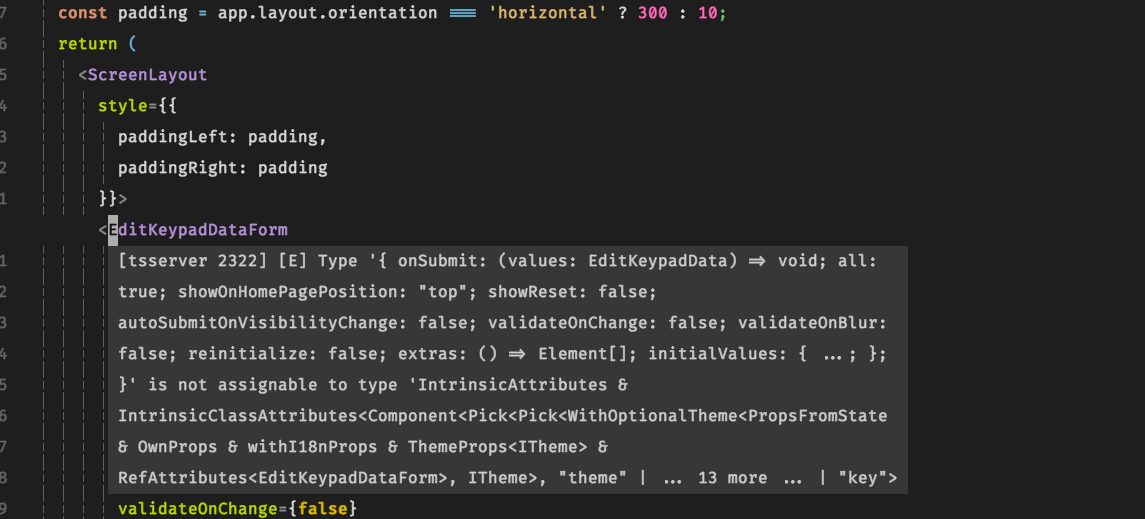
In vscode the error is the same but you can hover over with the mouse and scroll down until you can understand what the error is. In the above picture I can't really understand at the first sight what is happening and apparently there is no way to expand that message.
 ovidius72
All 6 comments
You can scroll the floating window by use mouse when your have set mouse=a, but in your case it's all message so no need to scroll.
So what's your suggestion to make it more readable?
 chemzqm
on 22 May 2019
chemzqm
on 22 May 2019
Thanks. Mouse was not working because I was using nvim inside a tmux session. Tried outside tmux and I can scroll the message as I do in vscode. The message in the screenshot is not the whole message, part of the text is at the very bottom and it contains the relevant issue giving me the name of the wrong property.
I'm not sure what to suggest but something that doesn't require the mouse would be better, maybe a shortcut that show the message in the classic vim QuickList without truncating it, or a new window at the bottom that you can focus and scroll ?
ovidius72
on 22 May 2019
but something that doesn't require the mouse would be better
Sure, there is coc#util#float_jump() can be used for jump to floating window, mostly I use <C-w>p for jump to last opened window then <C-f> to scroll.
chemzqm
on 22 May 2019
Wow, I didn't know about that. Amazing. Works like a charm. Thank you very much.
Closing.
ovidius72
on 22 May 2019
but something that doesn't require the mouse would be better
Sure, there is
coc#util#float_jump()can be used for jump to floating window, mostly I use<C-w>pfor jump to last opened window then<C-f>to scroll.
@chemzqm When I try <C-w>p it jumps to the window correctly, but it only lasts for a split second before disappearing. Any ideas what could be going on?
I suspect the window is being removed because I am no longer hovering over the affected code.
 hamza-tm
on 13 May 2020
hamza-tm
on 13 May 2020
@hamza-tm Can't reproduce, try minimal vimrc.
chemzqm
on 13 May 2020
Related issues
 cvlmtg
·
3Comments
cvlmtg
·
3Comments
 czepluch
·
3Comments
czepluch
·
3Comments
 npearson72
·
3Comments
npearson72
·
3Comments
 skylite21
·
3Comments
skylite21
·
3Comments
 MaskRay
·
3Comments
MaskRay
·
3Comments
Most helpful comment
Sure, there is
coc#util#float_jump()can be used for jump to floating window, mostly I use<C-w>pfor jump to last opened window then<C-f>to scroll.