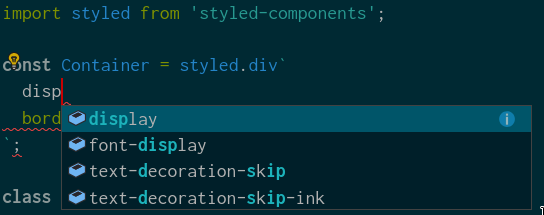
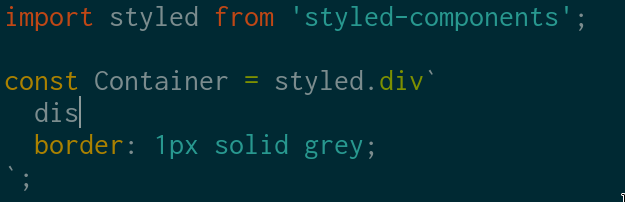
I'm using styled components in my projects and can't get IntelliSense to work when using CoC.
vscode-styled-components provides IntelliSense in VSCode. Maybe port of it work with CoC too.
Expected behavior
Problem
 kgnugur
All 10 comments
css-tsserver support plugins, you can configure tsserver to use typescript-styled-plugin in your tsconfig.json or jsconfig.json.
You should be able to install that VSCode extension by use url or use vim-plug https://github.com/neoclide/coc.nvim/wiki/Using-coc-extensions, coc-tsserver can load typescriptServerPlugins.
 chemzqm
on 7 Apr 2019
chemzqm
on 7 Apr 2019
From typescript-styled-plugin I tried npm install --save-dev typescript-styled-plugin typescript it worked for first few second but all completion recommendations stopped after that few seconds.
npm install --save-dev typescript-styled-plugin doesn't do anything.
Note: I configured by tsconfig.json accordingly.
kgnugur
on 7 Apr 2019
Need to checkout the log from tsserver.
chemzqm
on 7 Apr 2019
I did npm install --save-dev typescript-styled-plugin typescript, here is tsconfig:
{
  "compilerOptions": {
    "plugins": [
      {
        "name": "typescript-styled-plugin"
      }
    ]
  }
}
Here is the log:
2019-04-07T10:10:35.038 INFO (pid:12354) [plugin] - coc initialized with node: v8.9.0
2019-04-07T10:12:32.344 INFO (pid:14076) [plugin] - coc initialized with node: v8.9.0
2019-04-07T10:12:38.985 INFO (pid:14076) [services] - registed service "tsserver"
2019-04-07T10:12:39.063 INFO (pid:14076) [services] - service tsserver started
2019-04-07T10:12:41.918 INFO (pid:14076) [completion-complete] - Results from: emmet-javascriptreact,around
2019-04-07T10:12:42.227 INFO (pid:14076) [completion-complete] - Results from: around
2019-04-07T10:12:42.860 INFO (pid:14076) [completion-complete] - Results from: around
2019-04-07T10:12:43.051 INFO (pid:14076) [completion-complete] - Results from: tsserver-javascript,around
2019-04-07T10:12:43.093 INFO (pid:14076) [completion-complete] - Results from: tsserver-javascript,around
2019-04-07T10:12:46.647 WARN (pid:14076) [completion-complete] - Complete source "tsserver-javascript" takes 2000ms
2019-04-07T10:12:48.770 WARN (pid:14076) [completion-complete] - Complete source "tsserver-javascript" takes 2001ms
2019-04-07T10:12:54.674 INFO (pid:14076) [completion-complete] - Results from: around
2019-04-07T10:12:56.673 WARN (pid:14076) [completion-complete] - Complete source "tsserver-javascript" takes 2001ms
2019-04-07T10:12:56.673 INFO (pid:14076) [completion-complete] - Results from: around
2019-04-07T10:12:56.890 INFO (pid:14076) [completion-complete] - Results from: around
2019-04-07T10:12:58.888 WARN (pid:14076) [completion-complete] - Complete source "tsserver-javascript" takes 2000ms
2019-04-07T10:12:58.888 INFO (pid:14076) [completion-complete] - Results from: around
2019-04-07T10:13:00.625 INFO (pid:14076) [completion-complete] - Results from: around
The log of tsserver opened by :CocCommand tsserver.openTsServerLog
chemzqm
on 7 Apr 2019
Sorry,
I couldn't figure out what to paste and since it is too long I created a gist here is the log: https://gist.github.com/kgnugur/28c8c26a46babf8b7261ac10180d4458
kgnugur
on 7 Apr 2019
It's loaded:
Info 27 [11:22:42.628] Loading typescript-styled-plugin from /home/kgnugur/Codes/via-frontend (resolved to /home/kgnugur/Codes/via-frontend/node_modules)
Info 28 [11:22:42.720] [ts-styled-plugin] config: {"tags":["styled","css","extend","injectGlobal","createGlobalStyle"],"validate":true,"lint":{"emptyRules":"ignore"},"emmet":{}}
Info 29 [11:22:42.722] Plugin validation succeded
and I can't see any error, so no idea.
chemzqm
on 7 Apr 2019
Thank you for the help and your works. For other people here is how to make it work in steps:
1) npm install --save-dev typescript-styled-plugin
2) In root of the project make a tsconfig.json or jsconfig.json and paste the code:
{
  "compilerOptions": {
    "plugins": [
      {
        "name": "typescript-styled-plugin"
      }
    ]
  }
}
3) Setup a higher suggest time if it's not working in your coc-setting like: "suggest.timeout": 4000
kgnugur
on 7 Apr 2019
Step 3 was the charm for me - thanks so much for this, had managed to cobble together steps 1 and 2, and couldn't figure out what was going on
 phantomwhale
on 16 Sep 2019
phantomwhale
on 16 Sep 2019
There's now https://github.com/fannheyward/coc-styled-components which seem to work very well.
 pjg
on 28 Jan 2020
pjg
on 28 Jan 2020
Related issues
 andys8
·
3Comments
andys8
·
3Comments
 npearson72
·
3Comments
npearson72
·
3Comments
 LinArcX
·
4Comments
LinArcX
·
4Comments
 svenstaro
·
4Comments
svenstaro
·
4Comments
 MaskRay
·
3Comments
MaskRay
·
3Comments
Most helpful comment
Thank you for the help and your works. For other people here is how to make it work in steps:
1)
npm install --save-dev typescript-styled-plugin2) In root of the project make a
tsconfig.jsonorjsconfig.jsonand paste the code:3) Setup a higher suggest time if it's not working in your coc-setting like:
"suggest.timeout": 4000