Coc.nvim: CocAction('doHover') floating windows are not always closed
Result from CocInfo
:CocInfo
versions vim version: NVIM v0.4.0-391-gb90256e6c node version: v8.9.0 coc.nvim version: 0.0.60 term: xterm-kitty platform: linux
Description
Normally, floating windows are closed when the cursor moves. Calling CocAction('doHover') many times can create floating windows that are not automatically closed. The only way that I've found to close these windows is to click on them and manually close them.
To Reproduce
The most consistent way to reproduce this is to map 'doHover' to a key and hold the key down.
- Open a test file. I'm using the ccls language server for C/C++.
nvim test.c
- Write some code.
int main(void)
{
    int i = 0;
    int j = 0;

}
- Map
CocAction('doHover')to a key:
:nmap <silent> <M-i> :<C-U>call CocAction('doHover')<CR>
- Put the cursor on an identifier, then hold the key down.
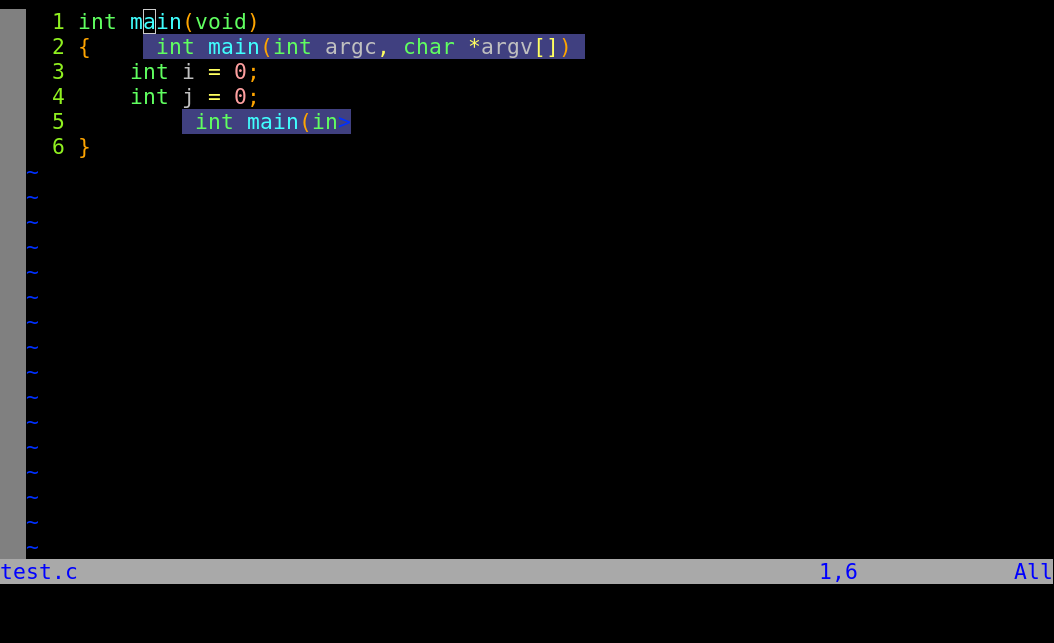
- When you move the cursor, the floating window will stay open.
Screenshots
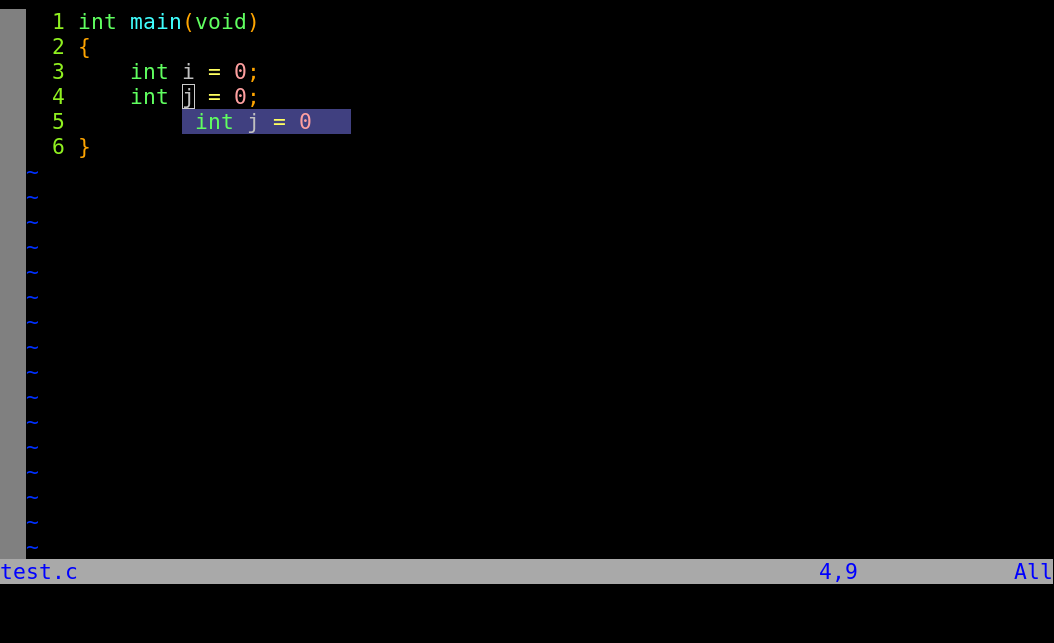
The floating window is created by holding down the mapped key:
The floating window stays open when the cursor is moved, even when another floating window is created.
 Synray
All 26 comments
You can press <C-w>o to close other windows.
I will fix this issue.
 chemzqm
on 16 Mar 2019
chemzqm
on 16 Mar 2019
Thanks for addressing this so quickly. I can still make the bug happen, if I hold the key down for 5-10 seconds or more.
Could it possibly be a bug with neovim? I opened a few floating windows on top of each other, and when I closed one, neovim segfaulted.
Synray
on 16 Mar 2019
@Synray No new release, need pull latest master and build from source code, instead of use "tag":"*" in Plug command.
chemzqm
on 16 Mar 2019
Ohhh I forgot about that. I had removed the "tag":"*" but I also needed to change the "do" command to 'yarn install'. It works now, thanks.
Synray
on 16 Mar 2019
This is still happening for me pretty consistently, would love to reopen the issue if possible.
vim version: NVIM v0.4.3
node version: v10.16.3
coc.nvim version: 0.0.74-d83536aa4e
term: iTerm.app
platform: darwin
You can press
o to close other windows.
This is not _really_ an appropriate workaround or fix. It will close all windows (which includes splits) and is really a bandaid for the symptom, not a cure for the cause.
If there's anything I can do to help with reproducing the error, please let me know. It's frequent, but not consistent so it's hard to replicate.
Thanks so much for all the work so far, coc.nvim is such a game changer that I'm super happy to help out as best I can 😅
 perrupa
on 17 Dec 2019
perrupa
on 17 Dec 2019
@perrupa try latest neovim.
chemzqm
on 18 Dec 2019
@perrupa try latest neovim.
I'm already on the latest stable version of neovim. Do you know if this issue been resolved in the nightly? I'll give it a try and report back if the floating windows continue to remain open.
perrupa
on 18 Dec 2019
I'm still having this issue intermittently and having to hit <C-w>o. It _seems_ to be random so unfortunately no repro at this stage.
 samhh
on 30 Mar 2020
samhh
on 30 Mar 2020
 reergymerej
on 30 Mar 2020
reergymerej
on 30 Mar 2020
Use :call coc#util#float_hide() or upgrade your neovim.
chemzqm
on 31 Mar 2020
Hey I hate to comment on closed issue. This is what :CocInfo gets me
vim version: NVIM v0.5.0-1f56f9a4b
node version: v12.14.0
coc.nvim version: 0.0.78-fc983ce6dd
term: screen-256color
platform: darwin
Sometimes the float window will be kept open. The trick with <C-w>o works but happens randomly so just reporting here.
 comatory
on 12 Apr 2020
comatory
on 12 Apr 2020
Adding onto the above, here's my :CocInfo where this sometimes happens:
vim version: NVIM v0.4.3
node version: v13.12.0
coc.nvim version: 0.0.78-fc983ce6dd
term: alacritty
platform: linux
It also happens to me on macOS and with older Node versions, and has been happening for a while (i.e. with old coc.nvim versions as well).
samhh
on 13 Apr 2020
I've got the latest, too, otherwise I wouldn't have said anything.
reergymerej
on 19 Apr 2020
We need debug log of coc.nvim to address this issue, please follow these steps:
- Add
let g:node_client_debug = 1to your vimrc. - Restart your vim/neovim to make the issue happen.
- Open the log file by command
:call coc#client#open_log(). - Attach the log file or paste content from the log.
chemzqm
on 19 Apr 2020
@reergymerej could be problem of your neovim or other plugin, can't reproduce
chemzqm
on 19 Apr 2020
I've added the debug switch. I'll try and capture a log the next time it happens. Thanks!
reergymerej
on 21 Apr 2020
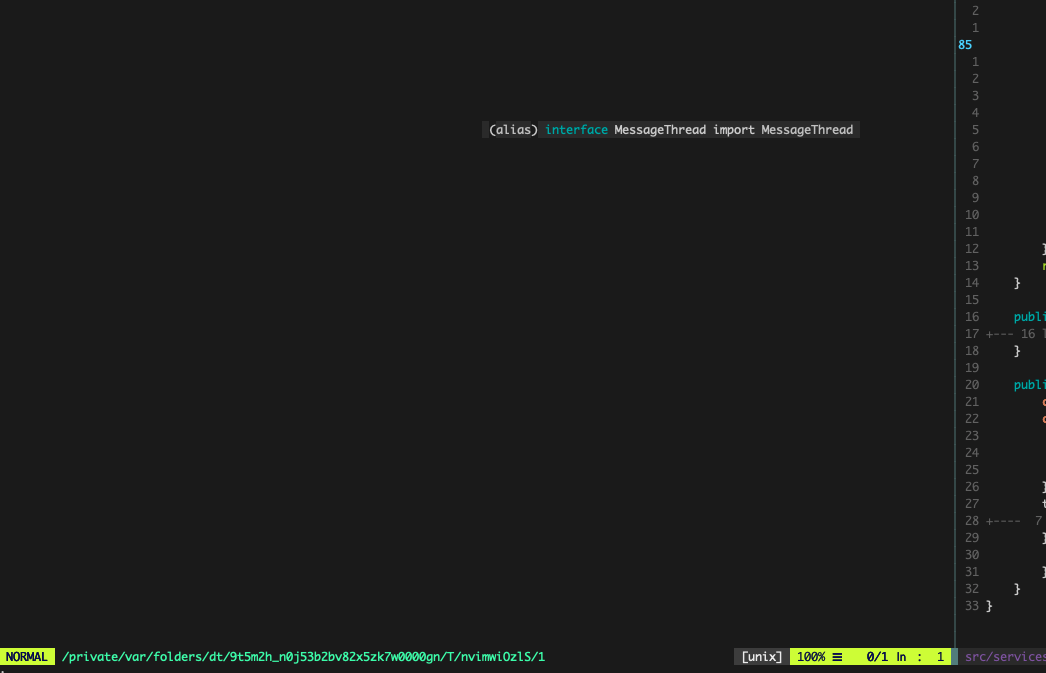
:call coc#client#open_log() opens an empty file. :CocOpenLog doesn't seem to work (though it did before this happened. 🤷♂️
reergymerej
on 21 Apr 2020
I have the same problem, editing Rust with coc-rust-analyzer. I get
E121: Undefined variable: g:node_client_debug
If I try to add
let g:node_client_debug = 1
To my vimrc.
The problematic window seems to appear during auto-completion (showing the doc of an entry), and then stays. If I trigger the auto-completion list again, it seems to get rid of it.
vim version: NVIM v0.4.3
node version: v10.20.1
coc.nvim version: 0.0.78-9d846734a2
term: xterm-256color
platform: linux
 yannham
on 6 May 2020
yannham
on 6 May 2020
This issue started for me after I moved from coc-rls to coc-rust-analyzer.
I was able to get the floating window to disappear normally by uninstalling coc via plug, and reinstalling from source.
Plug 'neoclide/coc.nvim', {'do': 'yarn install --frozen-lockfile'}
 qubies
on 27 May 2020
qubies
on 27 May 2020
Read doc of vim-plug for update your vim extensions.
chemzqm
on 27 May 2020
Update did not seem to fix it for me, had to be removed.
qubies
on 27 May 2020
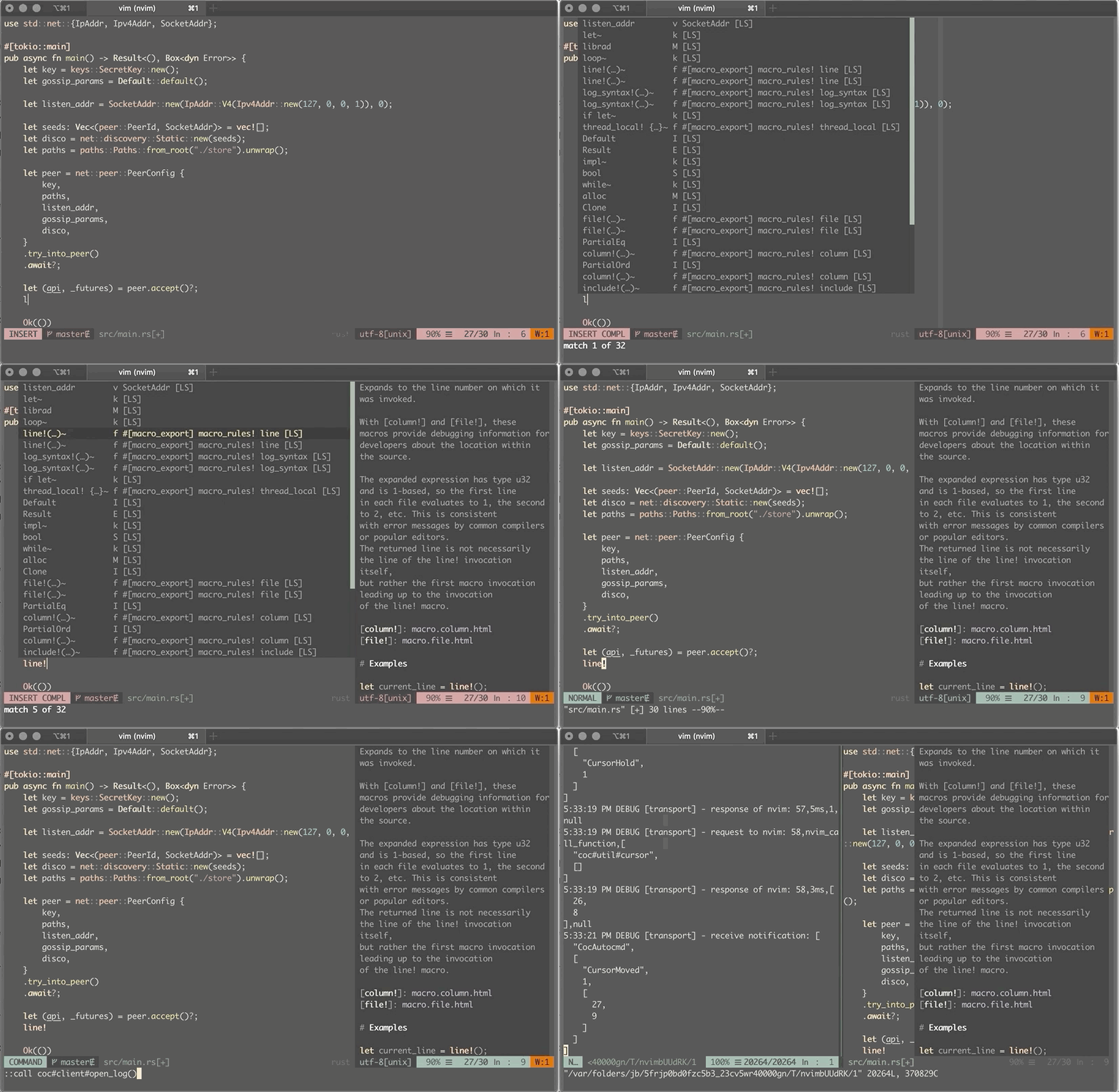
Can reliably reproduce it when hitting ctrl + c instead of esc when a second floating window is open (coc-rust-analyzer 0.7.9):
vim version: NVIM v0.4.3
node version: v12.17.0
coc.nvim version: 0.0.78-551353208d
term: iTerm.app
platform: darwin
Debug log: bug.log.
 rudolfs
on 3 Jul 2020
rudolfs
on 3 Jul 2020
You may be onto something. I use ctrl -c instead of esc.
reergymerej
on 4 Jul 2020
It's not possible for plugin to detect ctrl+c, you can remap it
chemzqm
on 4 Jul 2020
I also use C-c to exit insert mode and was having this same problem.
What I didn't realize (and what is alluded to by @chemzqm in his recent post) is that C-c and Esc are different commands.
This StackExchange post explains the difference well.
The solution (for me at least) was to just remap C-c to Esc via
inoremap <C-c> <Esc>
 a-torgovitsky
on 4 Sep 2020
a-torgovitsky
on 4 Sep 2020
I also use C-c to exit insert mode and was having this same problem.
What I didn't realize (and what is alluded to by @chemzqm in his recent post) is that C-c and Esc are different commands.
This StackExchange post explains the difference well.
The solution (for me at least) was to just remap C-c to Esc viainoremap <C-c> <Esc>
The solution above stopped reliably working for me. I am not sure why. New workaround that I found suggested in related issue #1940 is to bind escape to manually close floating windows:
nmap <Esc> :call coc#util#float_hide() <CR>
If I encounter a ghosting window that won't go away I just hit escape and it disappears. Not perfect, but ok for now.
a-torgovitsky
on 16 Oct 2020
Related issues
 iago-lito
·
3Comments
iago-lito
·
3Comments
 tom-james-watson
·
3Comments
tom-james-watson
·
3Comments
 MacGuffinLife
·
4Comments
MacGuffinLife
·
4Comments
 lanox
·
3Comments
lanox
·
3Comments
 ctaylo21
·
4Comments
ctaylo21
·
4Comments
Most helpful comment
You can press
<C-w>oto close other windows.I will fix this issue.