Coc.nvim: [Notice] buildin list will be added in next release, it's break change.
Why:
- Denite performance is bad.
- Denite need python and requires sometime to install and configure.
Break changes:
- Quickfix list would be no longer used for locations jump, location source would be used.
- Variable
g:coc_auto_copenno longer used. - Denite source would be moved to separate repo.
Supported list features:
- Two modes: insert & normal.
- Default keymappings for insert & normal mode.
- Cutomize keymappings for insert & normal mode.
- Build in actions for locations.
- Options for CocList command.
- Select action by
<tab>. - Multiple selection by
<space>on normal mode. - Interactive support.
- Fuzzy filter & sorter by default.
Why coc list?
- Always async, never block.
- Great live preview feature.
Let me know what else feature that you need for the list.
 chemzqm
👍10
All 7 comments
Documentation:
------------------------------------------------------------------------------

LIST COMMAND                    *coc-list-command*

:CocList [{...options}] [{souce}] [{...args}]       *CocList*

        Open coc list of {souce}, Ex: >

        :CocList --normal location
<
        For current jump locations.

        See |coc-list-command-options| for available list options,

        {args} are send to source during fetch list.

:CocListResume                      *CocListResume*

        Reopen last opened list, input and cursor position would
        be preserved.

:CocPrev                        *CocPrev*

        Invoke default action for previous item in last list.

        Doesn't open list window if it's closed.

:CocNext                        *CocNext*

        Invoke default action for next item in last list.

        Doesn't open list window if it's closed.

Command options             *coc-list-command-options*

--top
    Show list in top window.

--normal
    Start list in normal mode, recommended for short list.

--no-sort
    Disable sort by fuzzy score, useful for mru list.

--input={input}
    Specify input on session start.

--strictMatch
-S
    Use strict match instead of fuzzy match.

--regex
-R
    Use regex match instead of fuzzy match.

--ignore-case
    Ignore case when using strict match or regex match.

--interactive
-I
    Use interactive mode, list items would be reloaded on input
    change, filter and sort would be done by list implementation.

    Note: it won't work if list doesn't support interactive.

------------------------------------------------------------------------------

LIST CONFIGURATION              *coc-list-configuration*


Coc list just works, you can use `coc-settings.json` for configuration. For
best experience, install `coc-json` extension is recommended.

The following settings are available:

- `"list.indicator"`: The characer used as first characer in prompt line

    default: `>`

- `"list.maxHeight"`: Maxmium height of list window.

    default: 12

- `"list.autoPreview"`: Enable auto preview on cursor move.

    default: `true`

- `"list.autoResize"`: Enable window auto resize on buffer change.

    default: `true`

- `"list.nextKeymap"`: Key used for select next line on insert mode.

    default: <C-j>

- `"list.previousKeymap"`: Key used for select previous line on insert mode.

    default: <C-k>

- `"list.normalMappings"`: User defined keymappings on normal mode.

    defined: `{}`

    Checkout |coc-list-mappings-custom| for detail.

- `"list.insertMappings"`: User defined keymappings on insert mode.

    defined: `{}`

    Checkout |coc-list-mappings-custom| for detail.

------------------------------------------------------------------------------

LIST MAPPINGS                   *coc-list-mappings*

Default mappings on insert mode:

<Esc>       - cancel list session.
<C-c>       - stop loading task.
<C-l>       - reload list.
<C-o>       - change to normal mode.
<Down>      - select next line.
<Up>        - select previous line.
<Left>      - move cursor left.
<Right>     - move cursor right.
<End>       - move cursor to end of prompt.
<C-e>       - same as <End >.
<Home>      - move cursor to start of prompt.
<C-a>       - same as <Home>.
<Backspace> - remove previous characer of cursor.
<C-h>       - remove previous characer of cursor.
<C-w>       - remove previous word of cursor.
<C-k>       - remove characers after cursor.
<C-u>       - remove characers before cursor.
<C-n>       - navigate to next input in history.
<C-p>       - navigate to previous input in history.
<Tab>       - select action.

Default mappings on normal mode:

<Esc>       - cancel list session.
<C-c>       - stop source from fetching more items.
<C-l>       - reload list.
<Tab>       - select action.
<Space>     - toggle select of current item.
i,I,o,O,a,A - change to insert mode.
p           - preview action.
:           - cancel list session without closing window.

Use |coc-list-mappings-custom| to override default mappings.

                        *coc-list-mappings-custom*

Configurations `"list.normalMappings"` and `"list.insertMappings"` are used
for customize list keymappings, ex: >

    "list.insertMappings": {
        "<C-r>": "do:refresh",
        "<C-f>": "feedkeys:\\<C-f>",
        "<C-b>": "feedkeys:\\<C-b>",
        "<C-n>": "normal:j",
        "<C-p>": "normal:k",
        "<C-t>": "action:tabe",
        "<C-x>": "call:MyFunc"
    }
    "list.normalMappings": {
        "c": "expr:MyExprFunc"
        "d": "action:delete"
    }
<
Note: you should only use keys starts with `<C-` or `<A-` for insert mappings.

The mapping expression should be `command:arguments`, available commands:

'do' - special actions provided by coc list, including:
    'refresh' - reload list.
    'exit' -  exit list session.
    'stop' - stop loading task.
    'cancel' - cancel list session but leave list window open.
    'toggle' - toggle selection of current item.
    'previous' - move cursor to previous item.
    'next' - move cursor to next item.
    'defaultaction' - execute default action.
'prompt' - do prompt action, including:
    'previous' - change to previous input in history.
    'next' - change to next input in history.
    'start' - move cursor to start.
    'end' - move cursor to end.
    'left' - move cursor left.
    'right' - move cursor right.
    'deleteforward' - remove previous characer.
    'deletebackward' - remove next characer.
    'removetail' - remove characers afterwards.
    'removeahead' - remove characer ahead.
'action' - execute action of list, use <tab> to find available actions.
'feedkeys' - feedkeys to list window, use `\\` in json to escape special characer.
'normal' - execute normal command in list window.
'normal!' -  execute normal command without remap.
'call' - call vim function with |coc-list-context| as only argument.
'expr' - same as 'call' but expect the function return action name.

                        *coc-list-context*

Context argument contains following properties:

'name' - name of list, ex: `'location'`.
'args' - arguments of list.
'input' - current input of prompt.
'winid' - window id on list activated.
'bufnr' - buffer number on list activated.
'targets' - list of selected targets, checkout |coc-list-target| for properties.

                        *coc-list-target*

Target contains following properties:

'label' - mandatory properity that shown in buffer.
'filtertext' - optional filter text used for filter items.
'location' - optional location of item, checkout https://bit.ly/2Rtb6Bo
'data' - optional additional properties.


==============================================================================
👍3
Nice !!!
 sandangel
on 17 Jan 2019
sandangel
on 17 Jan 2019
This looks like a great feature.
 shawnohare
on 18 Jan 2019
shawnohare
on 18 Jan 2019
I've pushed code to https://github.com/neoclide/coc.nvim/tree/list branch, can be tested on neovim, not work on vim for now.
chemzqm
on 19 Jan 2019
🚀2
🎉2
👍2
❤1
😄1
Bugs:
Neovim does not auto redraw on window resize when list is open.
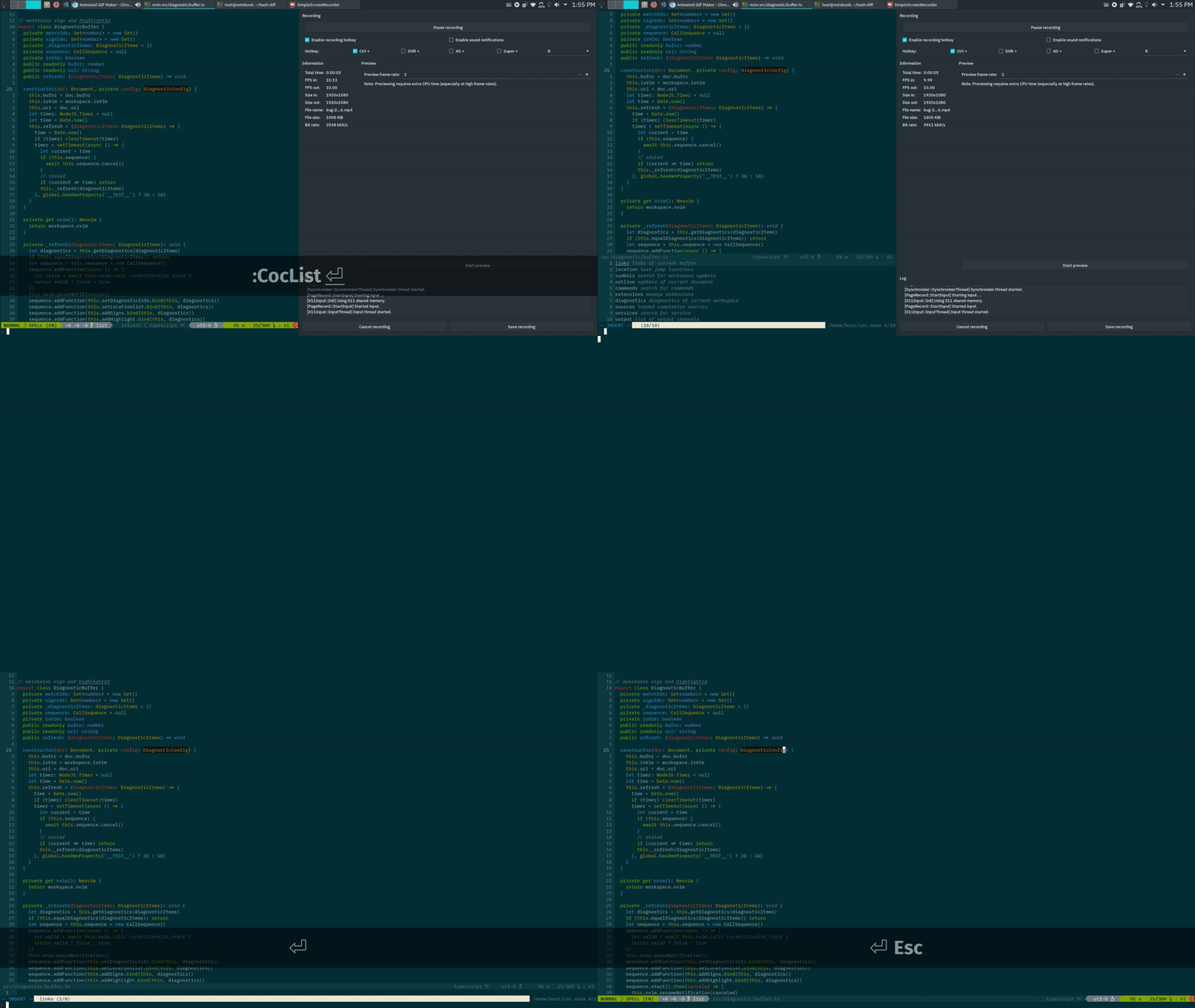
If you hit enter on a empty list you to line 1 of the empty list buffer
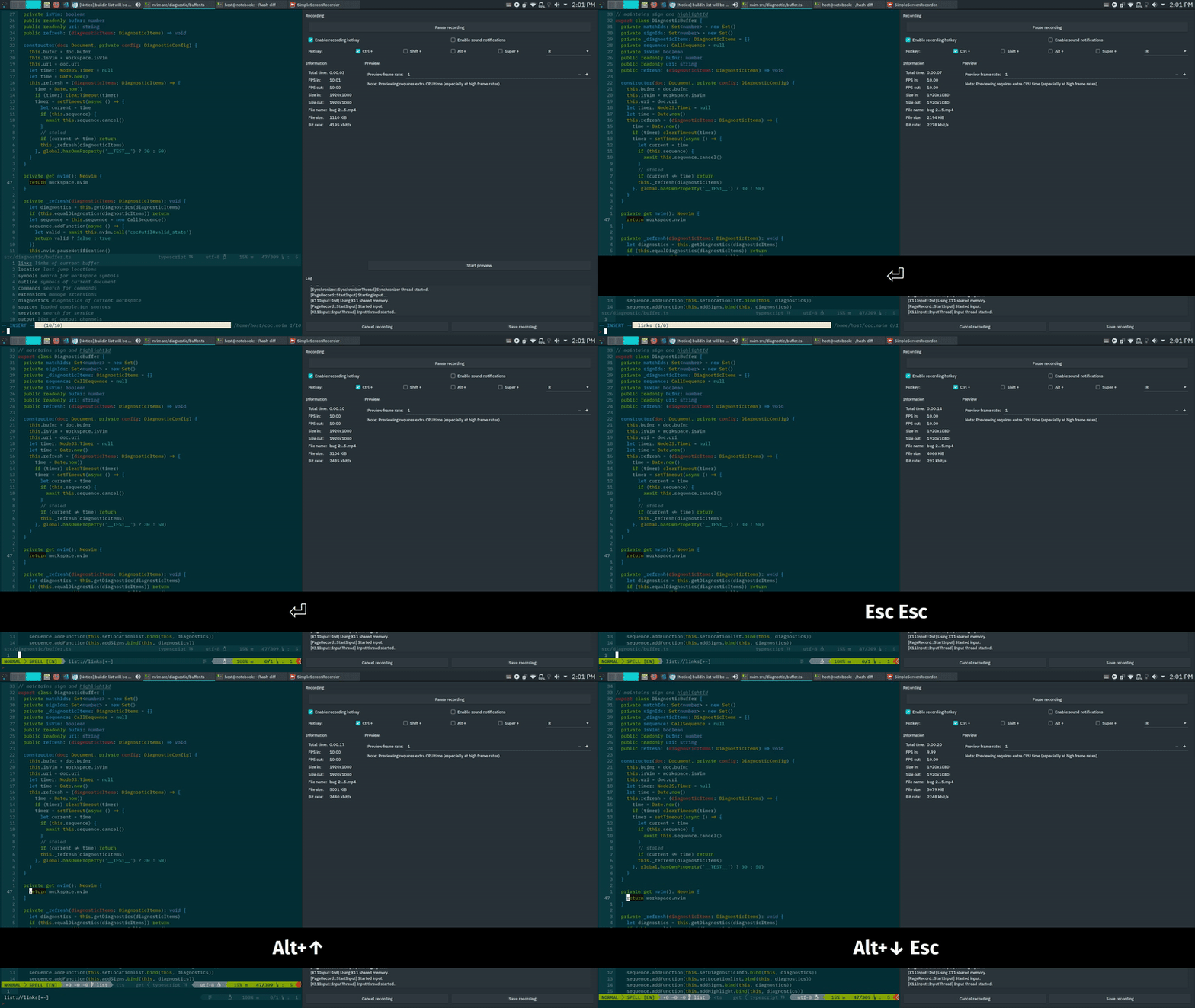
A few times I have gotten into an invalid state where I'm stuck in the vim cmdline while the list is open. I had to kill the vim window.
 Avi-D-coder
on 19 Jan 2019
Avi-D-coder
on 19 Jan 2019
👍1
@Avi-D-coder What's your neovim version?
chemzqm
on 20 Jan 2019
NVIM v0.3.4
Avi-D-coder
on 20 Jan 2019
Was this page helpful?
0 / 5 - 0 ratings
Related issues
 czepluch
·
3Comments
czepluch
·
3Comments
 MacGuffinLife
·
4Comments
MacGuffinLife
·
4Comments
 LinArcX
·
4Comments
LinArcX
·
4Comments
 iago-lito
·
3Comments
iago-lito
·
3Comments
 lanox
·
3Comments
lanox
·
3Comments
Most helpful comment
I've pushed code to https://github.com/neoclide/coc.nvim/tree/list branch, can be tested on neovim, not work on vim for now.