Result from CocInfo
Run :CocInfo command and paste the content below.
versions
vim version: NVIM v0.3.1
node version: v8.9.0
coc.nvim version: 0.0.35
term: xterm-256color
platform: linux
Error messages
Output channel: languageserver.MPLS
Microsoft Python Language Server version 1.0.0.0
Initializing for generic interpreter
Describe the bug
I could not use pyls because it always failed with a timeout even if I set timeout to a very high number e.g. 6000ms. So, I tried MPLS.
Here's the relevant section from coc.nvim logs:
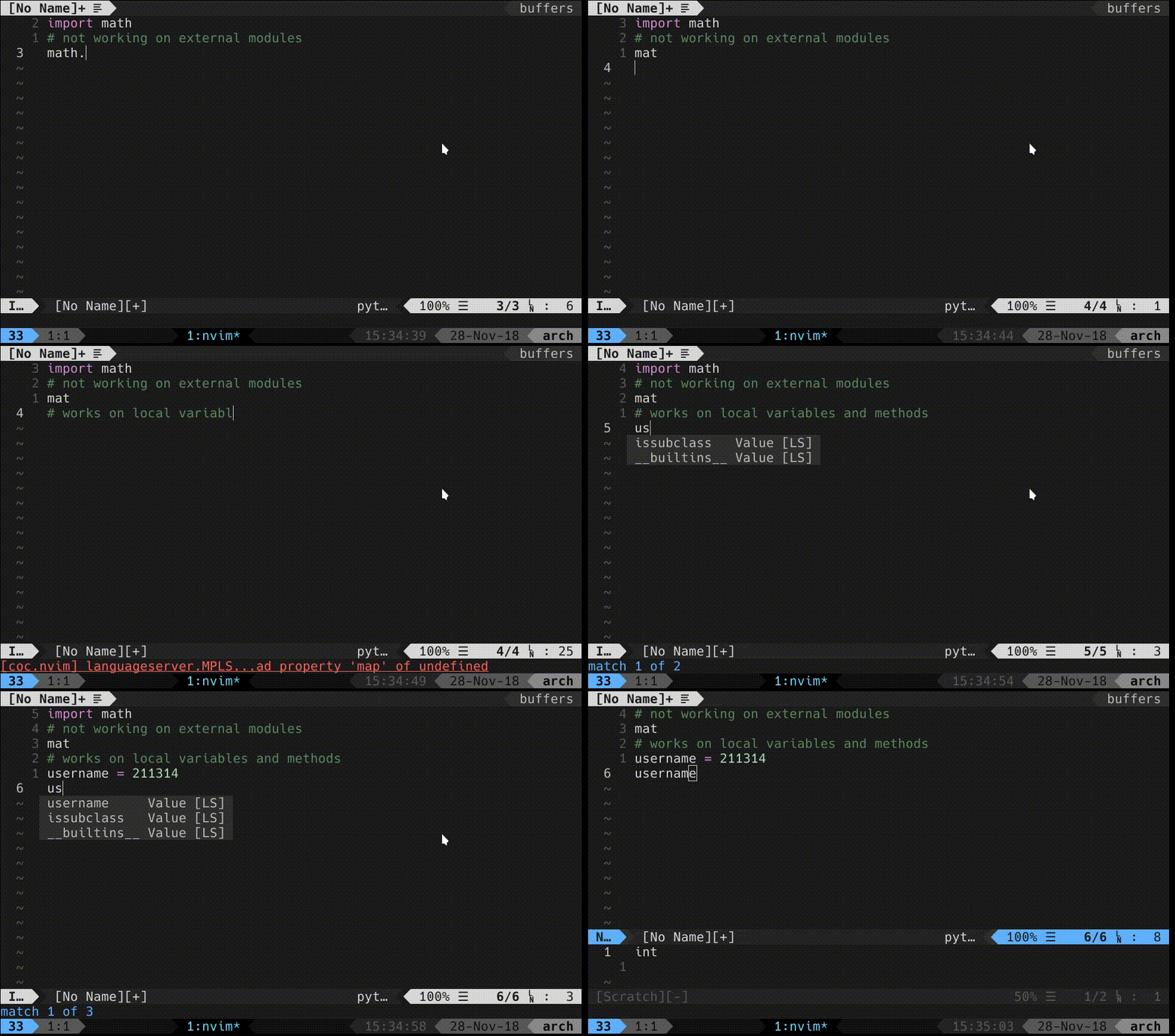
2018-11-28T15:15:08.588 ERROR (pid:26104) [model-complete] - Complete error: languageserver.MPLS TypeError: Cannot read property 'map' of undefined
    at Languages.<anonymous> (/snapshot/coc.nvim/lib/languages.js:494:43)
    at Generator.next (<anonymous>)
    at fulfilled (/snapshot/coc.nvim/node_modules/tslib/tslib.js:104:62)
    at <anonymous>
To Reproduce
See the gif below:
 Mrigank11
All 26 comments
The reason could be MPLS need sometime to analyze your project, it will throw error if the initialization is not done.
 chemzqm
on 28 Nov 2018
chemzqm
on 28 Nov 2018
Even on such a minimal file? It works fine on VS Code though.
Please let me know if I can help in further debugging. MPLS seems much faster than pyls.
Mrigank11
on 28 Nov 2018
It seems error of coc, I need output from languag server for further debug, check out https://github.com/neoclide/coc.nvim/wiki/Debug-language-server#using-output-channel
chemzqm
on 28 Nov 2018
@Mrigank11 if you manage to set it up could you please post how you set it up on Linux? Maybe adding the information to the Wiki here: https://github.com/neoclide/coc.nvim/wiki/Language-servers.
 oblitum
on 28 Nov 2018
oblitum
on 28 Nov 2018
@chemzqm Here's the log file: coc.log
@oblitum Sure, I'd be happy to add an entry on wiki pages if this works.
Mrigank11
on 29 Nov 2018
I've fixed the error, it's because MPLS reutrn completionList without items field (should always exists).
Is there completion items when you do manual completion (triggered by coc#refresh()) after math. ?
Maybe the server is slow, try increase the completion wait by change coc.preferences.triggerCompletionWait in your coc-settings.json.
chemzqm
on 29 Nov 2018
No, I still don't get any completions for math.. But I think it is an upstream issue since it's not working in sublime either. I'll file an issue there.
Mrigank11
on 29 Nov 2018
Okay, so I fixed this by explicitly setting python path in config. MPLS works flawlessly now!
Mrigank11
on 29 Nov 2018
@chemzqm is it possible for coc.nvim to set 'python path' so that MPLS can work in virtual environments without any further changes in config?
Mrigank11
on 29 Nov 2018
@Mrigank11 could you share your settings? Would be nice to try it without having to hit head in wall.
oblitum
on 1 Dec 2018
@chemzqm is it possible for
coc.nvimto set 'python path' so that MPLS can work in virtual environments without any further changes in config?
MPLS should have settings for 'python path', you can use coc-settings.json to configure it, but I don't know what the key is.
chemzqm
on 1 Dec 2018
@oblitum here's my config:
"MPLS":{
    "command": "dotnet",
    "args": ["exec", "<path to MPLS>/python-language-server/output/bin/Release/Microsoft.Python.LanguageServer.dll"],
    "filetypes": ["python"],
    "initializationOptions": {
                "interpreter":
                {
                    "properties":
                    {
            "InterpreterPath": "/bin/python3",
                        "UseDefaultDatabase": true,
                        "Version": "3.7.1"
                    }
                }
        }
},
You can either compile MPLS on linux using dotnet-sdk or download the version compiled for vscode.
Here's the link to current version(copied from vscode logs): https://pvsc.azureedge.net/python-language-server-stable/Python-Language-Server-linux-x64.0.1.65.nupkg
Let me know if it worked.
@chemzqm I meant something like this:
{
...
     "InterpreterPath":"${pythonPath}"
...
}
${pythonPath} willl be replaced by coc.nvim. What do you think?
Mrigank11
on 1 Dec 2018
@Mrigank11 so where does value of ${pythonPath} comes from? From vim global variable?
chemzqm
on 1 Dec 2018
Yeah, reading from a vim variable would be fine I think. Then, I can easily configure it to choose appropriate pythonPath for a folder.
Should I create a separate issue for supporting variables in config?
Mrigank11
on 1 Dec 2018
Talking about that, I wished coc did all conf from .vimrc, like vim-lsp does. This way, this issue would probably not only not be a problem, but also I'd not need to have two configuration formats to configure the editor (.vimrc and coc-settings.json), and also, it would be possible to take advantage of plugins like localvimrc for configuring coc. Coc is particular regarding that, for example, you have to configure sign symbols in coc-settings.json, while configuring the sign highlighting in the .vimrc, with ALE and all others, you just do it in the .vimrc.
oblitum
on 2 Dec 2018
@Mrigank11 just tried MPLS with your conf, after compiling it, in ArchLinux, completion is working, but so far, I get no diagnostics, nor signatureHelp.
Completion looks faster and I didn't hit an issue I get with pyls for some files that it spins in a loop with 100% CPU without responding. There's one file where that always happens and I still have to check it out why, but with MPLS for the same file it's simply working.
oblitum
on 3 Dec 2018
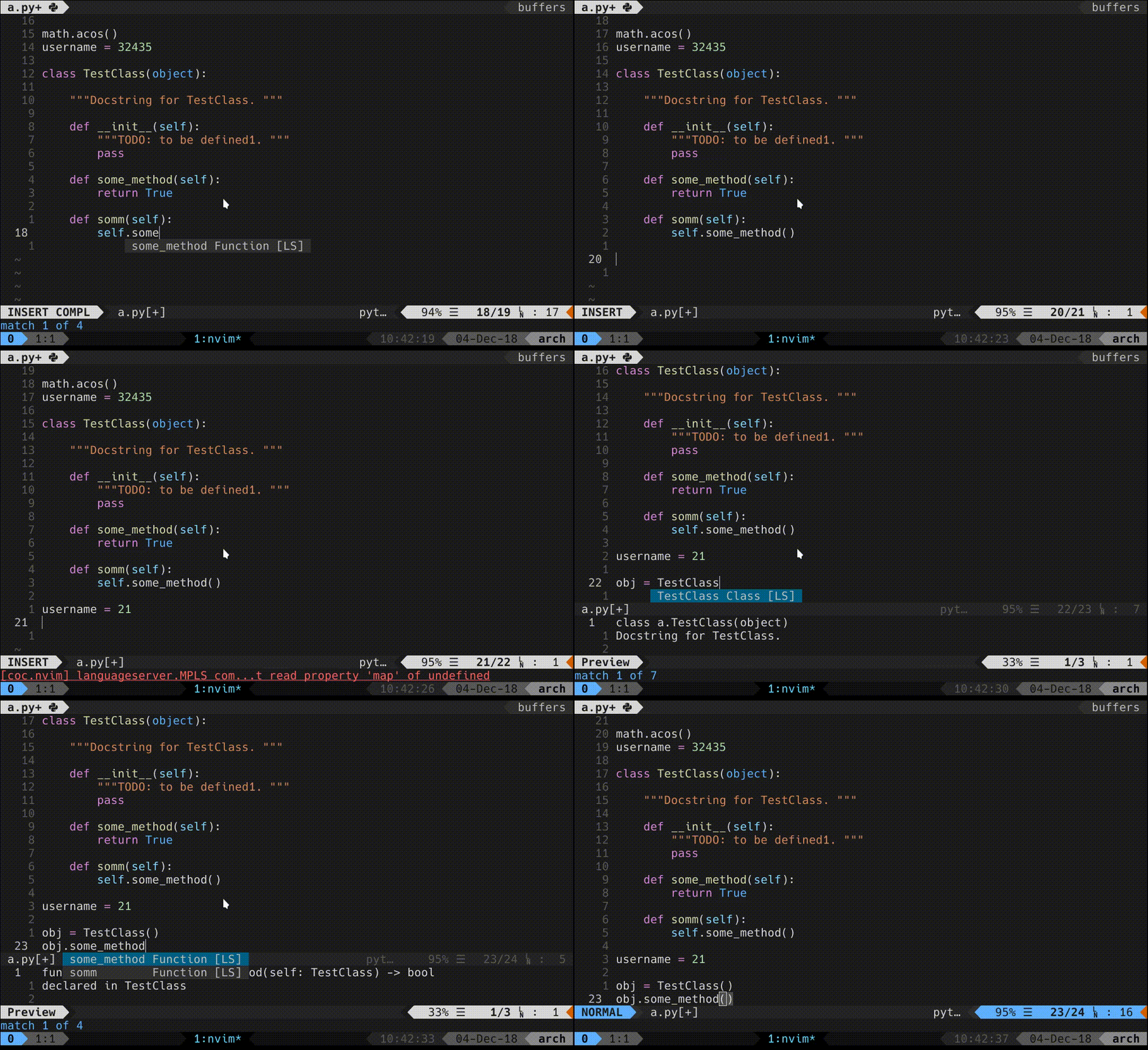
Looks like it isn't pretty smart yet though. Completion is quite faster, but just for package members. I'm getting no completion for members of variables/class-instances.
oblitum
on 4 Dec 2018
Well, it's working quite well for me :stuck_out_tongue:
Mrigank11
on 4 Dec 2018
huh? that's nice, maybe I've picked some bad commit??? I have no idea why just very basic completion is working. Did you compile it yourself too or just grabbed from compiled package?
oblitum
on 4 Dec 2018
I'm not seeing signatureHelp there too though, just the preview menu, which I don't use. signatureHelp works on the command line when you open parens and fill args. But at least there's ~diagnostics and~ better completion.
oblitum
on 4 Dec 2018
 "signatureHelpProvider": {
      "triggerCharacters": [
        "(,)"
      ]
    },
which should be ['(',',',')']
chemzqm
on 4 Dec 2018
@chemzqm is there a way to set it from initializationOptions? Couldn't find an example of setting that.
Or better, from coc-settings.json server conf, since initializationOptions is for another purpose I think.
oblitum
on 4 Dec 2018
It's response from server, need fix to handle it.
chemzqm
on 4 Dec 2018
@chemzqm ok.
By the way, I ended up discovering the pattern that makes pyls loop without response. If I open python file like vim ~/.local/bin/foo, it goes crazy on completion, but if I cd ~/.local/bin and then vim foo, it works fine. Maybe something related to root discovery.
oblitum
on 4 Dec 2018
@Mrigank11 How did you achieve the vim background texture (filled background with matrix of tiny crosses and dots)?
 xuyangy
on 28 Sep 2020
xuyangy
on 28 Sep 2020
@xuyangy I think that's just a glitch in the screenshot XD
Mrigank11
on 28 Sep 2020
Related issues
 svenstaro
·
4Comments
svenstaro
·
4Comments
 cvlmtg
·
3Comments
cvlmtg
·
3Comments
 czepluch
·
3Comments
czepluch
·
3Comments
 tom-james-watson
·
3Comments
tom-james-watson
·
3Comments
 npearson72
·
3Comments
npearson72
·
3Comments
Most helpful comment
@oblitum here's my config:
You can either compile MPLS on linux using
dotnet-sdkor download the version compiled for vscode.Here's the link to current version(copied from vscode logs): https://pvsc.azureedge.net/python-language-server-stable/Python-Language-Server-linux-x64.0.1.65.nupkg
Let me know if it worked.
@chemzqm I meant something like this:
${pythonPath}willl be replaced bycoc.nvim. What do you think?