Coc.nvim: vim-easymotion disturbs diagnostics
Describe the bug
Don't know if this bug should be reported here or on vim-easymotion (or both)? When all possible choices of jump are highlighted by easymotion, diagnostics report a lot of errors.
Expected behavior
Diagnostics should not analyze buffer changes when easymotion is waiting for a motion trigger.
Screenshots
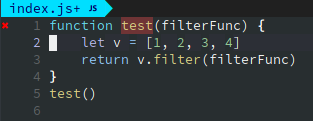
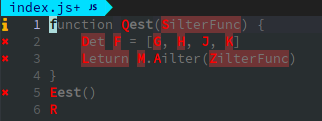
 Gontran-Molotov
All 27 comments
There is s:EasyMotion_is_active but coc could not retrieve that script variable to disable/enable document change event. To fix this, easymotion should either expose EasyMotion_is_active as global variable or trigger User autocmd on activate and deactivate.
 chemzqm
on 2 Oct 2018
chemzqm
on 2 Oct 2018
Could EasyMotion#is_active() be used for that?
 gbcreation
on 3 Oct 2018
gbcreation
on 3 Oct 2018
It could be used, but could make didChange a bit slower.
I think that easymotion should use conceal feature instead of change the buffer content.
chemzqm
on 4 Oct 2018
Looks like that variable can't be used for skip buffer change event. https://github.com/easymotion/vim-easymotion/issues/388
chemzqm
on 4 Oct 2018
I have the same issue for this, I just put autocmd to solve this problem temporarily, but it's surely not the best solution, waiting for easy-moation to fix it.
augroup FixConflict
autocmd!
au InsertEnter *.js CocEnable
au InsertLeave *.js CocDisable
augroup END
Maybe the custom event in multiple_cursors plugin solve the same problem, if there are Easymotion_before and Easymotion_after event, everything would be fine.
function! Multiple_cursors_before()
" ...
endfunction
function! Multiple_cursors_after()
" ...
endfunction
 keelii
on 10 Oct 2018
keelii
on 10 Oct 2018
@chemzqm I still get false errors from coc when using easymotion. I loaded easymotion before coc and use
 desmap
on 15 Jul 2019
desmap
on 15 Jul 2019
@desmap I just replaced vim-easymotion with coc-smartf, which works pretty well. You might as well have a try if you really can not resolve your problem.
 voldikss
on 15 Jul 2019
voldikss
on 15 Jul 2019
@voldikss man you are great, thanks, what I like about easymotion is not the easymotion-f feature but the easymotion-w (and easymotion-b) they allow even faster jumping, compare the two workflows.
f-workflow (also coc-smartf):
- see the target => 2. press f => 3. press the target's letter => 4. see the label => 5. enter the label letter(s)
w-workflow
- see the target =>2. press w => 3. see the label => 4. enter the label
It's not just one step less but a way more fluid motion. With easymotion you can even restrict it to a specific line to have then one-letter labels.
desmap
on 16 Jul 2019
~Can't fix, easymotion should expose some variable indicate it's activated.~
chemzqm
on 16 Jul 2019
@voldikss I tried now smartf for a day or so and it's actually quite ok, so maybe I'll stick with it
@chemzqm thanks for the info and good to know, out of curiosity: do know how ALE handles this without getting triggered by easymotion?
desmap
on 17 Jul 2019
smartf didn't work well for me. Are there ways to temporarily fix the issue?
@keelii can you elaborate on how to use the fix?
 kujohn
on 19 Aug 2019
kujohn
on 19 Aug 2019
For certain type of document like .go it doesn't trigger this type of issue. Seems to only trigger using .js.
kujohn
on 20 Aug 2019
@kujohn if you have issues with smartf, create issue for it with reproduce steps.
chemzqm
on 20 Aug 2019
It’s an issue I am having with coc and easy motion, not smartf.
kujohn
on 20 Aug 2019
@kujohn could you provide detail information about the issue?
chemzqm
on 20 Aug 2019
I'm facing the same issue. Took at look at smartf, but it doesn't fit my workflow at all. With easymotion i can just press
I hope diagnostics will be able to ignore easymotion characters. It seems to slow down nvim as well. It gets very laggy for me.
Regards
 abenz1267
on 27 Aug 2019
abenz1267
on 27 Aug 2019
The problem is still there, not clear why the issue is closed. It bugs me periodically with python files. Replacing easy-motion with smartf is not a solution as they are too different (e.g., no analog for easymotion-w).
 Galicarnax
on 28 Apr 2020
Galicarnax
on 28 Apr 2020
@Galicarnax I can't reproduce, you need checkout if this check works https://github.com/neoclide/coc.nvim/blob/master/autoload/coc/util.vim
chemzqm
on 29 Apr 2020
I have the same issue with the clangd diagnostic.
 SiNBizkit
on 29 Apr 2020
SiNBizkit
on 29 Apr 2020
@SiNBizkit I'm having the same issue as well...
 Zeta611
on 3 May 2020
Zeta611
on 3 May 2020
metoo comments are not helpful, just upvote the issue.
 oblitum
on 3 May 2020
oblitum
on 3 May 2020
Can't reproduce
chemzqm
on 3 May 2020
Describe the bug
I have the same issue with coc-json and easymotion using easymotion-sn. If I search a double quote and I jump to the target, I have a false linter error (double quote error because the double quote is replaced by the target key)
Reproduce the bug
- Create file minimal.vim with:
set nocompatible
set runtimepath^=~/.local/share/nvim/plugged/coc.nvim,~/.local/share/nvim/plugged/vim-easymotion
filetype plugin indent on
syntax on
set hidden
let g:coc_global_extensions = [
\ 'coc-json',
\ ]
map / <Plug>(easymotion-sn)
- Create file test.json with:
{
"hello": "world"
}
- Start (neo)vim with command: nvim -c 'CocInstall -sync coc-json' -u minimal.vim test.json
- Search the double quote with / and jump to the target
Screenshots
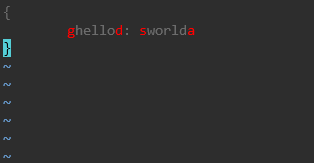
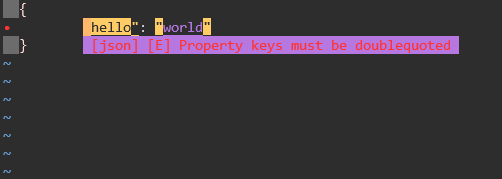
 elebeaup
on 19 May 2020
elebeaup
on 19 May 2020
i use TextChanged to disable coc temporarily
let g:easymotion#is_active = 0
function! EasyMotionCoc() abort
  if EasyMotion#is_active()
    let g:easymotion#is_active = 1
    CocDisable
  else
    if g:easymotion#is_active == 1
      let g:easymotion#is_active = 0
      CocEnable
    endif
  endif
endfunction
autocmd TextChanged,CursorMoved * call EasyMotionCoc()
 chinnkarahoi
on 21 May 2020
chinnkarahoi
on 21 May 2020
i use TextChanged to disable coc temporarily
let g:easymotion#is_active = 0
function! EasyMotionCoc() abort
  if EasyMotion#is_active()
    let g:easymotion#is_active = 1
    CocDisable
  else
    if g:easymotion#is_active == 1
      let g:easymotion#is_active = 0
      CocEnable
    endif
  endif
endfunction
autocmd TextChanged,CursorMoved * call EasyMotionCoc()
This works and is definitely better than those annoying ts error. But enabling/disable is a little bit slow but not deal-breaking.
Is anyone knows how to disable [coc.vim] Event {enabled, disabled} message at the bottom?
 numToStr
on 15 Jul 2020
numToStr
on 15 Jul 2020
Im having the exact same issue.
 kujbika
on 20 Jul 2020
kujbika
on 20 Jul 2020
@numToStr
Is anyone knows how to disable
[coc.vim] Event {enabled, disabled}message at the bottom?
Add silent! in front of CocDisable and CocEnable
e.g. silent! CocDisable
 frandsoh
on 1 Oct 2020
frandsoh
on 1 Oct 2020
Related issues
 lanox
·
3Comments
lanox
·
3Comments
 czepluch
·
3Comments
czepluch
·
3Comments
 iago-lito
·
3Comments
iago-lito
·
3Comments
 ctaylo21
·
4Comments
ctaylo21
·
4Comments
 hackingcat
·
3Comments
hackingcat
·
3Comments
Most helpful comment
i use TextChanged to disable coc temporarily