Coc.nvim: Can't configure vue-language-server
Hi, I can't make coc to work with vue-language-server
Here the content of my coc-settings.json:
{
    "languageserver" : {
        "vue": {
            "command": "vls",
            "filetypes": ["vue"]
        }
    }
}
$ which vls
 /usr/bin/vls


md5-29690a92f758aacff78109bafae8b669


$ nvim -v
NVIM v0.3.1


md5-83d899b93daff41c9161443ce5bb96c7


[coc.nvim] Executable vls not found
[coc.nvim] Service init error: Cannot read property 'catch' of undefined
[coc.nvim] service stylelint started
Press ENTER or type command to continue
Thank you for your work and help.
EDIT: vls works fine with deoplete and https://github.com/autozimu/LanguageClient-neovim
 deathmaz
All 24 comments
@deathmaz What the result when you run :echo executable('vls') in vim?
Looks like vls can't be found on $PATH, you can change command to /usr/bin/vls
 chemzqm
on 23 Jul 2018
chemzqm
on 23 Jul 2018
:echo executable('vls') return 1
I already tried before /usr/bin/vls as an argument for command the result is the same as previous
deathmaz
on 23 Jul 2018
I'm looking into it.
chemzqm
on 23 Jul 2018
I can fix this, but vls read some configuration from unknown variable.
chemzqm
on 23 Jul 2018
It's reading configuration from initializationOptions.config which is not standard and it's not checking the existence of variable.
chemzqm
on 23 Jul 2018
@deathmaz You need this
    "vue": {
      "command": "vls",
      "args": [],
      "settings": {
        "html": {
          "suggest": true
        },
        "vetur": {
          "validation": {}
        }
      },
      "filetypes": ["vue"],
      "initializationOptions": {
        "config": {
          "html": {
            "suggest": true
          },
          "vetur": {
            "validation": {}
          }
        }
      }
    }
in languageserver section for vls to work.
chemzqm
on 23 Jul 2018
is it intended that after i opened .vue file nvim opens vertical split with the following content
Vetur initialized
[Error - 12:58:51 PM] Notification handler 'workspace/didChangeConfiguration' failed with message: Cannot read property 'vetur' of undefined
?
deathmaz
on 23 Jul 2018
though the vls itself seems works fine
deathmaz
on 23 Jul 2018
@deathmaz That's another issue, I have update the configuration.
Now you can use
    "vue": {
      "command": "vls",
      "args": [],
      "configSection": "languageserver.vue.initializationOptions.config",
      "filetypes": ["vue"],
      "initializationOptions": {
        "config": {
          "html": {
            "suggest": true
          },
          "vetur": {
            "validation": {}
          }
        }
      }
    }
for vls, it's reading configuration from wired position.
Make sure to upgrade to latest master to have this feature.
chemzqm
on 23 Jul 2018
Hm, i still have the same error
deathmaz
on 23 Jul 2018
Run git pull and then yarn install, restart neovim should be fine.
chemzqm
on 23 Jul 2018
I should provide a vim command for user to upgrade coc.
chemzqm
on 23 Jul 2018
i'm using vim-plug, so :PlugUpdate works fine
deathmaz
on 23 Jul 2018
The issue has gone, everything woks fine. Thank you very much for the help! Btw autocompletion in you plugin works super fast compared to what i had in deoplete.
deathmaz
on 23 Jul 2018
it still doesn't work for me

coc-settings.json:
{
    "languageserver": {
        "sh": {
            "command": "bash-language-server",
            "args": ["start", "--stdio"],
            "filetypes": ["sh"],
            "cwd": "./",
            "initializationOptions": {},
            "settings": {}
        },
        "dart": {
            "command": "dart_language_server",
            "args": [],
            "filetypes": ["dart"],
            "cwd": "./lib",
            "initializationOptions": {},
            "settings": {}
        },
        "vue": {
            "command": "vls",
            "args": [],
            "configSection": "languageserver.vue.initializationOptions.config",
            "filetypes": ["vue"],
            "initializationOptions": {
                "config": {
                    "html": {
                        "suggest": true
                    },
                    "vetur": {
                        "validation": {}
                    }
                }
            }
        }
    }
}
// vim:ft=jsonc
 iamcco
on 23 Jul 2018
iamcco
on 23 Jul 2018
@iamcco add "completion:{}" below validation should do the trick.
chemzqm
on 23 Jul 2018
You can have full configuration here https://github.com/vuejs/vetur/blob/master/package.json#L131
chemzqm
on 23 Jul 2018
it works well now, thanks
iamcco
on 23 Jul 2018
I'm going to add vetur to extensions, it's easier for configuration while have same features as in VSCode.
chemzqm
on 23 Jul 2018
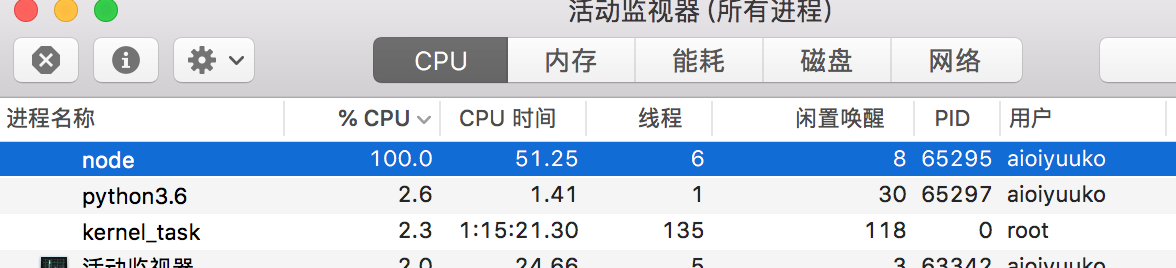
i update to latest master and it seems that the vetur extensions doesn't work for me.
when i edit the test.vue file the cpu raise to 100%.

iamcco
on 23 Jul 2018
@iamcco have you installed watchman?
chemzqm
on 23 Jul 2018
i had installed watchman and it works well if the work directory is not the home directory.
iamcco
on 23 Jul 2018
It get sucks when there're too many files in the directory, I have exclude watching for home on my side.
chemzqm
on 23 Jul 2018
@chemzqm get it, thanks
iamcco
on 23 Jul 2018
Related issues
 MacGuffinLife
·
4Comments
MacGuffinLife
·
4Comments
 marene
·
3Comments
marene
·
3Comments
 czepluch
·
3Comments
czepluch
·
3Comments
 svenstaro
·
4Comments
svenstaro
·
4Comments
 tom-james-watson
·
3Comments
tom-james-watson
·
3Comments
Most helpful comment
I'm going to add vetur to extensions, it's easier for configuration while have same features as in VSCode.