Cntk: C# `Value.CreateBatch(NDShape, T[], int, int, DeviceDescriptor, bool)` slow and lack of pointer overloads
The Value.CreateBatch method for creating Value in C# is really slow. Many times slower than memory copying if using DeviceDescriptor.CPUDevice, but similarly slow for GPU when taking into account PCIe express bandwidth. It takes a lot longer than the theoretical time it should take. x10 slower in some cases.
Looking at the source code, it seems that the code (here again we are missing the code in git see https://github.com/Microsoft/CNTK/issues/3180 as that would enable people to point to the code in question and so on) for this is not optimized and involves copies to end up in a std::vector<>, when really this should be handled by low level methods taking a pointer (or perhaps span<> https://github.com/Microsoft/GSL/blob/master/include/gsl/span).
The SWIG code generating a copy can be seen below:
CNTK::ValuePtr CNTK_Value_CreateBatchFloat__SWIG_0(CNTK::NDShape const &sampleShape,float const *dataBuffer,int dataStart,int dataSize,CNTK::DeviceDescriptor const &device,bool readOnly=false){
        std::vector<float> batchData(dataBuffer + dataStart, dataBuffer + dataStart + dataSize);
        return CNTK::Value::CreateBatch<float>(sampleShape, batchData, device, readOnly);
    }
a copy that is not needed, if the source code had better low level primitives support. Still keeping support for std::vector of course. And there might be a copy for P/Invoke marshalling too.
In our case we are entirely limited by the speed of Value.CreateBatch. There also needs to be more overloads so you can create a batch from native memory (via IntPtr) and in the future hopefully also Span<T> support, but Span<T> is not supported on all platforms, so low level overloads are really needed. We rarely have memory as managed arrays in our case, and thus have to convert/copy to a managed array, and then copy to Value.CreateBatch which again involves copying more than once... ☹️
Basically, I would like to refactor the CNTK Value creation methods to be able to create it as fast as possible and to be able to reuse an already "allocated" Value and copy new values into it. From native memory.
I am willing to help implement these changes if there is support for making these changes? 😄
I would assume python wrappers etc. have the same perf issues for "small" neural networks where the batch Value creation is the bottleneck. Note that in our case this is more than 2 times slower than actual train. Prefetching won't help, and we can't use the CNTK minibatch source because it is buggy see https://github.com/Microsoft/CNTK/issues/3280 and we really want to do our own sourcing anyway, due to limitations in the CNTK minibatch sources.
Of course, this would involve getting SWIG to output proper overloads too for. See http://www.swig.org/Doc3.0/CSharp.html#CSharp_void_pointers
Additionally, support for copying values as uint8 to GPU seems interesting and then converting to float in GPU via CNTKLib.Cast as that would be faster. If possible. But CNTK does not seem to support 8-bit unsigned integers... at all? Despite the DataType.UChar enum value.
 nietras
All 11 comments
Note that http://www.swig.org/Doc3.0/CSharp.html#CSharp_arrays_pinning shows how to use managed arrays without marshalling/copying. So all of it is possible, without breaking changes.
nietras
on 31 Aug 2018
Here a profiling screen shot detailing how much we are bounded by the CreateBatchFloat implementation:
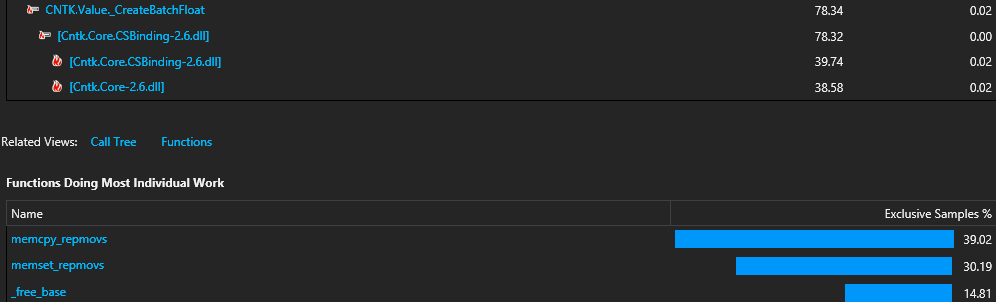
This is CNTK 2.6.
nietras
on 29 Oct 2018
@nietras hello!
Did you find workarounds for this problem? I have same problem now... The data loading is much slower than training...
 elevir
on 15 Mar 2019
elevir
on 15 Mar 2019
I have found the solution of this problem. Just do not use Value.CreateBatch, Value.CreateBatchOfSequences etc.
Following overloads are very fast:
[ctor] public NDArrayView(NDShape viewShape, float[] dataBuffer, DeviceDescriptor device, bool readOnly = false);
public static Value Create(NDShape sampleShape, IEnumerable<NDArrayView> sequences, IEnumerable<bool> sequenceStartFlags, DeviceDescriptor device, bool readOnly, bool createNewCopy);
Also these overloads more stable than other imho.
elevir
on 17 Mar 2019
@elevir that sounds great. However, I remember looking into using NDArrayView and thought I saw a similar problem in that. Could you perhaps given an example of how you use these to create the Value for just one NDArrayView?
nietras
on 18 Mar 2019
@nietras, sure!
DataType[] sequenceData = <data>;
NDArrayView sequence = new NDArrayView(<shapeOfSample>.AppendShape(new[] {<sequenceLengthInSamples>}), sequenceData, DeviceDescriptor.CPUDevice);
Value value = Value.Create(<shapeOfSample>, new[] { sequence }, new bool[] { }, DeviceDescriptor.UseDefaultDevice(), false, false);
Note that ctor of NDArrayView always requires DeviceDescriptor.CPUDevice. You can specify
GPU device in Value.Create(...);
elevir
on 18 Mar 2019
@elevir thanks!
NDArrayView always requires DeviceDescriptor.CPUDevice. You can specify
GPU device in Value.Create(...);
Right, think that was one of the problems I had, so this will still do a memory copy, but perhaps only a single memory copy... from the SWIG code I couldn't see how this would be faster. This is much faster for your use case? Any numbers? More details on use case e.g. what is the size of your float[] sequenceData for example?
However, no matter what this goes through a vector<float> in the C++ part, hence requiring a minimum of one memory copy, often at least 2 copies, one to copy from managed memory to vector<T>, then from vector<T> to vector<T> (again, since internal format for NDArrayView is vector<T>.
Our use case is for that, loading a float[] for 2D images with some number of batches e.g. 32. So size would be 320 x 240 x 32 for a batch of 32 images of size 320 x 240. We then often have multiple batches or Values e.g. 3 for each color channel for example.
Will try to see when I have time to test this. :)
nietras
on 18 Mar 2019
@nietras, I didn't do any performance measures, but invoking of this overloads was noticeably faster. In my case, I'm loading batches with three sequences, each sequence has size about 75 samples. So also I'm passing several variables, which have sizes: 160x120x3, 160x120x2, 207x207x1, 207x207x1, 207x1x3, 1x1x1, 1x1x1. Well, now I have problems with CUDA memory allocation sometimes :D
elevir
on 18 Mar 2019
@nietras I've looked into generated files by SWIG. There is no copying data from managed array to unmanaged.
The first invoked method is:
[global::System.Runtime.InteropServices.DllImport("Cntk.Core.CSBinding-2.6.dll", EntryPoint="CSharp_CNTK_new_NDArrayView__SWIG_14")]
public static extern global::System.IntPtr new_NDArrayView__SWIG_14(global::System.Runtime.InteropServices.HandleRef jarg1, [global::System.Runtime.InteropServices.In, global::System.Runtime.InteropServices.MarshalAs(global::System.Runtime.InteropServices.UnmanagedType.LPArray)]float[] jarg2, uint jarg3, global::System.Runtime.InteropServices.HandleRef jarg4, bool jarg5);
This method creates new object of unmanaged NDArrayView and pass to it just pointer to float array in C style without copying due to InAttribute.
The next method
SWIGEXPORT void * SWIGSTDCALL CSharp_CNTK_new_NDArrayView__SWIG_14(void * jarg1, float* jarg2, unsigned long jarg3, void * jarg4, unsigned int jarg5) {
casts pointers such as jarg1 and jarg4 (NDShape and DeviceDescriptor respectively) and feed all arguments to function
SWIGINTERN CNTK::NDArrayView *new_CNTK_NDArrayView__SWIG_14(CNTK::NDShape const &viewShape,float *dataBuffer,size_t numBufferElements,CNTK::DeviceDescriptor const &device,bool readOnly=false){
        if (device.Type() == CNTK::DeviceKind::GPU)
        {
            CNTK::NDArrayView cpuView(viewShape, dataBuffer, numBufferElements, CNTK::DeviceDescriptor::CPUDevice(), readOnly);
            auto gpuView = new CNTK::NDArrayView(cpuView.GetDataType(), cpuView.GetStorageFormat(), viewShape, device);
            gpuView->CopyFrom(cpuView);
            return gpuView;
        }
        else
            return new CNTK::NDArrayView(viewShape, dataBuffer, numBufferElements, device, readOnly);
    }
the last step is return new CNTK::NDArrayView(viewShape, dataBuffer, numBufferElements, device, readOnly);
If to see deeply, then you can see invoking method cblas_scopy with origin pointer to array from C# :)
Well, the rest work with data is fully dependent on C++ CNTK implementation and isn't dependent on Managed/Unmanaged conversions.
P.S. even with
if (device.Type() == CNTK::DeviceKind::GPU)
{
    CNTK::NDArrayView cpuView(viewShape, dataBuffer, numBufferElements, CNTK::DeviceDescriptor::CPUDevice(), readOnly);
    auto gpuView = new CNTK::NDArrayView(cpuView.GetDataType(), cpuView.GetStorageFormat(), viewShape, device);
    gpuView->CopyFrom(cpuView);
    return gpuView;
}
Value.Create doesn't allow to feed NDArrayView initialized with GPU device.
elevir
on 18 Mar 2019
@elevir this definitely looks a lot different than the Value.Create* method and what I remember (might have changed some things since I looked). Thanks for sharing. This should just do a single copy then and should definitely be faster. 👍
nietras
on 18 Mar 2019
There is another one important nuance, the data must be stored in column major order for C/C++/C#.
elevir
on 25 Mar 2019
Related issues
 IvanFarkas
·
4Comments
IvanFarkas
·
4Comments
 mogrysama
·
4Comments
mogrysama
·
4Comments
 playgithub
·
3Comments
playgithub
·
3Comments
 pallashadow
·
5Comments
pallashadow
·
5Comments
 Prasandhmcw
·
5Comments
Prasandhmcw
·
5Comments
Most helpful comment
Here a profiling screen shot detailing how much we are bounded by the
CreateBatchFloatimplementation:This is CNTK 2.6.