Cntk: Cannot load assembly Cntk.Core.CSBinding-2.3.1.dll'
Have created a new Csharp project and added a reference to CNTK nugget package.
Wenn running application CSBinding assembly cannot be loaded:
"Unable to load DLL 'Cntk.Core.CSBinding-2.3.1.dll': The specified module could not be found. (Exception from HRESULT: 0x8007007E)"
Thanks
Damir
 ddobric
All 15 comments
Try changing platform from Any CPU to x64.
 KichangKim
on 30 Jan 2018
KichangKim
on 30 Jan 2018
Project is already on x64. Unfortunately it does not help?
Repro Steps:
- Create .NET project
- Change build to x64
- Add nugget ref to CNTK.CPUOnly
- Run
Result: Application fails with named exception.
After build only Cntk.Core.Managed-2.3.dll is referenced.
All other assemblies like:
Cntk.Core.*
Cntk.Math.*
Cntk.PerformancePrifiler*
Cntk.Deserializers*
Cntk.Composite*
...
are not copied to bin folder. After I copy them manually from official example build all works fine.
ddobric
on 13 Feb 2018
Where did you get the copy of all the Cntk dll's?
 rposener
on 10 Mar 2018
rposener
on 10 Mar 2018
Have the same issue with version 2.5.
Only Cntk.Core.Managed-2.5 in References.
 PavelAgurov
on 17 Mar 2018
PavelAgurov
on 17 Mar 2018
Manually copied from \packages\CNTK.CPUOnly.2.4.0\support\x64\Release\ files:
Cntk.Composite-2.4.dll
Cntk.Core-2.4.dll
Cntk.Core.CSBinding-2.4.dll
Cntk.Deserializers.Binary-2.4.dll
Cntk.Deserializers.HTK-2.4.dll
Cntk.Deserializers.Image-2.4.dll
Cntk.Deserializers.TextFormat-2.4.dll
Cntk.Math-2.4.dll
Cntk.PerformanceProfiler-2.4.dll
Works now.
Project should be x64.
PavelAgurov
on 17 Mar 2018
Also need to copy:
libiomp5md.dll
mkldnn.dll
mklml.dll (140 MB!!!!)
Application can't work without it. Just crashed without clear messages.
PavelAgurov
on 18 Mar 2018
The issue here is setting of build to x64. Usually x64 in .NET project is set on project level.
When using CNTK x64 has to be set on the solution level.
This will fix the problem. It means no more copying of files required.
My recommendation to team would be to use x64 on the project level as typically expected by .NET developers.
ddobric
on 20 Mar 2018
I did it. My project is x64, I've remove and install nuget package, but no - I have only one link in refs. All other DLLs are out of scope and I should add it manually.
Will try to set x64 for solution. Possible it's way.
PavelAgurov
on 20 Mar 2018
I'm encountering this problem in .NET core 2.1 with 2.6.0-rc0.dev20180821
I've tried added
Where should it be set to resolve this issue?
 Rleahy
on 7 Sep 2018
Rleahy
on 7 Sep 2018
have the same problem with 2.6.0, but not when running the app from VS, but when running from folder publish output. dll copy works. looks like publish profile doesn't pick up the links
 dotnicht
on 16 Sep 2018
dotnicht
on 16 Sep 2018
I can only surmise there is a build error on the 'Cntk.Core.Managed-2.6' dll.
There was a mismatch between the processor architecture of the project being built "MSIL" and the processor architecture of the reference "Cntk.Core.Managed-2.6, Version=2.6.0.0, Culture=neutral, PublicKeyToken=a82c1f3f67b62253, processorArchitecture=AMD64", "AMD64". This mismatch may cause runtime failures. Please consider changing the targeted processor architecture of your project through the Configuration Manager so as to align the processor architectures between your project and references, or take a dependency on references with a processor architecture that matches the targeted processor architecture of your project.
The dll is in the following directory's:
packages\CNTK.GPU.2.6.0\lib\netstandard2.0
packages\CNTK.CPUOnly.2.6.0\lib\netstandard2.0
My project is x64 in all possible areas. I still get the issue. Perhaps making the project .NetStandard may fix the issue?
 GuntaButya
on 8 Feb 2019
GuntaButya
on 8 Feb 2019
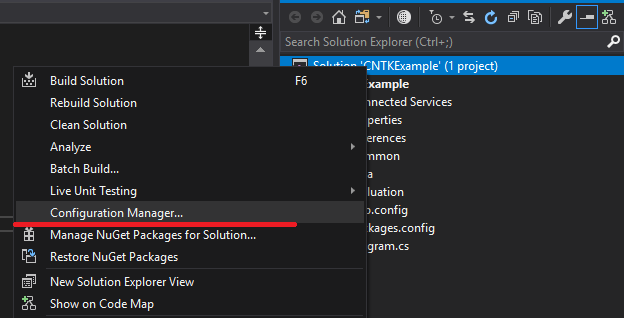
Try to set x64 not for project but for all solution. Only this way works for me.
PavelAgurov
on 9 Feb 2019
@PavelAgurov - Youre right, I also found this yesterday after struggling with the message presented. Thanks.
So steps are: Right click your solution, click Configuration Manager:
Change your Platform to 64
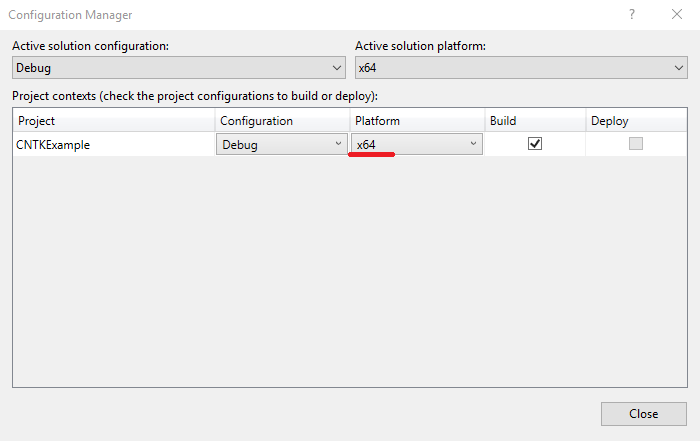
Click ok, and this should fix the problem.
Have fun!
GuntaButya
on 9 Feb 2019
Any idea how to do this in i'm using VS Code im not using VS, could you post the csproj file that making that change generates?
Rleahy
on 12 Apr 2019
In Code? I would say that's not possible as this is a Pre-Code Level configuration for your project.
GlobalSection(SolutionConfigurationPlatforms) = preSolution
        Debug|Any CPU = Debug|Any CPU
        Debug|x64 = Debug|x64
        Release|Any CPU = Release|Any CPU
        Release|x64 = Release|x64
    EndGlobalSection
GuntaButya
on 12 Apr 2019
Related issues
 colino
·
4Comments
colino
·
4Comments
 yujianyuanhaha
·
4Comments
yujianyuanhaha
·
4Comments
 haixpham
·
5Comments
haixpham
·
5Comments
 springkim
·
4Comments
springkim
·
4Comments
 nietras
·
5Comments
nietras
·
5Comments
Most helpful comment
Try to set x64 not for project but for all solution. Only this way works for me.