Cms: Update draft functionality can result in duplicate singles, causing errors and confusion
Description
I'm not really sure how this occurred, but we deployed a site today running on Craft 3.6.4.
Shortly after, I got an email from one of the editors stating that they were having an issue with images, and the error:
Could not generate a unique URI based on the URI format.
I don't really know how drafts are supposed to work here, so I'll list out what I've noticed in an attempt to narrow this issue down.
The following is an image of the Singles section. It has a duplicate "People" entry that seems to be a draft.
_Note: This screenshot was taken from my local environment, which I updated to 3.6.5 to test. Hence the updated icon._

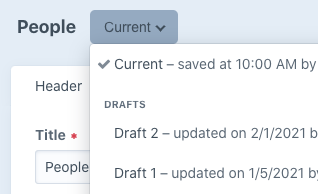
Below is a screenshot of the versions for the enabled "People" entry, showing 2 drafts.
Below is a screenshot of the same area on the draft version of the "People" entry.
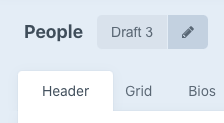
The error that the editor was experiencing seems to have come from working in, and trying to publish the draft version of the "People" entry.
This duplicate "People" entry shows that it was created today, so I'm guessing that it's something that the user did.
_At first, I thought it may have been a migration issue._
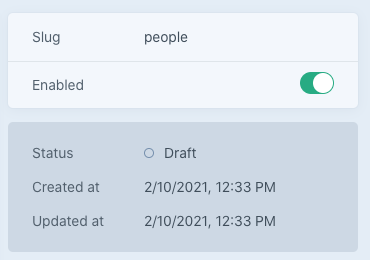
Pulling the production database down to my local machine and updating to Craft 3.6.5 didn't change anything. For now, I've simply deleted the duplicate entry.
I'm still pretty unfamiliar with the new draft setup, and it seems like there are ongoing changes. I'd be happy to provide some additional information if there is anything else that's helpful.
How should drafts work for singles with the draft updates?
Additional info
Production
- Craft version: 3.6.4
- PHP version: 7.3.27
Local
- Craft version: 3.6.5
- PHP version: 7.3.26
 jsunsawyer
All 10 comments
Huh… very weird! I’m not sure how that could have happened, and I’m not seeing a way to reproduce.
You can kill the extra draft by clicking to edit it, noting its ID in the URL, and then deleting the corresponding row in the elements table. Take note of its draftId value as well, and then delete the row in the drafts table with the same ID as well.
Maybe then ask the author if they have any memory of how this happened in the first place, and see if you can help us come up with steps to reproduce so we can get the underlying bug fixed.
How should drafts work for singles with the draft updates?
They work just like drafts of normal entries. That extra draft you saw from the Entries index page was an _unpublished draft_ – a brand new entry that hadn’t been published saved yet, so its row in the drafts table doesn’t have a sourceId value yet. It should not be possible to create a new unpublished draft for a Single section, which by definition should be limited to one single entry.
 brandonkelly
on 11 Feb 2021
brandonkelly
on 11 Feb 2021
I think that the extra draft may have been created in 3.6.0, when the main action for new entries was changed to "save draft", and drafts were kind-of hidden behind the "drafts" dropdown. The author probably thought that he "lost" the entry, and went-on to create a new one. I saw that happening to some of my clients.
 thupsi
on 11 Feb 2021
thupsi
on 11 Feb 2021
The draft creation when you click “New entry” has been that way since v3.2. But you’ve never been able to click “New entry” for a Single section.
I just found one way to reproduce this. When you convert a Channel or Structure section to a Single, Craft is supposed to ensure that one and only one entry exists for that section, and deletes any extras. However it wasn’t looking for unpublished drafts in the process, so if you had a Channel/Structure section with any unpublished drafts, and then converted it to a Single, you could end up in this situation. That’s now fixed for the next release.
@jsunsawyer Do you think maybe that’s what happened here?
brandonkelly
on 11 Feb 2021
@brandonkelly Nope, that's not it.
I actually just reproduced in production (3.6.4) by:
- Adjusting content of the "People" entry
- Clicking "Save as draft"
I can consistently reproduce this. This did not happen on 3.6.5 in my local environment. I rolled back local to 3.6.4 with a fresh db pull from production and was able to reproduce again. Possibly fixed in 3.6.5?
As far as my question "How should drafts work" goes, I just tested creating a draft (in 3.6.4) on local – for an entry in a structure. (This might be something for another thread, so let me know.)
I edited an entry in a "Projects" structure, then clicked "Save as draft". The original project entry still has "Draft 1" as part of its drafts. It creates a new draft with "Draft 2", and shows up at the bottom of my structure section. (This might be confusing for sortable areas – it might be nice if draft entries were always placed next to their corresponding one for structures, and ignored the view limit.) When I went to publish the newly created draft, it published the entry as the same url with "-1" appended to it.
This may be fixed in 3.6.5, but I didn't see anything about it, so putting it on your radar in case. Sort of waiting on updates before rolling out any other changes because of these issues.
Hope this helps. Again, happy to provide some additional info if needed.
jsunsawyer
on 11 Feb 2021
Aha! Yeah I’m able to reproduce in 3.6.4, and this was fixed in 3.6.4.1 via d7f4861cd74198887c854482716ab517305f18f5. At the time I didn’t realize the bug had any negative consequences besides some extra rows in the drafts table, which is why I didn’t connect the dots here.
Thanks for looking into it further @jsunsawyer!
brandonkelly
on 11 Feb 2021
@brandonkelly Did you happen to see the 2nd part of my last message – related to how drafts work in structures? Let me know if you'd like me to open a separate issue for that. I can test on the most recent version of Craft before submitting.
jsunsawyer
on 11 Feb 2021
Actually, I just went ahead and updated to test my concern (3.6.5.1).
Looks like the issue I experience in the structure was resolved in an update.
My only confusion here now is about how drafts work for structures. The draft for an entry in a structure seems to behave exactly as it did before 3.6 draft changes, in that it's only visible in the Drafts/Revisions dropdown. There's no indicator that the entry has a draft.
Is the new draft logic only for new entries?
Should there be improved draft visibility for existing, published entries that have drafts?
jsunsawyer
on 11 Feb 2021
Doh sorry, missed that. Yeah looks like it’s the same bug, also fixed via d7f4861cd74198887c854482716ab517305f18f5.
My only confusion here now is about how drafts work for structures. The draft for an entry in a structure seems to behave exactly as it did before 3.6 draft changes, in that it's only visible in the Drafts/Revisions dropdown. There's no indicator that the entry has a draft.
Correct – only unpublished drafts and fully saved entries should show up in the main entry listing.
Should there be improved draft visibility for existing, published entries that have drafts?
There’s a new “Drafts” column you can add from that “Customize” link in the sidebar, if you want to see the published entries’ drafts. They’ll also appear if you set the status menu to “Drafts”.
Is the new draft logic only for new entries?
Yeah.
brandonkelly
on 11 Feb 2021
@brandonkelly Wonderful! I wasn't aware of the new column. Thank you for the clarification.
Would love to see all these things outlined in a doc somewhere when your team has some time. Thanks again :)
jsunsawyer
on 11 Feb 2021
Craft 3.6.6 is out now with the Channel/Structure → Single conversion bugfix.
brandonkelly
on 15 Feb 2021
Related issues
brandonkelly
·
3Comments
 darylknight
·
3Comments
darylknight
·
3Comments
 richhayler
·
3Comments
richhayler
·
3Comments
 Mosnar
·
3Comments
Mosnar
·
3Comments
 timkelty
·
3Comments
timkelty
·
3Comments