Cms: [QUESTION] Searching for entries using multi-category "and" GraphQL query
Description
NOTE: This is a question and NOT a bug report.
I have a craft site running in headless mode and I am currently doing a search for entries using the relatedToCategories property in a graphQL query like this:
query ArticleSearch($userGroup: String) {
    articles: entries(section: ["article"], type: ["article"], relatedToCategories: {group: ["userGroupCategories"], title: [$userGroup]}) {
        title
        slug
    }
}
The above query searches for articles that are related to a particular userGroup (e.g. Teacher, Student, Supervisor)
However, now I need to do an "AND" query using two different category fields. In other words, return all articles where the userGroupCategory categories field has Student as a category AND the levelCategory categories field has Primary as a category.
I know I can do this using the field handles for the individual category fields, but that only accepts the IDs of the categories and not the titles. This means I will have to first do two graphQL queries (one each for the two category groups I want to filter on) to get the category IDs and then a third query to do the final search with the category IDs as filters like this:
query ArticleSearch($userGroupCategoryId: QueryArgument, $levelCategoryId: QueryArgument) {
    articles: entries(section: ["article"], type: ["article"], userGroupCategory: [$userGroupCategoryId], levelCategory: [$levelCategoryId]) {
        title
        slug
    }
}
Is this the only way to solve this currently? Is there a better way to do this directly using the category titles in the search query and without needing to lookup category IDs (i.e. avoiding the 3 roundtrips/queries to the server)?
If I definitely have to lookup the category IDs, then I guess I could use query batching (which I believe was recently introduced into Craft CMS)? However, I am not sure how to send the two category ID lookup queries as a batch.
Any help or guidance on the correct way to achieve the "AND" query above would be greatly appreciated. Thank you.
Additional info
- Craft version: 3.6.4.1
- PHP version: 7.3
- Database driver & version: PGSQL 11
 sidm1983
All 25 comments
This is similar to (but not an exact duplicate of) https://github.com/craftcms/cms/issues/7528.
Would the solution outlined there (when implemented) work for you?
 andris-sevcenko
on 10 Feb 2021
andris-sevcenko
on 10 Feb 2021
Hi @andris-sevcenko, yes, the solution you've outlined in the other issue would be awesome! It is exactly what I am looking for to simplify my graphql queries. Is this something that can be implemented fairly quickly?
Additionally, and I might be asking for too much here, but do you think this can be extended further to accept an "OR" query across the two different category groups? Would it be possible to have the array of criteria input wrapped in another object (maybe called CategoryCriteria?) that has a property called operation which could be set to either "and" or "or". So relatedToCategories would now accept the above CategoryCriteria object instead.
Even if this is too much, I definitely would love to be able to pass in an array of CategoryCriteriaInput objects at the very least (as you proposed in the other issue) and have that default to being an "and" operation.
Please let me know your thoughts. Thank you 🙏🏽🙌🏽
sidm1983
on 10 Feb 2021
@sidm1983 without testing but off the top of my head, it can already be done with an or operator. The whole relatedTo* argument gets executed as an element query, so, if you had relatedCategories: {groupId: [x, y]}, it should return categories belonging to either group x or y.
If I can manage this without breaking existing queries, it could happen as soon as the next 3.6 release.
andris-sevcenko
on 10 Feb 2021
@andris-sevcenko I meant an "or" between two category titles across two different category groups. I know you can do this:
relatedCategories: {group: [x, y], title: [catTitleFromX, catTitleFromY]}
But this will search for catTitleFromY in the x group as well (and vice versa). This won't work if both groups have a category with the same name. For example, if I had a category titled "All" in both groups.
sidm1983
on 10 Feb 2021
@sidm1983 gotcha.
I don't see this happening before Craft 4.0, though, as changing the argument type in such a manner would break all the queries using it now, so impossible to do before that.
andris-sevcenko
on 12 Feb 2021
@andris-sevcenko yes, I agree and completely understand that this request is a breaking change. I suppose you could still do this change before the 4.0 release if a different property name is used like relatedToMultipleCategories or similar, but doing an "or" query is not as urgent as being able to do an "and" query.
Would it still be possible to have relatedToCategories accept an array of CategoryCriteriaInput objects to do an "and" query in the next 3.6 release like you proposed in the other issue? That would be super handy.
Thank you.
sidm1983
on 13 Feb 2021
@sidm1983 yup, will look into that!
andris-sevcenko
on 15 Feb 2021
@sidm1983 added the possibility to list multiple criteria sets for the next Craft 3.6 release!
Going to close this and open a new issue for the or approach.
andris-sevcenko
on 16 Feb 2021
@andris-sevcenko you are amazing! ❤️👏🏽🙌🏽
Looking forward to seeing it in action.
Thank you!
sidm1983
on 16 Feb 2021
@andris-sevcenko which version of craft will this be available in? Is it in 3.6.6 or will it be in the one after that?
sidm1983
on 16 Feb 2021
3.6.7! I missed the cut for 3.6.6 as there were pressing fixes in there so it was rushed yesterday :)
andris-sevcenko
on 16 Feb 2021
@andris-sevcenko all good. Thank you.
Will be on the lookout for 3.6.7 👀
Also, please mention the other issue you create for the or approach in this issue so that anyone who finds this issue can be redirected to that one.
Thank you. 🙌🏽
sidm1983
on 17 Feb 2021
Also, please mention the other issue you create for the
orapproach in this issue so that anyone who finds this issue can be redirected to that one.
That’s #7576.
 brandonkelly
on 17 Feb 2021
brandonkelly
on 17 Feb 2021
@andris-sevcenko, I have just updated to version 3.6.7 and I can definitely pass in an array of CategoryCriteriaInput objects for the relatedToCategories property in Graph(i)QL, but it complains that my syntax is not correct (even though the query itself executes correctly). Looks like the Graph(i)QL docs/syntax needs to be updated. The error I get is Expected type CategoryCriteriaInput, found [{...},{...}]
Secondly, and more importantly, the "and" query doesn't seem to be working.
If I do the following "and" query, I don't get any results back:
query ArticleSearch($catTitleFromGroupX: String, $catTitleFromGroupY: String) {
  articles: entries(section: ["article"], type: ["article"], relatedToCategories: [{group: ["groupX"], title: [$catTitleFromGroupX]}, {group: ["groupY"], title: [$catTitleFromGroupY]}]) {
    title
    slug
}
This is not a categorisation issue with my article entry as I do have an article that is categorised to both of the above categories in separate fields.
In other words, doing this query (i.e. just filtering by the groupX category):
query ArticleSearch($catTitleFromGroupX: String) {
  articles: entries(section: ["article"], type: ["article"], relatedToCategories: [{group: ["groupX"], title: [$catTitleFromGroupX]}]) {
    title
    slug
}
returns:
{
  "data": {
    "articles": [
      {
        "title": "My First Article",
        "slug": "my-first-article"
      }
    ]
  }
}
And doing another separate query to filter by the groupY category:
query ArticleSearch($catTitleFromGroupY: String) {
  articles: entries(section: ["article"], type: ["article"], relatedToCategories: [{group: ["groupY"], title: [$catTitleFromGroupY]}]) {
    title
    slug
}
also returns the same article:
{
  "data": {
    "articles": [
      {
        "title": "My First Article",
        "slug": "my-first-article"
      }
    ]
  }
}
However, doing the "and" query to combine these two queries (like I did in the first query above) results in no article being returned.
Am I doing something wrong here? Any thoughts on this would be greatly appreciated.
Thank you.
sidm1983
on 1 Mar 2021
I have just updated to version 3.6.7 and I can definitely pass in an array of CategoryCriteriaInput objects for the relatedToCategories property in Graph(i)QL, but it complains that my syntax is not correct (even though the query itself executes correctly).
Can you try clearing your caches? Or set the enableGraphQlCaching config to false and see if the GraphQL error goes away? If it does, clear the caches and set it back to true again.
That _might_ also fix your other issue? Let me know!
andris-sevcenko
on 1 Mar 2021
@andris-sevcenko setting the enableGraphQlCaching config value to false fixed the GraphQL syntax error in Graph(i)QL. I have enabled the caching again and it still works, so the syntax is now working as expected.
Unfortunately, it did not fix my second issue. The "and" query still does not return any data even though the individual relatedToCategories criteria return the same article data when queried separately.
It works if the two criteria are both pointing to the same category group (which is pointless, but I just did it to test), but as soon as my two criteria are for different category groups, then it returns no data.
Any other ideas or thoughts on this?
Thank you.
sidm1983
on 2 Mar 2021
@sidm1983 I'm unable to reproduce this. Here's what I'm seeing in the screenshot.
Can you send over a DB dump, composer.lock, and composer.json files to [email protected], while referencing this issue? I'd be able to see what's the holdup in your case.
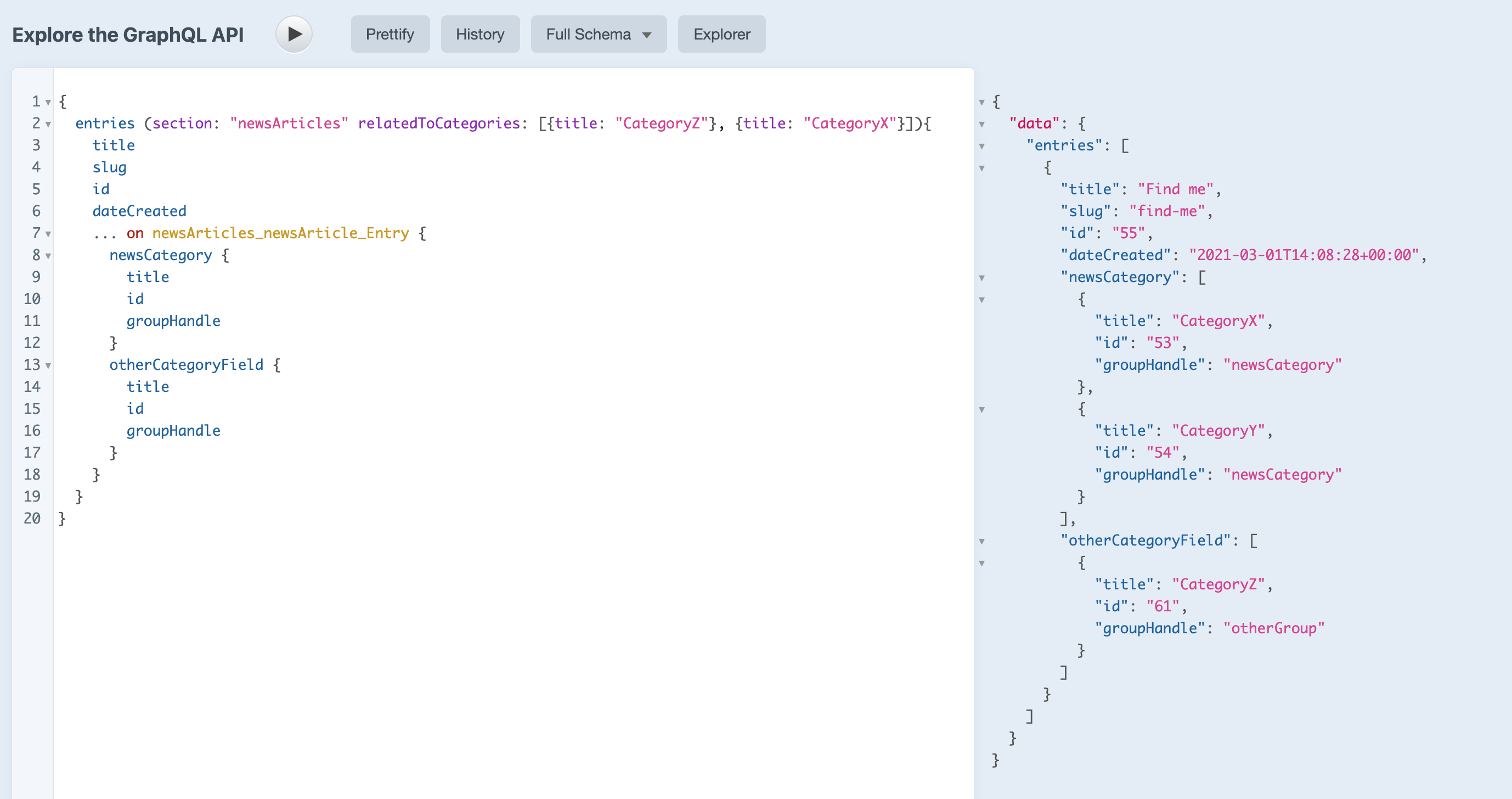
andris-sevcenko
on 2 Mar 2021
@andris-sevcenko does it still work for you if you update line 2 in your query above to this:
entries (section: "newsArticles", relatedToCategories: [{group: ["otherGroup"], title: ["CategoryZ"]}, {group: ["newsCategory"], title: ["CategoryX", "CategoryY"]}]){
This is a slight variation to what you have in your screenshot above. Basically, I am also explicitly setting which group it should search in for those category titles within each criteria input. I also have a scenario where I need to search for multiple category titles within a particular group, so I have added multiple titles to the second criteria input.
I am doing this because of what I mentioned to you in one of my replies above. I have a category called "Common" in all of my category groups, so I need to be able to query for articles that have been specifically categorised as "Common" but only from certain category groups.
If I query using each of the above category criteria inputs separately, I get the article returned. But as soon as I search for both together using the new "and" query, I get no entries returned. I would have thought that if the criteria inputs work individually and return the same article, then combining them in an "and" query should still work too, right?
Please try the above and let me know what you get. If it works for you, then it means that there is something wrong with my Craft CMS instance, in which case I can then send you a DB dump and the composer files.
Thank you.
sidm1983
on 3 Mar 2021
@sidm1983 huh. I am able to reproduce this with your query. Looking into it.
andris-sevcenko
on 3 Mar 2021
@sidm1983 All fixed up for the next release!
andris-sevcenko
on 3 Mar 2021
@andris-sevcenko Thank you! 🙏🏽
Which release is it going into and what's the rough ETA on it? Also, how do I get it sooner if I want to test it? If I get it sooner, will it be easy to update to the released version within Craft? As in will craft auto-detect the stable release version?
Once again, thank you for investigating and fixing this so quickly. ❤️🙌🏽👍🏽
sidm1983
on 3 Mar 2021
It'll be part of 3.6.8. It might be pout this week, but to get the fix early, change your craftcms/cms requirement in composer.json to:
"require": {
  "craftcms/cms": "dev-develop#0932e8fd7136ef3507058f59c9efd7b75a5a7729 as 3.6.7",
  "...": "..."
}
Then run composer update. This will check out the latest Craft CMS commit from develop branch for you and Composer will treat it as if it was 3.6.7, so, when 3.6.8 does get released, Composer will update without any problems for you.
andris-sevcenko
on 3 Mar 2021
Craft 3.6.8 is out now with the fix ✨
brandonkelly
on 3 Mar 2021
Thank you @brandonkelly & @andris-sevcenko. You both are amazing and very agile! 🎉🏃🏽♂️💨
Thank you for getting this sorted so quickly. I am about to update to version 3.6.8 and test. Will let you know how I go. 🤞🏽
sidm1983
on 4 Mar 2021
@andris-sevcenko It works brilliantly now. Thank you! 😄🙏🏽✨
sidm1983
on 4 Mar 2021
Related issues
brandonkelly
·
3Comments
 angrybrad
·
3Comments
angrybrad
·
3Comments
 Mosnar
·
3Comments
Mosnar
·
3Comments
 timkelty
·
3Comments
timkelty
·
3Comments
 mattstein
·
3Comments
mattstein
·
3Comments
Most helpful comment
Craft 3.6.8 is out now with the fix ✨