Cms: "No site settings exist for section XX" for new section when creating first entry type
Description
With Craft 3.6.4.1, when I create a new section and then immediately proceed to editing the entry type, I get an "No site settings exist for section XX" error when saving the new entry type. The section, and the new entry type, both seem to have saved successfully, however. I have to go back to the newly created section, re-save it, and then return to the entry type to save again, whereon it successfully saves.
Steps to reproduce
- Create a new section
- Click save and edit entry types
- Add fields and hit save
- Error is shown
- Go edit the new section, and save
- Go edit the entry type, and save: it is saved successfully
Additional info
- Craft version: 3.6.4.1
 howells
All 17 comments
I’m not able to reproduce this, and not really sure how it could have happened. Are you able to reproduce it?
 brandonkelly
on 8 Feb 2021
brandonkelly
on 8 Feb 2021
@brandonkelly Yeah, it's still happening. Would you like to take a look at a database dump? Something else odd is happening with this particular installation: matrix content disappears on publishing a draft every so often, which is very difficult to reliably replicate, so could be a wider problem with this specification instance.
howells
on 9 Feb 2021
@brandonkelly when I just replicated these steps to create a new test section, and then tried to delete it, the section wouldn't delete: in the network request the error was "Trying to access array offset on value of type null" from line 1140 in services/Sections.php
howells
on 9 Feb 2021
@howells Hm yeah something must be off with your install. If you send your Composer files and a database backup over to [email protected] we can take a look at it.
brandonkelly
on 10 Feb 2021
We are seeing this also, both myself and a colleague on different projects. I've had no issue making sections up until making a Single, just.
That was created, but "save" on the Entry Type throws that error every time. I've even gone and added content to the entry itself, then come back to edit the Entry Type, still get this error.
 MattWilcox
on 10 Feb 2021
MattWilcox
on 10 Feb 2021
Additional info: The problem went away after I forced a rebuild of the full Project Config.
MattWilcox
on 10 Feb 2021
@MattWilcox I tried rebuilding too, but doesn't resolve it for me. @brandonkelly I'll send these to you now.
howells
on 10 Feb 2021
@brandonkelly Yeah, it's still happening. Would you like to take a look at a database dump? Something else odd is happening with this particular installation: matrix content disappears on publishing a draft every so often, which is very difficult to reliably replicate, so could be a wider problem with this specification instance.
FYI I found the problem with the matrix content, and it's unrelated
howells
on 10 Feb 2021
And just hit this issue again when saving a new Single entry type.
The Entry itself is created, the fields are all right in the Entry, I can save the Entry itself, but going back to Settings > Sections > Edit Entry Type and trying to save that once again results in...
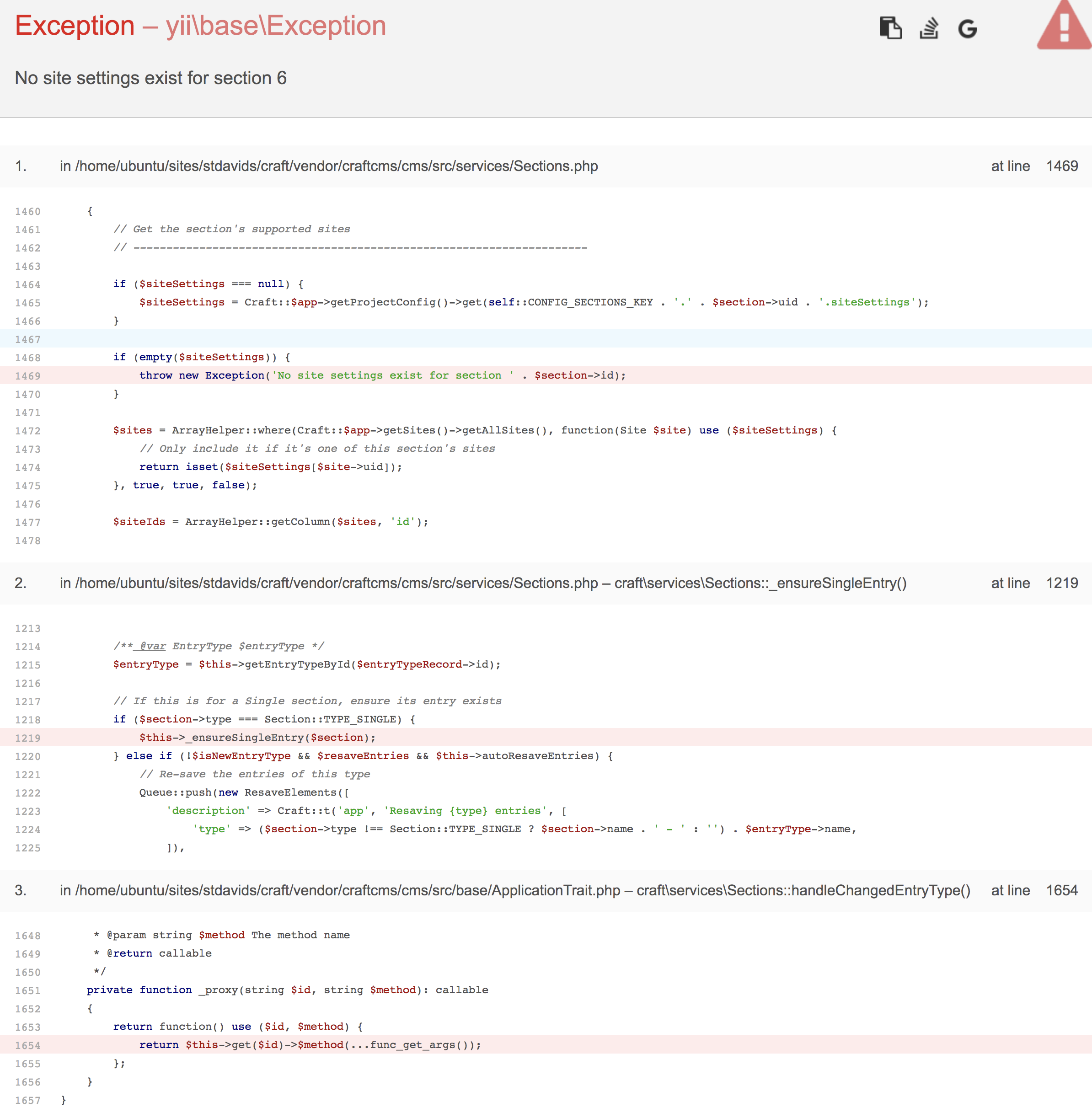
If I then go to Utilities > Project Config > Rebuild, wait for that to complete, and then go Settings > Sections > Edit Entry Type and save - it then works fine.
MattWilcox
on 11 Feb 2021
@MattWilcox ah yes I just went through these steps and the same happens for me now.
howells
on 11 Feb 2021
Guessing this is related to #7530.
brandonkelly
on 12 Feb 2021
We just released 3.6.11.1 with a project config bugfix that I suspect may have been the culprit here. Going to close, but please let me know if you see similar behavior going forward.
brandonkelly
on 24 Mar 2021
Hmm I think we are experiencing this error
- We upgraded to 3.6.11.1
- Created a new single called Our Team
- Commited and deployed the project config changes
- Applied the changes on production
See this error
- adding entryTypes.3db09341-3e69-4c8f-bd12-593471d9d5d6.fieldLayouts.508e9d84-700e-4ff9-a9f4-4ace5b4e207a.tabs.0.elements.2 ...
  - adding entryTypes.3db09341-3e69-4c8f-bd12-593471d9d5d6 ...
error: No site settings exist for section 33
Looking in the production DB, 33 refers to this section:
enableVersioning: true
handle: team
name: 'Our Team'
previewTargets:
  -
    __assoc__:
      -
        - label
        - 'Primary entry page'
      -
        - urlFormat
        - '{url}'
      -
        - refresh
        - '1'
propagationMethod: all
siteSettings:
  13954b1a-55b1-48aa-bc59-cce731dde0ca: # MWI
    enabledByDefault: true
    hasUrls: true
    template: _elements/our-team
    uriFormat: our-team
type: single
And here is the entry type
fieldLayouts:
  508e9d84-700e-4ff9-a9f4-4ace5b4e207a:
    tabs:
      -
        elements:
          -
            autocapitalize: true
            autocomplete: false
            autocorrect: true
            class: null
            disabled: false
            id: null
            instructions: null
            label: null
            max: null
            min: null
            name: null
            orientation: null
            placeholder: null
            readonly: false
            requirable: false
            size: null
            step: null
            tip: null
            title: null
            type: craft\fieldlayoutelements\EntryTitleField
            warning: null
            width: 100
          -
            fieldUid: 7ab913da-c5dc-43e7-a2ef-1ac54353fcd9 # Description
            instructions: null
            label: null
            required: false
            tip: null
            type: craft\fieldlayoutelements\CustomField
            warning: null
            width: 100
          -
            fieldUid: 34a4735e-ddf5-497c-8c86-e403988c627e # Organization Chart
            instructions: null
            label: null
            required: false
            tip: null
            type: craft\fieldlayoutelements\CustomField
            warning: null
            width: 100
        name: Content
        sortOrder: 1
handle: team
hasTitleField: true
name: 'Our Team'
section: 693cd98e-b318-4f8f-8bb8-4014693bfb60 # Our Team
sortOrder: 1
titleFormat: '{section.name|raw}'
titleTranslationKeyFormat: null
titleTranslationMethod: site
I see this data in the projectconfig table on production
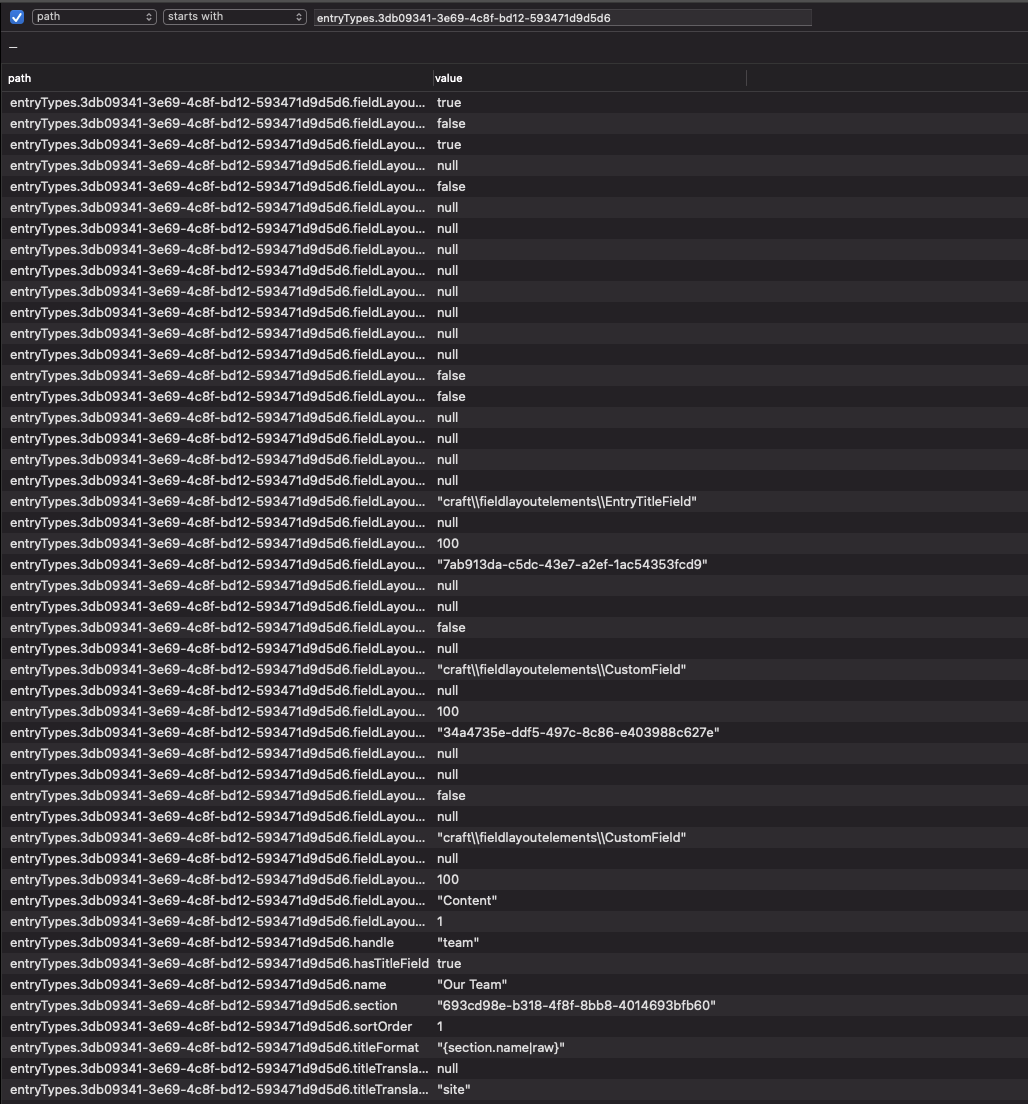
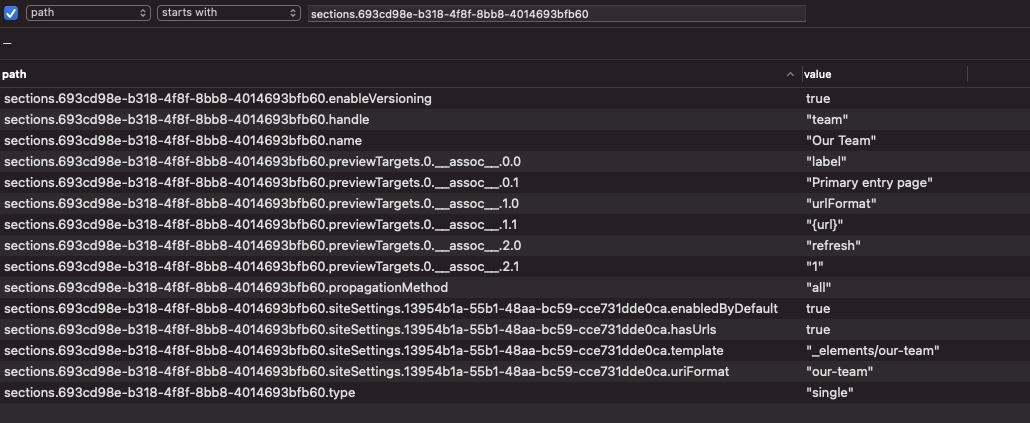
I tried force applying as well and got the same error. Let me know if there's any other info I can provide to help debug.
 davist11
on 25 Mar 2021
davist11
on 25 Mar 2021
@davist11 Probably easiest for us to debug if you send in your Composer files, a database backup, and your incoming config/project/ folder, to [email protected].
brandonkelly
on 25 Mar 2021
Great thanks, email sent
davist11
on 26 Mar 2021
In case anyone else comes across this issue, @andris-sevcenko helped me work it out via email. I had to ./craft clear-caches/data before applying the project config on the target environment
davist11
on 26 Mar 2021
Also, updating to the next Craft release(3.6.12, most likely) will invalidate the relevant cached data via a migration, so this exact scenario won't be an issue anymore, then.
 andris-sevcenko
on 26 Mar 2021
andris-sevcenko
on 26 Mar 2021
Related issues
 Mosnar
·
3Comments
Mosnar
·
3Comments
 bitboxfw
·
3Comments
bitboxfw
·
3Comments
 angrybrad
·
3Comments
angrybrad
·
3Comments
 darylknight
·
3Comments
davist11
·
3Comments
darylknight
·
3Comments
davist11
·
3Comments